
1. Įvadas
This manual provides detailed instructions for the safe installation, operation, and maintenance of your Lucci Air Peregrine 56-inch White Ceiling Fan with Remote, Model 21328001. The Peregrine fan features a modern design with three blades, energy-efficient direct current (DC) technology, six speeds, and high airflow. It is rated for both indoor and outdoor use in covered areas. The fan includes a 6-inch warm white GX53 light kit with 3-step dimming functionality and comes with a remote control and wall mount bracket.

1.1 vaizdas: priekis view of the Lucci Air Peregrine 56-inch White Ceiling Fan.
2. Saugos informacija
Please read all instructions carefully before beginning installation and retain this manual for future reference. Improper installation or use can lead to electric shock, fire, or personal injury.
- Elektros sauga: Ensure the power supply is disconnected at the circuit breaker before installation or maintenance. All electrical wiring must be performed by a qualified electrician and comply with local codes and regulations.
- Montavimas: The ceiling fan must be mounted to a structurally sound ceiling joist or outlet box capable of supporting the fan's weight (15.92 lbs).
- Ašmenų prošvaisa: Maintain a minimum clearance of 7 feet from the floor to the fan blades and 18 inches from the fan blades to any walls or obstructions.
- Šviesos rinkinys: Use only the specified GX53 12W 3000K bulb. Do not exceed the maximum wattage.
- Naudojimas lauke: This fan is rated for indoor and outdoor use in covered areas. Do not expose to direct water spray.
- Nuotolinio valdymo pultas: Nuotolinio valdymo pultą laikykite atokiau nuo vandens ir ekstremalių temperatūrų. Keiskite baterijas pagal poreikį.
3. Pakuotės turinys
Verify that all components are present and undamaged before proceeding with installation. If any parts are missing or damaged, contact customer support.
- Ceiling Fan Motor Housing with Downrod
- Ventiliatoriaus mentės (3)
- Nuotolinio valdymo pultas
- Wall Mount Bracket for Remote
- GX53 12W 3000K Light Kit (pre-installed or separate)
- Optional Metal Cap (for non-light use)
- Montavimo įranga
- Instrukcijų vadovas

3.1 vaizdas: Baigtaview of the remote control and its features, including 6 fan speeds, reverse switch, light on/off/dimming, fan on/off, and wall mount holster. A CP2032 battery is included.
4. Sąranka ir diegimas
Professional installation is recommended for this ceiling fan. Ensure all power is disconnected at the main circuit breaker before beginning installation.
- Paruoškite montavimo vietą: Securely attach the mounting bracket to a suitable ceiling joist or fan-rated outlet box. Ensure the structure can support the fan's weight.
- Assemble Downrod and Motor: Attach the downrod to the fan motor housing. Carefully feed the electrical wires through the downrod.
- Pakabinamo ventiliatoriaus surinkimas: Lift the fan assembly and hang it from the mounting bracket.
- Elektros jungtys: Connect the fan's electrical wires to the household wiring according to the wiring diagram provided in the separate installation guide (not included in this manual). Ensure all connections are secure.
- Pritvirtinkite peilius: Securely attach the three fan blades to the motor housing using the provided screws.
- Įdiekite apšvietimo komplektą (neprivaloma): If using the light, install the GX53 12W 3000K bulb into the light kit socket. Attach the light kit to the bottom of the fan motor housing. If not using the light, install the optional metal cap.
- Saugus stogelis: Slide the canopy up to the ceiling and secure it to the mounting bracket, covering all wiring.
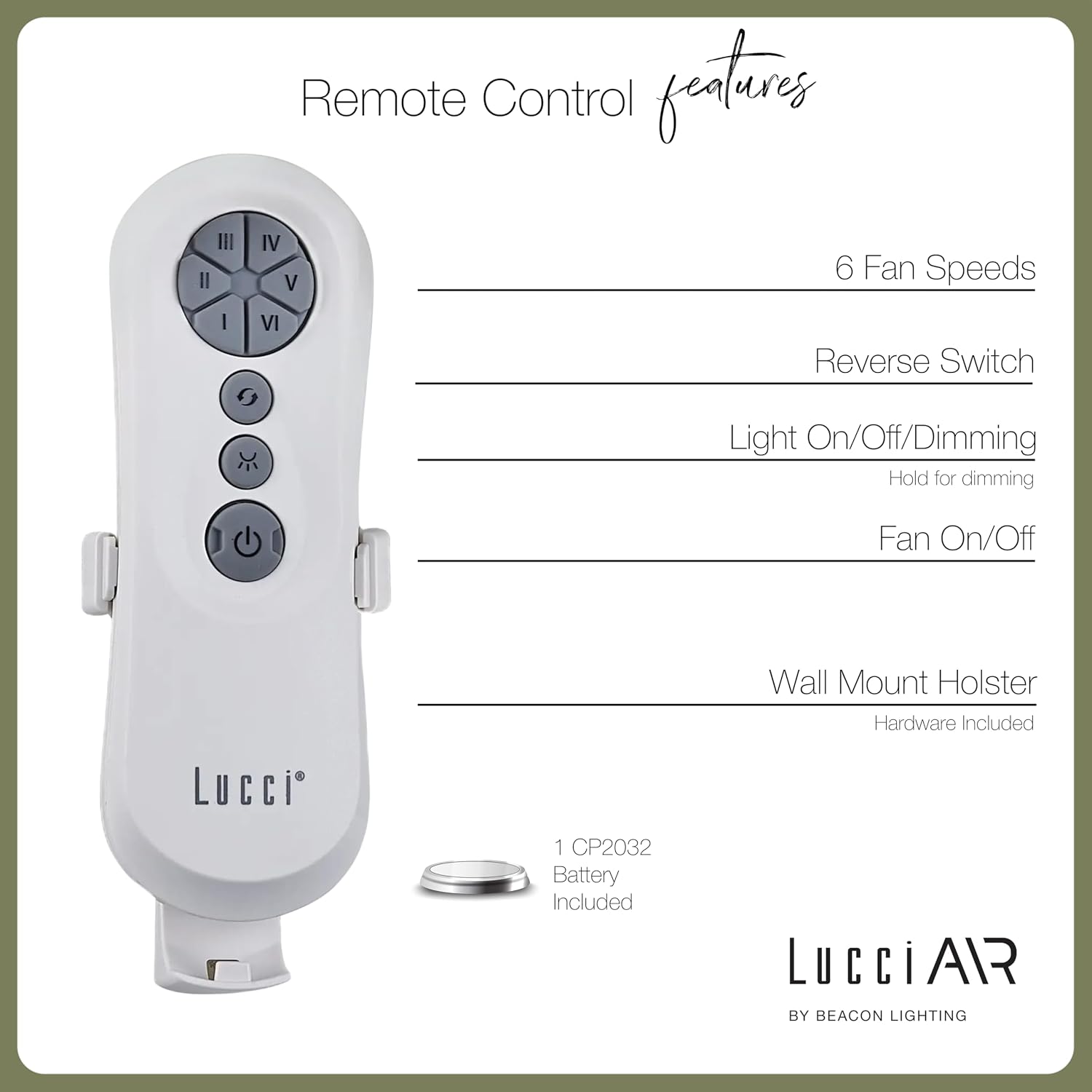
Image 4.1: Dimensional diagram of the Lucci Air Peregrine 56-inch Ceiling Fan, showing overall height, width, and blade length measurements.

4.2 pav.: Apačia view of the Lucci Air Peregrine fan, highlighting the integrated light kit.
5. Operacija
The Lucci Air Peregrine fan is operated using the included remote control. Ensure the remote has a working CP2032 battery installed.
5.1 Nuotolinio valdymo pulto funkcijos
- Ventiliatoriaus įjungimas/išjungimas: Press the power button (ⓘ) to turn the fan on or off.
- Ventiliatoriaus greitis: Use buttons I, II, III, IV, V, VI to select one of the six available fan speeds. I is the lowest speed, VI is the highest.
- Atbulinės eigos jungiklis: Press the reverse button (↻) to change the direction of the fan blades. This function is typically used to switch between summer (downward airflow) and winter (upward airflow) modes. Note: Some models may have a manual switch on the motor housing for this function.
- Šviesos įjungimas / išjungimas / pritemdymas: Press the light button (☀) to turn the light on or off. Hold the light button to dim or brighten the light through its 3-step dimming range.
5.2 Žiemos / vasaros režimas
The fan features a manual switch on the motor housing to change between winter and summer modes. For summer operation, the blades should rotate counter-clockwise to push air downwards, creating a cooling breeze. For winter operation, the blades should rotate clockwise to draw cool air up, circulating warm air trapped near the ceiling. Adjust the switch accordingly.
6. Priežiūra
Reguliarus valymas užtikrina optimalų veikimą ir prailgina lubų ventiliatoriaus tarnavimo laiką.
- Valymas: Reguliariai nuvalykite ventiliatoriaus mentes ir variklio korpusą minkšta šluoste.amp šluoste. Nenaudokite abrazyvinių valiklių ar tirpiklių, nes jie gali pažeisti apdailą.
- Ašmenų tvirtumas: Check all blade screws annually to ensure they are tight. Loose blades can cause wobbling and noise.
- Lemputės keitimas: Disconnect power before replacing the GX53 light bulb. Allow the bulb to cool completely before handling.
- Nuotolinio valdymo baterija: Replace the CP2032 battery in the remote control when its range decreases or it stops responding.
7. Problemų sprendimas
Dažniausiai pasitaikančias problemas ir jų sprendimus žr. toliau pateiktoje lentelėje.
| Problema | Galima priežastis | Sprendimas |
|---|---|---|
| Ventiliatorius neįsijungia | Ventiliatoriui nėra maitinimo Atsilaisvinę laidų jungtys Nuotolinio valdymo pulto baterija išsikrovė | Patikrinkite grandinės pertraukiklį Patikrinkite, ar visi laidai yra tvirtai sujungti (išjunkite maitinimą) Pakeiskite nuotolinio valdymo pulto bateriją |
| Ventiliatoriaus virpėjimas | Atsilaisvinę peilio varžtai Nesubalansuoti peiliai Atsilaisvinęs tvirtinimo kronšteinas | Priveržkite visus ašmenų varžtus Ensure blades are installed correctly and balanced Verify mounting bracket is securely fastened |
| Šviesa neveikia | Sugedusi lemputė Loose wire connection to light kit | Pakeiskite lemputę Check light kit wiring (power off) |
| Nuotolinio valdymo pultas neveikia | Išsikrovęs akumuliatorius Remote not paired (if applicable) | Pakeiskite bateriją Refer to separate remote pairing instructions (if provided with fan) |
8. Specifikacijos
Key technical details for the Lucci Air Peregrine 56-inch White Ceiling Fan (Model 21328001).
| Funkcija | Detalė |
|---|---|
| Modelio pavadinimas | Peregrine |
| Modelio numeris | 21328001 |
| Prekės ženklas | Lucci Air |
| Spalva | Baltas |
| Ventiliatoriaus dizainas | Lubinis ventiliatorius |
| Maitinimo šaltinis | DC (nuolatinė srovė) |
| Gaminio matmenys | 56 "D x 56" P x 15" A |
| Ašmenų skaičius | 3 |
| Ašmenų ilgis | 31.1 colių |
| Oro srauto talpa | 6363 kubinių pėdų per minutę (CFM) |
| Greičių skaičius | 6 |
| Energijos suvartojimas (vidutiniškai) | 38W |
| ttage | 120VAC, 60Hz |
| Į komplektą įeina šviesos rinkinys | 1x GX53 12W 3000K bulb, 1100 Lumens, 3-step dimmable |
| Kontrolės metodas | Nuotolinio valdymo pultas |
| Naudojimas viduje / lauke | Indoor, Outdoor (covered areas) |
| Prekės svoris | 15.92 svaro |
| UPC | 811769032344 |
9. Garantija ir palaikymas
The Lucci Air Peregrine 56-inch White Ceiling Fan comes with a ribota viso gyvenimo garantija. For warranty claims, technical support, or replacement parts, please contact Lucci Air customer service. Keep your proof of purchase for warranty validation.
Dėl papildomos pagalbos apsilankykite Lucci Air Store on Amazon arba susisiekite su savo mažmenininku.


