
Įvadas
Thank you for choosing the Oversteel Bulat 1080P Full HD WebŠiame vadove pateikiamos išsamios instrukcijos, kaip nustatyti, valdyti ir prižiūrėti jūsų webcam to ensure optimal performance. The Bulat webcam is designed for high-quality video communication, recording, and streaming, featuring a 1080p resolution at 60 frames per second, an integrated microphone, and an adjustable ring light.
Produktas baigtasview
Pagrindinės savybės
- 1080P „Full HD“ vaizdo įrašas: Equipped with a 2MP CMOS HD sensor, delivering sharp and clear video at resolutions up to 1920 x 1080 at 60fps. The 6G 2M glass lens ensures a crisp image.
- Integruotas mikrofonas: Features a built-in microphone for clear audio capture, effective up to 10 meters, suitable for video conferences, meetings, and live broadcasts.
- Adjustable Ring Light: An integrated ring light provides uniform and flattering illumination. It offers adjustable brightness and color temperature (warm/cold light) to suit various lighting conditions.
- „Plug & Play“ jungtis: Simple USB connection (compatible with USB 2.0/3.0) with a 150 cm cable. No additional drivers or software are required for operation.
- Kompaktiškas ir patvarus dizainas: Measuring 10 x 35 x 25 cm and weighing 135 grams, the webcam is portable and made from ABS material for durability.
Kas yra dėžutėje
- Oversteel Bulat Webkumštelis
Produkto komponentai
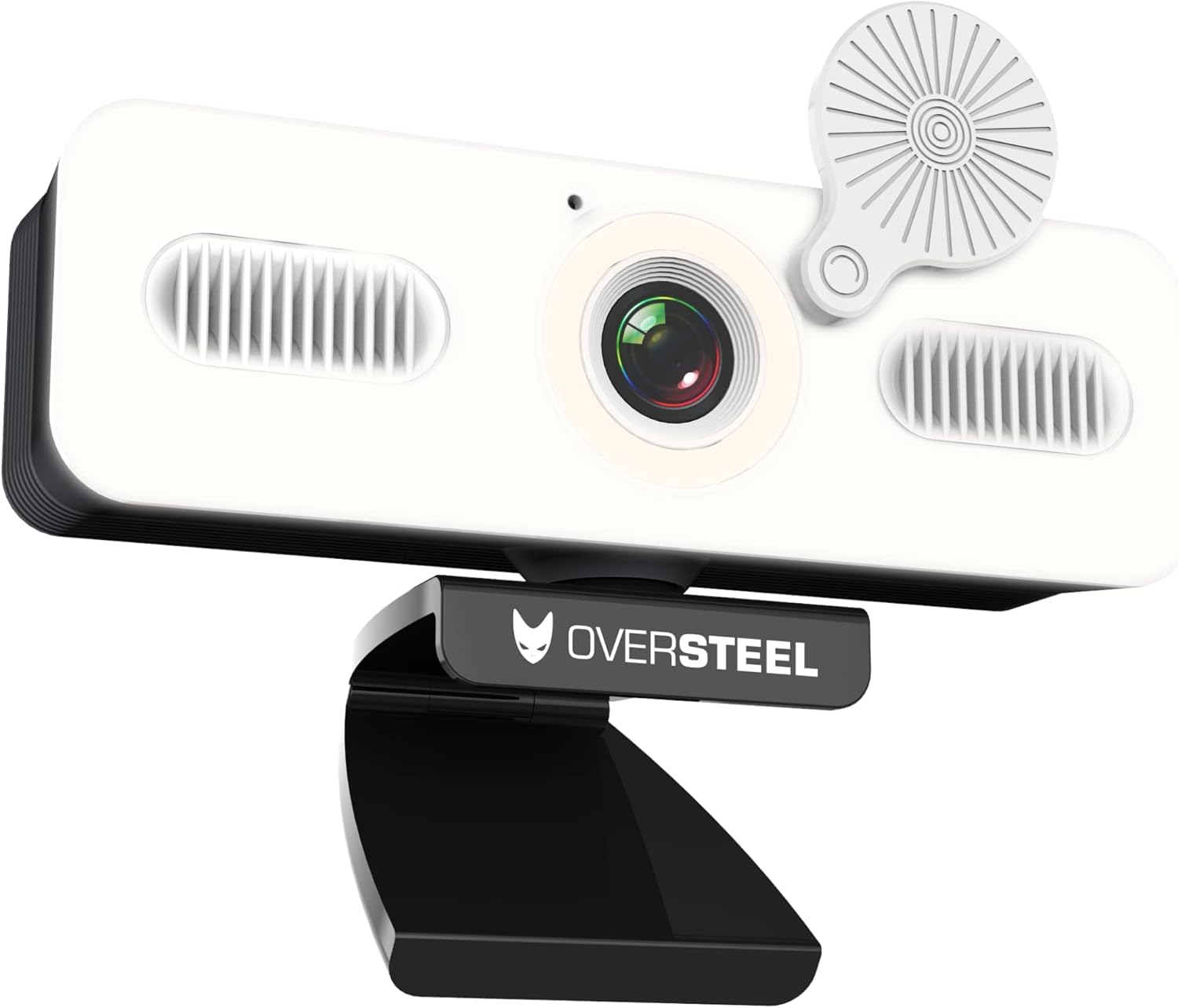
1 vaizdas: Priekyje view of the Oversteel Bulat Webcam, showing the camera lens, integrated ring light, and microphone grilles. The webcam is mounted on its adjustable stand.

2 vaizdas: Oversteel Bulat Webcam with its privacy cover closed, highlighting the design and the integrated light.
Sąrankos instrukcijos
- Išpakuokite Webkumštelis: Carefully remove the Oversteel Bulat Webkamerą iš pakuotės.
- Padėkite vietą Webkumštelis:
- Padėkite webcam on top of your monitor or laptop screen using its integrated clip. Ensure it is stable and securely positioned.
- Arba, webcam can be mounted on a tripod using the standard tripod thread located at the bottom of the stand (tripod not included).
- Prijunkite prie savo įrenginio: Prijunkite USB laidą nuo webcam into an available USB 2.0 or USB 3.0 port on your computer (PC, Mac, Laptop, Tablet, Chromebook).
- Automatinis diegimas: The webcam is Plug & Play. Your operating system will automatically detect and install the necessary drivers. This process may take a few moments. No manual driver installation is typically required.
- Patikrinkite įdiegimą:
- „Windows“: Go to Device Manager and check under "Cameras" or "Imaging devices" for "Oversteel Bulat Webcam".
- macOS: Open System Preferences > Sound > Input and check for the webcam's microphone. For video, open an application like Photo Booth or FaceTime.

3 vaizdas: The Oversteel Bulat Webant kompiuterio monitoriaus viršaus tvirtai pritvirtintas fotoaparatas, demonstruojantis jo reguliuojamą spaustuką.
Naudojimo instrukcijos
Naudojant Webcam for Video Calls and Recording
- Open Your Application: Launch your preferred video conferencing or recording software (e.g., Zoom, Microsoft Teams, Skype, Google Meet, OBS Studio, Photo Booth).
- Pasirinkite Webkumštelis: In the application's settings, navigate to the video and audio input options.
- For video input, select "Oversteel Bulat Webcam" or a similar name.
- For audio input, select "Oversteel Bulat Microphone" or a similar name.
- Koreguokite nustatymus (pasirenkama): Some applications allow you to adjust video resolution, frame rate, brightness, contrast, and other settings. Refer to your application's documentation for specific adjustments. The webcam supports 1080p resolution at 60fps.
- Start Your Session: Begin your video call, recording, or live stream.
Žiedinės lemputės veikimas
The Oversteel Bulat Webcam features an integrated ring light to enhance your illumination.
- Maitinimo įjungimas/išjungimas: The ring light is controlled by a touch-sensitive button located on the webcam body, typically near the lens. Tap the button to turn the light on or off.
- Sureguliuokite ryškumą: Press and hold the touch button to cycle through different brightness levels. Release the button when the desired brightness is achieved.
- Keisti spalvos temperatūrą: The light offers warm and cold light options. Tap the button repeatedly to switch between warm light, cold light, and mixed light modes.

4 vaizdas: Comparison of the Oversteel Bulat Webcam's integrated ring light in warm and standard (cold) light modes, illustrating the adjustable color temperature feature.
Priežiūra
- Objektyvo valymas: Use a soft, lint-free cloth specifically designed for camera lenses to gently wipe the webcam lens. Avoid using harsh chemicals or abrasive materials.
- Kūno valymas: Nuvalykite webcam body with a dry or slightly damp soft cloth. Do not immerse the webkamera vandenyje arba naudokite per daug drėgmės.
- Saugykla: Kai nenaudojate, laikykite webcam in a clean, dry place away from direct sunlight and extreme temperatures. Use the privacy cover to protect the lens from dust and scratches.
- Kabelio priežiūra: Kad nepažeistumėte USB kabelio, jo per daug nelenkite ir nesukite.
Trikčių šalinimas
| Problema | Galima priežastis | Sprendimas |
|---|---|---|
| No image or video |
|
|
| Nėra garso arba prasta garso kokybė |
|
|
| Ring light not working |
|
|
| Video appears choppy or laggy |
|
|
Specifikacijos
| Funkcija | Detalė |
|---|---|
| Modelio numeris | NAT-OV-BULAT-60 |
| Matmenys (G x P x A) | 10 x 35 x 25 cm |
| Svoris | 190 g |
| Jutiklio technologija | CMOS |
| Vaizdo įrašymo raiška | 1080p „Full HD“ raiška (1920 x 1080 pikselių) |
| Video Capture Speed | 60 kadrų per sekundę |
| Efektyvi nejudančių vaizdų raiška | 2.07 MP |
| Ryšio technologija | USB 2.0/3.0 |
| Ypatinga funkcija | Built-in Ring Light (Warm/Cold) |
| Mikrofonas | Integruota |
| Suderinami įrenginiai | PC, Laptop, Tablet, Chromebook |
| Operacinė sistema | Proprietary (firmware or embedded OS) |
| Vaizdo įrašo formatas | MP4 |
| Garso formatas | MP3 |
| Fokusavimo tipas | Fiksuotas fokusavimas |
| Baltos spalvos balansas | Automatinis |
| Vaizdo kraštinių santykis | 16:9 |
| Atsparumo vandeniui lygis | Neatsparus vandeniui |
Garantija ir palaikymas
Informacija apie garantiją
The Oversteel Bulat Webkamera yra su dvejų metų gamintojo garantija from the date of purchase. This warranty covers defects in materials and workmanship under normal use. It does not cover damage caused by misuse, accident, unauthorized modification, or external causes. Please retain your proof of purchase for warranty claims.
Pagalba klientams
For technical assistance, troubleshooting, or warranty inquiries, please contact Oversteel customer support. Refer to the official Oversteel websvetainė, kurioje rasite naujausią kontaktinę informaciją.
Internetiniai ištekliai: Aplankykite Oversteel Brand Store on Amazon dėl papildomos informacijos apie gaminį ir pagalbos.