
1. Įvadas
Thank you for choosing the Awei TC-7 Wired Earphones. These in-ear earphones are designed for clear audio and convenient communication, featuring a Type-C connector for modern devices and an inline microphone with control buttons. Please read this manual carefully to ensure proper use and maintenance of your earphones.
2. Pakuotės turinys
- Awei TC-7 Wired Earphones
- Multiple sizes of Ear Cushions (Small, Medium, Large)

2.1 paveikslas: The Awei TC-7 earphones include ear caps in various sizes to ensure a comfortable and secure fit for different users.
3. Produktas baigtasview
The Awei TC-7 earphones feature a durable design with a Type-C plug for direct connection to compatible devices. The inline remote control allows for easy management of audio playback and calls.

3.1 paveikslas: A close view of the Awei TC-7 earphones, showcasing their in-ear design for optimal sound delivery.

3.2 paveikslas: The inline remote control features multi-function buttons for managing audio and calls.

3.3 paveikslas: The integrated HD microphone is designed to pick up clear audio, even in noisy environments.
4. Sąranka
- Pasirinkite ausų pagalvėles: Choose the ear cushion size (Small, Medium, or Large) that provides the most comfortable and secure fit for your ears. A proper fit enhances sound quality and noise isolation.
- Prisijunkite prie įrenginio: Insert the USB-C plug of the earphones into the Type-C port of your smartphone, tablet, laptop, or other compatible device.
- Garso išvestis: Ensure your device's audio output is set to the connected earphones. This is usually automatic upon connection.
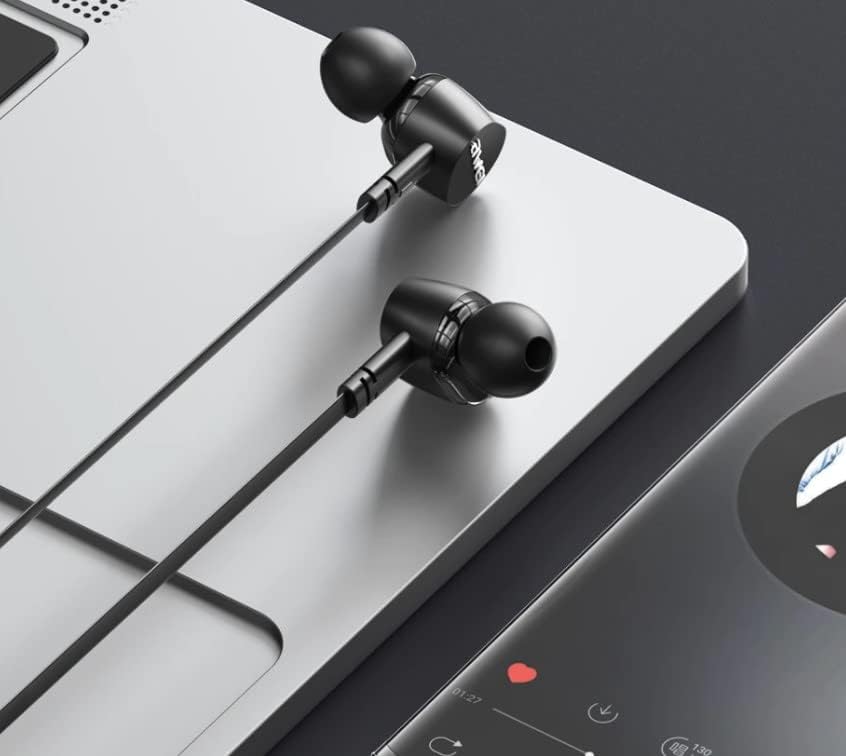
4.1 paveikslas: The earphones are compatible with various devices featuring a USB-C port, such as laptops and smartphones.
5. Naudojimo instrukcijos
The Awei TC-7 earphones feature an inline remote with buttons for convenient control of your audio and calls.
5.1. Muzikos atkūrimo valdymas
- Leisti / pristabdyti: Vieną kartą paspauskite centrinį mygtuką.
- Kitas takelis: Greitai du kartus paspauskite centrinį mygtuką.
- Ankstesnis takelis: Greitai tris kartus paspauskite centrinį mygtuką.
- Pagarsink: Paspauskite mygtuką „+“.
- Patildyti: Paspauskite mygtuką „-“.
5.2. Skambučių valdymas
- Atsiliepti / Baigti skambutį: Įeinančio arba aktyvaus skambučio metu vieną kartą paspauskite centrinį mygtuką.
- Atmesti skambutį: Įeinančio skambučio metu paspauskite ir palaikykite centrinį mygtuką maždaug 2 sekundes.
6. Priežiūra
Proper care will extend the lifespan of your Awei TC-7 earphones.
- Ausų pagalvėlių valymas: Regularly remove the ear cushions and clean them with a soft, damp audiniu. Prieš pritvirtindami, įsitikinkite, kad jie yra visiškai sausi.
- Kabelio priežiūra: The cable is designed to be tangle-free. Avoid excessive pulling or sharp bending to prevent internal damage.
- Saugykla: Kai nenaudojate, laikykite ausines švarioje, sausoje vietoje, toliau nuo ekstremalių temperatūrų.
- Atsparumas vandeniui: The earphones are rated as waterproof. However, avoid prolonged submersion and ensure the USB-C port is dry before connecting to a device after exposure to water.
7. Problemų sprendimas
If you encounter issues with your Awei TC-7 earphones, please refer to the following common solutions:
| Problema | Galima priežastis | Sprendimas |
|---|---|---|
| Nėra garso iš ausinių | Earphones not properly connected; device volume too low; incorrect audio output setting on device. | Ensure the USB-C plug is fully inserted. Increase device volume. Check device audio settings to confirm output is set to earphones. |
| Mikrofonas neveikia | Microphone port blocked; incorrect input setting on device; application permissions. | Ensure the microphone area is clear. Check device sound settings for microphone input. Verify application permissions for microphone access. |
| Mygtukai nereaguoja | Loose connection; device incompatibility; software glitch. | Reconnect the earphones. Test with another compatible device if possible. Restart your device. |
8. Specifikacijos
| Funkcija | Detalė |
|---|---|
| Modelio pavadinimas | TC-7 |
| Ryšio technologija | Laidinis |
| Ausinių lizdas | USB-C |
| Ausų išdėstymas | Ausyje |
| Dažnių diapazonas | 20 Hz–20 kHz |
| Papildomos funkcijos | Microphone Included, Inline Control |
| Medžiaga | Plastikiniai |
| Atsparumo vandeniui lygis | Atsparus vandeniui |
| Kabelio savybės | Susipainiojimas nemokamai |
| Suderinami įrenginiai | Smartphones, Laptops, Tablets, Desktops with USB-C |
9. Garantija ir palaikymas
Dėl garantijos informacijos ir klientų aptarnavimo žr. pirkimo metu pateiktus dokumentus arba susisiekite su pardavėju. Išsaugokite pirkimo įrodymą, jei prireiktų pateikti pretenziją dėl garantijos.