
1. Produktas baigtasview
The Prolink DL-7203E is a portable LTE Mobile Wi-Fi device designed to provide high-speed wireless connectivity on the go. It functions as a 4G router, allowing multiple devices to connect to the internet via a SIM card. Additionally, it features a built-in power bank function for charging other devices.
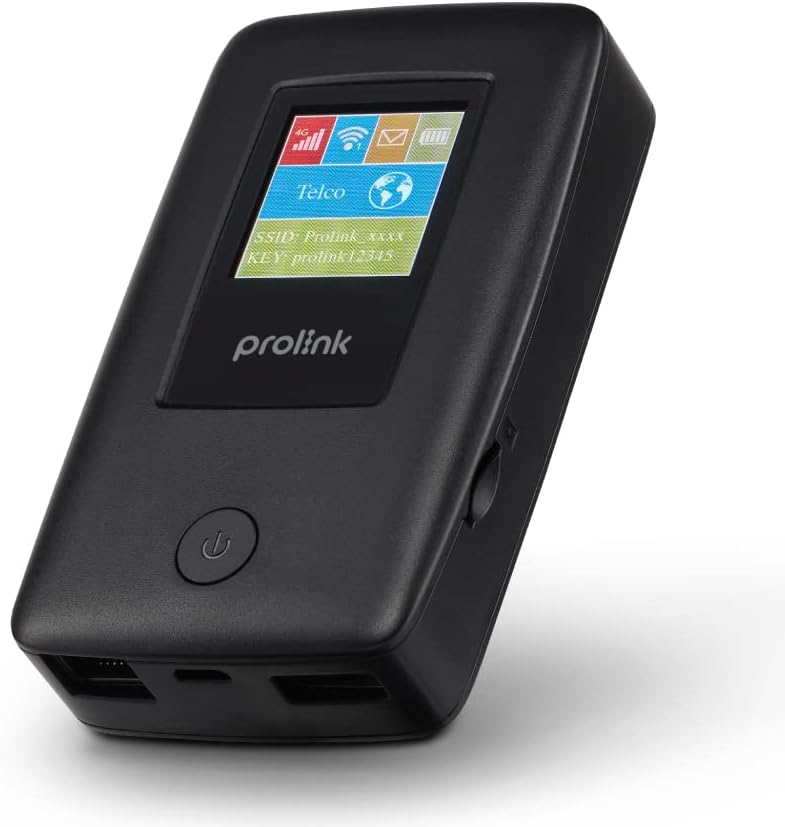
Figure 1.1: Prolink DL-7203E LTE Mobile Wi-Fi device.

Figure 1.2: Key features and capabilities of the Prolink DL-7203E.
Pakuotės turinys
- Prolink DL-7203E LTE Mobile Wi-Fi Device
- USB įkrovimo laidas
- Greito paleidimo vadovas (neįtrauktas į šį vadovą)
2. Įrenginio išdėstymas
Familiarize yourself with the various components and ports of your DL-7203E device.

2.1 pav.: Priekinė ir šoninė dalys view of the Prolink DL-7203E with labeled components.
- LCD Screen Indicator: Displays signal strength, battery level, Wi-Fi status, and network information.
- SIM kortelės lizdas: Įdėkite savo nano SIM kortelę čia.
- RJ45 LAN/WAN Port: For wired Ethernet connection to devices or an existing network.
- Įkrovimo prievadas (USB-C): Connect the provided USB cable for charging the device.
- USB Type-A Port (Output): Used for the power bank function to charge other devices.
- Maitinimo mygtukas: Paspauskite ir palaikykite, kad įjungtumėte / išjungtumėte įrenginį.
3. Sąrankos vadovas
3.1 SIM kortelės įdėjimas
- Įsitikinkite, kad įrenginys išjungtas.
- Suraskite SIM kortelės lizdą įrenginio šone.
- Carefully insert your Nano SIM card into the slot until it clicks into place. Ensure the correct orientation as indicated on the device.
- Uždarykite SIM kortelės lizdo dangtelį, jei yra.
3.2 Įrenginio įkrovimas
- Connect the provided USB charging cable to the USB-C charging port on the DL-7203E.
- Kitą laido galą prijunkite prie USB maitinimo adapterio (nepridedamas) arba kompiuterio USB prievado.
- The battery indicator on the LCD screen will show charging status. A full charge provides up to 25 hours of connectivity.
3.3 Įjungimas / išjungimas
- Norėdami įjungti: Paspauskite ir palaikykite maitinimo mygtuką, kol užsidegs LCD ekranas.
- Norėdami išjungti: Paspauskite ir palaikykite maitinimo mygtuką, kol įrenginys išsijungs.

Figure 3.1: The Auto APN feature enables plug-and-play functionality in over 185 countries.
4. Operacija
4.1 Įrenginių prijungimas per „Wi-Fi“
- Ensure the DL-7203E is powered on and has an active internet connection (indicated by the signal icon on the LCD).
- Savo įrenginyje su „Wi-Fi“ ryšiu (išmaniajame telefone, nešiojamajame kompiuteryje, planšetiniame kompiuteryje) ieškokite galimų „Wi-Fi“ tinklų.
- Select the SSID (network name) displayed on the DL-7203E's LCD screen.
- Enter the Wi-Fi Key (password) also displayed on the LCD screen.
- Your device should now be connected to the internet. The DL-7203E supports up to 16 Wi-Fi devices simultaneously.

Figure 4.1: Share internet connection with up to 16 devices simultaneously.
4.2 Naudojimas kaip išorinės baterijos
The DL-7203E can double as a portable power bank to charge your mobile devices.
- Connect your mobile device's charging cable to the USB Type-A output port on the DL-7203E.
- The DL-7203E will begin charging your device.

Figure 4.2: The DL-7203E can charge your devices on the go.
4.3 Connecting via LAN/WAN Port
The RJ45 port allows for wired connectivity.
- LAN režimas: Connect a device (e.g., laptop, desktop) to the DL-7203E via an Ethernet cable for a wired internet connection.
- WAN režimas: Connect the DL-7203E to an existing wired network (e.g., hotel Ethernet) to share that internet connection wirelessly.
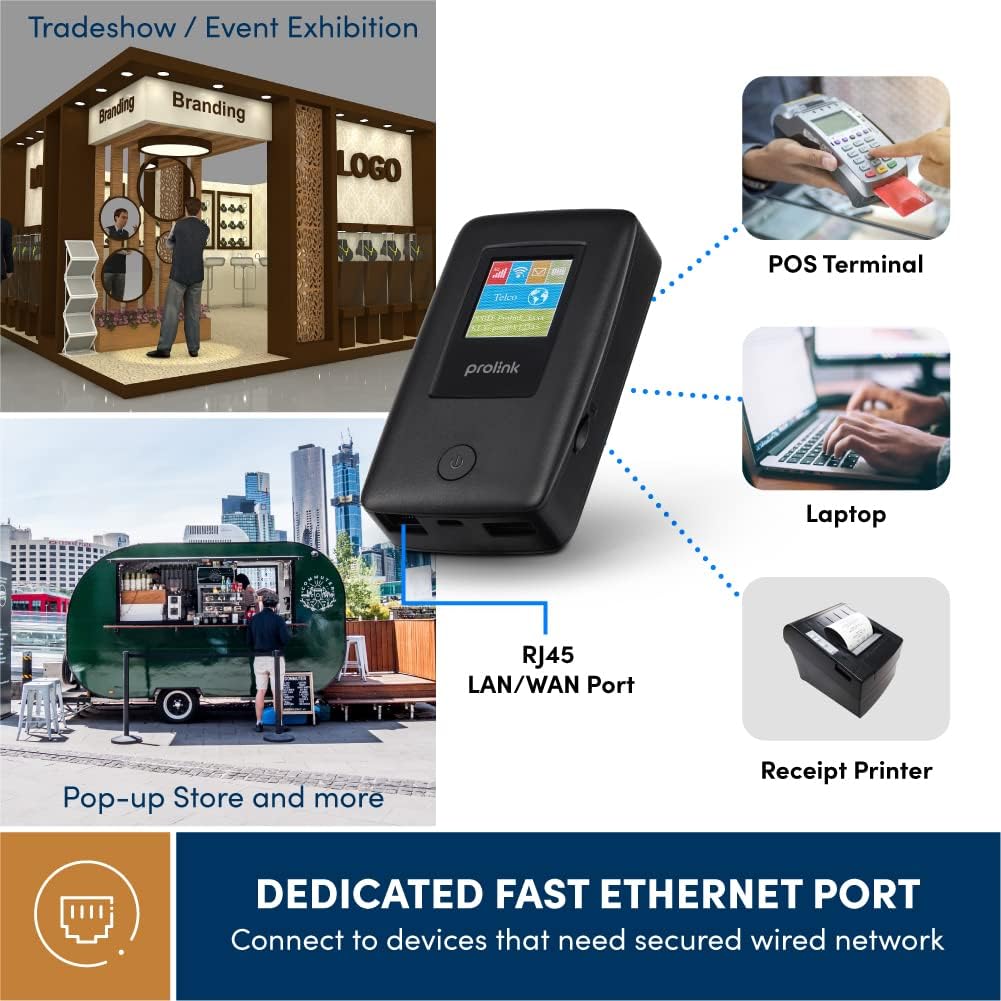
Figure 4.3: Utilize the dedicated Ethernet port for secured wired network connections.
4.4 File Sharing via MicroSD Card
The built-in microSD card slot supports up to 64GB, allowing for easy file dalijimasis.
- Įdėkite „microSD“ kortelę į tam skirtą angą.
- Access the shared content wirelessly from connected devices through the device's web interface or the mProMifi App.

Figure 4.4: Share media content wirelessly across your network via a microSD card.
4.5 Using the mProMifi App
For enhanced control and monitoring, download the mProMifi App (available for devices with P/N: LTE-DL7203E-E, S/N starting from "265201" or later). The app allows you to manage settings, view connected devices, and monitor data usage.
5. Pagrindinės savybės
- Fast Connection: Enjoy high-speed connectivity of up to 150Mbps via LTE and up to 300Mbps via Wi-Fi hotspot.
- Pailgintas akumuliatoriaus veikimo laikas: Equipped with a 5200mAh (or 6000mAh for updated models) battery, providing up to 25 hours of continuous connectivity.
- Kelių vartotojų prieiga: Share your internet connection with up to 16 Wi-Fi enabled devices simultaneously.
- Patogus kelionėms: Supports automatic APN configuration for over 185 countries, making it ideal for international travel.
- Maitinimo banko funkcija: Charge your smartphones and other USB-powered devices on the go.
- Ethernet prievadas: Provides a reliable wired connection for devices without wireless capabilities or for sharing an existing wired network.
- MicroSD kortelės lizdas: Supports up to 64GB for convenient wireless file dalijimasis.

Figure 5.1: Enjoy extended connectivity with up to 25 hours of battery life.

Figure 5.2: The compact design allows you to stay connected wherever you are.
6. Priežiūra
- Valymas: Įrenginį valykite minkšta, sausa šluoste. Venkite skystų valiklių ar aerozolių.
- Akumuliatoriaus priežiūra: To prolong battery life, avoid exposing the device to extreme temperatures. If storing for a long period, charge the battery to about 50% before storage.
- Saugykla: Prietaisą laikykite vėsioje, sausoje vietoje, apsaugotoje nuo tiesioginių saulės spindulių ir drėgmės.
7. Problemų sprendimas
Bendros problemos ir sprendimai
| Problema | Galima priežastis | Sprendimas |
|---|---|---|
| Nėra interneto ryšio | No SIM card inserted, SIM card not activated, poor signal, incorrect APN settings. | Ensure SIM is correctly inserted and active. Move to an area with better signal. The device has Auto APN, but if issues persist, check network provider settings. |
| Nepavyksta prisijungti prie „Wi-Fi“ | Neteisingas „Wi-Fi“ slaptažodis, įrenginys per toli nuo maršrutizatoriaus, „Wi-Fi“ išjungtas. | Verify Wi-Fi password. Move closer to the DL-7203E. Ensure Wi-Fi is enabled on the device. |
| Battery Not Charging / Draining Quickly | Faulty cable/adapter, high usage, old battery. | Try a different USB cable and power adapter. Reduce the number of connected devices or usage time. Contact support if battery life significantly degrades. |
| Device Freezes / Unresponsive | Programinės įrangos triktis. | Perform a soft reset by holding the power button until the device restarts. If persistent, a factory reset might be needed (refer to advanced settings via web sąsaja). |
8. Specifikacijos
| Funkcija | Detalė |
|---|---|
| Modelio pavadinimas | DL-7203E (LTE-DL7203E) |
| Prekės ženklas | Prolink |
| Belaidis ryšys | 4G LTE, Wi-Fi (802.11ac) |
| Wi-Fi greitis | Iki 300 Mbps |
| LTE greitis | Iki 150 Mbps |
| Baterijos talpa | 5200mAh (updated models 6000mAh) |
| Baterijos veikimo laikas | Iki 25 valandų |
| Maks. „Wi-Fi“ naudotojų skaičius | 16 |
| SIM kortelės tipas | Nano SIM |
| Uostai | RJ45 LAN/WAN, USB-C Charging, USB Type-A Output |
| MicroSD Support | Iki 64 GB |
| Matmenys (I x P x A) | 15.4 x 9.2 x 4.4 cm |
| Svoris | 161 g |
| Spalva | Juoda |
9. Garantija ir palaikymas
Prolink products come with a local warranty and technical support. For any inquiries or assistance, please contact Prolink support.

Figure 9.1: Prolink Official Store support information.
- Pagalba el. paštu: support@prolink2u.com
- Pagalba telefonu: (65) 6357 0666
- For the most up-to-date support information, please visit the official Prolink website or your regional Prolink support page.