Produktas baigtasview
The typecase Touch Keyboard Case is designed to enhance the functionality and protection of your iPad Air. It features a full-size keyboard with a multi-gesture trackpad, offering a laptop-like experience. The case boasts a 360° rotatable hinge, allowing for multiple viewing angles and usage modes. An adjustable 11-color RGB LED backlight provides comfortable typing in various lighting conditions. Integrated smart features like auto sleep/wake help conserve battery life, and a dedicated holder keeps your Apple Pencil secure.
Pagrindinės funkcijos:
- Suderinamumas: Specifically designed for iPad Air 11-inch (M3 2025 / M2 2024), iPad Air 5th Gen (2022, 10.9"), and iPad Air 4th Gen (2020, 10.9").
- Integruotas jutiklinis skydelis: Supports multi-gesture controls for precise navigation.
- Apšviesta klaviatūra: 11 adjustable RGB backlight colors with laser-etched keys and a full row of iPadOS shortcuts.
- Versatile Use Modes: 360° rotatable hinge for 7 different viewing modes (Laptop, Stand, Tent, Tablet, Corner, Share, Protect).
- Išmanioji apsauga: Premium hardshell design protects all sides of your iPad, with auto sleep/wake function.
- Pencil Holder: Conveniently stores your Apple Pencil.
Pakuotės turinys
Prašome patikrinti, ar pakuotėje yra visi reikalingi daiktai:
- 1 x typecase Touch Keyboard Case for iPad Air 5th/4th Gen (10.9 inch)
- 1 x USB-C įkrovimo laidas
- 1 x Vartotojo vadovas
Sąrankos vadovas
1. Charging the Keyboard Case
Before initial use, fully charge the keyboard case. Connect the provided USB-C charging cable to the charging port on the keyboard and to a USB power adapter (not included).
Charging indicator: The LED indicator will show charging status. Refer to the keyboard's specific LED behavior for full charge indication.
2. Inserting Your iPad into the Case
Carefully align your iPad with the protective shell of the keyboard case. Gently press the iPad into place, ensuring all corners are securely seated. The case is designed to protect all sides of your iPad.
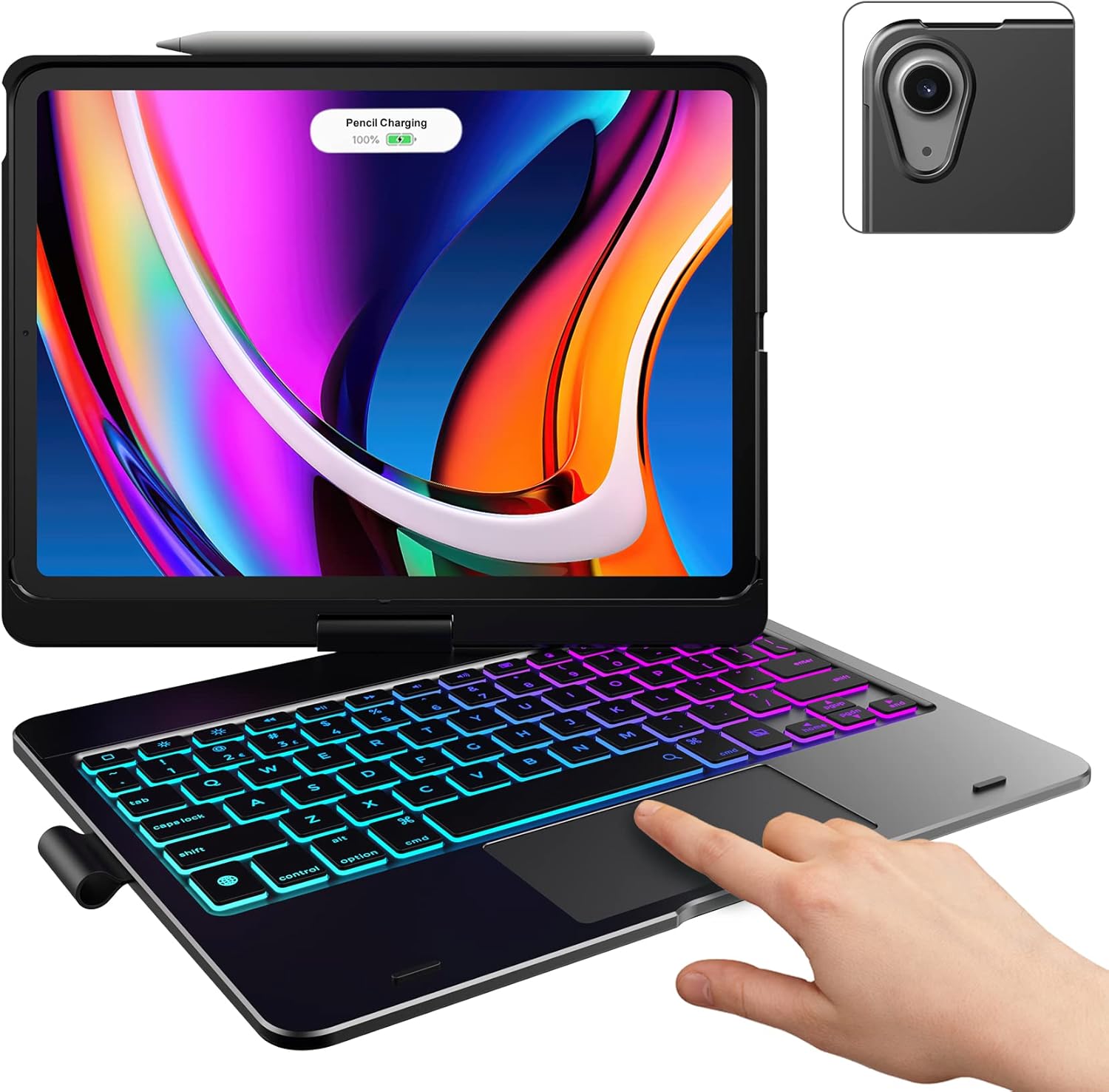
Image: The typecase keyboard case with an iPad securely inserted, ready for use. Note the integrated trackpad and backlit keys.

Image: Visual representation of the 7 versatile modes supported by the 360° rotatable hinge, including Laptop, Stand, and Tablet modes.
3. Pairing with Your iPad (Bluetooth)
- Įjunkite klaviatūrą, pastumdami maitinimo jungiklį į ON padėtį.
- Paspauskite Prisijunkite button (or a similar Bluetooth pairing button, usually indicated by a Bluetooth icon) on the keyboard. The Bluetooth indicator light will start blinking.
- Savo „iPad“ įrenginyje eikite į Nustatymai > Bluetooth.
- Įsitikinkite, kad „Bluetooth“ įjungtas On.
- Locate "typecase Keyboard" or a similar name in the "Other Devices" list and tap on it to pair.
- Once paired, the Bluetooth indicator light on the keyboard will stop blinking and remain solid, or turn off.
Note: The keyboard will automatically enter sleep mode after a period of inactivity to conserve battery. Press any key to wake it up.
Naudojimo instrukcijos
Klaviatūros funkcijos
The keyboard features a standard layout with 78 comfortably spaced keys and a dedicated row of iPadOS shortcut keys.

Vaizdas: Išsamus view of the backlit keyboard, highlighting the iPadOS shortcut keys and the vibrant 11-color RGB backlight.
„iPadOS“ spartieji klavišai:
| Rakto piktograma | Funkcija |
|---|---|
| Pradžia | Grįžta į pagrindinį ekraną. |
| Ryškumas sumažintas | Sumažina ekrano ryškumą. |
| Ryškumas aukštyn | Padidina ekrano ryškumą. |
| Keyboard Hide/Show | Toggles the on-screen keyboard. |
| Paieška | Activates iPad search. |
| Ankstesnis takelis | Peršoka į ankstesnį medijos takelį. |
| Leisti / pristabdyti | Paleidžia arba pristabdo mediją. |
| Kitas takelis | Pereina prie kito medijos takelio. |
| Nutildyti | Nutildo arba įjungia garsą. |
| Sumažinti garsumą | Sumažina garso garsumą. |
| Padidinti garsumą | Padidina garso garsumą. |
| Užrakinimo ekranas | Užrakina „iPad“ ekraną. |
Jutiklinės planšetės naudojimas
The integrated multi-gesture trackpad allows for precise control and navigation of your iPad. Ensure the trackpad is enabled in your iPad's settings if you experience issues.
Common Trackpad Gestures:
- Bakstelėjimas vienu pirštu: Click/Select.
- Dviejų pirštų slinkimas: Slinkite aukštyn arba žemyn.
- Žiupsnelis, norint priartinti: Priartinkite arba atitolinkite turinį.
- Trijų pirštų braukimas aukštyn: Eikite į pagrindinį ekraną.
- Trijų pirštų braukimas kairėn/dešinėn: Perjungti atidarytas programas.
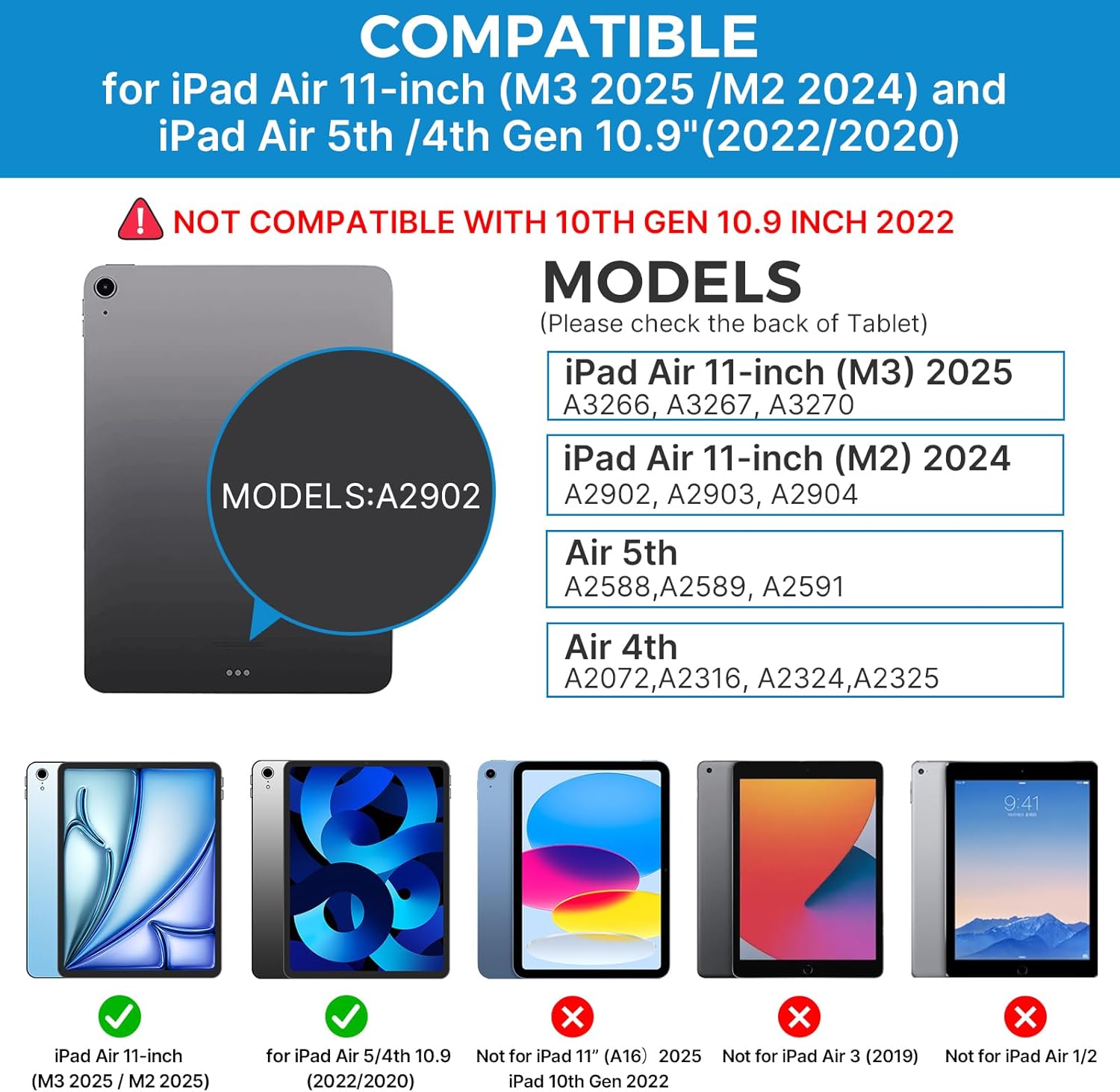
Image: A hand demonstrating the use of the multi-touch trackpad for precise cursor control on the iPad screen.
Foninio apšvietimo reguliavimas
The keyboard features 11 adjustable RGB backlight colors and 3 levels of brightness. Use the dedicated backlight keys on the keyboard to cycle through colors and adjust brightness levels.
Video: This video demonstrates the 360-degree rotation feature of the typecase Touch Keyboard Case, showcasing its versatility in different viewrežimų.
Video: This video provides a step-by-step guide on how to properly install and remove your iPad from the typecase Touch Keyboard Case, ensuring a secure fit and preventing damage.
Priežiūra ir priežiūra
- Valymas: Naudokite minkštą, damp cloth to clean the exterior of the case and keyboard. Avoid harsh chemicals or abrasive materials.
- Saugykla: When not in use for extended periods, store the keyboard case in a cool, dry place. Ensure the iPad is removed if storing for very long durations.
- Baterijos veikimo laikas: To maximize battery life, turn off the keyboard when not in use. The auto sleep/wake function helps conserve power.
- Venkite skysčių: Do not expose the keyboard case to excessive moisture or liquids.
- Elkitės atsargiai: While durable, avoid dropping the case or applying excessive force to the hinge or keyboard.
Trikčių šalinimas
If you encounter any issues with your typecase Touch Keyboard Case, please refer to the following common solutions:
Klaviatūra neprisijungia / nerašo:
- Ensure the keyboard is turned ON and fully charged.
- Patikrinkite „iPad“ „Bluetooth“ nustatymus, kad įsitikintumėte, jog klaviatūra susieta ir prijungta. Jei ne, pabandykite susieti iš naujo.
- Iš naujo paleiskite ir „iPad“, ir klaviatūrą.
- Įsitikinkite, kad jokie kiti „Bluetooth“ įrenginiai netrukdo ryšiui.
Jutiklinė planšetė nereaguoja:
- Patikrinkite, ar klaviatūra prijungta per „Bluetooth“.
- Patikrinkite „iPad“ nustatymus: Nustatymai > Prieinamumas > Palieskite > AssistiveTouch. Ensure "Mouse Keys" is off if it's causing interference.
- Nuvalykite jutiklinės planšetės paviršių, kad pašalintumėte visas šiukšles.
Foninis apšvietimas neveikia:
- Įsitikinkite, kad klaviatūra yra pakankamai įkrauta.
- Press the backlight adjustment keys to cycle through brightness levels and colors.
iPad Not Entering Sleep/Wake Mode:
- Ensure the iPad is correctly seated in the case.
- Patikrinkite „iPad“ nustatymus: Nustatymai > Ekranas ir ryškumas > Užrakinti/Atrakinti. Ensure this feature is enabled.
If problems persist, please contact typecase customer support for further assistance.
Specifikacijos
| Funkcija | Detalė |
|---|---|
| Modelis | B09WVRD5JD |
| Suderinamumas | iPad Air 11-inch (M3 2025 / M2 2024), iPad Air 5th Gen (2022, 10.9"), iPad Air 4th Gen (2020, 10.9") |
| Ryšys | Bluetooth |
| Klaviatūros išdėstymas | 78-key standard with iPadOS shortcuts |
| Foninis apšvietimas | 11 spalvų RGB, 3 ryškumo lygiai |
| Trackpad | Multi-functional, multi-gesture |
| Hinge Rotation | 360° (20,000-cycle stress tested) |
| Maitinimo šaltinis | Maitinamas su baterijomis (pridedama 1 ličio polimero baterija) |
| Prekės svoris | 1.52 svaro |
| Gaminio matmenys (IxPxH) | 11.02 x 8.66 x 0.79 colio |
| Medžiaga | Premium hardshell design |
Garantija ir palaikymas
typecase offers a comprehensive warranty and support for your product:
- 1 metų pakeitimo paslauga: Enjoy worry-free after-sales support with a 1-year replacement service for manufacturing defects.
- 30 dienų grąžinimas: Jei nesate patenkinti pirkiniu, galite gauti grąžinamąją išmoką per 30 dienų nuo pirkimo datos.
- Klientų aptarnavimas: For any questions, technical assistance, or warranty claims, please contact typecase customer service. Refer to the contact information provided in the product packaging or on the official typecase websvetainę.

Vaizdas: Viršview of typecase's customer support and warranty policy, including 1-year replacement and 30-day refund.