
U.S. Solid USS-DBS00061
U.S. Solid Electronic Precision Balance 1200g User Manual
Model: USS-DBS00061
Įvadas
This manual provides detailed instructions for the safe and efficient operation of your U.S. Solid Electronic Precision Balance 1200g. Please read this manual thoroughly before using the device to ensure proper functionality and to prevent damage.
The U.S. Solid Electronic Precision Balance is designed for accurate weighing in industrial and laboratory environments, offering a capacity of 1200g with a 0.01g resolution. Key features include an LCD display with backlight, dual power options (AC/battery), 19 measurement units, and an RS232 interface for data communication.
Saugos informacija
- Svarstykles visada naudokite ant stabilaus, lygaus paviršiaus, be vibracijos.
- Venkite svarstyklių veikimo esant ekstremalioms temperatūroms, drėgmei ar tiesioginiams saulės spinduliams.
- Neperkraukite svarstyklių daugiau nei maksimali 1200 g talpa.
- Laikykite svarstykles švarias, be dulkių ir ėsdinančių medžiagų.
- Use only the provided AC adapter or specified batteries (4xDC1.5V) for power.
- Disconnect power before cleaning or if the balance will not be used for an extended period.
Pakuotės turinys
Išpakuodami patikrinkite, ar visos prekės yra ir nepažeistos:
- U.S. Solid Electronic Precision Balance (Model USS-DBS00061)
- Nerūdijančio plieno svėrimo keptuvė
- AC Power Adapter (100V-240V)
- Dust Protective Cover
- Vartotojo vadovas

Image: The U.S. Solid Electronic Precision Balance shown with its stainless steel weighing pan, AC power adapter, and dust protective cover.
Produktas baigtasview
Familiarize yourself with the main components of the balance:
- Svėrimo lėkštė: Nerūdijančio plieno platforma sveriamiems daiktams sudėti.
- LCD ekranas: Digital screen with blue backlight for displaying weight and other information.
- Valdymo skydelis: Buttons for Power, Counting (COU), Unit (UNIT), and Tare/Calibration (TARE/CAL).
- RS232 prievadas: For connecting to a computer or printer.
- Išlyginančios pėdos: Adjustable feet for ensuring the balance is level.
- Burbulo lygis: Indicator to assist with proper leveling.
- Maitinimo įvestis: Port for AC adapter or battery compartment.

Vaizdas: Stambus planas view of the balance's LCD display and control buttons, including Power, COU, UNIT, and TARE/CAL.

Vaizdas: Šoninė view of the balance, highlighting the RS232 communication port for external device connection.
Sąranka
1. Išpakavimas ir įdėjimas
Carefully remove the balance from its packaging. Place the balance on a firm, level, and vibration-free surface. Ensure it is away from direct sunlight, drafts, and sources of heat or cold that could affect accuracy.
2. Maitinimo prijungimas
The balance can be powered by either the AC adapter or 4xDC1.5V batteries.
- Kintamosios srovės maitinimas: Connect the provided AC adapter to the power input port on the rear of the balance, then plug it into a suitable AC 100V-240V power outlet.
- Baterijos galia: Open the battery compartment on the underside of the balance and insert 4xDC1.5V batteries, ensuring correct polarity.

Vaizdas: Galinis view of the balance, showing the power input port.

Image: Underside of the balance with the battery compartment open, showing where to insert batteries.
3. Leveling the Balance
Accurate measurements require the balance to be perfectly level. Adjust the leveling feet located at the bottom of the balance until the bubble in the bubble level indicator is centered within the circle.

Image: A visual guide demonstrating the process of leveling the balance using the bubble indicator and adjustable feet.
4. Warm-up Time
For optimal accuracy, allow the balance to warm up for at least 30 minutes after initial power-on or after a power loss. This stabilizes the internal components.
Naudojimo instrukcijos
1. Maitinimo įjungimas/išjungimas
- Paspauskite Galia mygtukas () to turn the balance on.
- Paspauskite ir palaikykite Galia button for a few seconds to turn the balance off.
2. Vieneto perskaičiavimas
The balance supports 19 different measurement units. Press the VIENETAS button to cycle through the available units (e.g., g, kg, ct, oz, lb, etc.).

Image: An illustration of the balance display and a list of 19 selectable measurement units.
3. Taros funkcija
To subtract the weight of a container, place the empty container on the weighing pan and press the TARE/CAL button. The display will reset to zero, allowing you to weigh only the contents.
4. Kalibravimas
Recalibration is recommended after moving the balance or if accuracy is in question. Refer to the specific calibration procedure in the full manual for your model. Typically, this involves pressing and holding the TARE/CAL button and following on-screen prompts with a known calibration weight.

Image: A visual representation of the calibration function, indicating the TARE/CAL button and the need for a calibration weight.
5. Counting Function (COU)
The balance can count items of uniform weight. To use this function:
- Place a known quantity of items (e.g., 10, 20, 50, 100, 150, 200, 250, or 500) on the pan.
- Paspauskite COU mygtuką.
- Select the corresponding sample quantity using the VIENETAS button, then confirm.
- The balance will now display the count of items placed on the pan.

Image: An illustration demonstrating the piece counting feature, showing various sample quantities for setup.
6. RS232 ryšys
The RS232 interface allows for serial data exchange with a computer or printer. This is useful for recording weighing results and minimizing manual data entry errors. Consult your computer or printer's manual for specific connection and software requirements.
Priežiūra
- Valymas: Nuvalykite likučius minkšta šluosteamp šluoste. Nenaudokite abrazyvinių valiklių ar tirpiklių. Įsitikinkite, kad į vidinius komponentus nepatenka skysčio.
- Saugykla: When not in use, cover the balance with the provided dust protective cover. Store in a dry, stable environment.
- Baterijos keitimas: If using batteries, replace all four batteries when the low battery indicator appears on the display.
Trikčių šalinimas
| Problema | Galima priežastis | Sprendimas |
|---|---|---|
| Display shows "Err" or unstable readings | Overload, unstable surface, drafts, or magnetic interference. | Remove excess weight. Ensure balance is level and on a stable surface. Relocate away from drafts or magnetic fields. |
| Balansas neįsijungia | No power, dead batteries, or faulty AC adapter. | Check AC adapter connection. Replace batteries if using battery power. |
| Netikslūs rodmenys | Not leveled, not warmed up, needs calibration, or environmental factors. | Level the balance. Allow warm-up time. Perform calibration. Ensure stable environment. |
| RS232 ryšio sutrikimas | Incorrect cable, driver issues, or software settings. | Verify cable connection. Install necessary drivers. Check software settings. |
Specifikacijos
- Modelis: USS-DBS00061
- Talpa: 1200g
- Rezoliucija: 0.01g
- Ekranas: LCD su foniniu apšvietimu
- Maitinimas: AC 100V-240V (adapter included) or 4xDC1.5V Batteries
- Matavimo vienetai: 19 switchable units (g, kg, ct, Tola, TAR, Dram, PKT, Grain, TMR, gsm, tlJ, mo, Penny weight, Ounce, Pound, Taiwan Tael, Troy-Ounce, Hong Kong Tael, %)
- Sąsaja: RS232 prievadas
- Ypatingos savybės: Bubble leveling, height adjustable feet, dust protective cover, counting function.
- Matmenys: Maždaug 11 cm (ilgis) x 7.1 cm (plotis) x 3.2 cm (aukštis)
- Svoris: Maždaug 2.73 svarai
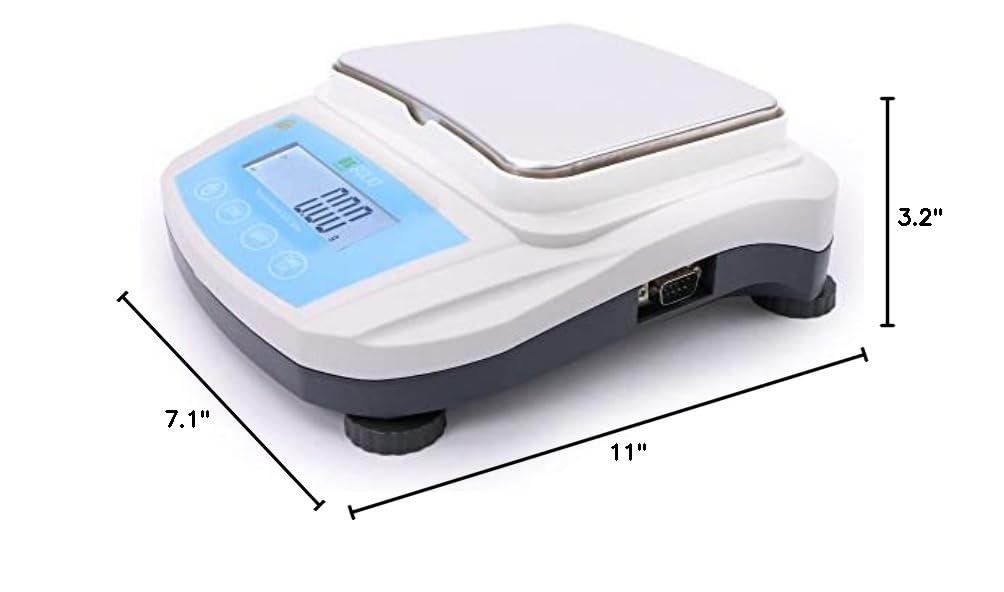
Image: Diagram showing the approximate dimensions of the balance: 11 inches long, 7.1 inches wide, and 3.2 inches high.
Garantija ir palaikymas
U.S. Solid products are designed for reliability and performance. For warranty information, technical support, or service inquiries, please refer to the contact information provided with your purchase documentation or visit the official U.S. Solid websvetainę.
Išsaugokite pirkimo įrodymą, kad galėtumėte kreiptis dėl garantijos.
Ask a question about this manual
Ask about setup, troubleshooting, compatibility, parts, safety, or missing instructions. Manuals+ will review the question and use this page’s manual context to help answer it.