
Shargeek STM2E-1
Shargeek STORM2 Slim Portable Charger User Manual
Modelis: STM2E-1
Įvadas
This manual provides comprehensive instructions for the safe and efficient use of your Shargeek STORM2 Slim Portable Charger. Please read this manual thoroughly before operating the device and retain it for future reference.
The Shargeek STORM2 Slim is a high-capacity portable power bank featuring a unique transparent design and an IPS display screen. It offers 130W max output with 100W USB-C and 30W USB-A ports, suitable for charging various devices including laptops, tablets, and smartphones.

Image: The Shargeek STORM2 Slim portable charger, showcasing its transparent design that reveals internal components and the included yellow USB-C to USB-C cables.
Produkto savybės
- Skaidrus dizainas: The see-through casing reveals the internal battery and circuit layout, highlighting the device's engineering.
- IPS Display Screen: A clear screen provides real-time information on battery life, output distribution, temperature, operation hours, and active ports.
- Didelė talpa: 20000mAh battery capacity, capable of multiple charges for various devices.
- Greitas įkrovimas: Features a 100W USB-C PD port and a 30W USB-A port, supporting 130W max output for rapid charging.
- Visuotinis suderinamumas: Charges laptops, phones, tablets, and other devices with USB-C or USB ports.

Paveikslėlis: detalus view of the Shargeek STORM2 Slim's IPS LCD screen, showing various data points such as input/output wattage, ttage, current, battery level, and temperatures.
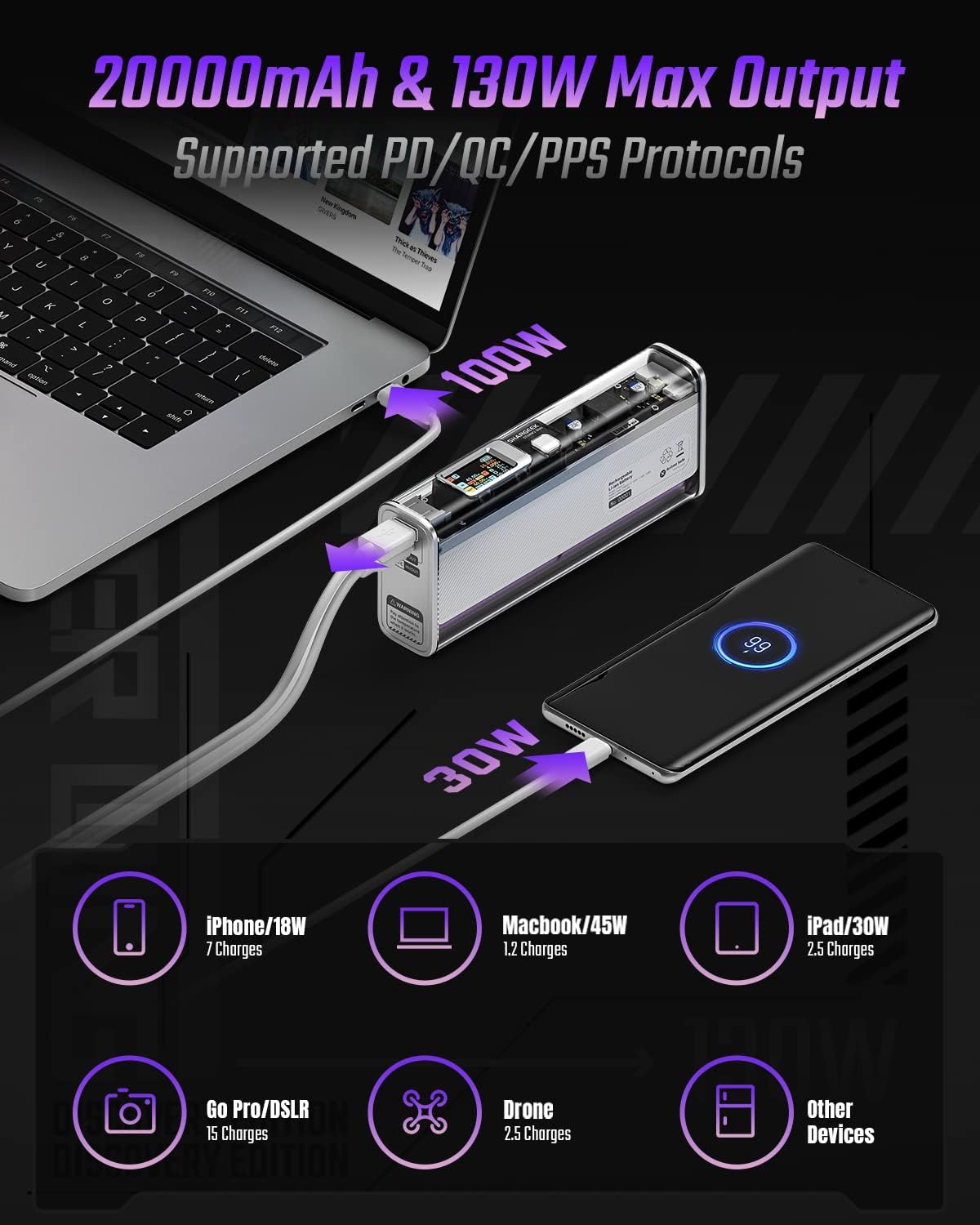
Image: The Shargeek STORM2 Slim connected via USB-C to a laptop for 100W charging and via USB-A to a smartphone for 30W charging, demonstrating its dual-port capability.
Sąranka ir pirmasis naudojimas
Pakuotės turinys:
- Shargeek STORM2 Slim Portable Charger
- USB-C į USB-C laidas
- Vartotojo vadovas (šis dokumentas)
Pradinis įkrovimas:
- Before first use, fully charge your STORM2 Slim.
- Connect the provided USB-C to USB-C cable to the USB-C port on the STORM2 Slim.
- Connect the other end of the cable to a compatible USB-C power adapter (not included) with a minimum of 100W output for fastest charging.
- The IPS screen will display charging status and battery percentage. The device is fully charged when the screen indicates 100%.
- A full recharge typically takes approximately 90 minutes with a 100W power adapter.
Naudojimo instrukcijos
Įkrovimo įrenginiai:
- Identify the appropriate charging cable for your device (USB-C to USB-C or USB-A to device-specific cable).
- Connect one end of the cable to your device and the other end to the corresponding port (USB-C or USB-A) on the STORM2 Slim.
- The IPS screen will automatically activate and display the charging output (watts, volts, amps) for the connected device(s).
- The STORM2 Slim can charge two devices simultaneously using both the USB-C and USB-A ports.
Understanding the IPS Screen:
The IPS screen provides detailed real-time information. Use the physical button on the side of the power bank to navigate through different display modes or access settings.
- Input/Output Dashboard: Shows power input (IN) when charging the power bank and power output (OUT) when charging devices, including wattage, ttage ir srovė kiekvienam prievadui.
- Baterijos lygis: Rodo likusią baterijos procentątage and a visual icon.
- ttage ir dabartinė: Detailed readings for the internal battery cells.
- Temperatūra: Shows the internal circuit board and battery temperatures.
- Veikimo laikas: A resettable timer indicating the duration of current operation.
To access menus: Long-press the button. Norėdami naršyti: Short-press. Pasirinkti: Long-press.
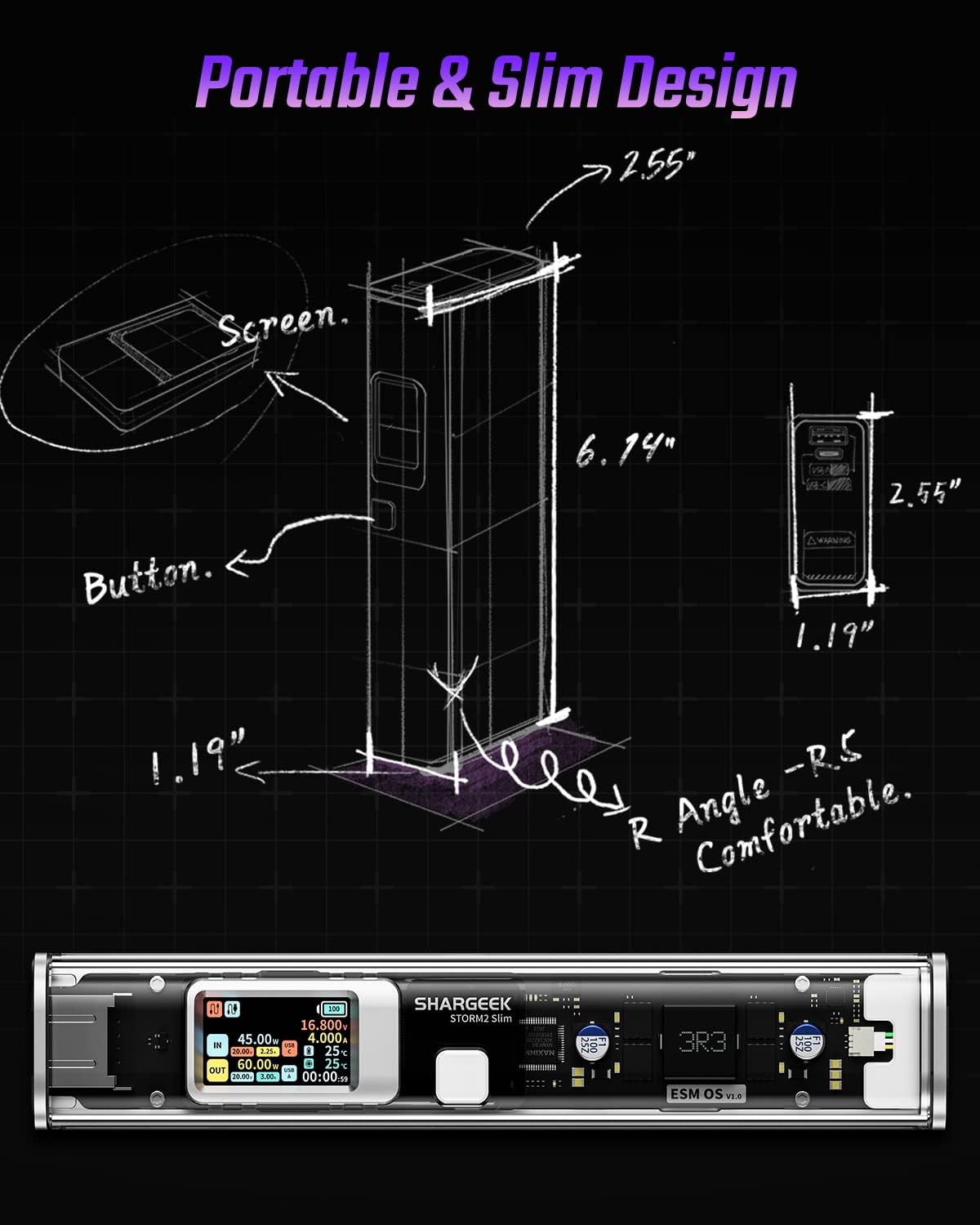
Image: A technical drawing illustrating the dimensions of the Shargeek STORM2 Slim and pointing out the screen and button locations.
Priežiūra
- Valymas: Išorinę išorinę bateriją valykite minkšta, sausa šluoste. Venkite naudoti stiprias chemines medžiagas ar abrazyvines medžiagas.
- Saugykla: Laikykite prietaisą vėsioje, sausoje vietoje, toliau nuo tiesioginių saulės spindulių, ekstremalių temperatūrų ir didelės drėgmės.
- Akumuliatoriaus priežiūra: Norėdami pailginti baterijos veikimo laiką, venkite dažnai visiškai iškrauti išorinę bateriją. Įkraukite ją, kai baterijos įkrovos lygis žemas. Jei ilgą laiką nenaudosite, įkraukite ją maždaug iki 50–70 % kas 3–6 mėnesius.
- Venkite lašų: While designed with an aluminum alloy frame for durability, avoid dropping the device as it may damage internal components or the transparent casing.
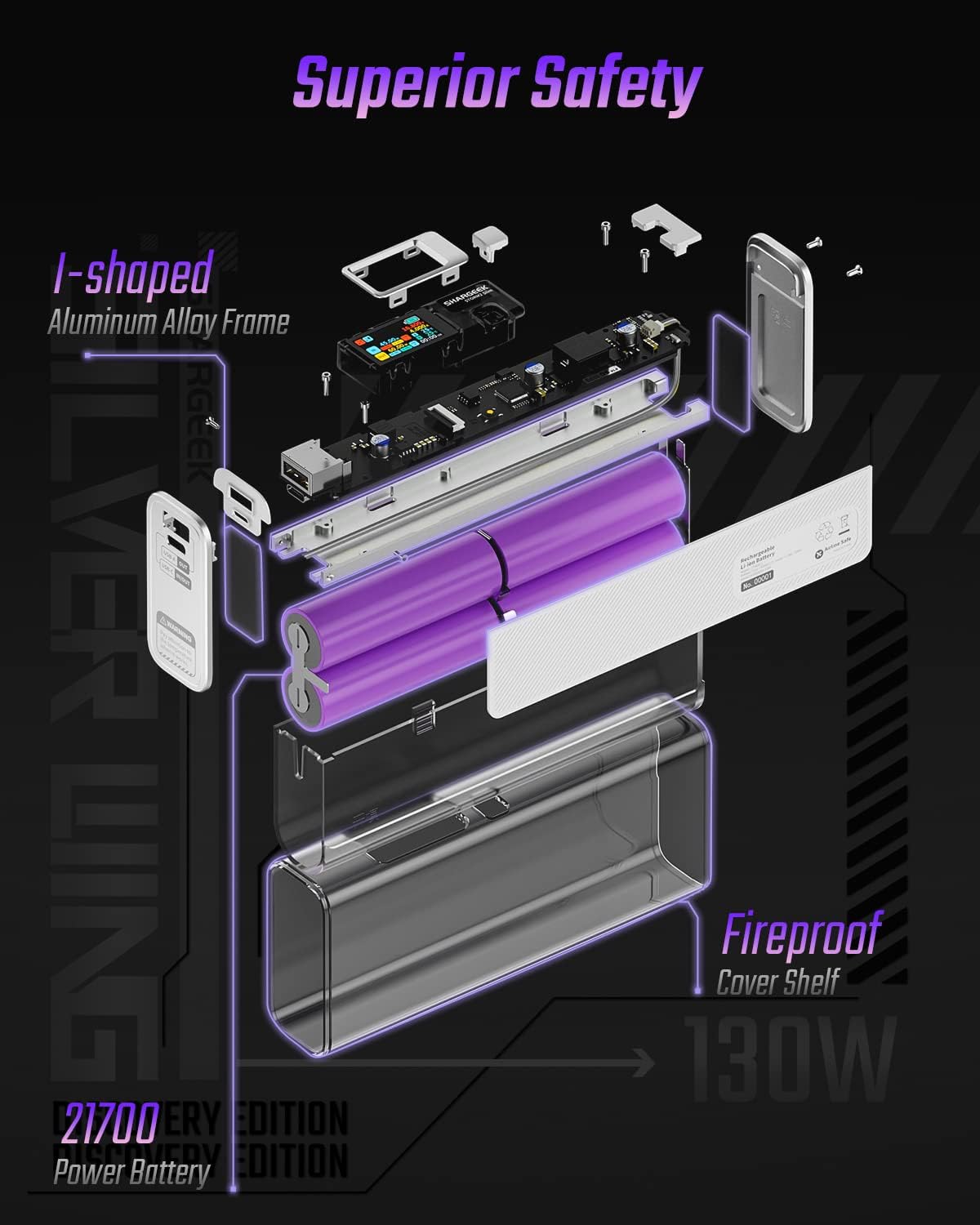
Image: An exploded diagram of the Shargeek STORM2 Slim, illustrating its internal structure including the I-shaped aluminum alloy frame, fireproof cover shelf, and 21700 power batteries, highlighting its robust construction.
Trikčių šalinimas
| Problema | Galima priežastis | Sprendimas |
|---|---|---|
| Įrenginys neįkraunamas iš išorinės baterijos. | Low power bank battery; incompatible cable; device not properly connected; device requires more power than available. | Recharge the STORM2 Slim. Ensure cable is fully inserted and compatible. Check device power requirements against power bank output. Try a different cable or port. |
| Nešiojamoji baterija neįkraunama. | Sugedęs įkrovimo laidas arba adapteris; pažeistas išorinės baterijos prievadas. | Try a different USB-C cable and power adapter. Ensure the adapter meets the recommended power output (e.g., 100W). If problem persists, contact support. |
| IPS screen is blank or unresponsive. | Power bank is off; temporary software glitch. | Press the button to activate the screen. If unresponsive, try connecting a device to charge or connecting the power bank to a charger to see if it activates. If problem persists, contact support. |
| Lėtas įkrovimas. | Laidas nepalaiko greito įkrovimo; įrenginys nepalaiko greito įkrovimo; prijungti keli įrenginiai. | Ensure you are using a high-quality USB-C PD cable. Verify your device supports fast charging. Charging multiple devices simultaneously may reduce individual charging speeds. |
Specifikacijos
- Modelio numeris: STM2E-1
- Baterijos talpa: 20000 mAh
- Maksimali išvestis: 130W
- USB-C išvestis: Iki 100 W galios tiekimas (PD)
- USB-A išėjimas: Iki 30W
- Įvestis: USB-C (up to 100W PD)
- Ekranas: IPS ekranas
- Matmenys: 3 x 6.5 x 15.59 cm (apytiksliai 1.18 x 2.56 x 6.14 colio)
- Svoris: Maždaug 689 g (1.52 svaro)
- Baterijos tipas: Ličio jonas
Garantija ir palaikymas
Informacija apie garantiją:
Shargeek products are covered by a limited warranty against defects in materials and workmanship. Please refer to the warranty card included with your purchase or visit the official Shargeek websvetainėje, kurioje pateikiamos išsamios garantijos sąlygos.
Klientų aptarnavimas:
For technical assistance, troubleshooting, or warranty claims, please contact Shargeek customer support through their official websvetainėje arba kontaktinę informaciją, pateiktą ant jūsų produkto pakuotės.
Official Shargeek Store Link: Shargeek Official Store
Saugos informacija
- Saugokite įrenginį nuo vandens, drėgmės ar ekstremalių temperatūrų.
- Neardykite, nemodifikuokite ir nebandykite taisyti įrenginio patys. Tai panaikins garantiją ir gali sukelti žalos ar sužalojimų.
- Laikyti vaikams nepasiekiamoje vietoje.
- Naudokite tik sertifikuotus ir suderinamus įkrovimo laidus bei adapterius.
- Stenkitės, kad prietaisas nenumestų ar nepatirtų stipraus smūgio.
- Dispose of the device responsibly according to local regulations for electronic waste.
Ask a question about this manual
Ask about setup, troubleshooting, compatibility, parts, safety, or missing instructions. Manuals+ will review the question and use this page’s manual context to help answer it.