
1. Įvadas
This manual provides detailed instructions for the setup, operation, maintenance, and troubleshooting of your YiBiChin Universal Replacement Remote Control, Model RU-12. This remote is designed to work seamlessly with various Roku Built-in TV models.
2. Produktas baigtasview
The YiBiChin RU-12 is a dedicated infrared (IR) replacement remote control for Roku Built-in TVs. It offers direct access to popular streaming services through its 12 shortcut buttons.
2.1 Pagrindinės savybės
- Nereikia programuoti ar poruoti.
- Compatible with a wide range of Roku Built-in TVs.
- 12 dedicated shortcut buttons for popular streaming apps: NETFLIX, Prime Video, Roku Channel, Disney+, Sling, Hulu, VUDU, YouTube, ESPN+, Fan-NOW, Google Play, and Spotify.
- Infrared (IR) technology for reliable control.
2.2 Suderinamumas
This remote is compatible with the following Roku Built-in TV brands:
- TCL „Roku“ televizorius
- „Hisense Roku“ televizorius
- ONN Roku televizija
- INSIGNIA Roku TV
- SHARP Roku TV
- Hitachi Roku TV
- „Philips Roku“ televizorius
- „Westinghouse Roku“ televizorius
- Elementas Roku TV
- And other Roku Built-in TV models.
2.3 Important Incompatibilities
This remote is NOT compatible with:
- Roku Stick devices.
- Roku Player devices without an IR receiver.
- Any Roku player/box that does not have an IR receiver.
- This is an infrared (IR) remote; it does not feature a pairing button, microphone for voice control, or a headphone jack. It is not an RF (Radio Frequency) model.

Image 1: Front, side, and back views of the YiBiChin RU-12 remote control. The remote is black with blue navigation buttons and various colored shortcut buttons.

Image 2: Visual guide indicating that the remote is compatible with Roku players/boxes that have an IR receiver (labeled 'YES') and incompatible with Roku Built-in TVs, Roku Sticks, and Roku Players without an IR receiver (labeled 'NO').
3. Sąranka
Setting up your YiBiChin RU-12 remote control is straightforward and requires no complex programming.
3.1 Akumuliatoriaus įdėjimas
- Nuotolinio valdymo pulto gale raskite baterijų skyrių.
- Atidarykite akumuliatoriaus skyriaus dangtelį.
- Įdėkite dvi (2) AAA baterijas, užtikrindami teisingą poliškumą (+ ir -), kaip nurodyta skyriaus viduje.
- Saugiai uždarykite akumuliatoriaus skyriaus dangtelį.
Pastaba: Baterijos nepridedamos prie nuotolinio valdymo pulto.
3.2 Pradinis naudojimas
Once batteries are installed, the remote is ready for immediate use. No programming or pairing is necessary. Simply point the remote at your Roku Built-in TV and begin operating it.

Image 3: The remote control being used with a television, highlighting that no setup or programming is required after battery installation.
4. Naudojimo instrukcijos
Familiarize yourself with the buttons on your YiBiChin RU-12 remote control for optimal use.
4.1 Standard Controls
- Power (N/P buttons): Įjungia arba išjungia televizorių.
- Navigation Pad (Up, Down, Left, Right arrows): Naršo meniu ir pasirinkimus.
- Gerai mygtukas: Patvirtina pasirinkimus.
- Atgal mygtukas: Grįžta į ankstesnį ekraną arba meniu.
- Namų mygtukas: Grąžina į „Roku“ pagrindinį ekraną.
- Leisti / pristabdyti, greitai persukti pirmyn, atsukti atgal: Valdo medijos atkūrimą.
- Asterisk (*) Button: Pasiekia parinktis arba nustatymus tam tikrose programose.
- Refresh/Replay Button: Replays the last few seconds of content.
4.2 spartieji mygtukai
The remote features 12 dedicated shortcut buttons for quick access to popular streaming applications:
- NETFLIX
- Pagrindinis vaizdo įrašas
- Roku kanalas
- Disney+
- Stropas
- Hulu
- VUDU
- "YouTube"
- ESPN+
- Fan-NOW
- Google Play
- „Spotify“.
Simply press the desired shortcut button to launch the corresponding application directly.

Image 4: Visual confirmation that the remote does not include features such as voice search, an earphone jack, or a pairing button.
5. Priežiūra
Tinkama priežiūra ir remontas užtikrins jūsų nuotolinio valdymo pulto ilgaamžiškumą.
5.1 Valymas
To clean the remote, gently wipe it with a soft, dry cloth. Avoid using liquid cleaners, solvents, or abrasive materials, as these can damage the remote's surface or internal components.
5.2 Akumuliatoriaus keitimas
Replace batteries when the remote's response becomes sluggish or stops working. Always replace both AAA batteries at the same time with new ones. Do not mix old and new batteries, or different types of batteries.
5.3 Saugykla
When not in use for extended periods, it is recommended to remove the batteries to prevent leakage and potential damage to the remote.
6. Problemų sprendimas
If you encounter issues with your remote control, please refer to the following troubleshooting steps:
- Nuotolinis nereaguoja:
- Ensure the batteries are correctly installed with the proper polarity.
- Pakeiskite senas baterijas naujomis AAA baterijomis.
- Check for any obstructions between the remote and your TV's IR receiver. Ensure a clear line of sight.
- Confirm that your TV is a Roku Built-in TV and not a Roku Stick or a Roku Player without an IR receiver.
- No voice control/headphone jack: This remote is an IR remote and does not support voice control, a headphone jack, or a pairing function. These are not malfunctions but inherent design characteristics.
- Shortcut buttons not working: Ensure your TV is powered on and connected to the internet for streaming apps to function correctly.
Jei atlikus šiuos veiksmus problemos išlieka, susisiekite su klientų aptarnavimo tarnyba.
7. Specifikacijos
| Prekės ženklas | YiBiChin |
| Modelio numeris | RU-12 |
| Spalva | Juoda |
| Ryšio technologija | Infraraudonųjų spindulių (IR) |
| Ypatingos savybės | No programming or setup required |
| Suderinami įrenginiai | Roku Built-in TVs |
| Reikalingos baterijos | 2 x AAA (neįtraukta) |
| Didžiausias diapazonas | 10 metrai |
| Mygtukų skaičius | Standard controls + 12 shortcut buttons |
| Matmenys (apytiksliai) | Ilgis: 13.9 cm (5.5 colio) Plotis: 4.1 cm (1.6 colio) Thickness: 2.1 cm (0.8 inches) |
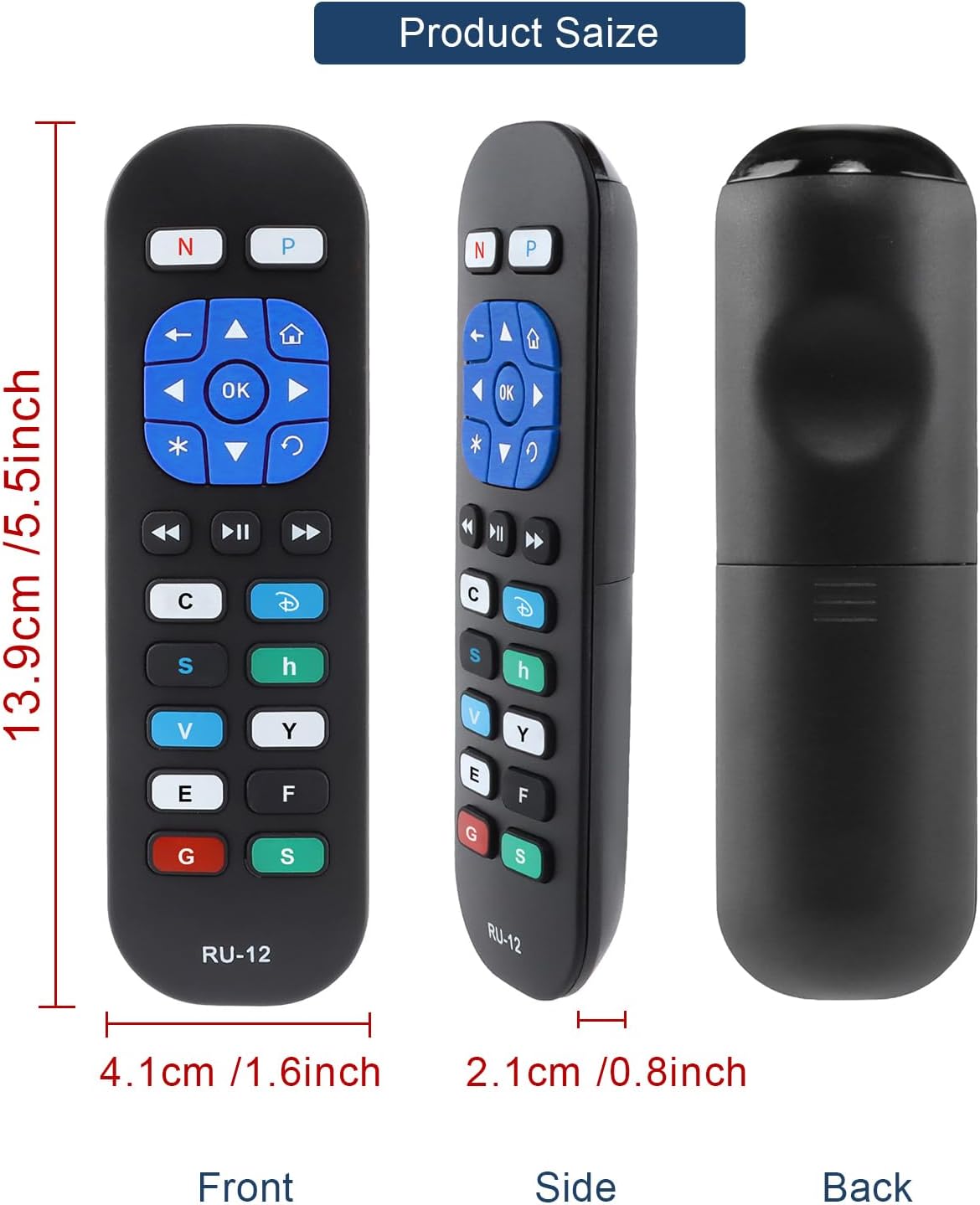
Image 5: Detailed dimensions of the remote control, indicating its length, width, and thickness.
8. Informacija apie garantiją
Specific warranty details for the YiBiChin RU-12 Universal Replacement Remote Control are not provided in the product information. Please refer to your purchase documentation or contact the seller for any warranty-related inquiries.
9. Parama
For any questions regarding your YiBiChin RU-12 remote control, whether before purchase or during use, please do not hesitate to contact our customer support team. We aim to respond to all inquiries within 24 hours.
Kontaktinė informacija: Please refer to the seller's contact details on your purchase platform or documentation.