
1. Įvadas
The V8 Live Sound Card is a versatile audio mixer and external sound card designed for live broadcasting, KTV, and voice chat. It offers multiple sound effects, adjustable audio controls, and broad compatibility with various devices, enhancing your audio experience for entertainment and professional use.
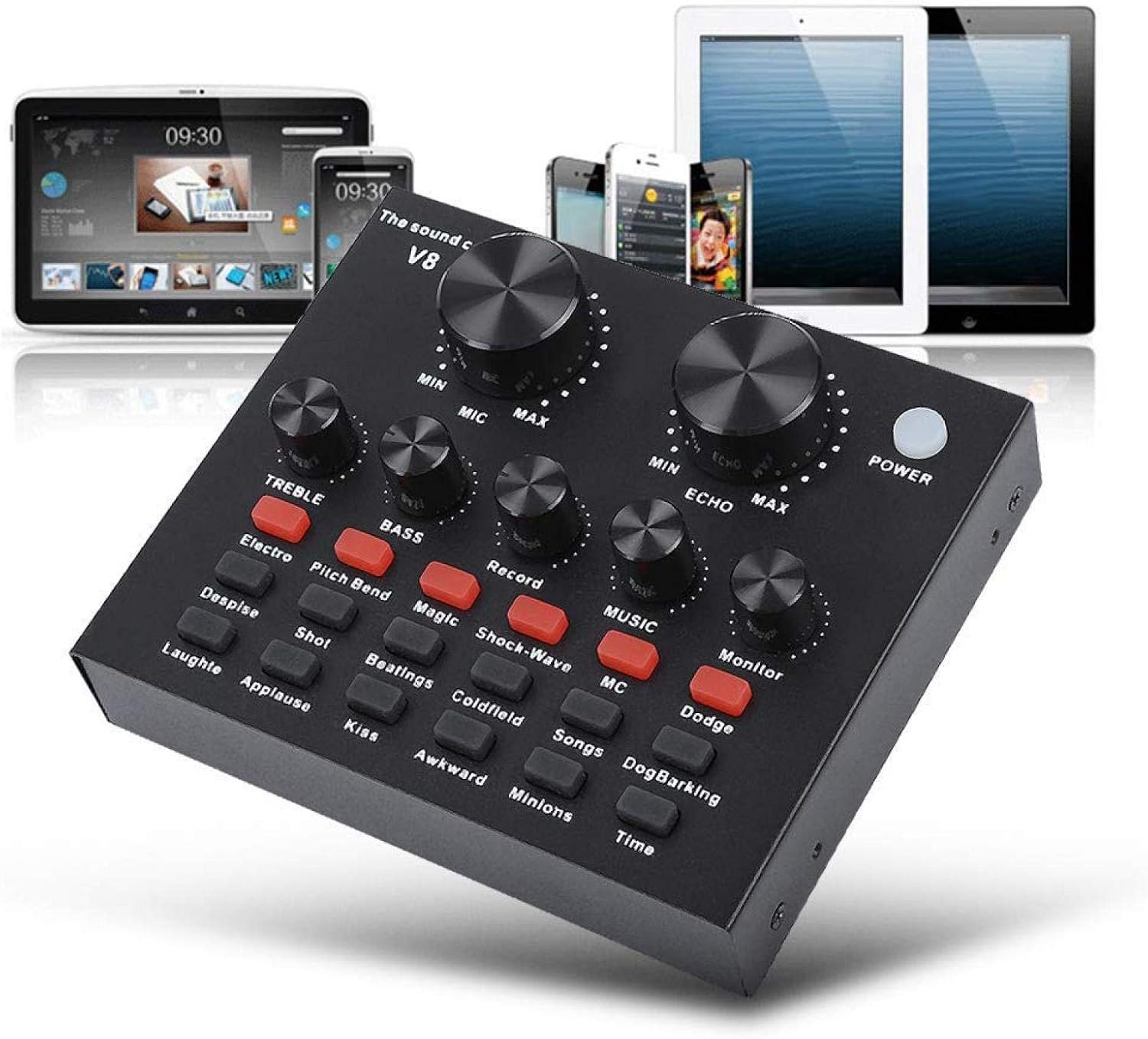
Figure 1: V8 Live Sound Card connected to various devices.
2. Savybės
- Kelių įrenginių palaikymas: Compatible with mobile phones, computers (laptops, desktops), and single headsets. Supports dual cell phone live, mobile phone computer synchronous live, one computer live, computer accompaniment cell phone live, and instrument input cell phone live.
- Professional Noise Reduction Technology: Features adjustable volume controls for various needs, including reverberation size, microphone volume, high/bass, recording volume, music volume, and monitoring volume (earphone function).
- Multiple Effects, Modes, and Gameplay: Includes 12 kinds of electric sound, 12 kinds of sound effects, and 10 kinds of effect modes. Silicone buttons allow for real-time volume adjustments without software.
- Nešiojamas ir lengvas: Designed for portability, allowing users to enjoy singing or speech anywhere.
- Platus pritaikymas: Suitable for Home KTV, Voice Chat, Live streaming (Facebook, Periscope, Livestream, Wechat, Smule), and more. Plug and Play functionality, no driver downloads required.
3. Pakuotės turinys
Atidarius pakuotę, patikrinkite, ar yra visi komponentai ir ar jie yra geros būklės:
- 1 x V8 Live Sound Card Unit
- 2 x garso kabeliai
- 1x USB laidas
- 1 x angliškas vartotojo vadovas

Figure 2: V8 Live Sound Card and its included accessories.
4. Produktas baigtasview
Familiarize yourself with the V8 Live Sound Card's layout and ports:
Priekinio skydelio valdikliai:

Figure 3: Front panel of the V8 Live Sound Card.

4 pav. Išsamus view of control panel labels.
- MIC (Microphone Volume): Adjusts the input volume of the microphone.
- ECHO (Echo Effect): Controls the intensity of the echo effect.
- TREBLE (aukštų dažnių reguliavimas): Adjusts the high-frequency sound.
- BASS (žemų dažnių reguliavimas): Adjusts the low-frequency sound.
- RECORD (Recording Volume): Controls the volume of the recorded output.
- MUSIC (Music Volume): Reguliuoja foninės muzikos garsumą.
- MONITOR (Monitoring Volume): Controls the volume heard through connected headphones/earphones.
- Įjungimo mygtukas: Įjungia/išjungia įrenginį.
- Garso efektų mygtukai: Various buttons for specific sound effects (e.g., Electro, Pitch Bend, Magic, Shock-Wave, MC, Dodge, Despise, Shot, Beatings, Coldfield, Songs, Dog Barking, Laughter, Applause, Kiss, Awkward, Minions, Time, Reverb Delay, Voice Change, Elimination, Crack, 9277, Yell, Slash, PUBG).
Galinio skydelio prievadai:

Figure 5: Rear panel ports of the V8 Live Sound Card.
- Charging / Computer Interface: USB port for charging and connecting to a computer.
- 1 tiesioginė transliacija / 2 tiesioginė transliacija: Ports for connecting mobile phones for live broadcasting.
- Akompanimento sąsaja: For connecting an external audio source for background music.
- Ausinių garsiakalbis: Output for connecting external speakers or headphones.
- Ausinių sąsaja: For connecting a headset with a combined microphone and headphone jack.
- Kondensatoriaus mikrofonas: Įvestis kondensatoriniams mikrofonams.
- Dynamic Mic: Dinaminių mikrofonų įvestis.
5. Sąranka
Follow these steps to set up your V8 Live Sound Card:
Pradinis įjungimas:
- Ensure the sound card is charged or connected to a power source via the USB cable.
- Paspauskite GALIA button on the front panel to turn on the device.
Prisijungimo būdai:

Figure 6: Computer Live/Accompaniment connection method.
- For Computer Live/Accompaniment:
- Prijunkite USB kabelį nuo garso plokštės Charging / Computer Interface to your computer. The sound card should be automatically recognized.
- Prijunkite mikrofoną prie Kondensatoriaus mikrofonas or Dinaminis mikrofonas įvestis.
- Connect your headphones or speakers to the Ausinių garsiakalbis or Ausinių sąsaja.
- If using an accompaniment device (e.g., another phone for music), connect it to the Accompaniment Interface using an audio cable.
- For Single Mobile Phone Live Broadcast:
- Connect one audio cable from the sound card's Gyvai 1 or Gyvai 2 port to your mobile phone's audio jack. If your phone does not have a 3.5mm audio jack, use an audio adapter cable (not included).
- Connect your microphone to the appropriate mic input.
- Prijunkite ausines prie Ausinių sąsaja or Ausinių garsiakalbis.
- For Dual Mobile Phone Live Broadcast:
- Connect one audio cable from the sound card's Gyvai 1 port to your first mobile phone.
- Connect a second audio cable from the sound card's Gyvai 2 port to your second mobile phone.
- Connect your microphone and headphones as described above.
6. Naudojimo instrukcijos
Once connected, you can begin using your V8 Live Sound Card:
- Adjusting Volumes: Use the large knobs for MIC ir ECHO. Use the smaller knobs for TREBLE, BASS, ĮRAŠAS, MUZIKA, ir MONITORIUS to fine-tune your audio levels.
- Applying Sound Effects: Press the various sound effect buttons on the front panel to activate different effects. Experiment with each button to find the desired sound.
- Balso keitimas: Pasinaudokite
Susiję dokumentai16508823665168
RELATED DOCUMENTTiesioginio garso plokštės vartotojo vadovas„V8 Live“ garso plokštės naudotojo vadovas, kuriame išsamiai aprašomas sąranka, mobiliųjų telefonų ir kompiuterių prijungimo būdai, naudojimo atsargumo priemonės ir gaminio parametrai.View document →RELATED DOCUMENTALPOWL V8 Live garso plokštės naudotojo vadovas„ALPOWL V8 Live“ garso plokštės naudotojo vadovas, kuriame išsamiai aprašomos jos funkcijos, sąranka, mobiliojo ir kompiuterio prijungimo būdai, „Bluetooth“ susiejimas ir gaminio specifikacijos tiesioginėms transliacijoms ir garso įrašymui.View document →RELATED DOCUMENTTiesioginio garso plokštės vartotojo vadovas„Live Sound Card“ naudotojo vadovas, kuriame išsamiai aprašomos jos funkcijos, naudojimo atsargumo priemonės, mobiliųjų telefonų ir kompiuterių prijungimo būdai bei trikčių šalinimo patarimai.View document →RELATED DOCUMENTV8 Audio External USB Live Broadcast Sound Card - Features & SpecificationsDetailed specifications and features for the V8 Audio External USB Sound Card, designed for mobile and computer live broadcasting with Bluetooth support.View document →RELATED DOCUMENTAyeBeau Live Sound Card User ManualUser manual for the AyeBeau Live Sound Card, including setup instructions, connection diagrams, and technical specifications.View document →RELATED DOCUMENTV8 Audio External USB Sound Card SpecificationsTechnical specifications and features for the V8 Audio External USB Sound Card, including sound effects, connection methods, and physical dimensions.View document →RELATED DOCUMENTV8 garso plokštė: prijungimo instrukcijos ir trikčių šalinimo vadovasIšsamus V8 garso plokštės prijungimo ir trikčių šalinimo vadovas, skirtas tiesioginėms transliacijoms, įrašymui ir balso keitimui. Apima sąrankos schemas ir dažniausiai pasitaikančių problemų sprendimus.View document →RELATED DOCUMENTV8 Audio External USB Sound Card User GuideTechnical specifications and feature overview for the V8 Audio External USB Headset Microphone Live Broadcast Sound Card by APWIKOGER.View document →Ask a question about this manual
Ask about setup, troubleshooting, compatibility, parts, safety, or missing instructions. Manuals+ will review the question and use this page’s manual context to help answer it.


