
1. Įvadas
This manual provides essential instructions for the installation, operation, and maintenance of your Chieftec Scorpion 3 White ATX Case (Model GL-03W-OP). Please read this manual thoroughly before beginning assembly to ensure proper setup and to maximize the lifespan of your product.
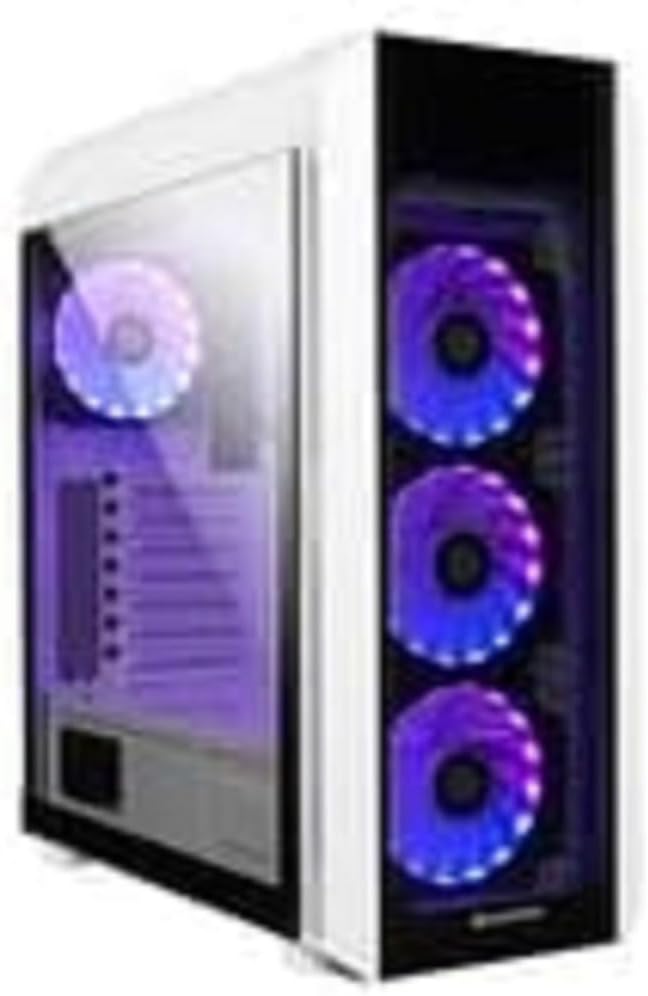
1 paveikslas: The Chieftec Scorpion 3 White ATX Case, showcasing its white exterior, tempered glass side panel, and three front-mounted, illuminated cooling fans. A single illuminated fan is visible at the rear.
2. Sąranka ir komponentų diegimas
This section guides you through the process of installing your computer components into the Chieftec Scorpion 3 White ATX Case.
2.1. Paruošimas
- Ensure you have all necessary components: motherboard, CPU, RAM, graphics card, storage drives, and power supply unit (PSU).
- Gather tools: Phillips head screwdriver, zip ties for cable management.
- Dirbkite ant švaraus, nuo statinės elektros apsaugoto paviršiaus. Apsvarstykite galimybę naudoti antistatinį riešo dirželį.
2.2. Dėklo atidarymas
- Carefully remove the side panels. Typically, the tempered glass side panel is secured with thumbscrews at the rear.
- Set the panels aside on a soft, non-abrasive surface to prevent scratches.
2.3. Maitinimo šaltinio (PSU) įrengimas
- The Chieftec Scorpion 3 supports rear-mount PSUs.
- Slide the PSU into its designated bay at the bottom rear of the case.
- Secure the PSU with screws from the exterior rear of the case.
2.4. Pagrindinės plokštės montavimas
- Įstatykite įvesties/išvesties skydą į išpjovą korpuso gale.
- Align your ATX motherboard with the pre-installed standoffs.
- Atsargiai uždėkite pagrindinę plokštę ant laikiklių ir pritvirtinkite varžtais.
2.5. Atminties disko diegimas
- Raskite 2.5 colio SSD ir 3.5 colio HDD diskų lizdus.
- Install your storage drives into the appropriate bays and secure them.
2.6. Vaizdo plokštė ir išplėtimo plokštės
- Nuimkite reikiamus PCIe lizdų dangtelius nuo korpuso galo.
- Insert your graphics card or other expansion cards into the motherboard's PCIe slots and secure them with screws.
2.7. Kabelių valdymas
- Route all cables (PSU, data, front panel) through the designated cutouts to the rear of the motherboard tray.
- Use zip ties or Velcro straps to bundle and secure cables for improved airflow and aesthetics.
2.8. Bylos užbaigimas
- Once all components are installed and cables managed, reattach the side panels.
- Secure the tempered glass panel with its thumbscrews.
3. Bylos valdymas
The Chieftec Scorpion 3 White ATX Case provides the housing and cooling for your PC components. Its operation primarily involves the use of the front panel controls and integrated cooling system.
3.1. Priekinio skydelio valdikliai
- Maitinimo mygtukas: Press to turn on or off your computer.
- Atkūrimo mygtukas: Press to restart your computer.
- USB prievadai: Prijunkite USB įrenginius.
- Garso lizdai: Prijunkite ausines ir mikrofonus.
3.2. Aušinimo sistema
The case is equipped with multiple fan mounts and pre-installed 120mm fans to ensure optimal airflow.
- Ensure all fans are properly connected to your motherboard or a fan controller.
- Monitor system temperatures using software to ensure adequate cooling.
- The illuminated fans provide aesthetic appeal and can often be controlled via motherboard software for RGB lighting effects.
4. Priežiūra
Regular maintenance helps ensure optimal performance and longevity of your Chieftec Scorpion 3 White ATX Case and its components.
4.1. Dulkių valymas
- Dažnis: Clean dust filters and interior components every 3-6 months, or more frequently in dusty environments.
- Dulkių filtrai: The case features removable dust filters (e.g., top, front, bottom). Gently remove and clean them with water and mild soap, or use a vacuum cleaner. Ensure they are completely dry before reinstallation.
- Interjeras: Use compressed air to blow dust out of fans, heatsinks, and other components. Hold fan blades gently to prevent over-spinning.
4.2. Išorės valymas
- Išorinius paviršius nuvalykite minkšta, damp skudurėliu. Venkite abrazyvinių valiklių ar tirpiklių.
- For the tempered glass panel, use a glass cleaner and a microfiber cloth to prevent streaks.
5. Problemų sprendimas
This section addresses common issues you might encounter with your PC build within the Chieftec Scorpion 3 White ATX Case.
5.1. Sistema neįsijungia
- Patikrinkite maitinimo jungtis: Ensure the PSU is switched on and all power cables (24-pin ATX, 8-pin CPU, PCIe power) are securely connected to the motherboard and components.
- Priekinio skydelio jungtys: Verify that the front panel power switch cable is correctly connected to the motherboard's front panel header. Refer to your motherboard manual for the correct pinout.
- Maitinimo bloko funkcionalumas: Test the PSU independently if possible, or try a known working PSU.
5.2. Fans Not Spinning or RGB Not Lighting Up
- Ventiliatorių jungtys: Ensure all fan power cables are securely connected to the motherboard fan headers or a fan controller.
- RGB jungtys: If applicable, verify that RGB cables are connected to the correct RGB headers on the motherboard or a dedicated RGB controller.
- Programinės įrangos valdymas: Check your motherboard's BIOS/UEFI settings or dedicated fan/RGB control software for fan speed and lighting settings.
5.3. Poor Airflow or High Temperatures
- Dulkių susidarymas: Išvalykite dulkių filtrus ir vidinius komponentus, kaip aprašyta skyriuje „Priežiūra“.
- Ventiliatoriaus orientacija: Ensure fans are oriented correctly for optimal airflow (e.g., front fans as intake, rear/top fans as exhaust).
- Kabelių valdymas: Patobulinkite laidų valdymą, kad sumažintumėte oro srauto kliūtis.
6. Specifikacijos
Detailed technical specifications for the Chieftec Scorpion 3 White ATX Case (Model GL-03W-OP).
| Funkcija | Detalė |
|---|---|
| Prekės ženklas | Chieftec |
| Serija | Scorpion 3 White |
| Modelio numeris | GL-03W-OP |
| Atvejo tipas | Mid Tower |
| Pagrindinės plokštės suderinamumas | ATX |
| Medžiaga | Akrilnitrilo butadieno stireno (ABS) plastikas |
| Spalva | Black (Note: Product name indicates White, but specification lists Black. Please verify product color upon receipt.) |
| Prekės svoris | 2.2 svaro |
| Gaminio matmenys (IxPxH) | 19.69 x 19.69 x 11.02 colio |
| Maitinimo šaltinio tvirtinimo tipas | Galinis tvirtinimas |
| Aušinimo būdas | Oras |
| Ventiliatoriaus dydis | 120 Millimeters (pre-installed fans) |
Note: Specifications are subject to change without prior notice. Please refer to the manufacturer's official websvetainė, kurioje rasite naujausią informaciją.
7. Informacija apie garantiją
Chieftec products are manufactured to high-quality standards. For specific warranty terms and conditions applicable to your Chieftec Scorpion 3 White ATX Case (Model GL-03W-OP), please refer to the warranty card included with your product or visit the official Chieftec websvetainę.
Typically, product warranties cover defects in materials and workmanship under normal use. Damage resulting from improper installation, accident, abuse, modification, or unauthorized repair is generally not covered.
8. Pagalba klientams
Should you encounter any issues or have questions regarding your Chieftec Scorpion 3 White ATX Case, please contact Chieftec customer support.
- Palaikymas internetu: Visit the official Chieftec webDUK, tvarkyklių atsisiuntimo ir pagalbos išteklių svetainė.
- Kontaktinė informacija: Refer to the product packaging or Chieftec's official website for regional contact details (phone, email).
When contacting support, please have your product model (GL-03W-OP) and purchase information readily available.


