
Įvadas
Thank you for choosing the BOBLOV W3 WiFi Body Camera. This manual provides detailed instructions for the proper setup, operation, and maintenance of your device. Please read this manual thoroughly before using the camera to ensure optimal performance and to prevent damage.
Pakuotės turinys
Patikrinkite, ar pakuotėje yra visi toliau išvardyti daiktai:
- 1x BOBLOV W3 Body Camera
- 1x 64GB Micro SD Card (pre-installed in camera)
- 1x USB-C įkrovimo laidas
- 1x Screw Driver
- 1x Naudotojo vadovas (šis dokumentas)
- 1x Back Magnets Clip
- 1x Brooch
Produktas baigtasview
Susipažinkite su fotoaparato komponentais ir valdikliais:

Vaizdas: BOBLOV W3 Body Camera with labels indicating the Power/Video Button, Audio/WiFi Button, Microphone, Reset button, Brooch attachment point, Back Magnetic Clip, and USB-C Charging Interface. The image also shows the dimensions of the camera.
- Power/Video Button: Used to power on/off the device and start/stop video recording.
- Audio/WiFi Button: Used to start/stop audio recording and activate/deactivate WiFi function.
- Mikrofonas: Mikrofonas garso įrašymui.
- Atstatyti: Small button to reset the device (requires a pin).
- Brooch: Attachment point for the included brooch clip.
- Back Magnetic Clip: Removable clip for magnetic attachment.
- Įkrovimo sąsaja: USB-C prievadas įkrovimui ir duomenų perdavimui.
Sąranka
1. Fotoaparato įkrovimas
Before initial use, fully charge the camera. The built-in 1450mAh battery takes approximately 3 hours to fully charge.
- Connect the provided USB-C charging cable to the camera's charging interface.
- Kitą laido galą prijunkite prie USB maitinimo adapterio (nepridedamas) arba kompiuterio USB prievado.
- Įkrovimo indikatoriaus lemputė užsidegs įkrovimo metu ir užges, kai bus visiškai įkrauta.
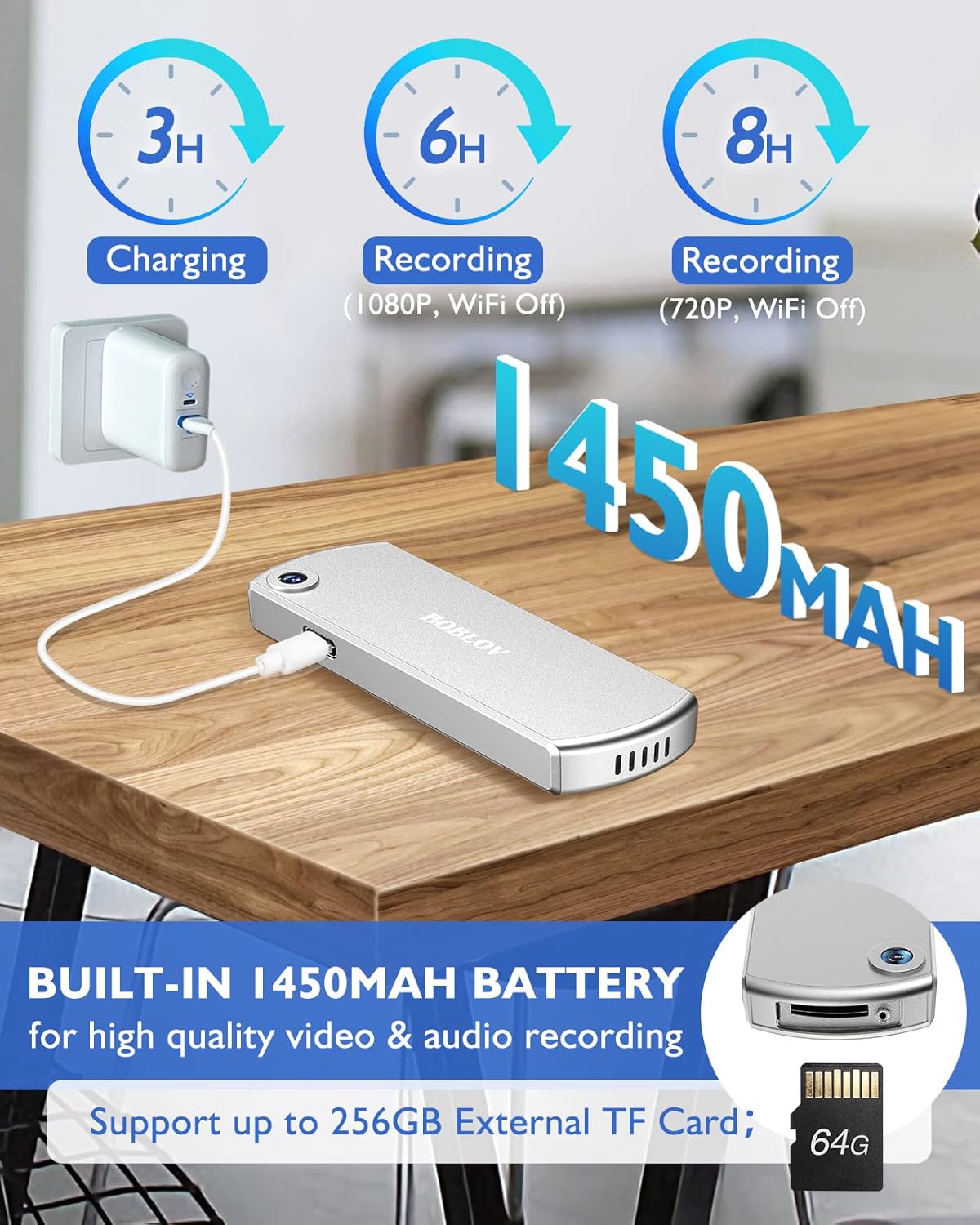
Vaizdas: The BOBLOV W3 Body Camera being charged via a USB-C cable, highlighting the 1450mAh battery and charging times: 3 hours for full charge, 6 hours recording (1080P, WiFi Off), and 8 hours recording (720P, WiFi Off).
2. Inserting/Expanding Memory Card
The W3 Body Camera uses an external Micro SD card. A 64GB card is included and pre-installed.
- Suraskite fotoaparato atminties kortelės angą.
- Use the included screwdriver to carefully unscrew the cover of the card slot.
- Insert or replace the Micro SD card (up to 256GB) into the slot with the contacts facing down.
- Securely fasten the card slot cover with the screwdriver.
3. Kameros pritvirtinimas
The camera offers two attachment options: a back magnetic clip and a brooch.
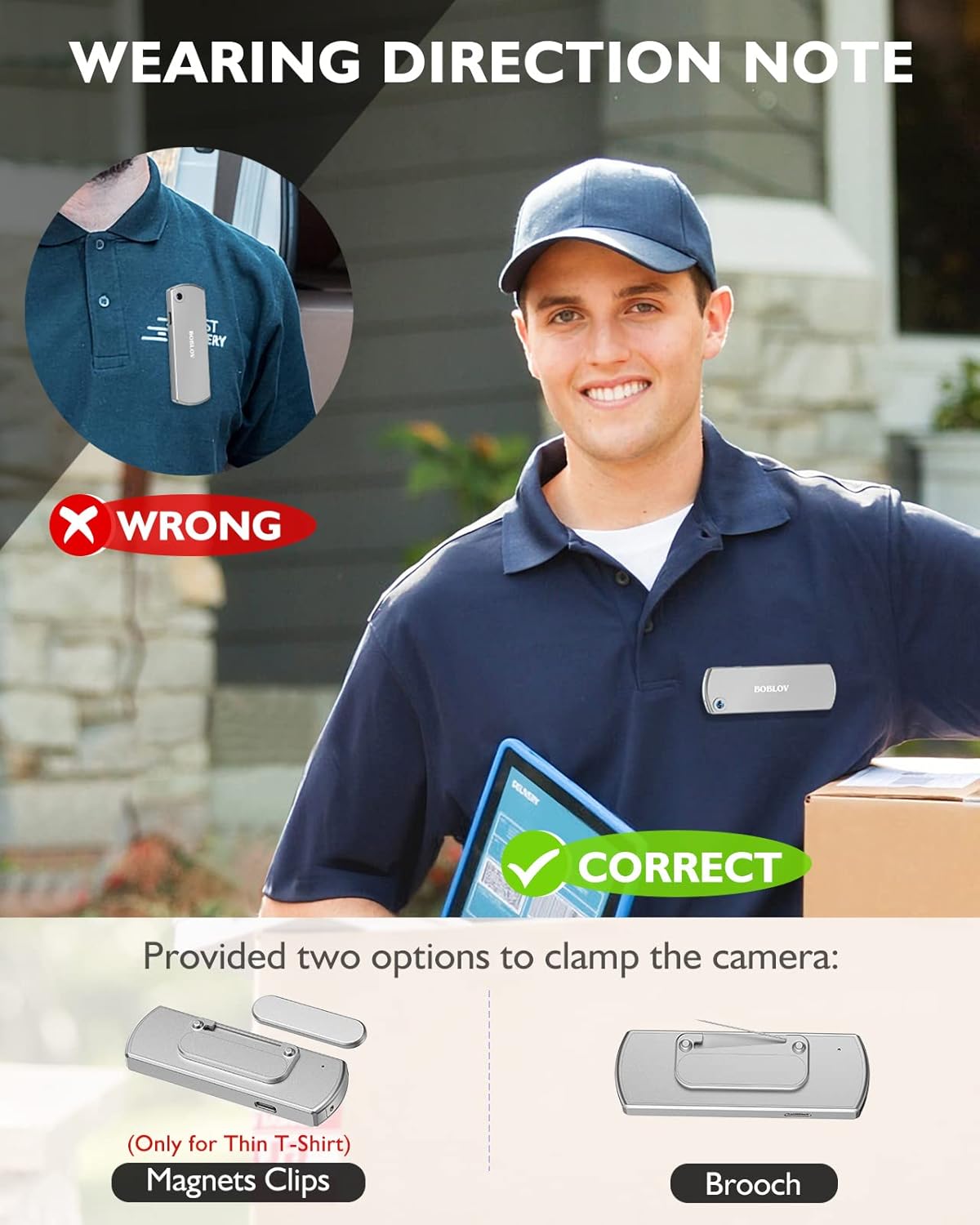
Vaizdas: Illustration demonstrating correct and incorrect ways to wear the BOBLOV W3 Body Camera. It shows that magnetic clips are suitable for thin T-shirts, while a brooch provides a more secure attachment for other clothing types.
- Magnetinis klipas: Attach the magnetic clip to the back of the camera. This is suitable for thin fabrics like T-shirts. Ensure the camera is securely held.
- Brooch: For more secure attachment or thicker clothing, use the provided brooch. Attach it to the camera's designated brooch point and then pin it to your clothing.
Naudojimo instrukcijos
1. Maitinimo įjungimas/išjungimas
- Maitinimas: Paspauskite ir palaikykite Power/Video Button for a few seconds until the indicator light illuminates.
- Išjungti: Paspauskite ir palaikykite Power/Video Button again for a few seconds until the indicator light turns off.
2. Vaizdo įrašymas
- While the camera is powered on, press the Power/Video Button once to start video recording. The indicator light will flash to indicate recording is in progress.
- Paspauskite Power/Video Button again to stop video recording. The indicator light will return to a steady state.
- The camera supports 1080P and 720P video recording. With WiFi off, it can record for approximately 6 hours at 1080P or 8 hours at 720P on a full charge.
- Videos are saved in 5-minute fragments by default. The camera supports loop recording, overwriting older files kai atminties kortelė pilna.
3. Garso įrašymas
- While the camera is powered on, press the Audio/WiFi Button once to start audio recording.
- Paspauskite Audio/WiFi Button dar kartą, kad sustabdytumėte garso įrašymą.
4. WiFi Function and App Connectivity
The BOBLOV W3 features WiFi connectivity, allowing you to manage files and change settings via a smartphone app.
- Activate WiFi: Paspauskite ir palaikykite Audio/WiFi Button for a few seconds to turn on the WiFi function. The WiFi indicator light will flash.
- Atsisiųsti programą:
- For Android devices, download the DHiHZ programėlė.
- For iOS devices, download the Mini-XRcam programėlė.
- Prisijungimas prie kameros: On your smartphone, go to WiFi settings and connect to the camera's WiFi network (usually named "BOBLOV_W3_XXXX"). The default password is typically "12345678".
- Naudoti programėlę: Open the downloaded app to view gyvas kvailystage, įrašų atkūrimas, atsisiuntimas files ir pakoreguokite fotoaparato nustatymus.
- Deactivate WiFi: Paspauskite ir palaikykite Audio/WiFi Button dar kartą, kad išjungtumėte „WiFi“.

Vaizdas: The BOBLOV W3 Body Camera wirelessly connected to a smartphone, illustrating the WiFi function for managing files, changing settings, and accessing features like video, audio, preview, playback, and download through the dedicated Android (DHiHZ) and iOS (Mini-XRcam) applications.
5. Prisijungimas prie kompiuterio
You can connect the camera to a computer to manage recorded files ir pakeiskite nustatymus.
- Ensure the camera is powered ON before connecting to the PC.
- Prijunkite fotoaparatą prie kompiuterio naudodami pridėtą USB-C laidą.
- Kamera kompiuteryje bus rodoma kaip išimamas diskas.
- You can then access, copy, delete, or upload recorded files. Some settings may also be configurable via a configuration file on the camera's storage.

Vaizdas: The BOBLOV W3 Body Camera connected to a laptop via a USB-C cable, demonstrating how to manage recorded files and change settings. Icons for Playback, Delete, Upload, and Settings are shown, with a note to ensure the camera is powered ON for connection.
Priežiūra
- Valymas: Use a soft, dry cloth to clean the camera body. Do not use liquid cleaners or solvents.
- Saugykla: Fotoaparatą laikykite vėsioje, sausoje vietoje, toliau nuo tiesioginių saulės spindulių ir ekstremalių temperatūrų.
- Akumuliatoriaus priežiūra: Norėdami pailginti baterijos veikimo laiką, venkite jos dažnai visiškai iškrauti. Reguliariai įkraukite fotoaparatą, net jei jo ilgą laiką nenaudojate.
- Atminties kortelė: Periodically back up important recordings from the Micro SD card to a computer. Format the Micro SD card regularly (e.g., once a month) to maintain optimal performance and prevent data corruption.
- Atsparumas vandeniui: The camera has an IP65 waterproof rating, meaning it is protected against dust and low-pressure water jets. It is not designed for submersion.
Trikčių šalinimas
| Problema | Galima priežastis / sprendimas |
|---|---|
| Kamera neįsijungia. | Battery may be depleted. Charge the camera for at least 3 hours. If the issue persists, try resetting the camera using a pin in the reset hole. |
| Camera gets hot when WiFi is on. | This is normal behavior for the camera when the WiFi function is active due to increased power consumption. |
| Cannot connect to WiFi via smartphone app. | Ensure WiFi is enabled on the camera. Check if you have downloaded the correct app (DHiHZ for Android, Mini-XRcam for iOS). Verify the WiFi password (default is "12345678"). Try restarting both the camera and your phone. |
| Camera stops recording unexpectedly. | The memory card may be full. The camera supports loop recording, but if the card is corrupted or too slow, it might cause issues. Try formatting the card or using a different high-speed Micro SD card. Battery may be low. |
| Negaliu prieiti files kompiuteryje. | Ensure the camera is powered ON before connecting to the PC. Try a different USB-C cable or USB port. |
Specifikacijos
| Funkcija | Detalė |
|---|---|
| Prekės ženklas | BOBLOV |
| Modelio pavadinimas | W3 |
| Modelio numeris | B-W3 |
| Ryšio technologija | Wi-Fi |
| Ypatingos savybės | Lengvas |
| Suderinami įrenginiai | Android/iOS Phone |
| Maitinimo šaltinis | Maitinamas baterijomis |
| Vaizdo įrašymo raiška | 1080p |
| Spalva | Sidabras |
| Montavimo tipas | Paviršinis montavimas |
| Formos faktorius | Kompaktiškas |
| Korpuso medžiaga | Metalas |
| Įspėjimo tipas | Tik judėjimas |
| Šviesos šaltinis | Infraraudonųjų spindulių |
| Atsparumo vandeniui įvertinimas | IP65 |
| Kontrolės metodas | Programėlė |
| Vattage | 3.7 vatvalandės |
| Naktinis matymas | Naktinė spalva |
| Prekės matmenys | 9 x 3 x 1.5 centimetrai |
| Baterijos talpa | 1450 mAh (įmontuota) |
| Recording Time (1080P, WiFi Off) | apytiksliai 6 valandas |
| Recording Time (720P, WiFi Off) | apytiksliai 8 valandas |
| Įkrovimo laikas | apytiksliai 3 valandas |
| Išorinė atmintis | Micro SD Card, up to 256GB (64GB included) |
| Grynasis svoris | 60 g / 2 uncijos |
Garantija ir palaikymas
BOBLOV provides a two-year warranty for high-value products, including the W3 Body Camera. For any technical assistance, troubleshooting, or warranty claims, please contact BOBLOV customer service.
Please refer to the official BOBLOV webNaujausią kontaktinę informaciją ir garantijos sąlygas rasite svetainėje arba pirkimo dokumentuose.