
Įvadas
This manual provides detailed instructions for the safe installation, operation, and maintenance of your bimar Wi-Fi Ceiling Fan, Model 1 (Ø 132). Please read this manual thoroughly before using the product and retain it for future reference.
Numatytas naudojimas: This high-performance ceiling fan is designed for ventilation in indoor domestic environments. Any other use is considered improper and potentially hazardous. The manufacturer cannot be held responsible for any damages resulting from improper use or repairs performed by unqualified personnel.
Svarbios saugos instrukcijos
Kad sumažintumėte gaisro, elektros smūgio ar žmonių sužalojimo pavojų, laikykitės šių nurodymų:
- Prieš montuodami ventiliatorių, perskaitykite visas instrukcijas.
- Montavimą turi atlikti kvalifikuotas elektrikas, laikydamasis visų vietinių ir nacionalinių elektros kodeksų.
- Ensure the installation site can support the fan's weight (approximately 6.2 kg).
- Prieš montuodami ar atlikdami techninę priežiūrą, visada atjunkite maitinimą nuo pagrindinio jungiklio.
- Nenaudokite ventiliatoriaus su pažeistu maitinimo laidu ar kištuku.
- Keep hands, hair, and clothing away from moving blades.
- Nekiškite jokių daiktų į ventiliatoriaus mentes, kai jis veikia.
- Šis prietaisas nėra skirtas naudoti asmenims (įskaitant vaikus), kurių fizinės, jutimo ar psichikos negalios arba neturintys patirties ir žinių, nebent už jų saugumą atsakingas asmuo juos prižiūrėtų arba instruktuotų, kaip naudoti prietaisą.
- Vaikus reikia prižiūrėti, kad jie nežaistų su prietaisu.
Kas yra dėžutėje
Your bimar Wi-Fi Ceiling Fan package includes the following components:
- bimar Wi-Fi Ceiling Fan unit (with 3 blades)
- Nuotolinio valdymo pultas
- Mounting hardware (screws, brackets, etc.)
- Instrukcijų vadovas (šis dokumentas)

Image: The bimar Wi-Fi Ceiling Fan, featuring three light-colored wooden blades and a brushed metal motor housing and downrod.
Sąranka ir diegimas
1. Ventiliatoriaus montavimas
Professional installation by a qualified electrician is strongly recommended. Ensure the ceiling structure can safely support the fan's weight and that all wiring complies with local electrical codes.
- Paruoškite montavimo vietą: Turn off power at the circuit breaker. Securely attach the mounting bracket to a ceiling joist or a fan-rated outlet box.
- Surinkite apatinį strypą ir variklį: Pritvirtinkite apatinį strypą prie ventiliatoriaus variklio korpuso.
- Pakabinkite ventiliatorių: Atsargiai pakelkite ventiliatoriaus mazgą ir pakabinkite jį nuo tvirtinimo laikiklio.
- Ventiliatoriaus prijungimas: Connect the electrical wires (live, neutral, ground) from the ceiling to the fan's wiring, following the wiring diagram provided in the separate installation guide (if applicable).
- Pritvirtinkite peilius: Securely fasten the three blades to the motor housing.
- Pritvirtinkite stogelį: Raise the canopy to cover the wiring and mounting bracket, securing it in place.

Vaizdas: Šoninė view of the bimar ceiling fan, illustrating the angle of the light wood blades and the connection to the downrod.
2. „Wi-Fi“ ir programėlės ryšys
The bimar Wi-Fi Ceiling Fan is compatible with the Bimar Live Smart app for advanced control and scheduling.
- Atsisiųskite programą: Ieškokite "Bimar Live Smart" in your smartphone's app store (iOS or Android) and install it.
- Sukurti paskyrą: Atidarykite programėlę ir vykdykite ekrane pateikiamus nurodymus, kad sukurtumėte naują vartotojo paskyrą arba prisijunkite, jei ją jau turite.
- Pridėti įrenginį: Power on the ceiling fan. In the Bimar Live Smart app, tap "Add Device" or the "+" icon. Select "Ceiling Fan" or the appropriate device type.
- Prisijunkite prie „Wi-Fi“: Follow the app's instructions to put the fan into pairing mode (usually by pressing a button on the fan or remote for a few seconds). Connect the fan to your home 2.4GHz Wi-Fi network.
- Name the Device: Once connected, you can name your fan for easy identification within the app.

Image: A modern living room featuring the bimar ceiling fan installed, with a smartphone displaying the Bimar Live Smart app interface, indicating Wi-Fi and voice control capabilities.
Naudojimo instrukcijos
Your bimar Wi-Fi Ceiling Fan offers multiple control options for convenience.
1. Nuotolinio valdymo pultas
The included remote control allows direct access to all fan functions.
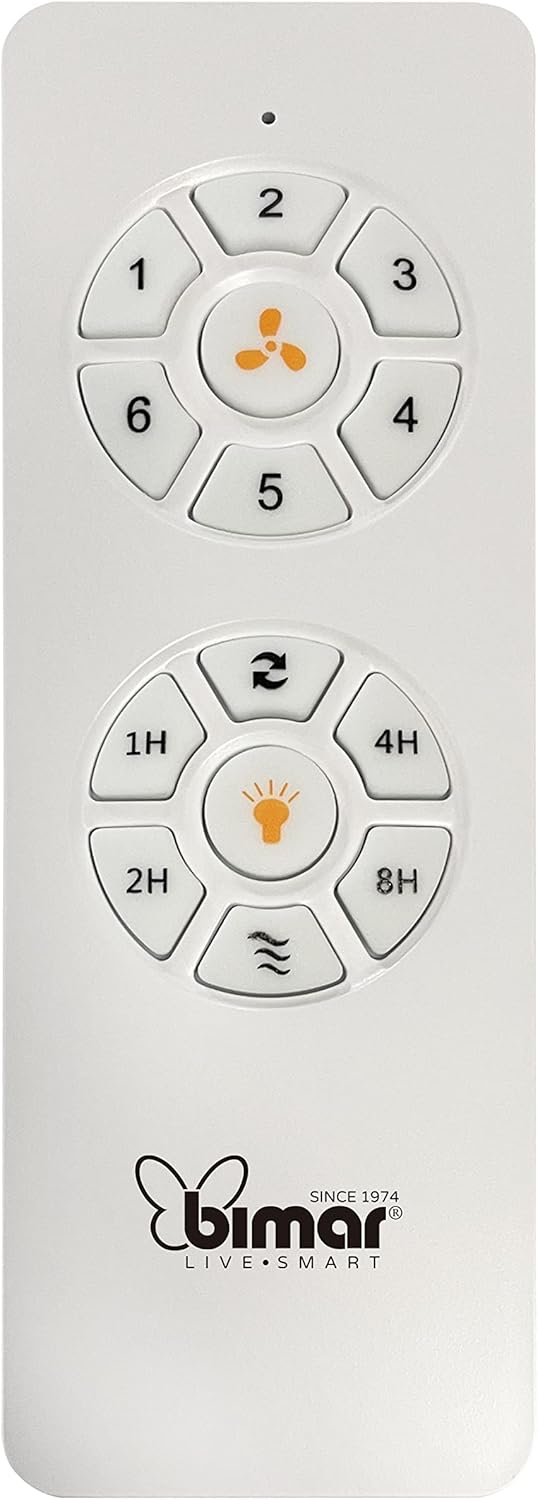
Image: The white remote control for the bimar ceiling fan, showing buttons for fan speed (1-6), fan on/off, timer (1H, 2H, 4H, 8H), mode selection, and reverse function.
- Maitinimo įjungimas/išjungimas: Norėdami įjungti arba išjungti ventiliatorių, paspauskite ventiliatoriaus piktogramos mygtuką.
- Greičio reguliavimas: Use buttons 1-6 to select one of the six available fan speeds.
- Laikmačio funkcija: Press 1H, 2H, 4H, or 8H to set the fan to automatically turn off after the selected duration.
- Režimo pasirinkimas: Use the mode button (often represented by waves or arrows) to cycle through Normal, Natural, Sleep, and Breeze modes.
- Vasaros / žiemos režimas: The reverse button (often two arrows forming a circle) changes the blade rotation direction.
2. App Control (Bimar Live Smart)
Once connected to the Bimar Live Smart app, you can access enhanced features:
- Nuotolinis valdymas: Control all fan functions from anywhere with an internet connection.
- Planavimas: Program daily and weekly on/off times for automated operation.
- Laikmatis: Nustatykite laikmatį nuo 1 iki 8 valandų.
- Mode and Speed Selection: Easily switch between the 6 speeds and 4 operating modes.
3. Valdymas balsu
The bimar Wi-Fi Ceiling Fan is compatible with popular voice assistants like Amazon Alexa and Google Assistant. After connecting the fan to the Bimar Live Smart app, link your Bimar account to your voice assistant app (e.g., Alexa app or Google Home app).
Exampbalso komandos:
- „Alexa, įjunk lubų ventiliatorių.“
- „Ei, „Google“, nustatykite lubų ventiliatoriaus greitį į 3.“
- "Alexa, turn off the ceiling fan in 1 hour."
4. Operating Modes and Speeds
- 6 Ventilation Speeds: Adjust the airflow intensity to your preference.
- Įprastas režimas: Consistent airflow at the selected speed.
- Natūralus režimas: Imituoja natūralų vėją keisdamas ventiliatoriaus greitį.
- Miegojimo rezimas: Veikia mažesniu, tylesniu greičiu, kad būtų galima netrukdyti poilsiui.
- Vėjo režimas: Provides a gentle, intermittent airflow.
5. Summer/Winter Function
The reversible blade function allows for year-round use:
- Vasaros režimas (sukimas prieš laikrodžio rodyklę): Sukuria žemyn nukreiptą oro srautą, kuris sukuria vėsinantį vėjelį.
- Žiemos režimas (sukimas pagal laikrodžio rodyklę): Creates an upward airflow, circulating warm air trapped near the ceiling, improving heating efficiency.

Image: A diagram illustrating the airflow patterns for summer (indirect ventilation, pushing air upwards) and winter (direct ventilation, pulling air downwards) modes of a ceiling fan.
Priežiūra
Reguliarus valymas užtikrina optimalų jūsų lubų ventiliatoriaus veikimą ir ilgaamžiškumą.
- Valymas: Before cleaning, ensure the fan is turned off and power is disconnected at the circuit breaker. Use a soft, damp cloth to wipe down the blades and motor housing. Do not use abrasive cleaners or solvents.
- Ašmenų patikrinimas: Periodically check the blades for any signs of damage or warping. Ensure all blade screws are tight.
- Variklio tepimas: The fan's DC motor is designed for maintenance-free operation and does not require lubrication.
- Priveržkite tvirtinimo detales: Over time, some fasteners may become loose. Check and tighten all screws and connections annually.

Vaizdas: Stambus planas view of the bimar ceiling fan's brushed metal motor housing and the attachment points for the light wood blades, highlighting areas for cleaning and inspection.
Trikčių šalinimas
| Problema | Galima priežastis | Sprendimas |
|---|---|---|
| Ventiliatorius neįsijungia | Nėra maitinimo; Išsikrovusi nuotolinio valdymo pulto baterija; Neteisingas laidų sujungimas. | Check circuit breaker and wall switch. Replace remote batteries. Verify wiring connections (consult electrician). |
| Ventiliatoriaus virpėjimas | Atsilaisvinę peiliai arba tvirtinimo detalės; nesubalansuoti peiliai. | Ensure all blade screws and mounting screws are tight. Use a balancing kit (not included) if necessary. |
| Nuotolinio valdymo pultas neveikia | Low battery; Obstruction between remote and receiver; Remote not paired. | Replace remote batteries. Ensure clear line of sight. Refer to pairing instructions in the full manual. |
| Wi-Fi ryšio problemos | Neteisingas „Wi-Fi“ slaptažodis; maršrutizatorius per toli; pasirinktas 5 GHz tinklas. | Verify Wi-Fi password. Move router closer or use a Wi-Fi extender. Ensure you are connecting to a 2.4GHz network. Reset fan and re-attempt pairing. |
| Ventiliatorius triukšmingas | Loose screws; Blades hitting an obstruction; Motor issue. | Check and tighten all screws. Ensure nothing is obstructing the blades. If noise persists, contact customer support. |
Specifikacijos
| Funkcija | Detalė |
|---|---|
| Prekės ženklas | bimaras |
| Modelio numeris | 1 |
| Gaminio matmenys | 132 x 132 x 27.5 cm (skersmuo x skersmuo x aukštis) |
| Svoris | 6.2 kg |
| Ašmenų skaičius | 3 |
| Medžiaga | Mediena |
| Spalva | Black (Note: Blades are light wood finish as shown in images) |
| Variklio tipas | DC (Brushless, energy-saving) |
| Energijos suvartojimas | 35W |
| Kontrolės metodai | Remote Control, Bimar Live Smart App, Voice Control (Amazon Alexa, Google Assistant) |
| Ventiliatoriaus greičiai | 6 |
| Veikimo režimai | Normal, Natural, Sleep, Breeze |
| Laikmatis | 1-8 valandas |
| Papildomos funkcijos | Silent operation, Summer/Winter mode (reversible blades) |
| Maitinimo šaltinis | Elektrinis |
| Diegimo tipas | Montavimas ant lubų |

Image: The three light wood fan blades, detached and laid flat, showcasing jų dizainą ir tekstūrą.


Paveikslėlis: Du views of the bimar ceiling fan, illustrating different downrod lengths: one with a 25 cm downrod and another with a 13 cm downrod, affecting the overall height of the fan.
Garantija ir palaikymas
For warranty information, technical support, or service inquiries, please refer to the warranty card included with your product or visit the official bimar websvetainėje. Išsaugokite pirkimo įrodymą garantiniams reikalavimams.
Gamintojas: Bimar S.r.l.
Susisiekite: Prašome apsilankyti the bimar store on Amazon or the official bimar websvetainė, kurioje rasite kontaktinius duomenis.