
1. Įvadas
Thank you for choosing the DIHOOM Wireless Outdoor Security Camera expansion unit. This camera is designed to be added to an existing DIHOOM wireless security camera system (ASIN: B09YRCF943). It features 5-megapixel (2K) resolution, advanced AI face and human detection, full-color night vision, two-way audio communication, and an IP66 weatherproof rating for reliable outdoor surveillance. Please read this manual carefully before installation and operation to ensure proper use and optimal performance.
2. Saugos informacija
- Ensure the power adapter (sold separately) is compatible with the camera's power requirements and local electrical standards.
- Nelaikykite fotoaparato ekstremaliose temperatūrose, kurios yra už jo veikimo diapazono ribų.
- Venkite laikyti fotoaparatą šalia stiprių elektromagnetinių laukų.
- Nebandykite ardyti ar modifikuoti kameros. Tai panaikins garantiją.
- Mount the camera securely to prevent accidental falls.
- Laikykite fotoaparatą ir jo priedus vaikams nepasiekiamoje vietoje.
3. Pakuotės turinys
Patikrinkite pakuotę, ar joje yra šie daiktai:
- DIHOOM Wireless Outdoor Security Camera Unit
- Tvirtinimo varžtai ir sieniniai kaiščiai
- Waterproof Cap for Network Cable (if applicable)
- Greitos pradžios vadovas
Pastaba: A power adapter is not included and must be purchased separately. This camera is an expansion unit and requires an existing DIHOOM wireless security camera system (ASIN: B09YRCF943) to function.
4. Produktas baigtasview
The DIHOOM Wireless Outdoor Security Camera features a robust design suitable for outdoor environments. Key components include the camera lens, infrared LEDs, white LED lights for full-color night vision, a microphone, a speaker for two-way audio, and an antenna for wireless connectivity.

Image: DIHOOM Wireless Outdoor Security Camera showing its main body and white LED lights. The camera is white with a black lens area and two prominent white LED lights on the front. An antenna extends from the top.
5. Sąranka
5.1. Kameros montavimas
- Pasirinkite tinkamą lauko vietą, kuri užtikrintų norimą viewing angle and is within range of your DIHOOM NVR/system's Wi-Fi signal.
- Use the included mounting screws and wall plugs to securely attach the camera bracket to a wall or ceiling. Ensure the camera is stable.
- Adjust the camera's angle for optimal coverage. The antenna is foldable for flexible positioning.

Image: A diagram illustrating the simple installation process, showing the camera mounted on a wall and its foldable antenna being adjusted. Another part of the image shows a multi-camera setup connected to a monitor.
5.2. Maitinimo prijungimas
Connect a compatible 12V DC power adapter (not included) to the camera's power input. Ensure the connection is secure and protected from moisture, especially for outdoor installations.
5.3. Adding to Your DIHOOM System
This camera is designed to be an expansion unit for the DIHOOM wireless security camera set (ASIN: B09YRCF943). Refer to your main DIHOOM NVR system's manual for specific instructions on how to add new cameras. Generally, this involves:
- Power on the new camera.
- Access the NVR's camera management interface.
- Initiate the 'Add Camera' or 'Pair Camera' function. The NVR will automatically search for and connect to the new camera.
- Once connected, the camera's live feed should appear on your NVR monitor or linked mobile application.
6. Naudojimo instrukcijos
6.1. Gyvai View ir Įrašymas
Access the live video feed through your DIHOOM NVR or the dedicated smartphone application. The system supports various recording modes:
- Nepertraukiamas įrašymas: Įrašai visą parą.
- Judesio aptikimo įrašymas: Įrašo tik aptikus judesį.
- Suplanuotas įrašymas: Įrašai konkrečiais laikotarpiais.

Image: A smartphone screen displaying the DIHOOM app interface, showing options for recording modes (continuous, motion detection, alarm recording) and user management settings.
6.2. Naktinio matymo režimai
Kamera turi du naktinio matymo režimus:
- Infraraudonųjų spindulių nakties vizija: Naudojant infraraudonųjų spindulių šviesos diodus, visiškoje tamsoje gaunami aiškūs nespalvoti vaizdai.
- Spalvotas naktinis matymas: Utilizes built-in white LED lights to illuminate the area, providing vivid full-color video even in low-light conditions. This mode can be activated automatically upon detection of an intruder. The night vision range is up to 20 meters.
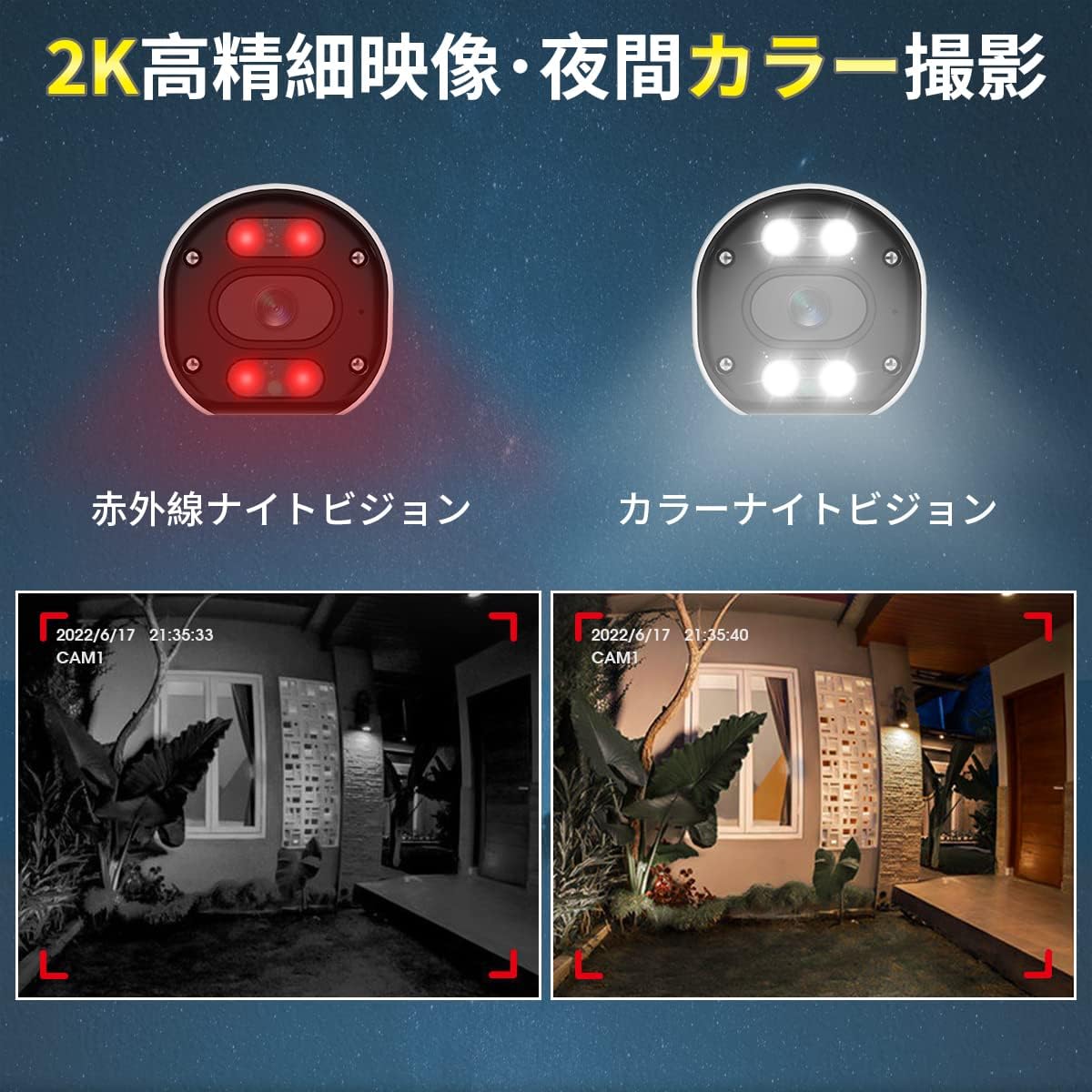
Image: A split image comparing infrared night vision (monochrome) and full-color night vision footage from the camera, demonstrating the clarity and color retention of the latter.
6.3. Dvipusis garsas
The camera is equipped with a built-in microphone and speaker, enabling two-way audio communication. Through the mobile app, you can listen to the camera's surroundings and speak through the camera's speaker. This feature is useful for deterring intruders or communicating with visitors.

Image: An illustration showing a person at a door communicating with someone via the camera's two-way audio feature. Another section highlights the camera's IP66 waterproof design under rain.
6.4. AI Detection Features
The camera integrates advanced AI for enhanced security:
- AI žmogaus aptikimas: Accurately identifies human movement, significantly reducing false alarms triggered by animals, insects, or swaying trees (up to 99% false alarm reduction). When a human is detected, you will receive instant app notifications.
- Dirbtinio intelekto veido atpažinimas: The system can detect and identify faces from recorded footage. You can register up to 10,000 faces and search for specific individuals' video clips. Up to 8 faces can be detected simultaneously.
- Garso ir šviesos signalizacija: Upon detecting an intruder, the camera can activate a 110dB siren and flash its 200LM white LED lights to deter unwanted visitors. This feature is configurable via the app.

Image: A diagram illustrating AI human detection, where a person entering a monitored area triggers an app notification, a sound siren, and flashing white lights from the camera.

Image: An illustration demonstrating AI face recognition, showing a face being detected and highlighted, with a note indicating simultaneous detection of up to 8 people and registration of up to 10,000 faces.
6.5. Detection Area and Sensitivity
You can customize the detection area and adjust the sensitivity of motion detection to suit your specific surveillance needs. This helps to focus monitoring on critical zones and further reduce unwanted alerts.

Image: A diagram showing a person walking into a defined 'alert area' with a 'warning line'. Below, a slider indicates 6 levels of detection sensitivity, allowing users to fine-tune the camera's responsiveness.
7. Priežiūra
- Valymas: Reguliariai valykite kameros objektyvą minkštu, sausu skudurėliu, kad užtikrintumėte ryškią vaizdo kokybę. Nenaudokite stiprių cheminių medžiagų.
- Firmware atnaujinimai: Check the DIHOOM app or website periodically for firmware updates. Keeping your camera's firmware up-to-date ensures optimal performance and access to new features.
- Kabelio apžiūra: Periodically inspect power and network cables for any signs of wear or damage, especially in outdoor installations.
8. Problemų sprendimas
- Nėra vaizdo / neprisijungus:
- Ensure the camera is properly powered on.
- Check the Wi-Fi connection between the camera and the NVR.
- Verify the camera is correctly added to your DIHOOM NVR system.
- Paleiskite kamerą ir NVR iš naujo.
- Prasta vaizdo kokybė:
- Nuvalykite fotoaparato objektyvą.
- Įsitikinkite, kad priešais objektyvą nėra jokių kliūčių.
- Check for strong light sources directly facing the camera.
- Verify the camera's resolution settings in the app/NVR.
- Dažni klaidingi aliarmai:
- Adjust the motion detection sensitivity to a lower level.
- Define a specific detection area to exclude irrelevant zones (e.g., swaying trees, busy roads).
- Įsitikinkite, kad įjungtas dirbtinio intelekto (DI) žmonių aptikimas.
- Dvipusio garso problemos:
- Check microphone and speaker volume settings in the app.
- Ensure there are no physical obstructions blocking the microphone or speaker.
- Verify network stability for real-time audio transmission.
9. Specifikacijos
| Funkcija | Specifikacija |
|---|---|
| Modelio numeris | B09YYB1261 |
| Prekės ženklas | DIHOOM |
| Vaizdo raiška | Up to 5 Megapixel (2K / 1440p) |
| Vaizdo jutiklis | SONY CMOS Sensor |
| Ryšys | Belaidis ryšys (Wi-Fi) |
| Naktinis matymas | Infrared Night Vision, Full-Color Night Vision (20m range) |
| Garsas | Dvipusis pokalbis (įmontuotas mikrofonas ir garsiakalbis) |
| Aptikimo funkcijos | AI Human Detection, AI Face Recognition, Motion Sensor |
| Signalizacija | 110dB Siren, 200LM White Light Alarm |
| Atsparumo oro sąlygoms įvertinimas | IP66 Atsparus dulkėms ir vandeniui |
| Apsauga nuo žaibo | 4KV |
| Suderinami įrenginiai | Smartphone (via app), DIHOOM NVR System (ASIN: B09YRCF943) |
| Matmenys | 19.6 x 10.9 x 9.7 cm |
| Svoris | 430 g |
10. Garantija ir palaikymas
DIHOOM products come with a standard manufacturer's warranty. For specific warranty terms and conditions, please refer to the warranty card included with your original DIHOOM NVR system or visit the official DIHOOM website. For technical support, troubleshooting assistance, or any inquiries, please contact DIHOOM customer service through the contact information provided on the official websvetainėje arba jūsų produkto pakuotėje.