
1. Įvadas
Thank you for choosing the Ctronics RBX-F20 2.5K 4MP Solar WiFi PTZ Outdoor Security Camera. This advanced security camera offers high-resolution surveillance, flexible pan and tilt capabilities, and sustainable solar power. This manual will guide you through the installation, setup, and operation of your camera to ensure optimal performance and security for your property.

Image: The Ctronics RBX-F20 camera with its integrated solar panel, designed for outdoor use.
2. Pagrindinės savybės
- 2.5K 4MP Resolution & Color Night Vision: Experience clear 2560x1440 resolution. Equipped with 10 built-in spotlights, the camera provides full-color night vision up to 30 meters, illuminating a wider area.
- 100 % belaidis ir maitinamas saulės energija: Features a 7800mAh rechargeable battery for extended operation. The integrated solar panel continuously recharges the battery, ensuring uninterrupted power and true wireless functionality.
- PIR Sensor & Human Detection: Utilizes a PIR sensor for accurate human shape detection with a rapid 0.2-second wake-up time. Adjustable alarm sensitivity (low, medium, high) sends precise real-time notifications to your smartphone upon human motion detection.
- 355° pasukimas ir 95° pakreipimas: Control the camera's rotation remotely via your smartphone, covering a wide area with 355° horizontal pan and 95° vertical tilt.
- Dvipusis garsas: Built-in microphone and speaker allow for real-time communication with family, visitors, or to deter intruders from anywhere.
- IP66 atsparumas oro sąlygoms: Designed with a robust IP66-certified weatherproof casing, ensuring reliable operation in various extreme weather conditions.

Image: Comparison of day and color night vision footage from the 2.5K 4MP camera, showing clarity and detail.
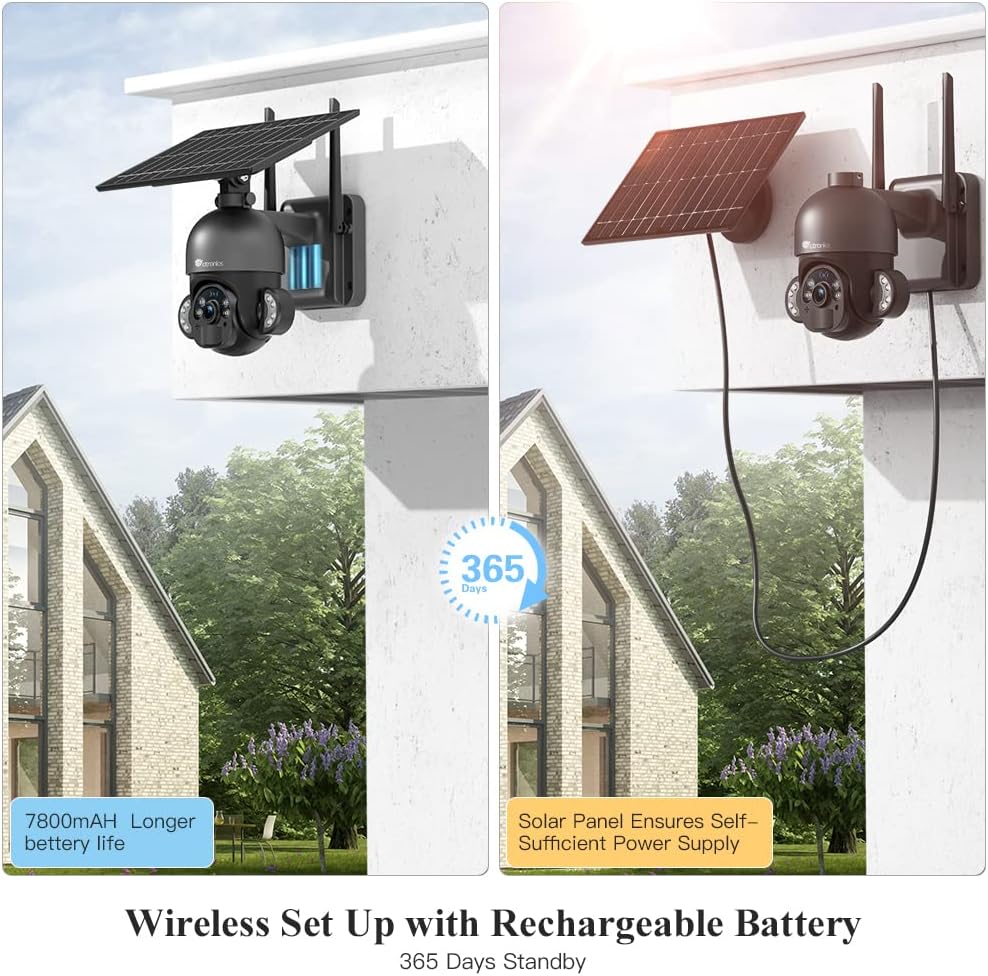
Image: The camera highlighting its 7800mAh battery and the solar panel providing continuous power, indicating 365 days of standby.

Image: A person and a dog in the camera's view, demonstrating the human detection feature distinguishing between human and non-human movement.

Image: The camera mounted on a wall, illustrating its 355-degree pan and 95-degree tilt capabilities for comprehensive coverage.

Image: A person interacting with a delivery driver via the camera's two-way audio feature, shown on a smartphone screen.

Image: The camera mounted outdoors, with rain and clouds indicating its IP66 weatherproof design.
3. Pakuotės turinys
Gavę siuntinį, patikrinkite jo turinį. Jei trūksta kokių nors prekių arba jos pažeistos, susisiekite su klientų aptarnavimo tarnyba.
- Ctronics RBX-F20 PTZ Camera with Solar Panel
- Mounting Bracket
- Tvirtinimo varžtai ir sieniniai kaiščiai
- USB įkrovimo laidas
- Vartotojo vadovas
- Greitos pradžios vadovas
4. Sąranka ir diegimas
4.1 Pradinis įkrovimas
Before installation, fully charge the camera's built-in 7800mAh battery using the provided USB cable. Connect the cable to a 5V/2A power adapter (not included) and the camera's charging port. The charging indicator will show the status.
4.2 Programėlės diegimas ir paskyros sukūrimas
- Download the "Ctronics" app from the App Store (iOS) or Google Play Store (Android).
- Open the app and register a new account, or log in if you already have one.
4.3 Kameros susiejimas su programėle
- Ensure your smartphone is connected to a 2.4GHz Wi-Fi network. (5GHz Wi-Fi is not supported).
- Įjunkite fotoaparatą.
- In the Ctronics app, tap the "+" icon to add a new device.
- Follow the on-screen instructions to scan the QR code on the camera or manually enter the device ID.
- Pasirinkite savo Wi-Fi tinklą ir įveskite slaptažodį.
- The camera will attempt to connect. Once connected, you can name your camera and complete the setup.
4.4 Fotoaparato montavimas
The camera offers two installation methods: all-in-one (camera and solar panel together) or separated (solar panel mounted separately for optimal sunlight exposure).
- Pasirinkite vietą: Select a location with good Wi-Fi signal and sufficient sunlight exposure for the solar panel. Ensure the camera has a clear view ploto, kurį norite stebėti.
- Pažymėkite gręžimo skyles: Use the mounting bracket as a template to mark the drill holes on the wall.
- Gręžimo skylės: Pažymėtose vietose išgręžkite skyles ir įstatykite sieninius kaiščius.
- Pritvirtinkite laikiklį: Pritvirtinkite tvirtinimo laikiklį prie sienos naudodami pateiktus varžtus.
- Attach Camera/Solar Panel:
- All-in-one: Attach the camera unit (with the solar panel already connected) to the mounting bracket.
- Išsiskyręs: Mount the solar panel in a location with maximum sunlight, then connect it to the camera using the extension cable (if needed, not included). Attach the camera to its mounting bracket.
- Sureguliuoti kampą: Adjust the camera and solar panel angles for optimal coverage and charging efficiency.

Image: Illustrates two installation methods for the camera: integrated solar panel and separate solar panel for flexible placement.
5. Operacija
5.1 Tiesiogiai View ir PTZ valdymas
Open the Ctronics app and select your camera to access the live view. Use the on-screen controls to pan (355° horizontally) and tilt (95° vertically) the camera lens to monitor different areas.
5.2 Dvipusis garsas
Gyvai view interface, tap the microphone icon to speak through the camera's speaker. Tap the speaker icon to listen to audio from the camera's surroundings.
5.3 Judesio aptikimas ir įspėjimai
The camera uses a PIR sensor for human detection. You can adjust the sensitivity (low, medium, high) in the app settings. When motion is detected, the camera will record and send a push notification to your smartphone.
5.4 Naktinio matymo režimai
The camera supports color night vision up to 30 meters using its built-in spotlights. You can configure night vision settings (e.g., automatic, black & white, color) within the app.
5.5 Įrašymas ir atkūrimas
The camera supports local storage via a Micro TF card (not included). Recorded footage can be accessed and played back through the Ctronics app. The camera also supports saving to an FTP server.
6. Priežiūra
- Valymas: Reguliariai valykite kameros objektyvą ir saulės bateriją minkšta,amp cloth to ensure clear images and efficient solar charging. Do not use harsh chemicals.
- Akumuliatoriaus priežiūra: While the solar panel provides continuous charging, ensure the camera receives adequate sunlight. If the camera is installed in a shaded area or during prolonged cloudy periods, occasional manual charging via USB may be necessary.
- Firmware atnaujinimai: Check the Ctronics app periodically for firmware updates. Keeping your camera's firmware up-to-date ensures optimal performance and security.
- Aplinkos apsauga: The IP66 rating protects against dust and water jets. Avoid submerging the camera in water or exposing it to extreme physical impact.
7. Problemų sprendimas
| Problema | Galima priežastis | Sprendimas |
|---|---|---|
| Kamerai nepavyksta prisijungti prie „Wi-Fi“. | Incorrect Wi-Fi password, 5GHz network, weak signal, or MAC address filtering on router. |
|
| False alarms or too many notifications. | Didelis PIR jautrumas, aplinkos veiksniai (pvz., judančios šakos, naminiai gyvūnai). |
|
| Battery not charging or low battery. | Insufficient sunlight, dirty solar panel, faulty connection. |
|
| Prasta vaizdo kokybė. | Nešvarus objektyvas, prastas apšvietimas, tinklo pralaidumo problemos. |
|
8. Specifikacijos
| Modelio pavadinimas | RBX-F20 |
| Prekės ženklas | Ctronics |
| Rezoliucija | 2.5K 4 MP (2560 x 1440) |
| Ryšio technologija | Wireless (Wi-Fi 2.4GHz), Wired (Ethernet, ONVIF, RTSP) |
| Maitinimo šaltinis | Solar Powered / Rechargeable Battery (7800mAh) |
| Kreipimo / pakreipimo kampas | 355°, pakreipimas 95° |
| Naktinis matymas | Color Night Vision up to 30 meters (with 10 spotlights) |
| Žmogaus aptikimas | PIR Sensor with adjustable sensitivity |
| Garsas | Two-Way Audio (Built-in microphone and speaker) |
| Atsparumas oro sąlygoms | IP66 sertifikuota |
| Sandėliavimas | Micro TF Card Slot (up to 128GB, not included), FTP Storage |
| Suderinami įrenginiai | Išmanusis telefonas („Android“ / „iOS“) |
| Rekomenduojamas naudojimas | Lauko apsauga |
9. Garantija ir palaikymas
Ctronics products come with a standard warranty. For detailed warranty information, please refer to the warranty card included in your package or visit the official Ctronics website. If you encounter any issues or have questions regarding your camera, please contact Ctronics customer support. Our team is dedicated to providing prompt and helpful assistance.
Kontaktinė informacija: Please refer to the contact details provided on the Ctronics official website or in your product packaging for the most up-to-date support channels.