
1. Svarbi saugos informacija
Please read all instructions carefully before assembling and using your Oversteel SAPHIRE Gaming Chair. Retain this manual for future reference.
- Use the chair strictly according to the instructions provided in this manual.
- Neviršykite rekomenduojamos maksimalios svorio galios, 110 kg (242 svaro).
- Ensure the chair is fully and correctly assembled, and all bolts are tightened, before initial use.
- Exercise caution when operating the recline and height adjustment functions to prevent injury.
- Surinkimo metu laikykite vaikus ir naminius gyvūnus atokiau nuo kėdės.
- Venkite stovėti ant kėdės arba naudoti ją kaip laiptelį.
If any parts are missing or damaged, do not attempt to assemble or use the chair. Contact Oversteel customer support immediately.
2. Pakuotės turinys
Before assembly, verify that all components are present and undamaged. Refer to the assembly diagram (if provided separately) for a complete list of parts.

Priekyje view of the Oversteel SAPHIRE Gaming Chair, showcasing the main components including the backrest, seat, armrests, and base.
3. Sąranka ir surinkimas
Follow these general steps for assembling your Oversteel SAPHIRE Gaming Chair. It is recommended to assemble the chair on a soft, clean surface to prevent damage.
- Pritvirtinkite ratukus prie pagrindo: Insert the 50mm nylon wheels into the holes on the five-star base until they click securely into place.
- Įdėkite dujų keltuvą: Place the gas lift cylinder into the center hole of the assembled five-star base. Do not remove the red cap from the gas lift piston until instructed.
- Pritvirtinkite mechanizmą prie sėdynės: Secure the multi-functional mechanism to the underside of the seat cushion using the provided bolts. Ensure the front of the mechanism faces the front of the seat.
- Pritvirtinkite porankius: Fasten the armrests to the seat cushion using the designated bolts.
- Pritvirtinkite atlošą prie sėdynės: Align the backrest with the seat and secure it using the provided bolts.
- Prijunkite sėdynės mazgą prie dujinio keltuvo: Atsargiai uždėkite surinktą sėdynę ir atlošą ant dujinio pakėlimo cilindro, užtikrindami, kad jie būtų centre ir stabilūs.
- Pritvirtinkite pagalvėles: Position the headrest and lumbar support cushions as desired. The lumbar cushion typically attaches with straps around the backrest.

The five-star base with 50mm nylon wheels attached.
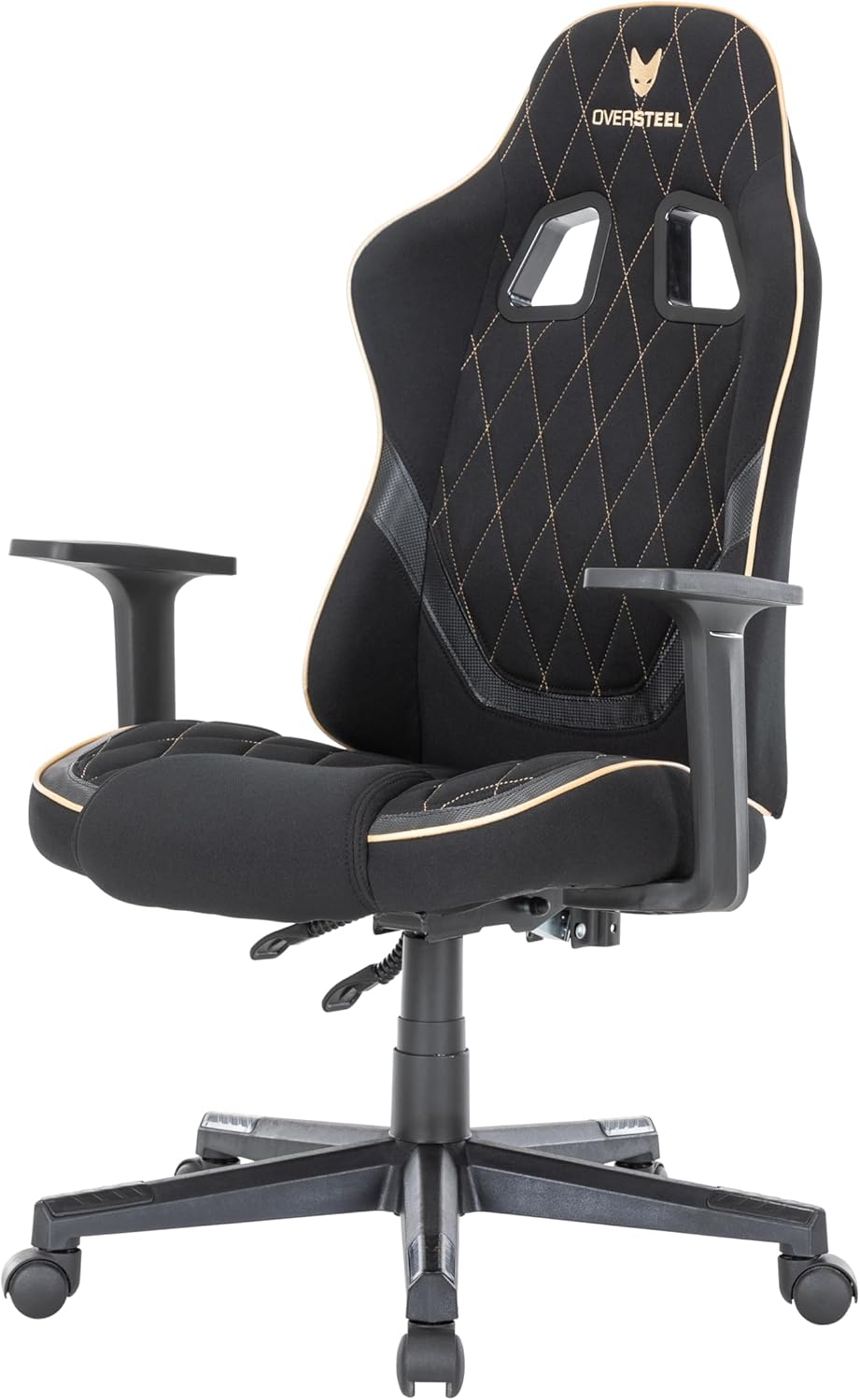
The Oversteel SAPHIRE Gaming Chair with its adjustable headrest and lumbar support cushions.
4. Naudojimo instrukcijos
Your Oversteel SAPHIRE Gaming Chair offers several adjustment options for personalized comfort.
4.1. Aukščio reguliavimas
- To raise the chair: While seated, pull the right lever (typically located under the seat on the right side) upwards and lift your weight slightly off the seat. The chair will rise. Release the lever at the desired height.
- To lower the chair: While seated, pull the right lever upwards. The chair will lower under your weight. Release the lever at the desired height.
4.2. Atlošo atlošas
- To recline the backrest: Pull the left lever (typically located under the seat on the left side) upwards and lean back. The backrest can recline up to 135 degrees. Release the lever to lock the backrest in position.
- To return the backrest to an upright position: Pull the left lever upwards and lean forward slightly. The backrest will return to its original position. Release the lever to lock.
The chair's backrest can be reclined to various angles for comfort.

Control levers for adjusting chair height and backrest recline.
4.3. Porankio reguliavimas
The armrests are fixed in height and position for stability.
4.4. Mobilumas
The 50mm nylon wheels provide smooth and stable mobility on various surfaces. Ensure the floor is clear of obstructions before moving the chair.
5. Priežiūra ir priežiūra
Proper maintenance will extend the life and appearance of your gaming chair.
- Valymas: Regularly wipe down the chair with a soft, damp cloth. For more stubborn stains on the fabric, use a mild soap solution and a soft brush, then wipe clean with a damp šluoste ir kruopščiai nusausinkite. Venkite stiprių cheminių medžiagų ar abrazyvinių valiklių.
- Patikra: Periodically check all bolts and screws to ensure they are tight. Re-tighten if necessary to maintain stability and prevent wobbling.
- Persikėlimas: When moving the chair, lift it rather than dragging it to prevent damage to the wheels or base.
- Aplinka: Avoid prolonged exposure to direct sunlight or extreme temperatures, which can degrade the fabric and foam.
6. Problemų sprendimas
If you encounter any issues with your Oversteel SAPHIRE Gaming Chair, refer to the following common solutions:
- Kėdės svyruoja:
- Įsitikinkite, kad visi surinkimo varžtai yra tvirtai priveržti.
- Check that the gas lift is properly seated in both the base and the seat mechanism.
- Sunkumai reguliuojant aukštį:
- Verify that the height adjustment lever is fully engaged.
- Ensure the gas lift's protective cap (if any) has been removed.
- Atlošas neatsilenkia / neužsifiksuoja:
- Check that the recline lever is functioning correctly and not obstructed.
- Ensure no foreign objects are interfering with the recline mechanism.
- Cypimo garsai:
- Priveržkite visus varžtus ir veržles.
- Apply a small amount of silicone lubricant to moving parts or joints if the noise persists.
If these steps do not resolve the issue, please contact Oversteel customer support.
7. Gaminio specifikacijos
| Modelio pavadinimas | SAFYRAS |
| Modelio numeris | NAT-OV-SAPHIRE-DGBK |
| Matmenys (I x P x A) | 48 x 53 x 118 cm (18.9 x 20.9 x 46.5 colio) |
| Svoris | 14.5 kg (32 svaro) |
| Didžiausia apkrova | 110 kg (242 svaro) |
| Medžiaga | Polyester fabric, Faux leather, Alloy steel frame, Foam padding |
| Atlošo atlošo kampas | Iki 135 laipsnių |
| Aukščio reguliavimo diapazonas | 8 cm (3.1 coliai) |
| Ratai | 50 mm nailonas |
| Spalva | Black (with grey/gold accents) |
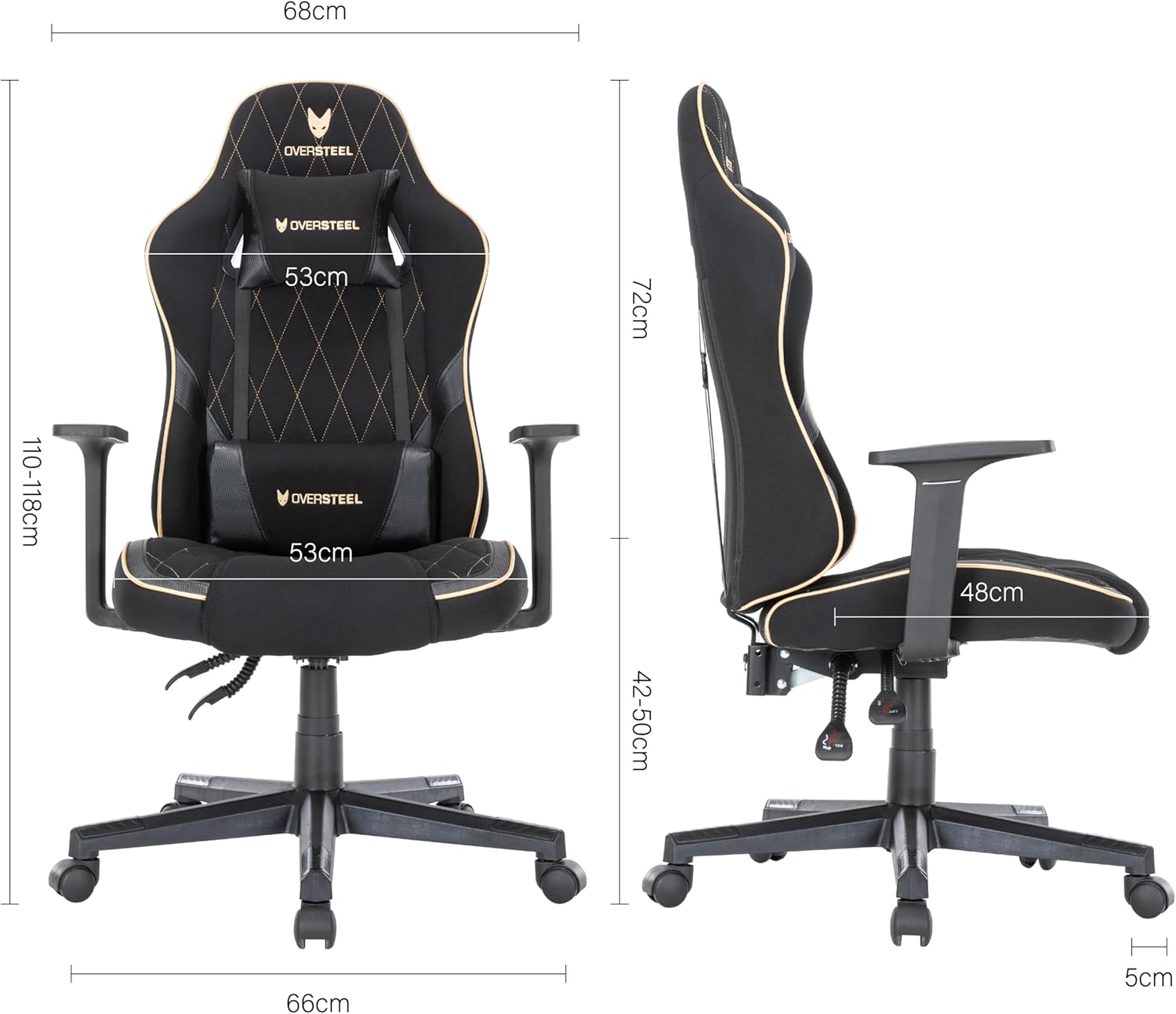
Detailed dimensions of the Oversteel SAPHIRE Gaming Chair.
8. Informacija apie garantiją
Oversteel products are manufactured to high-quality standards. This product comes with a standard manufacturer's warranty against defects in materials and workmanship. Please refer to your purchase documentation or the official Oversteel websvetainėje, kurioje rasite konkrečias jūsų regione taikomas garantijos sąlygas.
9. Pagalba klientams
If you have any questions, require assistance with assembly, or need troubleshooting support that is not covered in this manual, please contact Oversteel customer service. Contact information can typically be found on the Oversteel official websvetainėje arba ant jūsų produkto pakuotės.
For the most up-to-date information and support resources, please visit the official Oversteel websvetainę.