
1. Įvadas
This manual provides comprehensive instructions for the DEKCO DC4L 2K Outdoor Security Camera. It covers product features, installation procedures, operational guidelines, maintenance tips, troubleshooting solutions, and detailed technical specifications. Please read this manual thoroughly before using the camera to ensure proper setup and optimal performance.

Image 1.1: DEKCO DC4L Outdoor Security Cameras.
2. Produktas baigtasview
The DEKCO DC4L is a wired outdoor security camera designed for robust surveillance. It features 2K resolution, color night vision, and a 180° pan capability to cover wide areas. Key functionalities include dual-band WiFi connectivity, AI human detection, and flexible storage options.
Pagrindinės funkcijos:
- 2K Ultra-Clear Spotlight Color Night Vision: Captures clear, vibrant color images even in low-light conditions.
- Stable Dual-Band WiFi Connection: Supports both 2.4GHz and 5GHz networks for reliable connectivity.
- Lanksčios saugojimo parinktys: Offers local storage via Micro SD card (8-128GB) and cloud storage services for 24/7 continuous recording.
- Išmanusis dirbtinis intelektas (DI) – žmogaus aptikimas: Advanced algorithms accurately identify human figures, reducing false alarms from other movements.
- 180° Horizontal Pan: Provides a wide 270° viewkampas, kad būtų galima aprėpti visą plotą.
- IP65 atsparumo vandeniui įvertinimas: Sukurtas naudoti lauke, atsparus dulkėms ir vandeniui.
- Dvipusis garsas: Enables communication through the camera via the mobile application.
- Išmaniųjų namų integracija: Compatible with Amazon Alexa and Google Home devices.

2.1 vaizdas: Baigtaview of DEKCO DC4L Camera Features.
3. Sąranka
3.1 Fizinis įrengimas
The DEKCO DC4L camera is designed for wall mounting. Ensure the installation location provides a clear view of the desired monitoring area and is within range of your WiFi network and a power source. The camera is wired and requires a continuous power supply; it is not battery-powered or solar-powered.
- Pasirinkite vietą: Select a suitable outdoor location for mounting, considering coverage, power access, and WiFi signal strength.
- Sumontuokite fotoaparatą: Use the provided mounting hardware to securely attach the camera to a wall. Adjust the bracket to achieve the desired initial angle.
- Prijunkite maitinimą: Connect the camera to a 5V DC power source using the included adapter.

Image 3.1: Camera Installation.

Image 3.2: Wired Camera Installation Overview.
3.2 Programėlės diegimas ir paskyros sukūrimas
The DEKCO DC4L camera operates with a dedicated mobile application, often referred to as the CloudEdge app. Download the app from your device's app store (iOS or Android) and follow the on-screen instructions to create an account.
3.3 WiFi ryšys
The camera supports both 2.4GHz and 5GHz WiFi networks for flexible and stable connectivity.
- Maitinimas: Ensure the camera is powered on and in pairing mode (refer to app instructions for specific indicator lights).
- Pridėti įrenginį: Open the app, select 'Add Device', and follow the prompts to connect your camera to your home WiFi network.
- Pasirinkite tinklą: Choose your 2.4GHz or 5GHz WiFi network and enter the password.

Image 3.3: 2.4GHz WiFi Connection.
3.4 „Micro SD“ kortelės įdėjimas
For local storage, install a Micro SD card (8GB to 128GB, Class 10 or higher recommended) into the designated slot on the camera.
- Raskite lizdą: Identify the Micro SD card slot on the camera body.
- Įdėkite kortelę: Švelniai įkiškite „Micro SD“ kortelę į angą, kol ji užsifiksuos.
- Formato kortelė: Within the app settings, navigate to storage options and format the newly inserted SD card.

Image 3.4: Micro SD Card Installation.
4. Naudojimo instrukcijos
4.1 Tiesiogiai View
Access the live video feed from your camera through the mobile application.
- Atidaryti programą: Launch the DEKCO app on your smartphone.
- Pasirinkite kamerą: Tap on the desired camera from your device list to view jo tiesioginis srautas.

4.1 paveikslas: Tiesioginis vaizdas View on Smartphone.
4.2 Pan Control
The camera offers a 180° horizontal pan function, providing a 270° viewing kampas.
- Prieigos valdikliai: Kol vyksta gyvai view, use the on-screen controls to pan the camera horizontally.
- Auto Cruise: Enable the 'Auto Cruise' feature in the app settings for the camera to automatically pan across a predefined area at 60-minute intervals.

Image 4.2: 270° Viewing Angle with 180° Horizontal Pan.

Image 4.3: Auto Cruise Functionality.
4.3 Naktinis matymas
The camera features 2K Ultra-Clear Spotlight Color Night Vision, providing clear and detailed images even in complete darkness.
- Automatinis aktyvinimas: Naktinio matymo funkcija paprastai įsijungia automatiškai esant prastam apšvietimui.
- „Spotlight“ režimas: The integrated spotlight can be activated to provide full-color night vision.

Image 4.4: 2K QHD Color Night Vision.
4.4 Dirbtinio intelekto žmonių aptikimas ir įspėjimai
The camera uses advanced AI algorithms to accurately detect human figures, minimizing false alarms from other moving objects.
- Įjungti aptikimą: In the app's 'Alarm Management' settings, enable 'Motion Detection' and set the sensitivity (Low, Medium, High).
- Gaukite įspėjimus: The app will send push notifications to your smartphone when human motion is detected.
- Deterrence: The camera can be configured to activate a spotlight and siren upon detection to deter unwanted activity.

Image 4.5: AI Human Detection for Fewer False Positives.

Image 4.6: Alarm Management Settings.

Image 4.7: Deterrence Features (Spotlight, Push, Siren).
4.5 Įrašymas
The camera supports 24/7 continuous recording and motion-activated recording, with options for local Micro SD card storage or cloud storage.
- Nepertraukiamas įrašymas: Records continuously to the Micro SD card or cloud service.
- Renginio įrašas: Įrašo tik aptikus judesį, taip taupoma vieta saugykloje.
- Atkūrimas: Prieiga įrašyta footage through the app's playback feature, with a timeline for easy navigation.

Image 4.8: 24/7 Continuous Recording and Micro SD Storage.
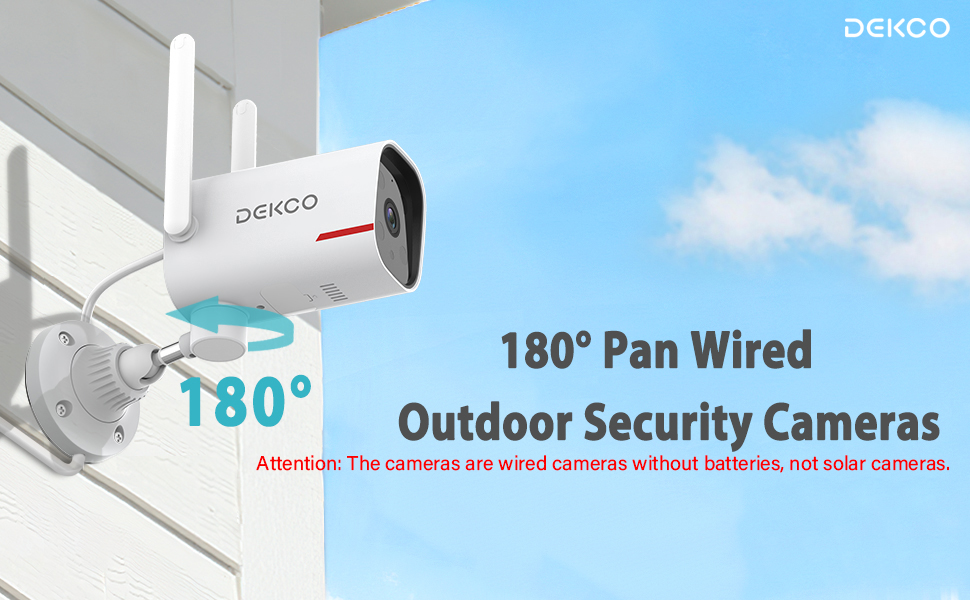
Image 4.9: 24/7 Home Monitoring.
4.6 Dvipusis garsas
Utilize the built-in microphone and speaker for two-way communication through the camera.
- Suaktyvinkite domofoną: Gyvai view, palieskite mikrofono piktogramą, kad galėtumėte kalbėti per kamerą.
- Klausyk: Kameros mikrofonas užfiksuos garsą iš stebimos zonos.
4.7 Išmaniųjų namų integracija
The DEKCO DC4L camera is compatible with Amazon Alexa and Google Home smart devices.
- Susieti paskyrą: Follow the instructions in your Alexa or Google Home app to link your DEKCO account.
- Valdymas balsu: Naudokite balso komandas, kad view kameros vaizdo signalas suderinamuose išmaniuosiuose ekranuose.
4.8 Sharing Camera Access
You can share access to your camera with family members or trusted individuals through the app.
- Prieigos bendrinimo nustatymai: In the app, navigate to the camera settings and find the 'Share Device' option.
- Invite Users: Follow the prompts to invite other users to view your camera feed.
4.9 ONVIF/RTSP Support (Advanced Users)
For advanced users, the camera supports ONVIF/RTSP protocols, allowing integration with Network Video Recorders (NVRs) or other surveillance software.
- Įjungti programėlėje: Enable ONVIF/RTSP functionality within the camera's settings in the mobile app.
- Configure NVR: Refer to your NVR or software documentation for instructions on adding an ONVIF/RTSP camera.
5. Priežiūra
5.1 Valymas
Reguliarus valymas padeda išlaikyti optimalią vaizdo kokybę ir prailgina fotoaparato tarnavimo laiką.
- Objektyvas: Gently wipe the camera lens with a soft, lint-free cloth. Avoid abrasive cleaners.
- Korpusas: Nuvalykite fotoaparato korpusą reklaminiu valikliuamp šluoste dulkėms ir nešvarumams pašalinti.
5.2 Firmware atnaujinimai
Periodically check for and install firmware updates through the mobile application to ensure your camera has the latest features and security enhancements.
5.3 SD kortelės valdymas
To ensure continuous recording, regularly check the status of your Micro SD card in the app. Format the card periodically or replace it if it becomes corrupted or reaches its end of life.
6. Problemų sprendimas
If you encounter issues with your DEKCO DC4L camera, refer to the following common troubleshooting steps:
- Fotoaparatas neprisijungęs: Check the power connection and WiFi signal strength. Restart the camera and your router. Ensure the camera is connected to the correct 2.4GHz or 5GHz WiFi network.
- SD kortelė neatpažinta: Ensure the SD card is correctly inserted and formatted within the app. Try a different compatible SD card if the issue persists.
- Prasta vaizdo kokybė: Clean the camera lens. Check your network connection speed.
- Klaidingi pavojaus signalai: Adjust the AI Human Detection sensitivity settings in the app.
- Rožinė View: If the camera displays a pink image, try restarting the camera. If the issue persists, contact customer support as it may indicate a hardware fault.
- Pan Control Not Working: Ensure the camera has a stable network connection. For ONVIF/RTSP users, ensure the camera firmware is up to date, as this can resolve compatibility issues.
If these steps do not resolve your issue, please contact DEKCO customer support for further assistance.
7. Specifikacijos
| Funkcija | Specifikacija |
|---|---|
| Modelio pavadinimas | DC4L |
| Montavimo tipas | Sieninis laikiklis |
| Vaizdo įrašymo raiška | 2K |
| Number of Items (in pack) | 1 (for this model variant) |
| Įtraukti komponentai | Adapteris |
| Belaidžio ryšio technologija | „Wi-Fi“ (2.4 GHz ir 5 GHz) |
| Formos faktorius | Kupolas |
| Viewing kampas | 270 Degrees (180° Pan) |
| Naktinio matymo diapazonas | 32 pėdų |
| Kadrų dažnis | 30 kadrų per sekundę |
| Medžiaga | Metalas |
| ttage | 5 volto (DC) |
| Gaminio matmenys (I x P x A) | 20.5 x 9.98 x 9.98 cm |
| Prekės svoris | 1.99 kg |
| Lemputės tipas | Infraraudonųjų spindulių |
| Ypatingos savybės | Night Vision, AI Human Detection, Two-Way Audio |
| Naudojimas viduje / lauke | Lauke |
| Maitinimo šaltinis | Su laidu elektra |
| Suderinami įrenginiai | Smartphone (Android, iPhone), Amazon Alexa, Google Home |
8. Garantija
The DEKCO DC4L camera comes with a 1 metų garantija from the date of purchase. Please retain your proof of purchase for warranty claims. The warranty covers manufacturing defects and malfunctions under normal use. It does not cover damage caused by misuse, accidents, unauthorized modifications, or natural disasters.
9. Parama
For technical assistance, product inquiries, or warranty claims, please contact DEKCO customer support. Refer to the contact information provided with your product packaging or visit the official DEKCO webpalaikymo išteklių svetainė.