
OMOTON WK003
OMOTON 2.4GHz Wireless AZERTY Keyboard Instruction Manual
Modelis: WK003
Prekės ženklas: OMOTON
1. Įvadas
Thank you for choosing the OMOTON 2.4GHz Wireless AZERTY Keyboard. This ultra-slim, silent keyboard is designed for comfortable and efficient typing across various Windows operating systems. This manual provides detailed instructions for setting up, operating, maintaining, and troubleshooting your new keyboard to ensure optimal performance.
2. Pakuotės turinys
Please check the package contents carefully. If any items are missing or damaged, please contact OMOTON customer support.
- 1 x OMOTON 2.4GHz Wireless AZERTY Keyboard
- 1 x USB imtuvas
- 1 x Vartotojo vadovas
3. Sąrankos vadovas
Follow these steps to set up your OMOTON wireless keyboard:
- Įdėkite baterijas: Open the battery compartment on the back of the keyboard. Insert two AAA batteries (not included), ensuring correct polarity. Close the compartment.
- Įdėkite USB imtuvą: Locate the USB receiver, which is magnetically stored in the battery compartment. Plug the USB receiver into an available USB port on your computer.

Image: Battery compartment with USB receiver and AAA batteries.
- Maitinimas: Slide the ON/OFF switch located on the top right side of the keyboard to the "ON" position.
- Prisijunkite: Your computer should automatically detect and install the necessary drivers for the keyboard. No additional software is required.

Image: Plug & Play setup with USB receiver.
Dabar klaviatūra paruošta naudoti.
4. Naudojimo instrukcijos
4.1 Pagrindinis spausdinimas
Simply begin typing. The keyboard features a standard AZERTY layout for familiar use.
4.2 Fn Lock Function
The keyboard includes a convenient Fn Lock function. By default, the F1-F12 keys perform their standard function. To access the multimedia shortcuts directly without pressing the Fn key, activate the Fn Lock.
- Activate/Deactivate Fn Lock: Paspauskite Fn + Échap simultaneously. When activated, the multimedia functions (e.g., volume control, home page) will be directly accessible by pressing F1-F12. When deactivated, F1-F12 will perform their standard functions, and multimedia actions will require pressing Fn + Fx.

Image: Fn Lock function and multimedia keys.
4.3 Multimedijos spartieji klavišai
The keyboard provides 12 multimedia shortcuts for quick access to common functions. These can be used directly when Fn Lock is active, or by pressing Fn in combination with the respective F-key when Fn Lock is inactive.
| Raktas | Funkcija |
|---|---|
| F1 | Nutildyti |
| F2 | Sumažinti garsumą |
| F3 | Padidinti garsumą |
| F4 | Ankstesnis takelis |
| F5 | Leisti / pristabdyti |
| F6 | Kitas takelis |
| F7 | Brightness Down (System Dependent) |
| F8 | Brightness Up (System Dependent) |
| F9 | Paieška |
| F10 | Pagrindinis puslapis |
| F11 | Kopijuoti |
| F12 | Įklijuoti |
4.4 Suderinamumas
This keyboard is compatible with Windows 11, 10, 8, 7, XP, and Vista, making it suitable for a wide range of desktop and laptop computers.
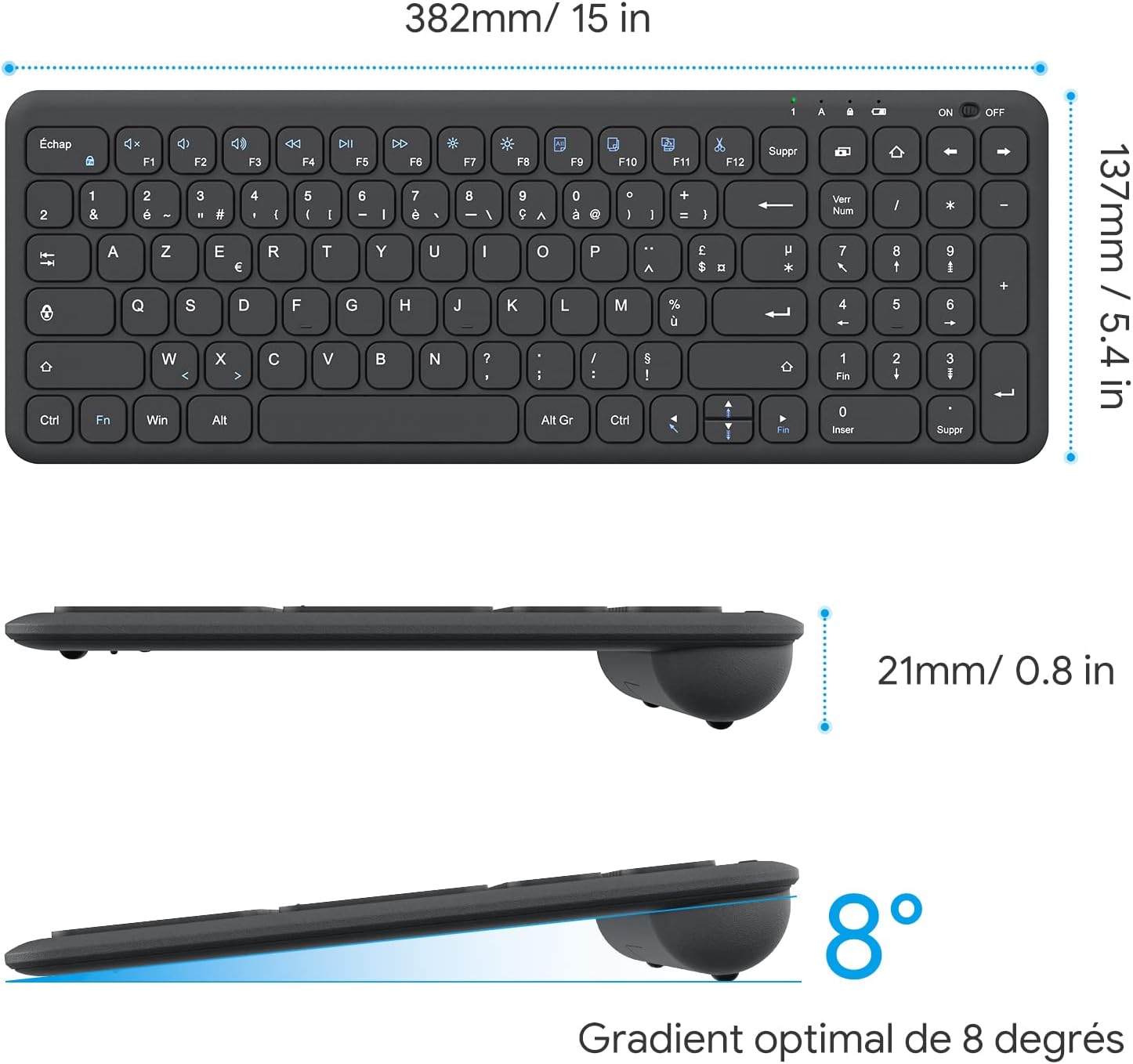
Image: Keyboard compatibility with Windows systems.
5. Priežiūra
5.1 Akumuliatoriaus keitimas
When the keyboard's performance degrades or the indicator light flashes, it's time to replace the batteries. Open the battery compartment on the back and replace the two AAA batteries with new ones, observing polarity.
5.2 Valymas
Norėdami išvalyti klaviatūrą, švelniai nuvalykite paviršių minkšta,amp cloth. Avoid using harsh chemicals or abrasive materials. Ensure the keyboard is turned off before cleaning.
5.3 USB Receiver Storage
For convenience and to prevent loss, the USB receiver can be magnetically stored inside the keyboard's battery compartment when not in use or during transport.
6. Problemų sprendimas
Jei kyla problemų dėl klaviatūros, žr. šiuos įprastus sprendimus:
- Klaviatūra nereaguoja:
- Ensure the keyboard is turned ON.
- Patikrinkite, ar baterijos tinkamai įdėtos ir ar jos pakankamai įkrautos. Jei reikia, pakeiskite.
- Patikrinkite, ar USB imtuvas tvirtai prijungtas prie veikiančio kompiuterio USB prievado. Išbandykite kitą USB prievadą.
- Iš naujo paleiskite kompiuterį.
- Lagging or intermittent input:
- Ensure the keyboard is within the effective operating range (up to 10 meters) of the USB receiver.
- Reduce potential interference by moving the keyboard closer to the receiver or away from other wireless devices (e.g., Wi-Fi routers, cordless phones).
- Check battery level. Low batteries can affect wireless performance.
- Neveikia tam tikri klavišai:
- Gently clean around the affected key to remove any debris.
- If the issue persists, contact OMOTON customer support for further assistance.
7. Specifikacijos
Detailed technical specifications for the OMOTON Wireless AZERTY Keyboard:
| Funkcija | Detalė |
|---|---|
| Prekės ženklas | OMOTON |
| Modelis | WK003 |
| Ryšio technologija | 2.4 GHz belaidis ryšys (USB imtuvas) |
| Klaviatūros išdėstymas | AZERTY |
| Suderinami įrenginiai | PC, Desktop, Laptop |
| Suderinamos operacinės sistemos | Windows 11/10/8/7/XP/Vista |
| Ypatingos savybės | 12 Multimedia Shortcuts, Fn Lock, Silent Keys, Ultra-Slim Design, Magnetic USB Receiver Storage |
| Spalva | Juoda |
| Maitinimo šaltinis | 2 x AAA baterijos (į komplektą neįeina) |
| Matmenys (I x P x A) | 38.1 x 13.7 x 2 cm (15 x 5.4 x 0.8 colio) |
| Raktų skaičius | 99 |
| Rakto jungiklio tipas | Tactile (Scissor-mechanism) |
| Optimal Gradient | 8 laipsnių |

Image: Keyboard dimensions and ergonomic design.

Image: Scissor-mechanism key design.
8. Informacija apie garantiją
OMOTON products typically come with a manufacturer's warranty. Please refer to the warranty card included with your product or visit the official OMOTON webIšsamias garantijos sąlygas ir nuostatas rasite svetainėje. Išsaugokite pirkimo kvitą kaip pirkimo įrodymą bet kokiems garantiniams prašymams.
9. Pagalba klientams
If you have any questions, require technical assistance, or experience issues not covered in this manual, please do not hesitate to contact OMOTON customer support. You can usually find contact information on the OMOTON official websvetainėje arba per pardavėją, iš kurio įsigijote produktą.
Ask a question about this manual
Ask about setup, troubleshooting, compatibility, parts, safety, or missing instructions. Manuals+ will review the question and use this page’s manual context to help answer it.