
1. Įvadas
This manual provides detailed instructions for the safe and effective operation of your COLBOR CL60 65W COB LED Video Light. Please read this manual thoroughly before using the product and retain it for future reference. The COLBOR CL60 is a compact, bi-color LED light designed for various photography and videography applications, featuring adjustable color temperature, brightness, and special effects.
2. Saugos informacija
Kad nesugadintumėte gaminio ar nesusižalotumėte savęs ar kitų, laikykitės šių saugos priemonių:
- Do not disassemble or modify the product. Unauthorized modifications may cause malfunction or electric shock.
- Laikykite prietaisą sausai. Nelieskite jo šlapiomis rankomis ir nemerkite į vandenį.
- Įsitikinkite, kad maitinimo šaltinis atitinka nurodytą tūrįtage reikalavimus.
- Venkite tiesioginio akių poveikio šviesos šaltiniui.
- Laikyti vaikams nepasiekiamoje vietoje.
- Operate in a well-ventilated area to prevent overheating.
- Remove the protective film from the COB light before initial use.
3. Pakuotės turinys
Patikrinkite, ar pakuotėje yra visi toliau išvardyti daiktai:
- COLBOR CL60 Video Light (x1)
- Standard Adapter (Bowens Mount) (x1)
- Bowens Mount Reflector (x1)
- Light Base (x1)
- COB Protective Cover (x1)
- Nešiojimo krepšys (x1)
- Maitinimo adapteris (x1)
- Vartotojo vadovas (1x)
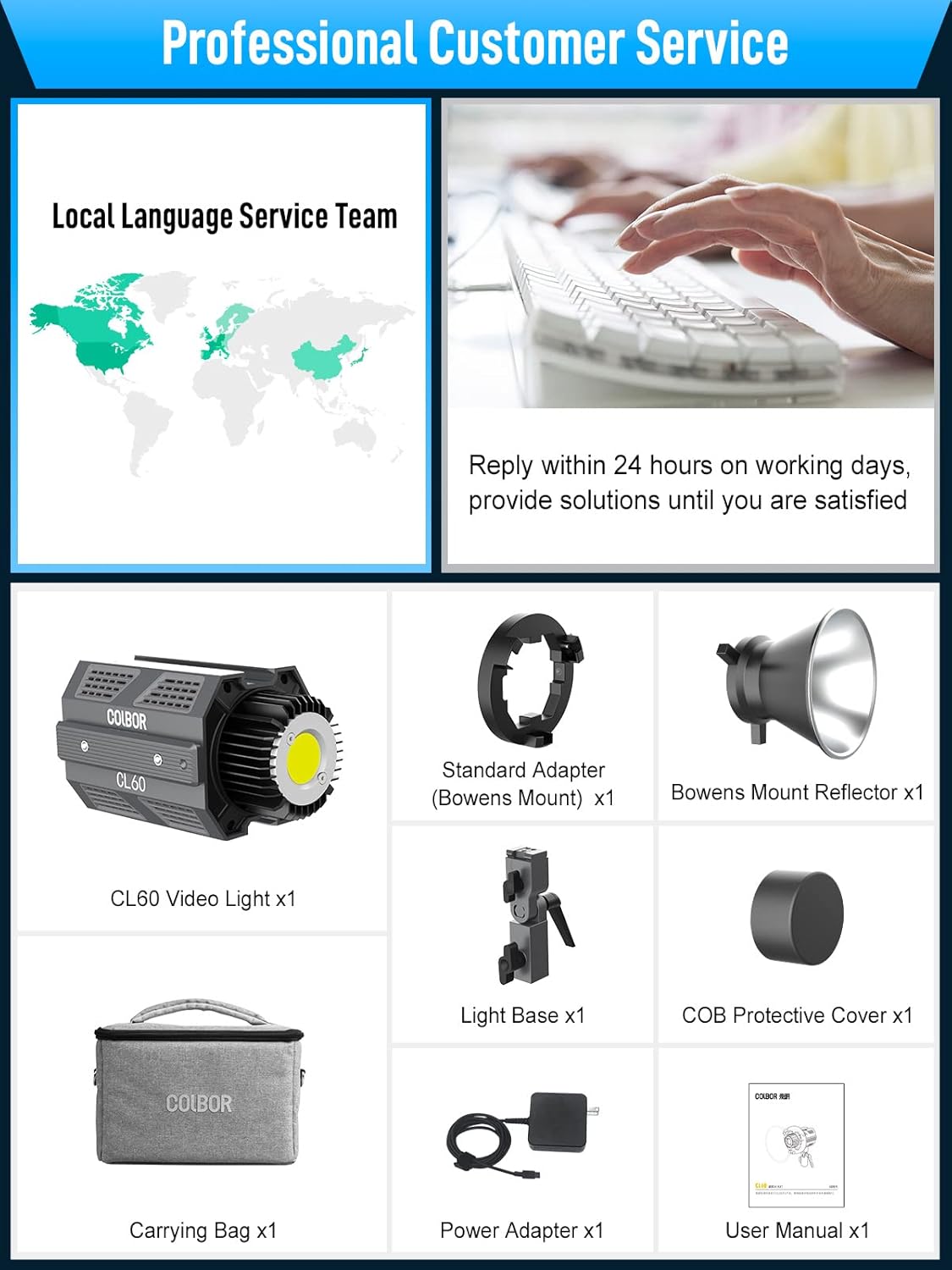
Image: Contents of the COLBOR CL60 package, including the light, various adapters, reflector, protective cover, carrying bag, power adapter, and user manual.
4. Produktas baigtasview
The COLBOR CL60 is a compact and robust video light constructed from aircraft-grade aluminum alloy. It features a COB LED for continuous output, a control panel with an LCD screen, and multiple mounting options.
Pagrindinės funkcijos:
- Reguliuojama spalvos temperatūra: nuo 2700 iki 6500 XNUMX tūkst.
- Ryškumo valdymas: Pritemdymas nuo 0% iki 100%.
- Didelis spalvų atkūrimas: CRI 97+ tiksliam spalvų atkūrimui.
- Special Lighting Effects: 10 built-in effects with 46 modes.
- Kompaktiškas dizainas: Weighs approximately 550 grams (1.2 lbs) and measures 14x8x9cm (5.5x3x3.5 inches).
- Bowens laikiklio suderinamumas: Allows attachment of various light modifiers.
- PowerCube Design: Multiple CL60 units can be interlocked via slide rails to create a larger light matrix.
- COLBOR Studio APP Control: Remote control for up to 10 lights.
- Įvairios maitinimo parinktys: Supports Type-C PD power banks, PD adapters, V-mount, and NP-F batteries.
- Tyli aušinimo sistema: Aluminum alloy body with a built-in cooling system, operating below 20dB in Quiet Mode.

Image: Two COLBOR CL60 lights demonstrating light output and color rendering capabilities with a CRI of 97+.

Image: A person holding the COLBOR CL60 light, illustrating its ultra-compact size and portability.
5. Sąranka
Follow these steps to set up your COLBOR CL60 video light:
- Attach the Light Base: Secure the light base to the bottom slide rail of the CL60. This base typically includes a 1/4" screw thread for mounting onto a light stand or tripod.
- Tvirtinimas prie stovo: Attach the CL60 (with the light base) to a compatible light stand or tripod. Tighten securely.
- Install Bowens Mount Adapter: If using Bowens mount accessories, attach the standard Bowens mount adapter to the front of the CL60. Align the adapter with the light's front and twist to lock.
- Attach Reflector or Modifier: Mount the Bowens mount reflector or any other compatible light modifier (e.g., softbox, lantern) onto the Bowens mount adapter.
- Prijunkite maitinimą: Connect the power adapter to the Type-C port on the CL60 and then to a power outlet. Alternatively, connect a compatible PD power bank or battery solution (see Section 7 for details).
- PowerCube Configuration (Optional): For increased light output, multiple CL60 units can be interlocked using their side slide rails to form a larger lighting matrix.

Vaizdas: Stambus planas view of the Bowens mount mechanism on the COLBOR CL60, illustrating how light modifiers are attached.

Image: Diagram showing how multiple COLBOR CL60 units can be connected via their slide rails to form a larger 'PowerCube' lighting array.
6. Naudojimo instrukcijos
The COLBOR CL60 can be operated using its onboard controls or via the COLBOR Studio App.
Borto valdymas:
- Maitinimo įjungimas/išjungimas: Paspauskite maitinimo mygtuką, kad įjungtumėte arba išjungtumėte šviesą.
- Ryškumo reguliavimas (DIM): Use the designated control wheel to adjust the light intensity from 0% to 100%.
- Spalvų temperatūros (CCT) reguliavimas: Use the CCT control wheel to change the color temperature between 2700K (warm) and 6500K (cool).
- Access Special Effects (EFF): Press the 'EFF' button to cycle through the available lighting effects. Use the control wheel to select and adjust specific effect modes (e.g., Fire, Pulsing, TV, Lightning).
- Meniu naršymas: Use the 'SET' button and control wheels to navigate through menu options displayed on the LCD screen.

Image: Visual representation of various lighting effects available on the COLBOR CL60, such as Fire, CCT Chase, Pulsing, TV, Explosion, Faulty Bulb, Welding, Strobe, Lightning, and SOS.
7. App Control (COLBOR Studio App)
The COLBOR Studio App allows for remote control of your CL60 light(s) via a smartphone or tablet.
- Atsisiųskite programą: Ieškokite "COLBOR Studio" in your device's app store and install it.
- Įjungti Bluetooth: Įsitikinkite, kad jūsų išmaniajame telefone / planšetiniame kompiuteryje įjungtas „Bluetooth“.
- Įrenginių poravimas: Open the COLBOR Studio App. The app should automatically detect nearby CL60 lights. Follow the in-app instructions to pair your light(s).
- Valdymo funkcijos: Within the app, you can adjust brightness, color temperature, and activate special effects. The app also supports matrix control, allowing you to manage up to 10 lights simultaneously or individually.

Image: A smartphone screen displaying the COLBOR Studio App interface, showing controls for brightness, color temperature, and multiple light management.
8. Power Solutions
The COLBOR CL60 offers flexible power options for studio and on-location use:
- Kintamosios srovės adapteris: Use the included power adapter for continuous power from a wall outlet.
- Type-C PD Power Bank: The CL60 supports charging and operation via PD (Power Delivery) compatible power banks with an output greater than 65W.
- V-Mount / NP-F Batteries: With optional accessories (sold separately), the CL60 can be powered by V-mount or NP-F batteries for portable operation.

Image: Close-up of the COLBOR CL60's Type-C charging port and examples of power bank and V-mount battery setups.
9. Priežiūra
Proper maintenance ensures the longevity and performance of your COLBOR CL60:
- Valymas: Šviestuvo išorę valykite minkšta, sausa šluoste. Nenaudokite stiprių cheminių medžiagų ar abrazyvinių medžiagų.
- Saugykla: Store the light in its carrying bag in a cool, dry place away from direct sunlight and extreme temperatures.
- Aušinimo sistema: The built-in Hummingbird-Intelligence Cooling System manages heat. Ensure the vents are not obstructed during operation. The fan operates quietly, typically below 20dB in Quiet Mode.

Image: Diagram illustrating the internal cooling system of the COLBOR CL60, highlighting airflow and heat dissipation mechanisms.
10. Problemų sprendimas
If you encounter issues with your COLBOR CL60, refer to the following common problems and solutions:
| Problema | Galima priežastis | Sprendimas |
|---|---|---|
| Šviesa neįsijungia. | Nėra maitinimo, sugedęs laidas arba maitinimo adapteris. | Check power connection. Ensure power adapter is functional. Try a different Type-C cable or power source. |
| Programėlė negali prisijungti prie šviestuvo. | Bluetooth off, app issue, or light not in pairing mode. | Ensure Bluetooth is enabled on your device. Restart the app and the light. Try re-pairing the device in the app. |
| Šviesos srautas nepastovus arba mirga. | Nestabilus maitinimo šaltinis arba vidinė problema. | Ensure a stable power source. If using a power bank, verify it meets the required output. Contact support if the issue persists. |
| Fan noise is louder than expected. | Operating in Smart Mode or obstructed vents. | Check if the light is in Quiet Mode. Ensure vents are clear of obstructions. |
11. Specifikacijos
| Funkcija | Detalė |
|---|---|
| Modelis | CL60 |
| Maitinimo išvestis | 65W |
| Spalvos temperatūra | 2700–6500 tūkst |
| CRI | 97+ |
| Gaminio matmenys | 5.5 x 3 x 3.5 colio (14 x 8 x 9 cm) |
| Prekės svoris | 1.21 svaro (550 gramai) |
| Montavimas | Bowens Mount, 1/4" screw thread, Slide Rails |
| Kontrolės metodas | Onboard controls, COLBOR Studio App |
| Maitinimo įvestis | Type-C (PD compatible), AC Adapter, V-mount/NP-F (with optional accessories) |
| Aušinimo sistema | Hummingbird-Intelligence Cooling System (<20dB in Quiet Mode) |
12. Garantija ir palaikymas
COLBOR products are designed for reliability and performance. For warranty information and technical support, please refer to the warranty card included with your product or visit the official COLBOR website. Our customer service team is available to assist with any questions or issues you may encounter.
For direct support, please contact COLBOR customer service through the contact information provided on the official websvetainėje arba jūsų pirkimo platformoje.