
PowerDrive PWD2000P
„PowerDrive 2000 W“ galios keitiklio naudotojo vadovas
Model: PWD2000P
Įvadas
This manual provides detailed instructions for the safe and efficient operation, installation, and maintenance of your PowerDrive 2000 Watt Power Inverter, Model PWD2000P. This device converts 12V DC power from your vehicle battery into 110V AC power, allowing you to operate various AC devices and charge electronic devices on the go. Please read this manual thoroughly before using the inverter.
Svarbi saugos informacija
Always observe the following safety precautions to prevent injury or damage to the inverter or connected devices:
- Neatidarykite keitiklio casing. Viduje nėra dalių, kurias galėtų aptarnauti vartotojas.
- Užtikrinkite tinkamą ventiliaciją aplink keitiklį. Neužblokuokite aušinimo angų.
- Laikykite keitiklį atokiau nuo vandens, drėgmės ir degių medžiagų.
- Keitiklį junkite tik prie 12 V nuolatinės srovės maitinimo šaltinio.
- Do not exceed the inverter's rated power output (2000 Watts continuous, 4000 Watts surge).
- Prieš prijungdami kintamosios srovės įrenginius, visada prijunkite keitiklį prie akumuliatoriaus.
- Atjunkite keitiklį nuo akumuliatoriaus, kai jo nenaudojate.
- Šiame gaminyje yra cheminių medžiagų, kurios Kalifornijos valstijoje žinomos kaip sukeliančios vėžį ir apsigimimus arba kitokią žalą reprodukcijai. Po naudojimo nusiplaukite rankas.
Produkto komponentai
The PowerDrive 2000 Watt Power Inverter comes with the following components:
- PowerDrive 2000 Watt Power Inverter unit
- 39-inch heavy-duty installation cables (red for positive, black for negative)
- Nuimamas LCD ekranas
- Montavimo laikikliai

1 paveikslas: Priekyje view of the PowerDrive 2000 Watt Power Inverter, showing the digital display, power button, Bluetooth indicator, four AC 120V outlets, one USB-C port, and one USB-A port. The unit features a durable yellow and black casing with ventilation grilles.

2 paveikslas: Baigėsiview of the PowerDrive 2000 Watt Power Inverter with key dimensions (14.54" length, 9.8" width, 4.25" height) and included accessories. The image displays the inverter unit, red and black 39-inch battery cables, and a 12-foot remote LCD cable.
Sąranka ir diegimas
Proper installation is crucial for the inverter's performance and safety. Follow these steps carefully:
- Pasirinkite vietą: Select a dry, well-ventilated area for mounting the inverter. Ensure it is away from direct sunlight, heat sources, and any flammable materials. The mounting brackets can be used to secure the unit.
- Paruoškite bateriją: Ensure your vehicle's battery is a 12V DC system. Turn off the vehicle and any accessories.
- Prijunkite kabelius:
- Prijunkite raudona (positive) cable to the teigiamas (+) keitiklio terminalas.
- Prijunkite juodas (negative) cable to the neigiamas (-) keitiklio terminalas.
- Prijunkite kitą galą raudona kabelis prie teigiamas (+) transporto priemonės akumuliatoriaus gnybtas.
- Prijunkite kitą galą juodas kabelis prie neigiamas (-) transporto priemonės akumuliatoriaus gnybtas.
Svarbu: Always connect the inverter terminals first, then the battery terminals. Ensure connections are tight and secure.
- Connect Remote LCD (Optional): If desired, connect the removable LCD screen to the inverter using the provided cable. This allows for remote monitoring and control.
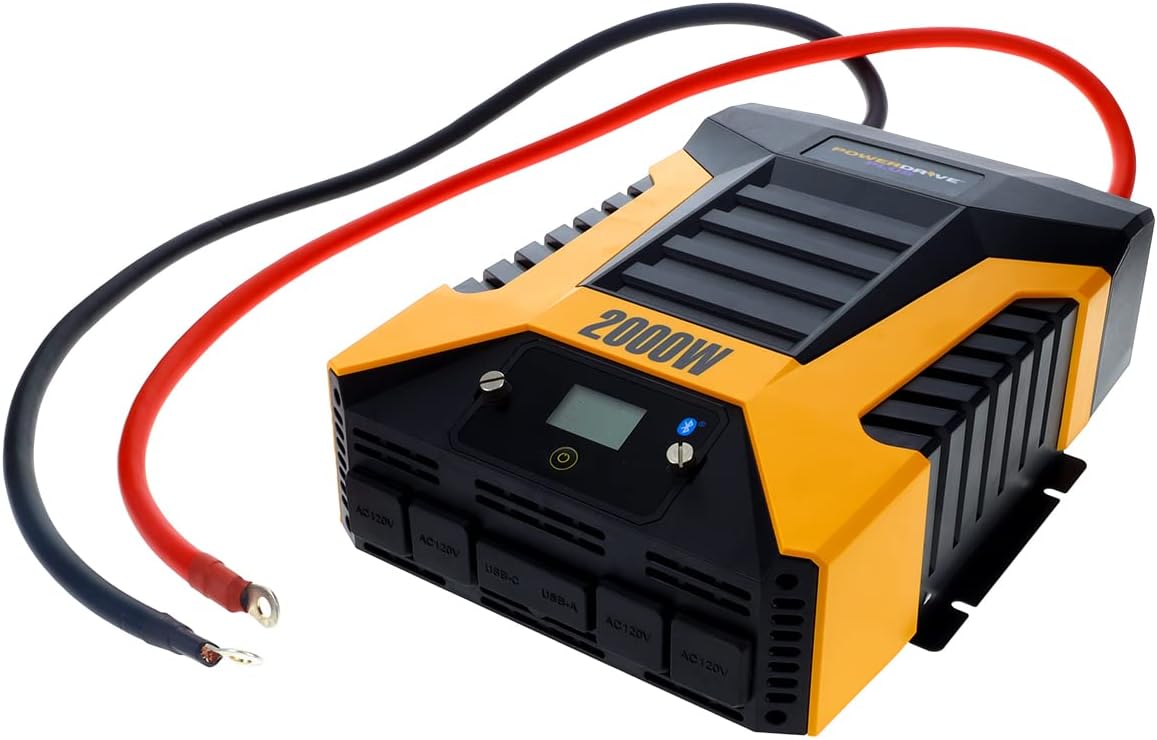
3 paveikslas: The PowerDrive 2000 Watt Power Inverter with the red positive and black negative battery cables securely connected to its terminals, ready for connection to a vehicle battery. This illustrates the correct cable attachment for power input.
Naudojimo instrukcijos
Once installed, the inverter is ready for operation:
- Įjungimas: Press the power button on the inverter's front panel or on the remote LCD screen. The digital display will illuminate, showing battery voltage ir išėjimo vattage.
- Įrenginių prijungimas: Plug your AC devices into the four 3-prong AC outlets. For charging smartphones and tablets, use the standard USB 2.4 Amp port or the fast-charging USB-C 3.0 Amp uostas.
- Stebėjimas: The digital display provides real-time information on battery voltage, output power (watts), and any error codes.
- „Bluetooth“ belaidė technologija:
- Atsisiųskite nemokamą PowerDrive Plus app from your smartphone's app store (compatible with Android and iOS).
- Enable Bluetooth on your smartphone and pair it with the inverter.
- The app allows you to remotely monitor battery voltage, output power, and product temperature. You can also set up protections like undervoltage and overload, and power the inverter on/off from a distance.
- Išjungimas: Press and hold the power button until the display turns off, or use the PowerDrive Plus app. Disconnect devices before turning off the inverter.

4 paveikslas: Priekinis stambus planas view of the PowerDrive 2000 Watt Power Inverter, highlighting its four AC 120V outlets, one USB-C port, and one USB-A port. These ports provide versatile power options for various electronic devices and appliances.

5 paveikslas: A smartphone screen showing the PowerDrive Plus application interface. The app displays real-time data such as output power (842 watts), battery power percentage (88%), battery voltage (12.6 VDC), and output voltage (120 VAC), along with temperature readings and control options.
Priežiūra
To ensure the longevity and optimal performance of your PowerDrive inverter, follow these maintenance guidelines:
- Laikyti švarų: Reguliariai valykite keitiklio išorę sausa, minkšta šluoste. Nenaudokite skystų valiklių ar tirpiklių.
- Vėdinimas: Ensure the cooling fan vents are clear of dust and debris. The high-speed cooling fan automatically activates when needed and is designed for quiet operation.
- Kabelių jungtys: Periodically check that all cable connections to the battery and inverter terminals are secure and free from corrosion.
- Saugykla: Kai keitiklis ilgesnį laiką nenaudojamas, jį laikykite vėsioje, sausoje vietoje, atjungtą nuo akumuliatoriaus.

6 paveikslas: Galinis view of the PowerDrive 2000 Watt Power Inverter, showcasing its two high-speed cooling fans and the robust battery input terminals. Proper airflow through these fans is essential for maintaining optimal operating temperature.
Trikčių šalinimas
Jei kyla problemų dėl keitiklio, žr. šias dažniausiai pasitaikančias problemas ir sprendimus:
| Problema | Galima priežastis | Sprendimas |
|---|---|---|
| Nėra maitinimo / Inverteris neįsijungia |
|
|
| Inverteris dažnai išsijungia |
|
|
| Skaitmeninis ekranas rodo klaidos kodą | Specific error condition (e.g., over-voltage, pagal ttage, overload, short circuit) | Refer to the PowerDrive Plus app or contact customer support for specific error code interpretations and solutions. Address the underlying issue (e.g., reduce load, check battery). |
Gaminio specifikacijos
| Funkcija | Detalė |
|---|---|
| Prekės ženklas | PowerDrive |
| Modelio numeris | PWD2000P |
| Nuolatinė galia | 2000 vatų |
| Viršutinė galia | 4000 vatų |
| Įvesties tomastage | 12V DC |
| Išėjimas ttage | 110V kintamoji srovė |
| AC lizdai | Four 3-prong outlets |
| USB prievadai | Vienas USB 2.4 Amp, One USB-C 3.0 Amp |
| Ryšys | Bluetooth Wireless Technology (PowerDrive Plus App compatible) |
| Ekranas | Digital display (removable LCD screen) |
| Aušinimas | Didelio greičio aušinimo ventiliatorius |
| Prekės svoris | 9 svaro |
| Gaminio matmenys | 5.7 x 17 x 12 colio |
Garantija ir palaikymas
For warranty information, technical support, or service inquiries, please contact PowerDrive customer service. Keep your purchase receipt as proof of purchase.
For additional resources and frequently asked questions, visit the official PowerDrive website or refer to the PowerDrive Plus app.
Ask a question about this manual
Ask about setup, troubleshooting, compatibility, parts, safety, or missing instructions. Manuals+ will review the question and use this page’s manual context to help answer it.