
1. Įvadas
Ačiū, kad pirkoteasing the Lenco SCD-341 Portable CD-Radio. This device combines a CD player, DAB+ and FM radio, and Bluetooth connectivity in a compact design. This manual provides essential information for safe and efficient use of your new audio system. Please read it thoroughly before operation and retain it for future reference.
2. Saugos informacija
- Saugokite įrenginį nuo lietaus ar drėgmės, kad išvengtumėte gaisro ar elektros smūgio.
- Užtikrinkite tinkamą vėdinimą. Neužblokuokite ventiliacijos angų.
- Naudokite tik su įrenginiu pateiktą maitinimo adapterį.
- Neatidarykite casing. Visus techninės priežiūros darbus patikėkite kvalifikuotiems darbuotojams.
- Venkite įrenginio statyti šalia šilumos šaltinių arba tiesioginiuose saulės spinduliuose.
- Saugokite įrenginį nuo stiprių magnetinių laukų.
3. Pakuotės turinys
Prašome patikrinti, ar visi daiktai yra ir yra geros būklės:
- Lenco SCD-341 Portable CD-Radio Unit
- Maitinimo adapteris
- Vartotojo vadovas (šis dokumentas)
- Greitos pradžios vadovas
4. Produktas baigtasview
The Lenco SCD-341 features a user-friendly interface with clearly labeled buttons and an LCD display.

1 pav.: priekis view of the Lenco SCD-341, showing the main controls, LCD display, and stereo speakers.

Figure 2: Lenco SCD-341 with its integrated handle and telescopic antenna extended for radio reception.
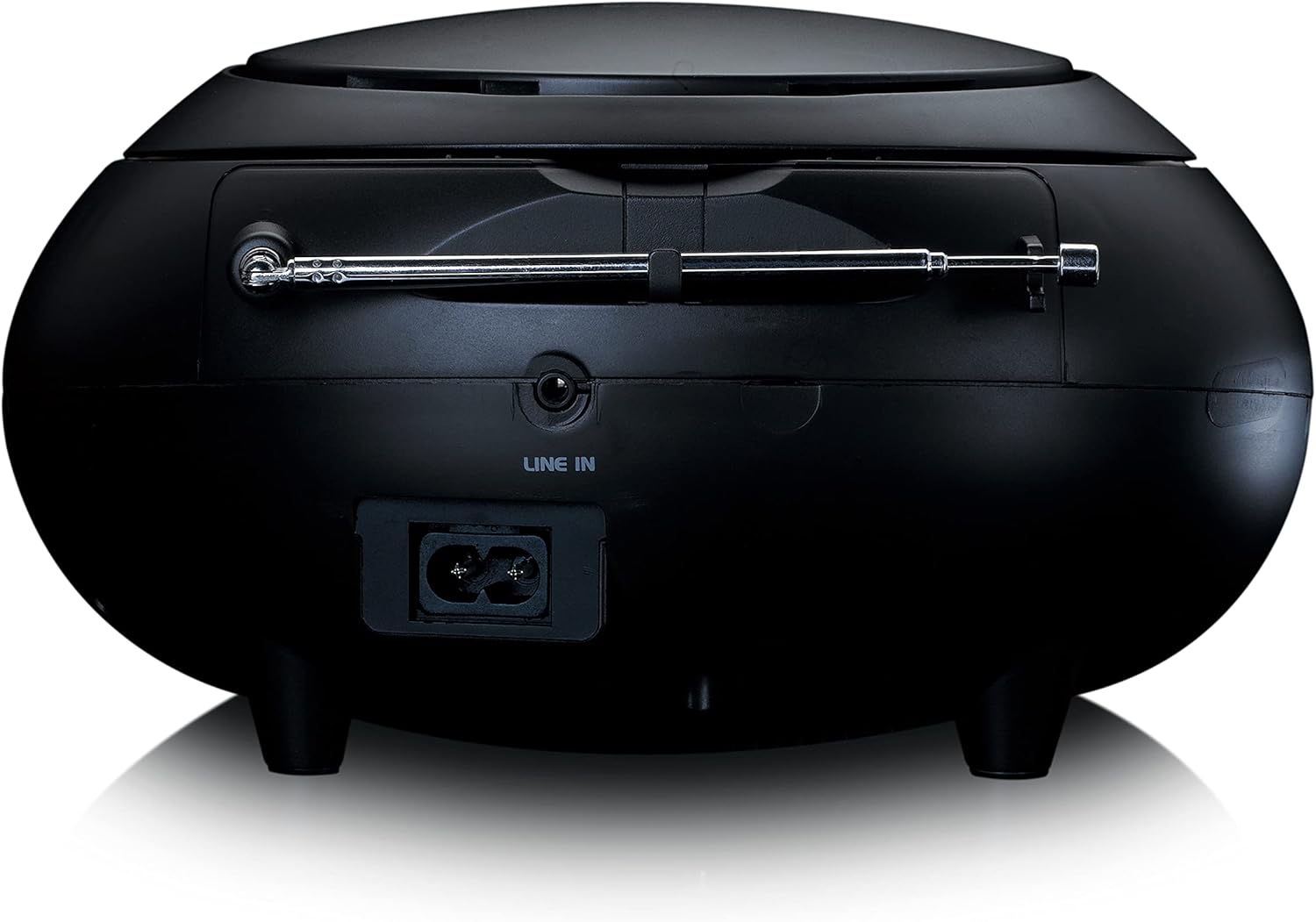
3 pav.: galinis view of the Lenco SCD-341, highlighting the power input and LINE IN audio port.
5. Sąranka
5.1 Maitinimo jungtis
The Lenco SCD-341 can be powered by the included AC adapter or by batteries.
- Kintamosios srovės maitinimas: Connect the supplied power adapter to the AC IN socket on the rear of the unit (refer to Figure 3) and plug the other end into a standard wall outlet.
- Baterijos galia: Open the battery compartment on the bottom of the unit. Insert the required number of C-type batteries (not included), ensuring correct polarity. Close the compartment securely.
5.2 Antenos sąranka
For optimal DAB+ and FM radio reception, fully extend the telescopic antenna located on the rear of the unit. Adjust its position for the best signal.
6. Naudojimo instrukcijos
6.1 Maitinimo įjungimas/išjungimas
Paspauskite GALIA mygtuką, kad įjungtumėte arba išjungtumėte įrenginį.
6.2 CD atkūrimas
- Paspauskite ŠALTINIS button repeatedly until "CD" is displayed on the LCD screen.
- Atidarykite CD skyriaus dangtelį švelniai jį pakeldami.
- Padėkite kompaktinį diską ant ašies etikete į viršų.
- Close the CD compartment lid. The unit will begin reading the CD.
- Naudokite PALEISTI / PAUZĖ, STOP, Praleisti pirmyn, ir PRAŠKITE ATGAL mygtukai, skirti valdyti atkūrimą.

4 paveikslas: viršuje view of the Lenco SCD-341 with the CD compartment open, showing a CD being inserted.
6.3 DAB+ radijo veikimas
- Paspauskite ŠALTINIS button repeatedly until "DAB" is displayed.
- The unit will automatically scan for available DAB+ stations. This may take a few moments.
- Kai nuskaitymas bus baigtas, naudokite TUNE +/- mygtukais galite naršyti po galimas stotis.
- Norėdami išsaugoti stotį kaip iš anksto nustatytą, paspauskite ir palaikykite NUSTATYMAS mygtuką, tada naudokite TUNE +/- to select a preset number and press NUSTATYMAS dar kartą patvirtinti.
6.4 FM radijo veikimas
- Paspauskite ŠALTINIS mygtuką kelis kartus, kol pasirodys „FM“.
- Paspauskite ir palaikykite TUNE +/- buttons to automatically scan for the next available station. Briefly press to manually tune.
- Norėdami išsaugoti stotį kaip iš anksto nustatytą, paspauskite ir palaikykite NUSTATYMAS mygtuką, tada naudokite TUNE +/- to select a preset number and press NUSTATYMAS dar kartą patvirtinti.
6.5 Bluetooth poravimas
- Paspauskite ŠALTINIS button repeatedly until "Bluetooth" is displayed. The unit will enter pairing mode, indicated by a flashing Bluetooth icon on the display.
- On your external device (smartphone, tablet), enable Bluetooth and search for available devices.
- Select "Lenco SCD-341" from the list of found devices.
- Once paired, the Bluetooth icon on the unit's display will stop flashing and remain solid. You can now play audio from your device through the Lenco SCD-341.
6.6 Garsumo valdymas
Naudokite TŪRIS +/- mygtukais, kad sureguliuotumėte garso išvesties lygį.
7. Priežiūra
- Valymas: Išorinį įrenginio paviršių valykite minkštu, sausu skudurėliu. Nenaudokite abrazyvinių valiklių ar tirpiklių.
- CD objektyvo priežiūra: Jei kyla problemų dėl CD atkūrimo, naudokite komerciškai įsigyjamą CD lęšio valymo diską.
- Saugykla: When not in use for extended periods, disconnect the power adapter and remove batteries. Store the unit in a cool, dry place.
8. Problemų sprendimas
| Problema | Galima priežastis | Sprendimas |
|---|---|---|
| Nėra galios | Neprijungtas maitinimo adapteris; išsikrovusios arba neteisingai įdėtos baterijos. | Check power adapter connection; replace batteries or ensure correct polarity. |
| Nėra garso | Per mažas garsumas; pasirinktas neteisingas šaltinis; prijungtos ausinės. | Increase volume; select correct source (CD, DAB, FM, Bluetooth); disconnect headphones. |
| CD negroja | Kompaktinis diskas įdėtas neteisingai; kompaktinis diskas nešvarus arba subraižytas; kompaktinio disko formatas nepalaikomas. | Reinsert CD correctly; clean or replace CD; ensure CD is a standard audio CD. |
| Prastas radijo priėmimas | Antenna not extended or positioned poorly; strong interference. | Fully extend and adjust antenna; move unit away from other electronic devices. |
| „Bluetooth“ susiejimas nepavyko | Bluetooth not enabled on external device; device too far; unit not in pairing mode. | Ensure Bluetooth is on and discoverable; move device closer; select Bluetooth source on unit. |
9. Specifikacijos
| Modelio numeris | SCD-341 |
| Prekės ženklas | Lenco |
| Matmenys (I x P x A) | 21.5 x 21 x 11.5 cm |
| Svoris | 1.09 kg |
| Maitinimo šaltinis | AC (adapter included) / Battery-Powered |
| Derintuvo technologija | DAB+, FM |
| Ryšys | Bluetooth |
| Garso išvesties režimas | Stereo |
| Ekrano tipas | LCD |
| Išėjimo galia | 3 vatų RMS |

Figure 5: Dimensions of the Lenco SCD-341 unit.
10. Garantija ir palaikymas
For warranty information and technical support, please refer to the warranty card included in your package or visit the official Lenco websvetainę.
Gamintojas: Lenco GmbH
Kilmės šalis: Honkongas
11. Oficialūs produktų vaizdo įrašai
Watch this official video for a visual guide to the Lenco SCD-341.
Video 1: A 360-degree product view of the Lenco SCD-341, showcasing jo dizainą ir savybes iš visų pusių.