
Įvadas
Welcome to the user manual for your Lecoo DS152 Boombox RGB Portable Bluetooth Speaker. This speaker combines powerful audio performance with dynamic RGB lighting and versatile connectivity options. This manual provides essential information for setting up, operating, and maintaining your device to ensure optimal performance and longevity.
Pakuotės turinys
- 1x Lecoo DS152 Boombox RGB Portable Bluetooth Speaker
- 1x tipo C laidas
- 1x Aux kabelis
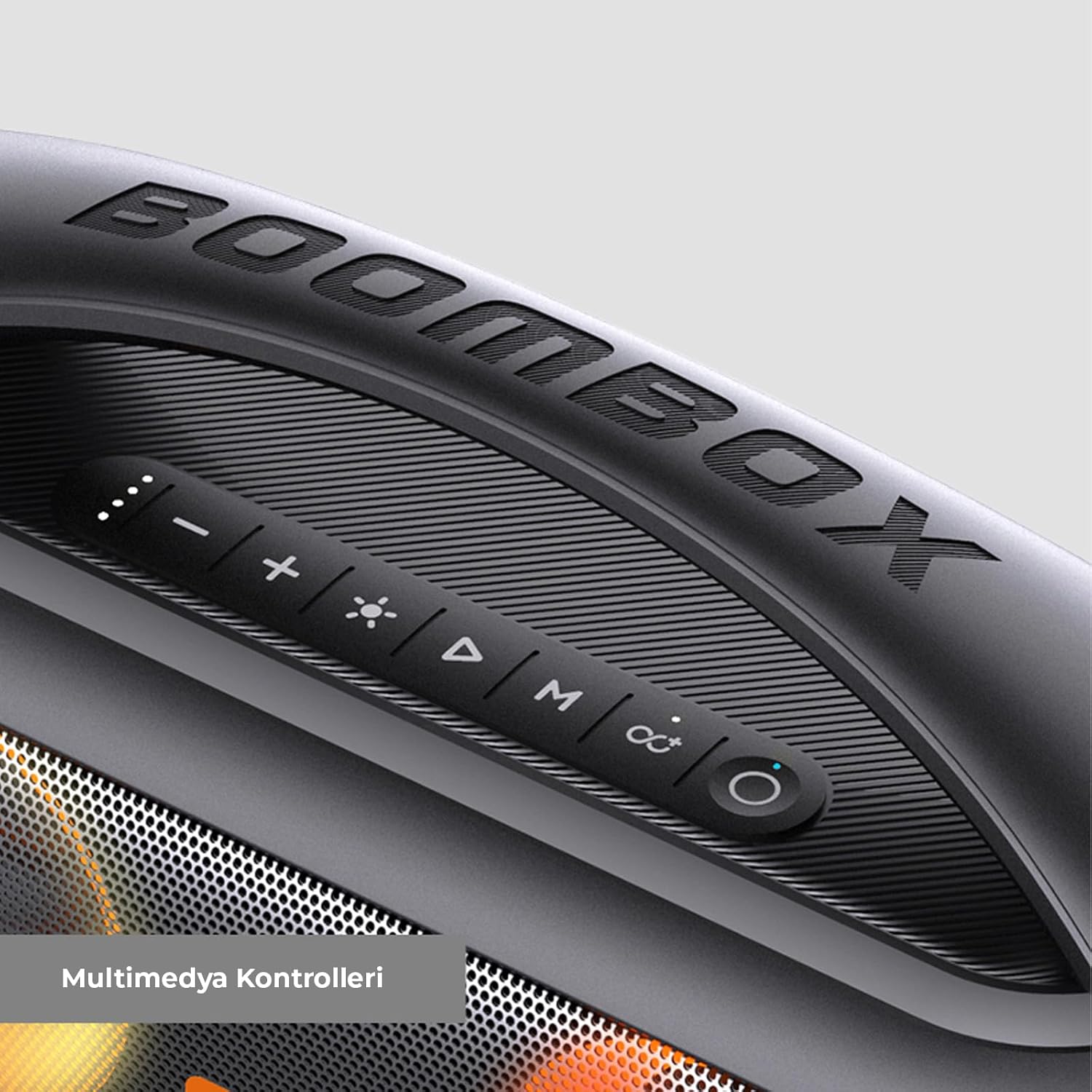
Image: The Lecoo DS152 speaker shown in its retail packaging, indicating the included Type-C charging cable and Aux cable.
Produktas baigtasview
The Lecoo DS152 features a robust design with integrated controls and dynamic RGB lighting. It is engineered with dual subwoofers and a tweeter for balanced and powerful sound output.

Paveikslėlis: sprogęs view of the Lecoo DS152 speaker, highlighting its internal components including two 3-inch subwoofers and a 2-inch tweeter for comprehensive sound.

Image: A close-up of the multimedia control panel located on the top surface of the Lecoo DS152 speaker, showing buttons for volume, playback, mode, and RGB lighting.
Sąranka
Garsiakalbio įkrovimas
Before initial use, ensure the speaker is fully charged to maximize battery life and performance.
- Connect the provided Type-C cable to the charging port on the speaker.
- Connect the other end of the Type-C cable to a compatible USB power adapter (5V 1A or 5V 2A, not included).
- The charging indicator light will illuminate, signifying that charging is in progress.
- Charging time is approximately 4.5 hours with a 5V 1A adapter or 4 hours with a 5V 2A adapter.
- The indicator light will change or turn off once the battery is fully charged.
Maitinimo įjungimas/išjungimas
To power the speaker on or off, press and hold the power button located on the control panel for a few seconds until you hear an audible prompt or see the indicator light change.
Naudojimo instrukcijos
"Bluetooth" poravimas
- Įjunkite garsiakalbį. Jis automatiškai įsijungs „Bluetooth“ susiejimo režimu, ką parodys mirksinti lemputė.
- Savo įrenginyje (išmaniajame telefone, planšetiniame kompiuteryje, nešiojamajame kompiuteryje) įjunkite „Bluetooth“ ir ieškokite galimų įrenginių.
- Select "Lecoo DS152" from the list of detected devices.
- Sėkmingai suporavus, garsiakalbis skleis patvirtinimo garsą ir indikatoriaus lemputė pradės šviesti nuolat.
- Efektyvus „Bluetooth“ veikimo atstumas yra maždaug 10 metrų (33 pėdos).
AUX režimas
To connect an audio source using the AUX cable:
- Connect one end of the provided 3.5mm AUX cable to the AUX input port on the speaker.
- Kitą galą prijunkite prie išorinio įrenginio garso išvesties lizdo.
- The speaker may automatically switch to AUX mode, or you may need to press the 'M' (Mode) button on the speaker to select AUX input.
TWS („True Wireless Stereo“) funkcija
The TWS function allows you to pair two DS152 speakers together for a synchronized stereo sound experience.
- Ensure both DS152 speakers are powered on and are not currently connected to any Bluetooth device.
- On one of the speakers, press and hold the TWS button (often indicated by an infinity symbol or two interlocking circles) until you hear an audible prompt.
- The speakers will automatically search for and pair with each other. A confirmation sound will indicate successful TWS pairing.
- Once TWS paired, connect your primary device via Bluetooth to the first speaker. Both speakers will now play audio in stereo.
RGB apšvietimo valdymas
The speaker features dynamic RGB lighting to enhance your listening experience.
- Press the light button (often indicated by a sun or lightbulb icon) on the control panel to cycle through different RGB lighting modes.
- There are three distinct lighting modes available.

Image: The Lecoo DS152 speaker displaying its vibrant and active RGB lighting effects on the speaker grilles.

Paveikslėlis: detalus view of the RGB lighting on the Lecoo DS152 speaker's grille, showcasing the color transitions.
Maitinimo banko funkcija
The Lecoo DS152 can also function as a power bank to charge other devices.
- Connect your smart device's charging cable to the USB output port on the speaker.
- The speaker's internal 3000mAh battery will begin charging your connected device.
- Note that utilizing the power bank function will consume the speaker's battery and may reduce its audio playback time.
Priežiūra
Valymas
To clean the speaker, gently wipe its surfaces with a soft, dry cloth. Avoid using abrasive cleaners, solvents, or harsh chemicals, as these can damage the finish and internal components.
Atsparumas vandeniui
The Lecoo DS152 speaker is rated IPX5 water-resistant. This means it is protected against splashes and light rain. Nenardinkite garsiakalbio į vandenį. For optimal protection against moisture, ensure all port covers are securely closed before exposing the speaker to any wet conditions.

Image: The Lecoo DS152 speaker shown with water splashing on its surface, illustrating its IPX5 water resistance capabilities.
Sandėliavimas
When not in use for extended periods, store the speaker in a cool, dry place. Keep it away from direct sunlight, extreme temperatures, and high humidity to prevent damage.
Trikčių šalinimas
Nėra galios
- Ensure the speaker's battery is charged. Connect it to a power source using the provided Type-C cable.
- Press and hold the power button for a few seconds to attempt to turn it on.
Nepavyksta susieti per „Bluetooth“
- Ensure the speaker is in Bluetooth pairing mode (indicated by a flashing light).
- Verify that Bluetooth is enabled on your source device.
- Move the speaker closer to your device, ensuring they are within the 10-meter effective range.
- Try turning off and then restarting both the speaker and your device's Bluetooth function.
- If issues persist, clear the Bluetooth pairing list on your device and attempt to pair again.
Nėra garso
- Patikrinkite garsumo lygius tiek garsiakalbyje, tiek prijungtame įrenginyje.
- Ensure the speaker is correctly paired via Bluetooth or properly connected via the AUX cable.
- If using AUX, confirm the cable is fully inserted into both devices and the correct input mode is selected on the speaker.
Prasta garso kokybė
- Move the speaker closer to your Bluetooth device to minimize potential interference.
- Ensure there are no significant physical obstructions between the speaker and your device.
- Try playing a different audio source or file to rule out issues with the content.
TWS Pairing Failure
- Ensure both DS152 speakers are powered on and are not connected to any other Bluetooth device.
- Repeat the TWS pairing steps carefully, ensuring the TWS button is pressed on only one speaker initially.
- Verify that both speakers are the same model (DS152) for TWS compatibility.
Specifikacijos
| Funkcija | Specifikacija |
|---|---|
| Modelis | DS152 |
| Bluetooth versija | 5.1 |
| RMS galios išėjimas | 18W |
| Didžiausia galia | 36W |
| Baterijos talpa | 3.7 V, 3000 mAh |
| Įkrovimo laikas | 4.5 hours (5V 1A), 4 hours (5V 2A) |
| Žaidimo laikas | 2.5 hours (100% volume), 4.5 hours (50% volume) |
| Dažnių diapazonas | 70Hz-16KHz |
| Efektyvus atstumas | 10 metrai |
| Atsparumas vandeniui | IPX5 |
| Produkto dydis | 350 x 138 x 183 mm |
| Svoris | 2.27 kg |
| Žemųjų dažnių garsiakalbio dydis | 3 colio * 2 |
| Garsiakalbio dydis | 2 colio * 1 |
Informacija apie garantiją
This product is covered by a manufacturer's warranty. Please refer to the warranty card included in your product packaging or visit the official Lecoo website for detailed information regarding warranty terms, conditions, and duration. It is recommended to retain your purchase receipt as proof of purchase for any warranty claims.
Pagalba klientams
For further assistance, technical support, or service inquiries regarding your Lecoo DS152 speaker, please contact Lecoo customer support. You can typically find contact information on the official Lecoo websvetainėje arba dokumentacijoje, pateiktoje kartu su jūsų produktu.