
vtech
CS5209 DECT 6.0 belaidžio telefono išplėtimo ragelio naudotojo vadovas
Modelis: CS5209
Įvadas
Welcome to the user manual for your new vtech CS5209 DECT 6.0 Cordless Phone Expansion Handset. This manual provides detailed instructions for setting up, operating, and maintaining your new handset. For optimal performance, please read these instructions carefully before use.
Kas yra dėžutėje
- CS5209 Cordless Handset
- Handset Battery Pack
- Handset Battery Cover
- Charger Cradle for Handset
- Įkroviklio laikiklio maitinimo adapteris
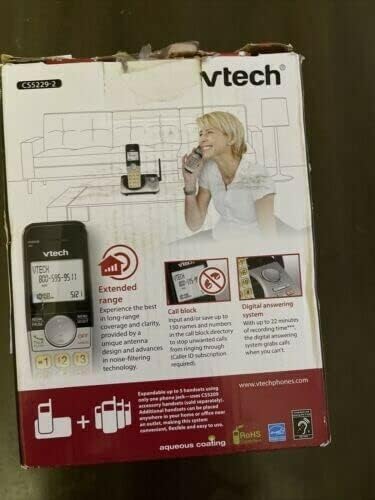
This image displays the product packaging for the vtech CS5209 DECT 6.0 Cordless Phone Expansion Handset. The box highlights key features including extended range for better coverage and clarity, a call block function capable of storing up to 150 numbers to prevent unwanted calls (requires Caller ID subscription), and a digital answering system with up to 17 minutes of recording time to capture messages when you are unavailable. The packaging also indicates that the system is expandable up to 5 handsets using only one phone jack.
Sąranka
1. Akumuliatoriaus įdėjimas
- Raskite akumuliatoriaus skyrių ragelio gale.
- Insert the battery pack into the compartment, ensuring the connector is properly aligned with the socket.
- Close the battery compartment with the battery cover until it clicks into place.
2. Ragelio įkrovimas
- Connect the small end of the power adapter to the charger cradle.
- Prijunkite didelį maitinimo adapterio galą į standartinį elektros lizdą.
- Place the handset face forward into the charger cradle. The charge indicator light on the handset should illuminate, indicating it is charging.
- Prieš pirmą kartą naudodami, leiskite įrenginiui įkrauti bent 16 valandas, kad užtikrintumėte pilną akumuliatoriaus įkrovą.
3. Ragelio registravimas
The CS5209 is an expansion handset and must be registered to a compatible vtech DECT 6.0 base unit (e.g., CS5229, CS5249) before use. Refer to your base unit's manual for specific registration instructions. Generally, the process involves:
- Place the CS5209 handset in its charger cradle.
- On your base unit, press and hold the PUSLAPIS or RANKO LOKATORIUS button for approximately 4 seconds until the registration light on the base unit begins to flash.
- Per 10 sekundžių paspauskite # key on the CS5209 handset.
- The handset will display "Registering..." and then "Handset Registered" if successful. If registration fails, try again or consult the base unit's manual for troubleshooting.
Naudojimo instrukcijos
Skambinimas ir skambučių priėmimas
- Norėdami paskambinti: Paspauskite TALK/Blykstė arba bet kurį skambinimo klaviatūros klavišą, tada surinkite telefono numerį.
- Norėdami atsiliepti į skambutį: Kai suskamba telefonas, paspauskite TALK/Blykstė or any dial pad key.
- Norėdami baigti skambutį: Paspauskite IŠJUNGTA/IŠVALYTI or place the handset back in the charger cradle.
- Garso reguliavimas: Pokalbio metu paspauskite VOL+ or VOL- on the side of the handset to adjust the earpiece volume.
Skambučių blokavimo funkcija
The call block feature allows you to stop unwanted calls from ringing through. You can input and save up to 150 names and numbers in the call block directory. This feature requires a Caller ID subscription from your telephone service provider.
- Norėdami užblokuoti numerį iš skambintojo ID istorijos: Nors reviewNorėdami peržiūrėti skambintojo ID istoriją, paspauskite BLOKAS , kad įtrauktumėte numerį į blokuojamų numerių sąrašą.
- Norėdami rankiniu būdu įtraukti numerį į blokuojamųjų sąrašą: Access the Call Block menu through the handset's menu options and follow the prompts to add a number.
Skaitmeninė atsakiklio sistema
The digital answering system, integrated with your base unit, automatically answers calls and records messages when you are unavailable. It offers up to 17 minutes of recording time.
- Pranešimų grojimas: Access the answering system menu on your handset or base unit to play new or old messages.
- Pranešimo įrašymas: You can record a personalized outgoing announcement through the answering system menu.
- Laiškų trynimas: Messages can be deleted individually or all at once through the answering system menu.
Domofonas
If you have multiple registered handsets, you can use the intercom feature to communicate between them.
- Norėdami užmegzti domofoną: Paspauskite INT on the handset, then dial the number of the desired handset (e.g., 2 for Handset 2).
- To Answer Intercom: Paspauskite TALK/Blykstė when an intercom call comes in.
Priežiūra
Jūsų ragelio valymas
To keep your phone clean, wipe it with a soft, slightly damp šluoste. Nenaudokite valymo purškiklių ar stiprių cheminių medžiagų, nes jos gali pažeisti apdailą ar elektrinius komponentus.
Akumuliatoriaus priežiūra
- Always charge the handset for at least 16 hours before initial use.
- Jei ragelis nebus naudojamas ilgesnį laiką, išimkite bateriją, kad išvengtumėte elektrolito pratekėjimo.
- Replace the battery when the handset consistently shows a low battery warning or has significantly reduced talk/standby time. Use only the specified replacement battery pack.
Trikčių šalinimas
| Problema | Sprendimas |
|---|---|
| Ragelis neužsiregistruoja prie bazinio bloko. | Ensure the handset battery is charged. Follow the registration steps carefully. If issues persist, try resetting the base unit by unplugging its power for a few minutes, then plugging it back in and attempting registration again. |
| Nėra rinkimo tono. | Check that the base unit is properly connected to the telephone line and power outlet. Ensure the handset is registered to the base unit. |
| Poor call quality (static, interference). | Move the handset closer to the base unit. Avoid placing the base unit near other electronic devices (Wi-Fi routers, microwaves, computers) that may cause interference. |
| Atsakiklis neįrašo pranešimų. | Check if the answering system is turned ON. Ensure there is sufficient recording time available (up to 17 minutes). Delete old messages to free up space if necessary. |
| Handset battery does not hold a charge. | Ensure the handset is properly seated in the charger cradle. Clean the charging contacts on both the handset and cradle. If the battery is old, it may need to be replaced. |
Specifikacijos
- Modelis: CS5209
- Telefono tipas: Cordless DECT 6.0 Expansion Handset
- Spalva: Juoda
- Maitinimo šaltinis: Corded Electric (for charger cradle)
- Rinkiklio tipas: Viena klaviatūra
- Atsakiklio tipas: Digital (integrated with compatible base unit)
- Įrašymo talpa: Up to 17 minutes (on compatible base unit)
- Suderinami įrenginiai: PSTN, ISDN (via compatible base unit)
- Kelių linijų veikimas: Multi-Line Operation (via compatible base unit)
- Skambintojo identifikavimas: Yes (requires subscription from service provider)
- Gamintojas: vtech
Garantija ir palaikymas
For warranty information, technical support, or to purchase replacement parts, please visit the official vtech websvetainėje arba susisiekite su jų klientų aptarnavimo tarnyba. Išsaugokite pirkimo kvitą kaip pirkimo įrodymą garantijos pretenzijoms.
Official vtech websvetainė: www.vtechphones.com