
1. Įvadas
This manual provides essential information for setting up, operating, maintaining, and troubleshooting your Alienware X17 R2 Gaming Laptop. Please read this guide thoroughly to ensure optimal performance and longevity of your device.
The Alienware X17 R2 is designed for high-performance gaming and demanding tasks, featuring advanced cooling technologies, powerful processors, and dedicated graphics.
2. Produktas baigtasview
The Alienware X17 R2 is engineered to deliver an immersive gaming experience in a thin 17-inch form factor. Key features include:
- Powerful Intel CPUs: Experience high-performance action across all your favorite games with 12th Gen Intel Core processors.
- Next-Gen GPUs: Game unrestrained with NVIDIA GeForce RTX 3070Ti graphics, Dynamic Boost 2.0, and Deep Learning Super Sampling technologija.
- Patented Quad Cooling: An industry-first design uses four intelligently controlled and programmable fans to dissipate heat.
- Prailgintas grojimo laikas: Improve battery life with Advanced Optimus technology from NVIDIA—now available on all display options.
- Legend 2.0 Industrial Design: A fresh evolution in design with a high-endurance finish and customizable AlienFX lighting.

2.1 pav.: priekis view of the Alienware X17 R2 Gaming Laptop displaying a game.
3. Sąranka
3.1 Išpakavimas ir pirminė apžiūra
- Atsargiai išimkite nešiojamąjį kompiuterį ir visus priedus iš pakuotės.
- Patikrinkite, ar yra visi daiktai, išvardyti skyriuje „Kas yra dėžutėje“.
- Apžiūrėkite nešiojamąjį kompiuterį, ar nėra fizinių pažeidimų. Jei pastebėsite pažeidimų, nedelsdami susisiekite su pardavėju.
3.2 Maitinimo prijungimas
- Connect the power adapter to the charging port located at the rear of the laptop.
- Įkiškite maitinimo laidą į sieninį lizdą.
- The power indicator light will illuminate, indicating the laptop is receiving power.
3.3 Pirmasis paleidimas ir operacinės sistemos sąranka
- Press the Alienware head power button to turn on the laptop.
- Vykdykite ekrane pateikiamus nurodymus, kad užbaigtumėte „Windows 11 Home“ sąrankos procesą. Tai apima regiono pasirinkimą, prisijungimą prie „Wi-Fi“ tinklo ir vartotojo paskyros sukūrimą.
- Leiskite sistemai atsisiųsti ir įdiegti visus reikalingus atnaujinimus.
4. Nešiojamojo kompiuterio valdymas
4.1 Klaviatūra ir jutiklinė planšetė
The Alienware X17 R2 features a backlit keyboard and a responsive touchpad. The AlienFX lighting allows for customizable colors and effects across the keyboard and other zones.

4.1 pav. Išsamus view apšviestos klaviatūros ir jutiklinės planšetės.
4.2 Ekranas ir grafika
Enjoy stunning visuals on the 17.3-inch FHD display with a 480Hz refresh rate and 3ms response time. The NVIDIA GeForce RTX 3070Ti graphics card ensures smooth gameplay and high-fidelity rendering. The laptop supports Dolby Vision for optimized color profiles.
4.3 garsas
Experience immersive 3D sound via Dolby Atmos, designed to deliver audio as studios intended.
4.4 Prievadai ir jungiamumas
The laptop offers a variety of ports for peripherals and external displays:

4.2 pav.: galinis view illustrating the various connectivity ports.
- USB 3.0 prievadai: 3 ports for connecting various USB devices.
- USB-C prievadai: For versatile connectivity, including Thunderbolt 4.
- HDMI 2.1: Supports up to 4K/120Hz output for external displays.
- Ethernet: Killer E3100 RJ45 Ethernet for stable wired network connections.
- Belaidis ryšys: Killer Wi-Fi 6 (802.11ax) and Bluetooth for wireless connectivity.
5. Priežiūra
5.1 Valymas
- Ekranui ir išoriniams paviršiams valyti naudokite minkštą, nepūkuotą šluostę.
- Venkite naudoti stiprių cheminių medžiagų ar abrazyvinių medžiagų.
- Regularly clean the cooling vents to prevent dust buildup, which can affect performance.
5.2 Programinės įrangos naujiniai
Ensure your operating system and drivers are kept up-to-date. Windows Update will handle OS updates, and Alienware Command Center can assist with driver and firmware updates.
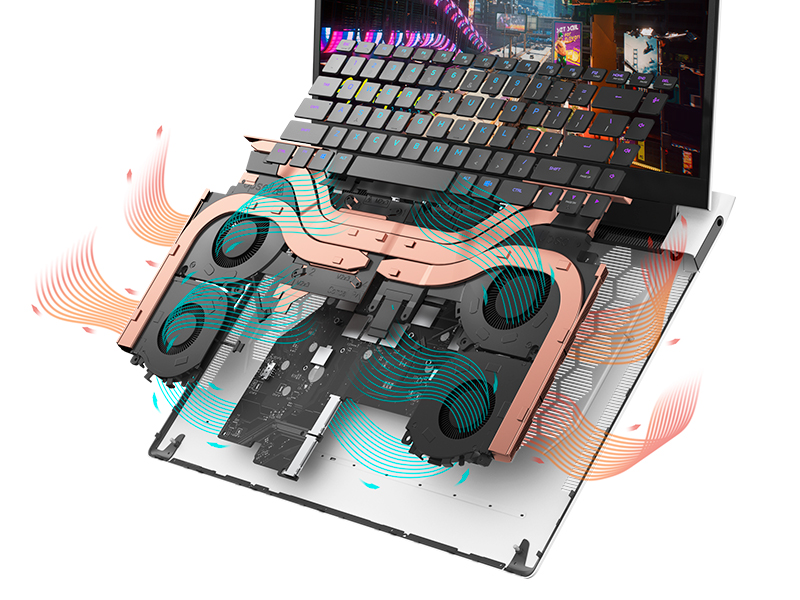
Figure 5.1: Alienware Command Center for system management.
6. Problemų sprendimas
If you encounter issues with your Alienware X17 R2, consider the following basic troubleshooting steps:
- Nėra galios: Įsitikinkite, kad maitinimo adapteris yra tvirtai prijungtas tiek prie nešiojamojo kompiuterio, tiek prie veikiančio maitinimo lizdo. Patikrinkite maitinimo indikatoriaus lemputę.
- Rodymo problemos: If the screen is black, try connecting an external monitor to verify if the issue is with the laptop's display or the graphics card. Update graphics drivers.
- Perkaitimas: Ensure cooling vents are clear of obstructions. Use Alienware Command Center to monitor temperatures and adjust fan profiles.
- Našumo sulėtėjimas: Uždarykite nereikalingas programas. Patikrinkite, ar nėra foninių procesų, kurie naudoja daug procesoriaus arba RAM. Įsitikinkite, kad SSD diske yra pakankamai laisvos vietos.
- Programinės įrangos problemos: Restart the laptop. If issues persist, consider performing a system restore or reinstalling the problematic software.
7. Specifikacijos
| Funkcija | Specifikacija |
|---|---|
| Ekrano dydis | 17.3 colių |
| Ekrano raiška | 1920 x 1080 pikselių (Full HD) |
| Procesorius | Intel Core i9-12900H (3.8 GHz, 14 Cores) |
| RAM | 16 GB DDR5 (4800 MHz) |
| Kietasis diskas | 1 TB SSD (kietojo kūno) |
| Grafikos koprocesorius | NVIDIA GeForce RTX 3070 Ti (8 GB GDDR6) |
| Operacinė sistema | Windows 11 Home |
| Belaidis tipas | 802.11ax (Killer Wi-Fi 6), Bluetooth |
| USB 3.0 prievadai | 3 |
| Prekės svoris | 6.82 svaro |
| Gaminio matmenys | 11.79 x 15.72 x 0.58 colio |
8. Kas yra dėžutėje
- Alienware X17 R2 žaidimų nešiojamasis kompiuteris
- Maitinimo adapteris
- Maitinimo laidas
- Dokumentacija
9. Oficialūs produktų vaizdo įrašai
Alienware X17 R2 Gaming Laptop Overview
9.1 vaizdo įrašas: Oficialus asmuoview of the Alienware X17 R2 Gaming Laptop, highlighting its design, cooling, and performance features.
About Alienware X17 R2 Gaming Laptop
Video 9.2: A detailed look at the Alienware X17 R2 Gaming Laptop, showcasing its features and design elements.
10. Garantija ir palaikymas
Your Alienware X17 R2 Gaming Laptop comes with a standard manufacturer's warranty. For detailed warranty information, please refer to the documentation included with your product or visit the official Alienware support websvetainę.
For technical support, driver downloads, and service requests, please visit the Alienware support portal. You can also find FAQs and community forums for additional assistance.