
1. Įvadas
The Black Box Boxilla KVM Manager, model BXAMGR-R2-ULT, is a robust and TAA-compliant KVM management solution designed to streamline network operations. This device allows for efficient management and control of an unlimited number of devices within your KVM infrastructure, eliminating the need for multiple licenses. It ensures compliance with government and public sector standards, providing a secure and reliable platform for KVM management.
This manual provides comprehensive instructions for the setup, operation, maintenance, and troubleshooting of your Boxilla KVM Manager.
2. Saugos informacija
Prieš naudodami šį įrenginį, perskaitykite ir supraskite visas saugos instrukcijas. Nesilaikant šių instrukcijų, gali kilti elektros smūgis, gaisras arba sugesti gaminys.
- Įsitikinkite, kad įrenginys prijungtas prie įžeminto maitinimo lizdo.
- Saugokite prietaisą nuo vandens ar per didelės drėgmės.
- Neatidarykite įrenginio c.asing. Visus techninės priežiūros darbus patikėkite kvalifikuotiems darbuotojams.
- Naudokite įrenginį nurodytose temperatūros ir drėgmės ribose.
- Prieš valydami ar perkeldami įrenginį, atjunkite jį nuo elektros tinklo.
3. Pakuotės turinys
Patikrinkite, ar pakuotėje yra visi reikalingi daiktai:
- Black Box Boxilla KVM Manager (BXAMGR-R2-ULT)
- Maitinimo adapteris
- Greitos pradžios vadovas
- Tvirtinimo detalės (jei taikoma)
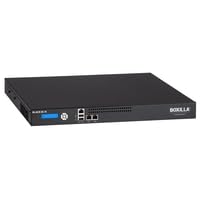
Image of the Black Box Boxilla KVM Manager, model BXAMGR-R2-ULT, showing its front panel and compact design.
4. Sąranka
Follow these steps for initial setup of your Boxilla KVM Manager:
- Išpakuokite įrenginį: Carefully remove the KVM manager and all accessories from its packaging.
- Vieta: Place the device on a stable, flat surface or mount it in a rack using the provided hardware. Ensure adequate ventilation around the unit.
- Prijunkite tinklo laidus: Connect the KVM manager to your network infrastructure using standard Ethernet cables. Refer to your network topology for specific port connections.
- Prijunkite maitinimą: Plug the power adapter into the KVM manager's power input, then connect it to a grounded electrical outlet. The device will power on automatically.
- Pradinė konfigūracija: Prieiga prie įrenginio web sąsaja per a web browser using its default IP address (refer to the Quick Start Guide for default IP and login credentials). Follow the on-screen prompts to configure network settings, user accounts, and initial KVM device discovery.
5. Naudojimo instrukcijos
Once the Boxilla KVM Manager is set up, you can begin managing your KVM devices. The primary interface for operation is the web-based management console.
- Prisijungiama: Atidarykite a web browser and navigate to the IP address or hostname of your Boxilla KVM Manager. Enter your username and password.
- Įrenginio atradimas: Use the discovery tools within the interface to find and add KVM transmitters and receivers to your management system.
- Vartotojo valdymas: Create and manage user accounts, assigning appropriate access levels and permissions for KVM control.
- Session Management: Initiate, monitor, and terminate KVM sessions to connected devices.
- Sistemos stebėjimas: Review system logs, device status, and network performance metrics through the dashboard.
- Firmware atnaujinimai: Reguliariai tikrinkite, ar yra programinės įrangos atnaujinimų, ir juos taikykite, kad užtikrintumėte optimalų našumą ir saugumą.
6. Priežiūra
Regular maintenance ensures the longevity and optimal performance of your Boxilla KVM Manager.
- Valymas: Įrenginio išorę valykite minkštu, sausu skudurėliu. Nenaudokite skystų valiklių ar aerozolių.
- Vėdinimas: Ensure that ventilation openings are clear of dust and obstructions to prevent overheating.
- Firmware: Keep the device firmware updated to the latest version. Refer to the Black Box support websvetainę, kurioje rasite atnaujinimus ir instrukcijas.
- Atsarginės kopijos konfigūracija: Periodically back up your device configuration settings to prevent data loss in case of an unforeseen issue.
7. Problemų sprendimas
This section addresses common issues you might encounter with the Boxilla KVM Manager.
| Problema | Galima priežastis | Sprendimas |
|---|---|---|
| Įrenginys neįsijungia. | No power supply, faulty power adapter, or power outlet issue. | Check power cable connection. Verify power outlet functionality. Try a different power adapter if available. |
| Negaliu prieiti web sąsaja. | Neteisingas IP adresas, tinklo ryšio problema arba prieigą blokuojanti užkarda. | Verify the device's IP address. Check network cable connections. Ensure your computer is on the same network segment. Temporarily disable firewall for testing. |
| KVM devices not discovered. | Network configuration issues, KVM devices not powered on, or incorrect discovery settings. | Ensure KVM transmitters/receivers are powered and connected. Verify network settings on Boxilla and KVM devices. Check discovery range settings in the web sąsaja. |
| Lėtas veikimas. | Network congestion, outdated firmware, or high CPU/memory usage. | Check network bandwidth. Update firmware to the latest version. Monitor system resources via the web sąsaja. |
8. Specifikacijos
Detailed specifications for the Black Box Boxilla KVM Manager BXAMGR-R2-ULT:
- Modelio numeris: BXAMGR-R2-ULT
- ASIN: B0BCX8GNRR
- Gaminio matmenys: 11 x 10 x 6 colio
- Gamintojas: Black Box Network
- Pirmas prieinamas: 30 m. gegužės 2023 d
- Licencija: Unlimited Device License
- Atitiktis: Atitinka TAA
9. Garantija ir palaikymas
For warranty information and technical support, please refer to the official Black Box Network websvetainėje arba susisiekite su jų klientų aptarnavimo skyriumi. Išsaugokite pirkimo kvitą, jei prireiktų pateikti pretenziją dėl garantijos.
Black Box Network Official Websvetainė: Www.blackbox.com