
Įvadas
This manual provides detailed instructions for the installation, operation, and maintenance of your Tiandy TC-C38XS 8MP IR Turret Camera. Please read this manual thoroughly before using the product to ensure correct usage and to prevent damage.
Saugos informacija
- Ensure the power supply meets the camera's requirements (DC 12V or PoE).
- Nelaikykite fotoaparato ekstremalioje temperatūroje, drėgmėje ar korozinėje aplinkoje.
- Venkite ilgą laiką nukreipti fotoaparatą tiesiai į stiprius šviesos šaltinius.
- Elkitės su fotoaparatu atsargiai, kad išvengtumėte fizinės žalos.
- Montavimą turėtų atlikti kvalifikuoti specialistai, laikydamiesi vietinių elektros kodeksų.
Pakuotės turinys
Patikrinkite, ar pakuotėje yra visi komponentai:
- Tiandy TC-C38XS IR Turret Camera
- Tvirtinimo varžtai ir sieniniai kaiščiai
- Vandeniui atspari Ethernet kabelio jungtis
- Greito paleidimo vadovas (jei taikoma)
- Gręžimo šablonas (jei taikoma)
Produktas baigtasview
The Tiandy TC-C38XS is an 8MP IR Turret Camera designed for outdoor surveillance, featuring a full metal housing and advanced imaging capabilities.
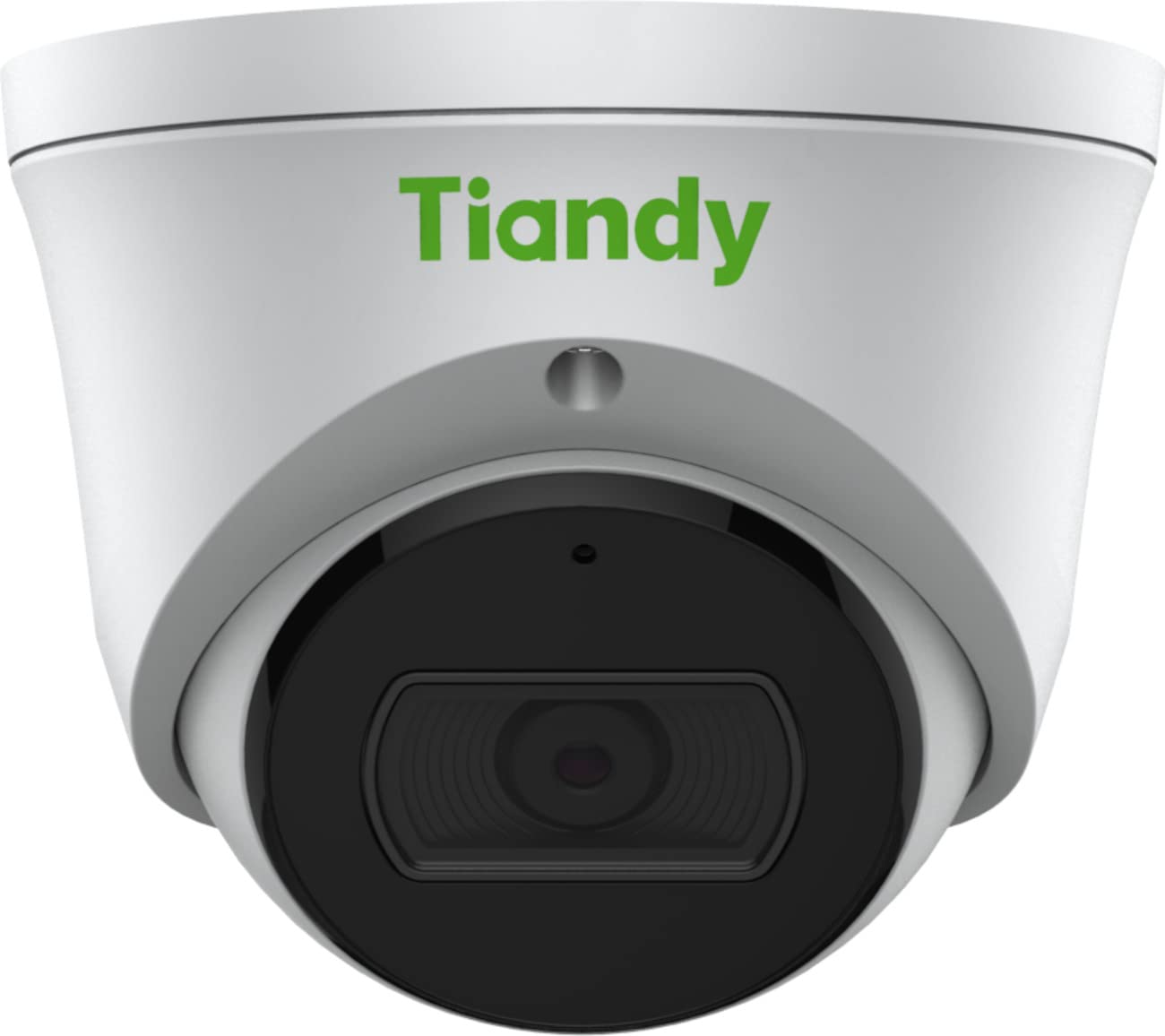
1 paveikslas: Priekyje view of the Tiandy TC-C38XS IR Turret Camera, showing the lens and IR illuminators.

2 paveikslas: Kampuotas view of the Tiandy TC-C38XS IR Turret Camera, highlighting its compact turret design.

3 paveikslas: Technical drawing showing the dimensions of the Tiandy TC-C38XS IR Turret Camera (approx. 116.6mm diameter, 96mm height).
Pagrindinės funkcijos:
- 8 Megapixel Resolution: Captures video at up to 3840x2160 at 20fps.
- 1/2.8" CMOS Sensor: Provides clear images even in low-light conditions.
- Išmanusis IR: Infrared illumination up to 30 meters (98.42 feet) for night vision.
- 120dB WDR: Wide Dynamic Range for balanced images in high-contrast scenes.
- Integruotas mikrofonas: Garso stebėjimui.
- Laivo saugykla: Supports MicroSD cards up to 512 GB.
- Full Metal Housing: Durable construction for outdoor use.
Sąranka
1. Kameros montavimas
The TC-C38XS is designed for wall mounting. Choose a suitable location that provides the desired field of view ir yra pasiekiamas tinklo ir maitinimo kabeliais.
- Use the provided drill template (if included) to mark the screw holes on the mounting surface.
- Drill pilot holes and insert wall plugs if mounting on masonry or drywall.
- Pritvirtinkite kameros pagrindą prie tvirtinimo paviršiaus naudodami pateiktus varžtus.
- Adjust the camera's angle: The camera supports pan 0 to 340°, tilt 0 to 75°, and rotate 0 to 360° for optimal positioning. Loosen the adjustment screws, position the camera, and then tighten the screws to secure it.
2. Laidai ir maitinimo prijungimas
The camera supports Power over Ethernet (PoE) or a DC 12V power supply.
- PoE ryšys: Connect a standard Ethernet cable from a PoE-enabled switch or NVR to the camera's RJ45 port. This provides both power and data connectivity. Ensure the waterproof connector is properly installed to protect the Ethernet port from moisture.
- DC 12V Connection: If PoE is not used, connect a DC 12V power adapter (not included) to the camera's power input port. Then, connect a standard Ethernet cable from your network to the camera's RJ45 port for data.
After connecting, the camera will power on and begin its startup sequence.
Veikiantis
1. Initial Network Configuration
To access the camera's web interface for configuration, you will need to find its IP address on your network. This can typically be done using a manufacturer-provided IP search tool or by checking your router's connected devices list.
- Prijunkite kompiuterį prie to paties tinklo kaip ir fotoaparatas.
- Atidarykite a web naršyklę ir įveskite kameros IP adresą.
- Log in using the default username and password (refer to the Quick Start Guide or manufacturer's documentation for default credentials). It is highly recommended to change the default password immediately for security.
2. Pagrindinės funkcijos
- Tiesiogiai View: Access the live video feed through the web interface or compatible NVR/VMS software.
- Įrašas: Configure recording schedules and methods (continuous, motion-triggered) to the on-board MicroSD card (up to 512 GB) or a connected NVR.
- Judesio aptikimas: Set up motion detection zones and sensitivity. The camera can trigger alarms (e.g., email notifications) upon detection.
- Išmanusis IR: The camera automatically adjusts IR intensity to prevent overexposure in night vision, ensuring clear images up to 30 meters.
- Vaizdo nustatymai: Adjust saturation, brightness, contrast, and sharpness via the client software or web browser to optimize image quality.
- Garsas: Utilize the built-in microphone for audio monitoring.
Priežiūra
1. Valymas
Reguliarus valymas padeda išlaikyti optimalią vaizdo kokybę.
- Gently wipe the camera lens with a soft, clean cloth. If necessary, use a mild lens cleaning solution.
- Do not use harsh chemicals or abrasive materials, as they can damage the lens coating or housing.
- Periodically clean the camera housing to remove dust and debris.
2. Firmware atnaujinimai
Periodiškai tikrinkite gamintojo website for firmware updates. Firmware updates can improve performance, add new features, and enhance security. Follow the instructions provided with the firmware update package carefully.
3. „MicroSD“ kortelių valdymas
If using on-board storage, regularly check the status of the MicroSD card. Format the card periodically to maintain performance and prevent data corruption. Back up important recordings before formatting.
Trikčių šalinimas
| Problema | Galima priežastis | Sprendimas |
|---|---|---|
| No image/No power | Incorrect power supply; Loose cable connection; PoE issue. | Check power adapter (DC 12V) or PoE switch. Ensure all cables are securely connected. |
| Nepavyksta pasiekti kameros per tinklą | Incorrect IP address; Network configuration error; Firewall blocking. | Verify IP address. Check network cable. Disable temporary firewall for testing. Ensure camera and computer are on the same subnet. |
| Prasta vaizdo kokybė | Dirty lens; Insufficient lighting; Incorrect image settings. | Clean the lens. Adjust image settings (brightness, contrast, WDR). Ensure IR is functioning correctly at night. |
| Judesio aptikimas neveikia | Neteisingi jautrumo nustatymai; Nekonfigūruota aptikimo zona; Kliūtys. | Review motion detection settings in the web interface. Adjust sensitivity and redraw detection zones. Clear any obstructions in the camera's view. |
| „MicroSD“ kortelė neįrašo | Card full; Card not formatted; Card faulty; Recording schedule not set. | Check card capacity. Format the MicroSD card via the camera's interface. Replace card if faulty. Verify recording schedule. |
Specifikacijos
| Funkcija | Detalė |
|---|---|
| Modelis | TC-C38XS |
| Vaizdo jutiklis | 1/2.8 colio CMOS |
| Maks. Rezoliucija | 3840 x 2160 (8 MP) |
| Kadrų dažnis | Up to 20fps (3840x2160), 30fps (1080p) |
| Min. Apšvietimas | Color: 0.003Lux@ (F1.6, AGC ON), B/W: 0Lux with IR |
| Objektyvas | Fiksuotas 2.8mm |
| Laukas View (FOV) | Horizontalus: 100.1° |
| IR diapazonas | Up to 30m (98.42 feet) with Smart IR |
| Platus dinaminis diapazonas (WDR) | 120 dB |
| Vaizdo įrašų suspaudimas | S+265/H.265/H.264/M-JPEG |
| Garsas | Integruotas mikrofonas |
| Laive esančios saugyklos | MicroSD kortelė iki 512 GB |
| Tinklo sąsaja | 1 RJ45 10M / 100M savaime prisitaikantis Ethernet prievadas |
| Maitinimo šaltinis | DC 12V, PoE (802.3af) |
| Medžiaga | Pilnas metalinis korpusas |
| Matmenys | Approx. 4.59 x 4.59 x 3.77 inches (116.6mm diameter, 96mm height) |
| Svoris | apytiksliai 0.88 svaro (0.4 kg) |
| Eksploatavimo sąlygos | Naudojimas lauke |
| Protokolai | TCP/IP, HTTP, HTTPS, DHCP, DNS, RTP, RTSP, etc. |
| Signalizacijos paleidiklis | Motion Detection, Mask Alarm, Disk Full, etc. |
| Vaizdo įrašų analizė | Tripwire, Perimeter |
Informacija apie garantiją
Tiandy products typically come with a limited manufacturer's warranty. For specific warranty terms and conditions, please refer to the warranty card included with your product or visit the official Tiandy websvetainėje. Išsaugokite pirkimo kvitą kaip pirkimo įrodymą garantiniams reikalavimams.
Palaikymas
If you encounter any issues or have questions regarding your Tiandy TC-C38XS camera that are not covered in this manual, please contact your authorized Tiandy reseller or visit the official Tiandy support website for further assistance. You may also find FAQs and additional resources online.
- Gamintojas: Tiandy
- Modelio numeris: TC-C38XS
- UPC: 785249841675