
Andoer d8cfa559-d5d2-443f-9ed4-a8e814a7e410
Andoer 4K Digital Camera Video Camcorder User Manual
Model: d8cfa559-d5d2-443f-9ed4-a8e814a7e410
1. Įvadas
This manual provides essential information for the safe and effective operation of your Andoer 4K Digital Camera Video Camcorder. Please read this manual thoroughly before using the device and retain it for future reference.
2. Saugos informacija
Įspėjimas:
- Saugokite fotoaparatą nuo vandens ar drėgmės.
- Venkite fotoaparato numetimo ir stiprių smūgių.
- Laikyti mažiems vaikams nepasiekiamoje vietoje dėl smulkių dalių.
- Naudokite tik nurodytą įkrovimo laidą ir maitinimo šaltinį.
- Dispose of packaging materials properly to avoid choking hazards.

Image: A warning graphic indicating proper disposal of packaging materials to prevent choking hazards. This emphasizes the importance of safety, especially for children.
3. Pakuotės turinys
Patikrinkite, ar pakuotėje yra visi toliau išvardyti daiktai:
- 1 x Andoer Digital Camera
- 1x USB įkrovimo laidas
- 1 x Riešo dirželis
- 1 x nešiojimo krepšys
- 1 x 32GB atminties kortelė
- 1 x Users' Manual (English)
4. Produktas baigtasview
4.1 Kameros komponentai
Familiarize yourself with the main components of your digital camera.

Vaizdas: Priekinė ir galinė dalys views of the silver Andoer 4K Digital Camera. The front shows the lens and flash, while the back displays the screen and control buttons, including zoom (W/T), OK, menu, and mode buttons.

Paveikslėlis: Šoninė pusė view of the Andoer 4K Digital Camera, highlighting the USB port and memory card slot, which are typically covered by a flap.
4.2 Ekranas ir valdikliai
The camera features a 2.4-inch IPS screen for clear viewing and intuitive controls.
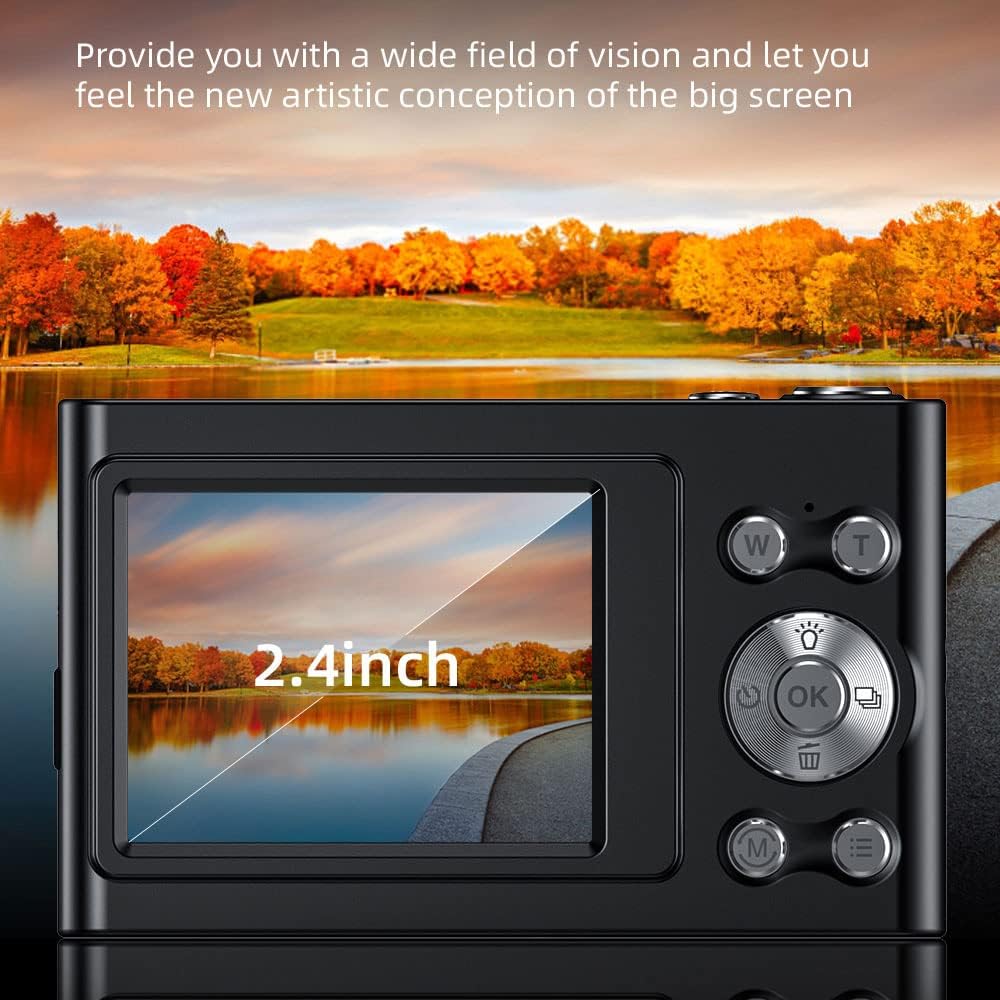
Image: A close-up of the camera's 2.4-inch IPS screen, displaying a landscape scene with a lake and autumn trees, demonstrating the screen's clarity and size.

Image: A hand holding the Andoer camera, with the screen displaying a family on a beach. The image highlights the camera's compact size and the accessibility of its rear controls, including the directional pad and function buttons.
4.3 Matmenys
The compact design of the camera makes it portable and easy to handle.

Image: A technical diagram illustrating the dimensions of the Andoer 4K Digital Camera. It shows the length (95mm), height (58mm), and thickness (25mm) of the device, along with top, front, and side views.
5. Sąranka
5.1 Akumuliatoriaus įkrovimas
The camera has a built-in lithium battery. To charge:
- Connect the camera to a USB power adapter (not included) or a computer using the provided USB charging cable.
- Užsidegs įkrovimo indikatoriaus lemputė.
- Once fully charged, the indicator light will turn off or change color.
Note: Ensure the camera is turned off during charging for optimal battery life.
5.2 Atminties kortelės įdėjimas
The camera supports Class-10 external TF memory cards up to 128GB. A 32GB memory card is included.
- Locate the memory card slot on the side of the camera (refer to Product Overview vaizdas).
- Atidarykite apsauginį dangtelį.
- Insert the memory card with the metal contacts facing the correct direction until it clicks into place.
- Uždarykite apsauginį dangtelį.
Note: Format the memory card in the camera's settings before first use.
6. Naudojimo instrukcijos
6.1 Maitinimo įjungimas/išjungimas
Press and hold the power button (usually located on the top or side) to turn the camera on or off.
6.2 Fotografavimas
- Įjunkite fotoaparatą.
- Select Photo Mode using the Mode button (M).
- Frame your shot using the IPS screen.
- Use the W/T buttons for 16X digital zoom.
- Press the Shutter button (usually the large button on top) to capture the photo.

Image: A visual comparison demonstrating the camera's 16X digital zoom capability. The top image shows a wide shot (1x zoom) of a person on a beach with a hot air balloon, while the bottom image shows a zoomed-in view (16x zoom) of the same person, highlighting the magnification.
6.3 Vaizdo įrašų įrašymas
- Įjunkite fotoaparatą.
- Select Video Mode using the Mode button (M).
- Norėdami pradėti įrašymą, paspauskite užrakto mygtuką.
- Norėdami sustabdyti įrašymą, dar kartą paspauskite užrakto mygtuką.
The camera supports 4K (3840x2160) video resolution.
6.4 Atkūrimas
Į view užfiksuotos nuotraukos ir vaizdo įrašai:
- Enter Playback Mode (often indicated by an icon like a triangle or arrow).
- Norėdami naršyti medijoje, naudokite krypties mygtukus.
- Press the OK button to play videos.
6.5 Meniu nustatymai
Press the Menu button to access camera settings, including:
- Paveikslėlio raiška: 48M, 36M, 30M, 24M, 20M, 18M, 16M, etc.
- Vaizdo įrašo raiška: 4K(3840x2160), 2.7K(2688x1520), 1080P(1920x1080), 720P(1280x720)
- Režimas: Auto, Sport, Night, Portrait, Landscape, Backlight, Party, Beach, High Sensitivity
- Baltos spalvos balansas: Automatinis, Dienos šviesa, Debesuota, Fluorescencinė, Volframas
- Laikmatis: Išjungta, 2 sek., 5 sek., 10 sek
- Automatinis išjungimas: Išjungta, 1 minutė, 3 minutės, 5 minutės, 10 minučių
- Poveikis: EV-3 to EV+3
- Apsauga nuo drebėjimo: Digital image stabilization.
- Face Detect & Smile Capture: Features for improved portrait photography.
- Continuous Photography: For capturing multiple shots in quick succession.

Paveikslėlis: Du views of the Andoer camera demonstrating its ability to support both vertical and horizontal screen shooting. One camera is positioned horizontally, and another is rotated vertically, each displaying a portrait of a woman.
7. Priežiūra
7.1 Kameros valymas
- Kameros korpusą valykite minkštu, sausu skudurėliu.
- For the lens and screen, use a specialized lens cleaning cloth and solution.
- Nenaudokite abrazyvinių valiklių ar tirpiklių.
7.2 Saugykla
- Fotoaparatą laikykite vėsioje, sausoje vietoje, toliau nuo tiesioginių saulės spindulių ir ekstremalių temperatūrų.
- If storing for an extended period, remove the memory card and ensure the battery is partially charged (not fully charged or fully depleted).
- Use the provided carry bag for protection during transport.
8. Problemų sprendimas
| Problema | Galima priežastis | Sprendimas |
|---|---|---|
| Kamera neįsijungia. | Baterija išsikrovusi. | Įkraukite akumuliatorių. |
| Negalima fotografuoti / filmuoti. | Atminties kortelė pilna arba netinkamai įdėta. | Insert/reinsert memory card, delete unnecessary files, or replace with a new card. |
| Vaizdai neryškūs. | Lens is dirty; camera shake; subject too close/far. | Clean the lens; use anti-shake feature; ensure proper focus distance. |
| Blykstė neveikia. | Blykstės režimas išjungtas arba baterija išsikrovusi. | Check flash settings; charge battery. |
9. Specifikacijos
| Funkcija | Detalė |
|---|---|
| Vaizdo jutiklis | CMOS jutiklis |
| Ekranas | 2.4 colio IPS ekranas |
| Paveikslėlio raiška | 48M, 36M, 30M, 24M, 20M, 18M, 16M, etc. |
| Vaizdo raiška | 4K(3840x2160), 2.7K(2688x1520), 1080P(1920x1080), 720P(1280x720) |
| Skaitmeninis priartinimas | 16X |
| Poveikis | EV-3 to EV+3 |
| Maitinimo šaltinis | Integruota ličio baterija |
| Prekės dydis | 9.5 * 5.8 * 2.5 cm (3.7 * 2.3 * 1 colio) |
| Prekės svoris | 115 g (4.1 uncijos) |
| Atminties kortelių palaikymas | Class-10 TF card, max. 128GB (32GB included) |
| Ryšys | USB |
| Ypatingos savybės | Anti-shake, Face Detect, Smile Capture, Continuous Photography, Self-timer, Built-in Flash |
10. Garantija ir palaikymas
This product comes with a standard manufacturer's warranty. For specific warranty terms and conditions, please refer to the documentation provided with your purchase or contact Andoer customer support.
For technical support or service inquiries, please visit the official Andoer websvetainėje arba susisiekite su jų klientų aptarnavimo skyriumi. Kontaktinę informaciją paprastai galite rasti ant produkto pakuotės arba oficialioje prekės ženklo internetinėje svetainėje.
Based on product specifications, the warranty type is listed as "No Warranty". Please refer to your purchase documentation for any applicable seller or retailer warranties.
Ask a question about this manual
Ask about setup, troubleshooting, compatibility, parts, safety, or missing instructions. Manuals+ will review the question and use this page’s manual context to help answer it.