
CAS CL3000-30KG-P
CAS CL3000-P brūkšninių etikečių spausdinimo svarstyklių naudotojo vadovas
Model: CL3000-30KG-P
1. Įvadas
This manual provides detailed instructions for the setup, operation, maintenance, and troubleshooting of the CAS CL3000-P Networking Barcode Label Printing Scale. This device is designed for commercial use in environments such as grocery stores, butcher shops, and supermarkets, offering integrated weighing, price computing, and barcode label printing capabilities.
Pagrindinės funkcijos:
- Integrated Barcode Label Printer for item-specific labels.
- Networking Ready (LAN) for central price updates and data synchronization.
- High-Speed Printing with 202 dpi resolution.
- Dual LCD Display for operator and customer viewing.
- User-Friendly PLU Management, storing up to 10,000 PLUs.
- Durable Aluminum Body Construction.
2. Išpakavimas ir sąranka
Carefully unpack all components and ensure all items are present before proceeding with setup.
2.1. Pakuotės turinys
Patikrinkite, ar jūsų pakuotėje yra šie daiktai:
- CAS CL3000-P Scale Unit
- Maitinimo kabelis
- Etikečių ritinėlio pradinis rinkinys
- Vartotojo vadovas (šis dokumentas)
2.2. Įdėjimas
Place the scale on a stable, level surface, away from direct sunlight, excessive heat, or strong vibrations. Ensure adequate space for operation and label printing.
2.3. Maitinimo prijungimas
- Connect the power cable to the scale's power input port.
- Kitą maitinimo laido galą prijunkite prie įžeminto elektros lizdo.
- Turn on the scale using the power switch, typically located on the rear or side of the unit.
2.4. Network Connection (LAN)
For networking capabilities, connect an Ethernet cable from the scale's LAN port to your network router or switch. Refer to your network administrator for specific IP address configuration if required.
2.5. Label Roll Installation
Open the printer cover and carefully load the label roll according to the diagram inside the printer compartment. Ensure the labels feed smoothly and are correctly aligned for printing.
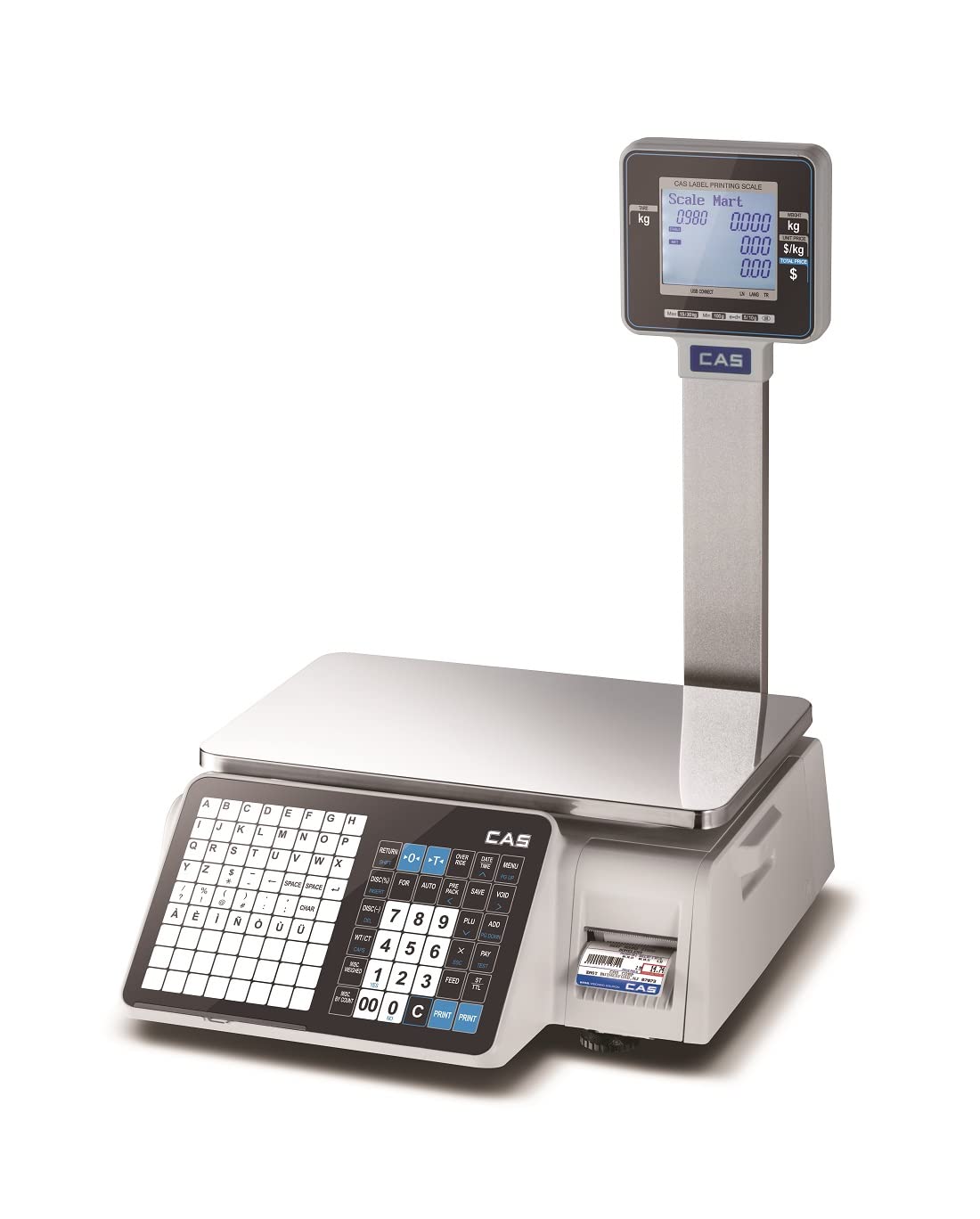
Figure 2.1: CAS CL3000-P Barcode Label Printing Scale with dual display and integrated printer.
3. Naudojimo instrukcijos
This section details the basic operation of the CAS CL3000-P scale for weighing, price computing, and label printing.
3.1. Pagrindinis svėrimas
- Ensure the scale displays "0.000 kg" before placing any item. If not, press the NULIS mygtuką.
- Place the item to be weighed on the weighing platter.
- Svoris bus rodomas tiek operatoriaus, tiek kliento LCD ekranuose.
3.2. Price Computing and Label Printing
The scale supports up to 10,000 PLUs (Price Look-Up units) for efficient operation.
- Place the item on the weighing platter.
- Enter the PLU code for the item using the numeric keypad.
- Alternatively, if a PLU is not set, enter the unit price directly using the numeric keypad.
- Paspauskite SPAUSDINTI button to generate a barcode label. The label will include weight, unit price, total price, and barcode.

Figure 3.1: Close-up of the dual LCD display, featuring a scrolling message bar for enhanced communication.

Figure 3.2: Detail of the integrated printer, capable of linerless printing for efficiency.
3.3. PLU Management
The CL3000-P allows for easy management of up to 10,000 PLUs. Refer to the detailed programming guide (separate document or advanced settings menu) for adding, editing, or deleting PLUs.

Figure 3.3: The scale's internal memory supports storage for up to 10,000 product PLUs.
4. Priežiūra
Regular maintenance ensures the longevity and accuracy of your CAS CL3000-P scale.
4.1. Valymas
- Prieš valydami atjunkite maitinimą.
- Wipe the scale's exterior and weighing platter with a soft, damp audinys.
- Nenaudokite abrazyvinių valiklių, tirpiklių ir nemerkite įrenginio į vandenį.
- Ensure no liquids enter the display or printer openings.
4.2. Spausdintuvo priežiūra
- Regularly check the printer head for debris or adhesive residue. Clean gently with a lint-free cloth and isopropyl alcohol if necessary.
- Ensure label rolls are stored in a cool, dry place to prevent adhesive degradation.
4.3. Kalibravimas
The scale is factory-calibrated. If you suspect accuracy issues, contact authorized CAS service personnel for re-calibration. Do not attempt to calibrate the scale yourself unless specifically instructed by a qualified technician.
5. Problemų sprendimas
This section provides solutions to common issues you might encounter with your CAS CL3000-P scale.
| Problema | Galima priežastis | Sprendimas |
|---|---|---|
| Svarstyklės neįsijungia. | Power cable disconnected; Power outlet faulty; Power switch off. | Check power cable connection; Test power outlet; Ensure power switch is ON. |
| Netikslūs svorio rodmenys. | Scale not level; Debris under platter; Needs calibration. | Ensure scale is on a level surface; Clean under platter; Contact service for calibration. |
| Labels not printing or printing blank. | Label roll empty or incorrectly loaded; Printer head dirty; Printer error. | Replace/re-load label roll correctly; Clean printer head; Restart scale. |
| Tinklo ryšio problemos. | Ethernet cable disconnected; Network configuration error. | Check Ethernet cable; Verify network settings with IT support. |
If the problem persists after attempting these solutions, please contact CAS customer support.
6. Specifikacijos
| Funkcija | Detalė |
|---|---|
| Modelis | CL3000-30KG-P |
| Prekės ženklas | CAS |
| Svorio apribojimas | 30 kilogramo |
| Nuskaitymo tikslumas | 10g |
| Keptuvės dydis | 380 x 250 mm (15 x 10 colių) |
| Ekrano tipas | LCD (dvigubas ekranas) |
| PLU Memory | Iki 10 000 PLU |
| Spausdintuvo skiriamoji geba | 202 dpi |
| Ryšys | LAN (Ethernet), USB port, RS-232C, RJ11, optional wireless |
| Medžiaga | Stainless Steel (platter), Aluminum Body Construction |
| Maitinimo šaltinis | AC/DC |
| Prekės svoris | 3.5 kg |
| Pakuotės matmenys | 30 x 20 x 10 cm |
| Kilmės šalis | Indija |
7. Garantija ir palaikymas
7.1. Informacija apie garantiją
The CAS CL3000-P scale comes with a standard manufacturer's warranty. For specific warranty terms and conditions, please refer to the warranty card included with your product or contact CAS customer service. Extended warranty options may be available.
7.2. Pagalba klientams
For technical assistance, service requests, or any inquiries regarding your CAS CL3000-P scale, please contact CAS Weighing India Pvt Ltd. Their contact information can typically be found on the product packaging or their official websvetainę.
Kontaktinė informacija:
- Manufacturer: CAS Corportaion
- Packer: CAS Weighing India Pvt Ltd
- Importer: CAS Corportation
- Telefonas: 9212559707
Ask a question about this manual
Ask about setup, troubleshooting, compatibility, parts, safety, or missing instructions. Manuals+ will review the question and use this page’s manual context to help answer it.