
1. Įvadas
Thank you for choosing the Voktta Battery Capacity Voltage Meter. This device is designed to accurately monitor your battery's capacity, voltage, and temperature, providing essential data for various applications. It features a clear display, alarm functions, and broad compatibility with different battery types. Please read this manual thoroughly before installation and operation to ensure correct usage and optimal performance.
2. Produkto ypatybės
- Daugiafunkcis ekranas: Simultaneously shows battery capacity percentage, ttage, and temperature (Celsius or Fahrenheit).
- Integruota apsauga: Equipped with a protective cover, dustproof and waterproof surface, and reverse input connection protection.
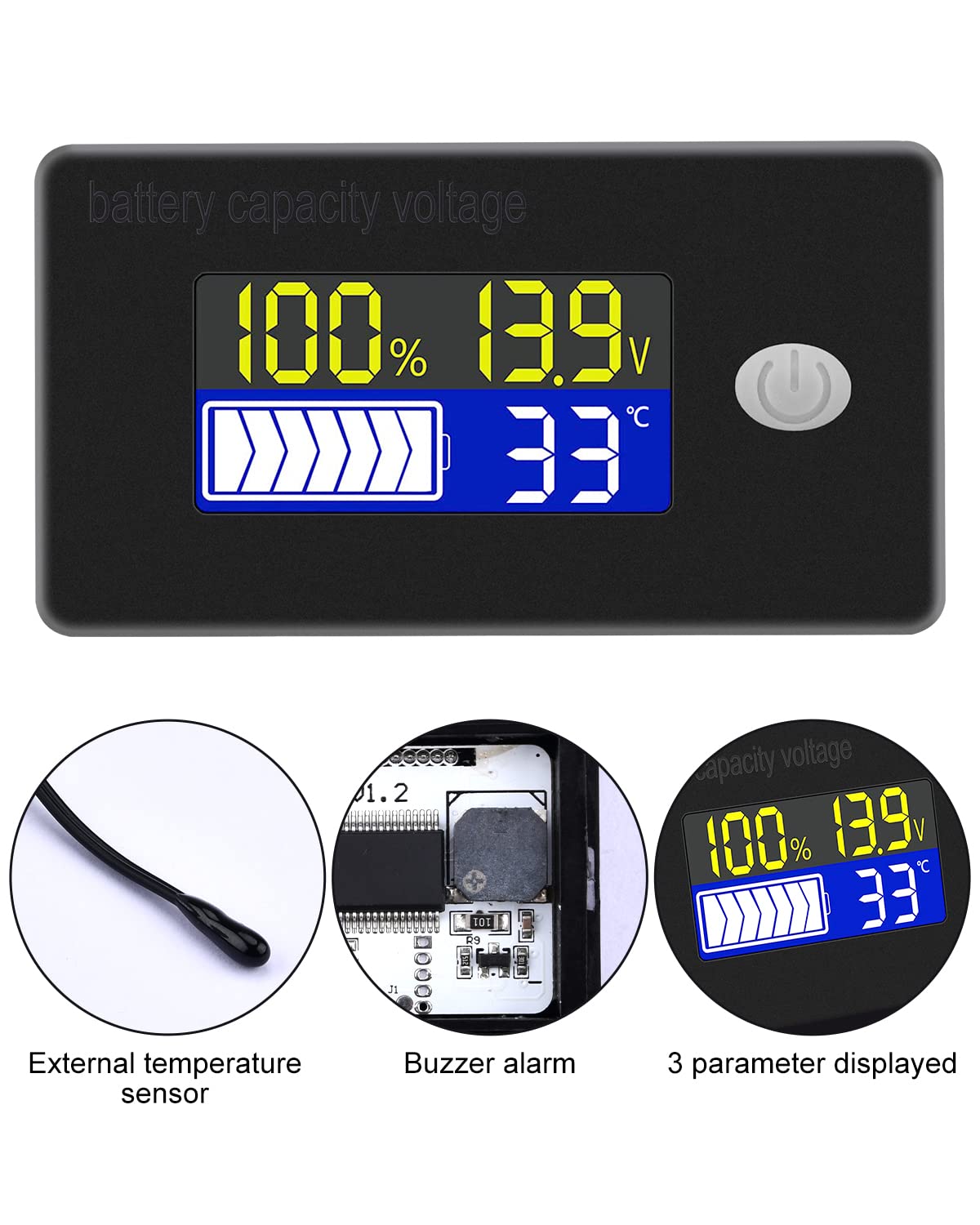
- External Temperature Sensor & Buzzer: Includes an external temperature sensor for accurate readings and an internal buzzer for high/low voltage and over-temperature alarms.
- Six Programmable Modes: Allows setting battery type, delay for ultra-low power mode, adjusting battery percentage limits, activating undervoltage alarm and threshold, activating temperature alarm, and voltage kalibravimas.
- Platus baterijų suderinamumas: Compatible with 12V, 24V, 36V, 48V, 60V, 72V, 84V lead-acid batteries, lithium-ion batteries, polymer lithium-ion batteries, 3-15 series lithium-ion batteries, water batteries, and lithium iron phosphate batteries.
- Platus taikymas: Suitable for use in jet skis, golf carts, RVs, lawnmowers, aquariums, DIY solar generators, and other systems requiring battery monitoring.
3. Pakuotės turinys
Patikrinkite pakuotę, ar joje yra šie daiktai:
- Voktta Battery Capacity Voltage Skaitiklis
- Connection Wires (Red for positive, Black for negative)
- Išorinis temperatūros jutiklis
- Vartotojo vadovas (šis dokumentas)

4. Saugos informacija
- Prieš montuodami ar atlikdami įrenginio techninę priežiūrą, visada atjunkite maitinimą.
- Ensure correct polarity when connecting the wires (Red to positive, Black to negative) to prevent damage to the meter and battery.
- Do not exceed the specified operating voltage diapazonas (10-100V).
- Keep the device away from extreme temperatures, moisture, and corrosive environments.
- Nebandykite ardyti ar modifikuoti įrenginio. Visus techninės priežiūros darbus patikėkite kvalifikuotiems darbuotojams.
5. Produktas baigtasview
The Voktta Battery Capacity Voltage Meter features a compact design with a clear LCD display and a single control button. The external temperature sensor provides accurate ambient or battery temperature readings.

6. Montavimas ir laidų sujungimas
Norėdami tinkamai įdiegti, atlikite šiuos veiksmus:
- Montavimas: Choose a suitable location for the meter, ensuring it is protected from direct impact and excessive vibration. The meter is designed for panel mounting.
- Maitinimo jungtis: Connect the red wire to the positive (+) terminal of your battery system and the black wire to the negative (-) terminal. Ensure a secure connection. The meter supports a wide voltage įvesties diapazonas 10-100V.
- Temperatūros jutiklio jungtis: Plug the external temperature sensor into its designated port on the back of the meter. Position the sensor to measure the desired temperature (e.g., near the battery for battery temperature, or in the environment for ambient temperature).

7. Pradinė sąranka
After connecting the meter, you may need to configure it for your specific battery type and preferences.
7.1 Maitinimo įjungimas/išjungimas
Press the power button (usually located on the front panel) to turn the device on or off.

7.2 Akumuliatoriaus tipo nustatymas
The meter supports various battery types. Refer to the detailed programming instructions (often accessed by holding the power button or a dedicated 'SET' button) to select the correct battery chemistry and voltage configuration (e.g., 3S Lithium, 12V Lead-Acid).

8. Naudojimo instrukcijos
Once powered on and configured, the meter will display real-time battery information.
8.1 Ekrano režimai
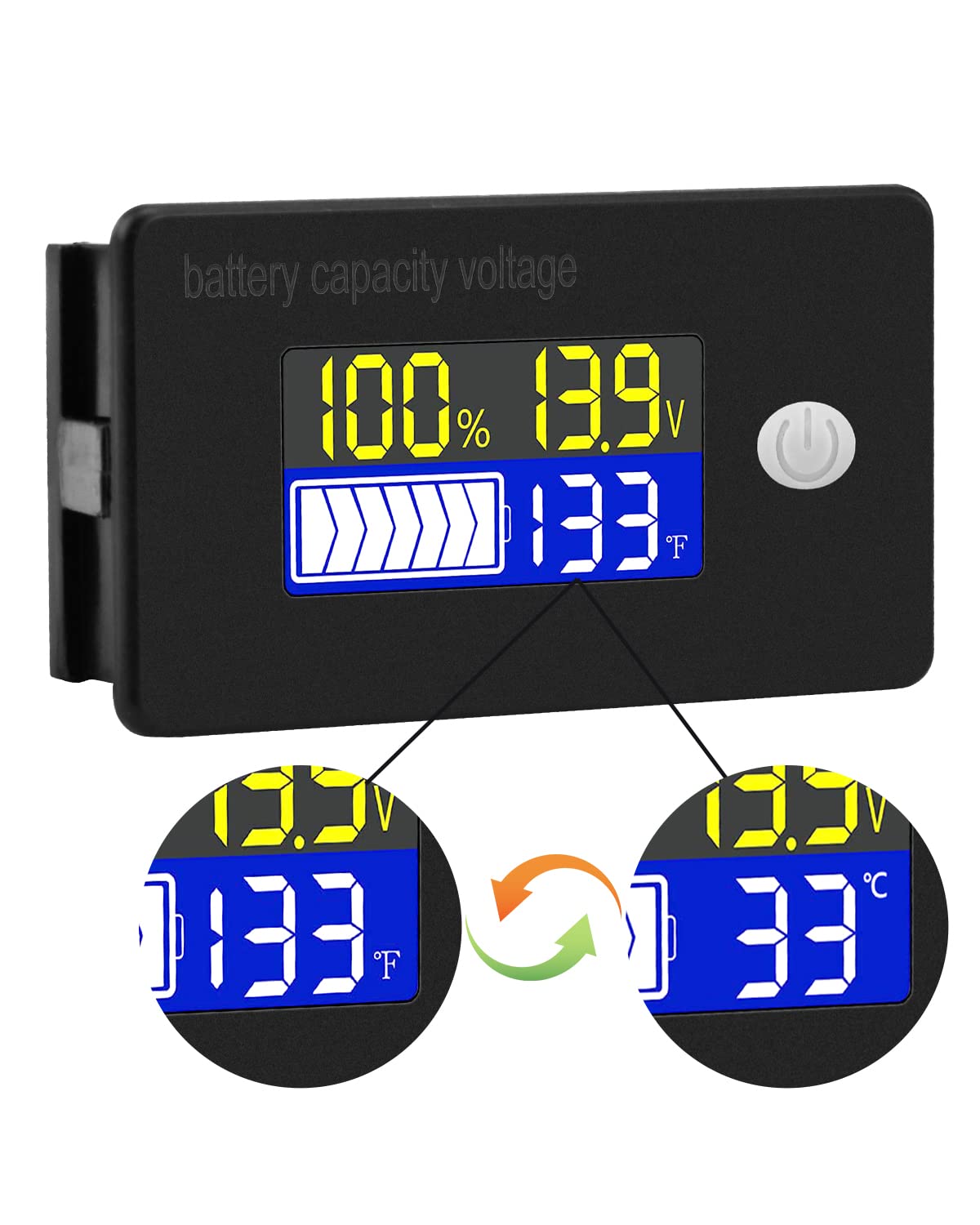
The display typically shows battery capacity percentage, srovės ttage, and temperature. Some models allow switching between Celsius and Fahrenheit for temperature display.
8.2 Signalizacijos funkcijos
The internal buzzer will activate if the battery voltage falls below the set low voltage threshold, exceeds the high voltage threshold, or if the temperature goes beyond the set limits. This provides an audible warning for critical conditions.
9. Išplėstinė konfigūracija
The meter offers several programmable modes for fine-tuning its operation. Access these modes by following the specific button press sequences outlined in the full product documentation (if provided separately) or by holding the main button for an extended period.
- Baterijos tipo nustatymas: Configure the meter for your specific battery chemistry and cell count (e.g., LiFePO4, Li-ion, Lead-Acid, 3S, 4S, etc.).
- Ultra-Low Power Mode Delay: Set a delay (10s, 20s, 30s, 60s, 120s adjustable) before the meter enters a low power consumption state to conserve energy.
- Baterijos procentastage Ribos: Adjust the upper and lower voltage thresholds that correspond to 100% and 0% battery capacity for accurate percentage ekranas.
- Undervoltage aliarmas: Activate and set the specific voltage threshold (e.g., 10.5V to 60.0V) at which the low voltage alarm will trigger.
- Aliarmo signalas: Activate and set the temperature threshold (e.g., 0°C to 79°C or 0°F to 179°F) at which the over-temperature alarm will trigger.
- ttage Kalibravimas: Atlikti ttage calibration to ensure the most accurate readings.
10. Specifikacijos
| Parametras | Vertė |
|---|---|
| Prekės ženklas | Voktta |
| Modelio numeris | B0BHSSKRVP |
| Veiklos ttage | 10-100V |
| Veikimo srovė | 8-10mA |
| Energijos suvartojimas (miego režimas) | 15-20uA |
| ttage Tikslumas | ±0.1% ~ ±0.5% |
| Temperatūros tikslumas | ±0.5℃ ~ ±1℃ (built-in standard, external 30cm probe) |
| Temperatūros diapazonas | -19 ~ 80 ℃ / 0 ~ 179 ℉ |
| Over-temperature Alarm Setting | 0 ~ 79 ℃ / 0 ~ 179 ℉ |
| Žemas tomastage Signalo nustatymas | 10.5~60.0V |
| Skambučio garsumas | 60 ~ 80 dB |
| Darbinė temperatūra | -10-65 ℃ |
| Spalva | Juoda |
| Atitiktis | CE, IP67, RoHS |
| Matavimo tipas | Voltmetras |
11. Problemų sprendimas
If you encounter issues with your Voktta Battery Capacity Voltage Meter, refer to the following common problems and solutions:
- Nėra ekrano:
- Check power connections: Ensure red wire is connected to positive and black to negative, and connections are secure.
- Patikrinkite akumuliatoriaus tūrįtage: Patvirtinkite akumuliatoriaus įkrovątage is within the 10-100V operating range.
- Netikslūs rodmenys:
- ttage / talpa: Įsitikinkite, kad tinkamas akumuliatoriaus tipas ir įtampatage configuration are set in the meter's settings. Perform voltage calibration if available.
- Temperatūra: Check if the external temperature sensor is properly connected and positioned.
- Nuolatinis signalizacijos suveikimas:
- Review alarm thresholds: Adjust the low voltage, didelis tūristage, or over-temperature alarm settings to appropriate levels for your battery and application.
- Check battery health: A constantly triggering low voltage alarm might indicate a failing battery.
- Mygtukai nereaguoja:
- Power cycle the device: Turn the meter off and then on again.
- Įsitikinkite, kad mygtukams neužstoja jokios šiukšlės.
12. Priežiūra
To ensure the longevity and accurate operation of your Voktta Battery Capacity Voltage Meter, follow these maintenance guidelines:
- Valymas: Use a soft, dry cloth to clean the display and housing. Do not use abrasive cleaners or solvents.
- Jungtys: Periodiškai patikrinkite visas laidų jungtis, kad įsitikintumėte, jog jos yra tvirtos ir be korozijos.
- Aplinkos apsauga: While the device has some dust and water resistance (IP67), avoid prolonged exposure to harsh weather conditions or direct water immersion.
- Saugykla: Jei prietaisą ilgesnį laiką sandėliuosite, atjunkite jį nuo maitinimo šaltinio ir laikykite vėsioje, sausoje vietoje.
13. Parama
For any questions, technical assistance, or if you encounter issues not covered in this manual, please contact Voktta customer support. We are committed to providing assistance to resolve any problems you may experience.
Kontaktinę informaciją paprastai galima rasti ant produkto pakuotės arba mažmenininko websvetainė, kurioje produktas buvo įsigytas.