
ToolkitRC M7AC
„ToolkitRC M7AC“ daugiafunkcio išmaniojo kintamosios srovės balanso įkroviklio naudotojo vadovas
Model: M7AC
Įvadas
The ToolkitRC M7AC is a versatile multi-function smart balance charger designed for various battery types and applications. It features dual AC/DC input and supports 2-6S batteries. Beyond its primary charging capabilities, the M7AC integrates several useful tools, including a power supply, multimeter, signal source, drone charger, and signal tester, making it an indispensable tool for hobbyists and professionals alike.
Pagrindinės funkcijos:
- Dual AC/DC Input for flexible power options.
- XT30/XT60 Output for broad compatibility.
- Supports 2-6S LiPo, LiHV, LiFe, Lion, LTO batteries, 1-16S NiMh, and 1-10S Pb batteries.
- Integrated functions: Power supply, multimeter, signal source, drone charger, and signal tester.
- IPS 2.4 inch LCD display for clear information.
Saugos informacija
Please read and understand all safety warnings and instructions before using the M7AC charger. Improper use can lead to property damage, injury, or death.
- Įkroviklį visada naudokite gerai vėdinamoje patalpoje, atokiau nuo degių medžiagų.
- Nepalikite įkroviklio be priežiūros veikimo metu.
- Ensure correct battery type and cell count settings before charging.
- Use only compatible power sources and cables.
- Saugokite įrenginį nuo vandens, drėgmės ir ekstremalių temperatūrų.
- Nebandykite ardyti ar modifikuoti įkroviklio.
Produktas baigtasview
Familiarize yourself with the components and interfaces of your M7AC charger.

1 pav.: priekis View. This image displays the front of the M7AC charger, highlighting its 2.4-inch IPS LCD screen. The screen shows real-time charging data, including voltage, current, capacity, and individual cell voltages. To the right of the screen are the navigation button and scroll wheel for menu interaction.

2 pav.: šonas View (Ports). This image shows the side of the M7AC charger where various input and output ports are located. Visible ports include a USB-A output (5.0V 2.1A), a balance port (2-6S), and dual XT60 output ports labeled "OUTPUT".

Figure 3: Signal Output Display. This image captures the M7AC's screen displaying the "Signal Output" function, specifically for SBUS. It shows multiple channels with adjustable pulse widths, demonstrating the device's capability as a signal source or tester.
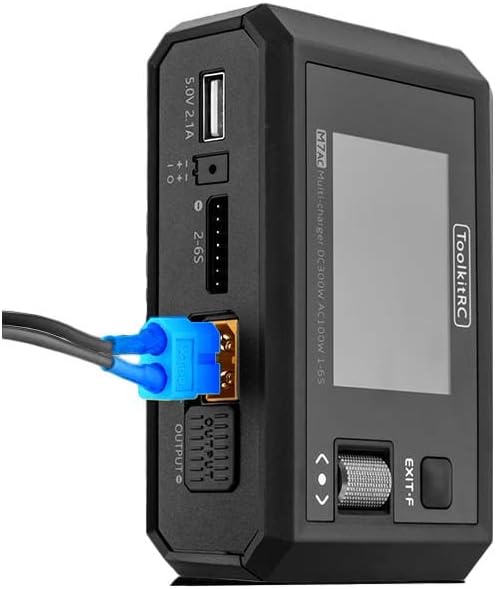
Figure 4: XT60 Output in Use. This image illustrates an XT60 connector plugged into one of the M7AC's output ports, demonstrating how a battery or device would connect for charging or power supply functions.
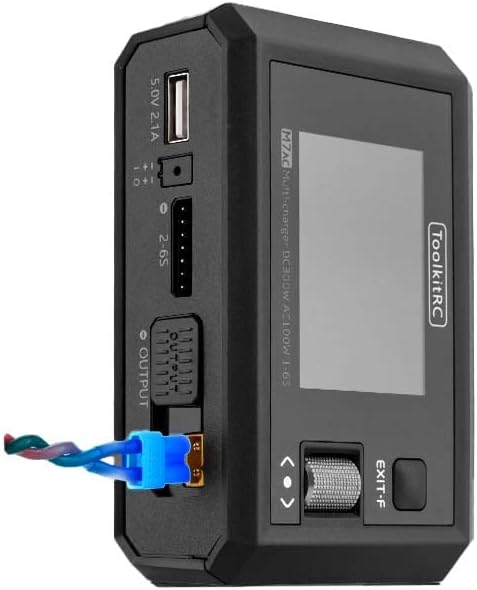
Figure 5: XT60 and Balance Lead Connected. This image provides another perspective of the M7AC with an XT60 connector and a balance lead connected, showing the typical setup for balanced charging of a multi-cell battery pack.
Sąranka
- Maitinimo jungtis:
- For AC input, connect the provided AC power cable to the charger's AC input port and then to a standard wall outlet (AC 100-240V).
- For DC input, connect a DC power source (7.0-28.0V) to the charger's DC input port. Ensure correct polarity.
- Pradinis įjungimas: Once connected to power, the charger will automatically power on and display the main menu on the IPS LCD screen.
- Navigacija: Use the scroll wheel and button on the right side of the charger to navigate through menus and select options.
Naudojimo instrukcijos
1. Akumuliatoriaus įkrovimas
- Prijunkite akumuliatorių: Connect your battery's main discharge lead to one of the XT60 output ports. For multi-cell batteries, also connect the balance lead to the appropriate balance port (2-6S).
- Pasirinkite baterijos tipą: From the main menu, navigate to the "Charger" function. Select the correct battery type (LiPo, LiHV, LiFe, Lion, LTO, NiMh, Pb) and cell count (e.g., 3S, 6S).
- Set Charging Parameters: Adjust the charging current (up to 15A) and mode (e.g., Balance Charge, Fast Charge, Storage Charge) as required for your battery. The maximum charging power is 300W.
- Pradėti įkrovimą: Confirm settings and start the charging process. The screen will display real-time charging status, including total voltage, current, charged capacity, and individual cell voltages.
2. Baterijos išsikrovimas
The M7AC supports discharging batteries with a power of up to 300W in Recycle mode or 15W in Normal mode.
- Prijunkite akumuliatorių: Connect the battery to the XT60 output and balance port.
- Select Discharge Function: Navigate to the "Discharge" function in the menu.
- Nustatyti parametrus: Set the discharge current and target voltage.
- Start Discharging: Initiate the discharge process. Monitor the battery temperature and voltage iškrovimo metu.
3. Power Supply Function
The M7AC can act as a regulated DC power supply (1.0-28.0V, 0.5-15A).
- Access Power Supply Mode: Select the "Power Supply" option from the main menu.
- Nustatyti išvesties tūrįtage ir dabartinė: Sureguliuokite norimą išvesties tūrįtage and current limit using the scroll wheel.
- Prijunkite įrenginį: Connect your device requiring power to the XT60 output port.
- Suaktyvinti išvestį: Enable the power supply output.
4. Multimetro funkcija
Išmatuokite ttage and internal resistance of batteries.
- ttage Matavimas: Connect the battery to the balance port to measure individual cell voltages (1.0-5.0V per cell, 1-6S).
- Internal Resistance Measurement: The charger can measure internal resistance from 0.1 mR to 99mR for 1-6S batteries.
5. Signal Source / Tester
The M7AC can generate and test various signals.
- PWM išvestis: Generate PWM signals (500-2500us @ 20-1000Hz).
- PPM išvestis: Generate PPM signals (880-2200us * 8CH @ 20-50Hz).
- SBUS Output: Generate SBUS signals (880-2200us * 16CH @ 20-100Hz).
6. USB-A išvestis
The USB-A port provides 5.0V at 2.1A, suitable for charging mobile devices or powering small electronics.
Priežiūra
- Valymas: Įkroviklio išorę valykite minkšta, sausa šluoste. Nenaudokite tirpiklių ar abrazyvinių valiklių.
- Saugykla: Įkroviklį laikykite vėsioje, sausoje vietoje, apsaugotoje nuo tiesioginių saulės spindulių ir ekstremalių temperatūrų.
- Kabelio apžiūra: Regularly inspect all cables and connectors for signs of wear or damage. Replace damaged cables immediately.
- Firmware atnaujinimai: Check the ToolkitRC official website periodically for firmware updates to ensure optimal performance and access to new features. The TF Card slot (128MB-16GB) is used for updates.
Trikčių šalinimas
| Problema | Galima priežastis | Sprendimas |
|---|---|---|
| Įkroviklis neįsijungia. | No power input or faulty cable. | Check AC/DC power connection. Ensure power source is active. Try a different power cable. |
| Battery not detected. | Incorrect connection or damaged battery. | Ensure main and balance leads are securely connected. Verify battery is not severely over-discharged or damaged. |
| Charging error message. | Incorrect battery settings (type, cell count) or battery fault. | Double-check battery type and cell count settings. Inspect battery for swelling or damage. |
| Ekranas nereaguoja. | Laikinas programinės įrangos triktis. | Disconnect power, wait a few seconds, then reconnect to restart the device. |
Specifikacijos
| Kategorija | Parametras | Vertė |
|---|---|---|
| Įkroviklis | Įvesties tomastage | AC 100-240V MAX 100W 1.5A / DC 7.0-28.0V @MAX 20A |
| Baterijų tipų palaikymas | Lipo LiHV LiFe Lion LTO@1-6S / NiMh @1-16S Pb @1-10S | |
| Įkrovimo galia | 300W @MAX 15A | |
| Iškrovimo galia | 300W @MAX 15A Recycle mode / 15W@3A Normal mode | |
| Balanso srovė | 800 mA 4.2 V įtampa | |
| USB-A išvestis | 10W@5.0V | |
| Generolas | LCD | IPS 2.4 inch LCD 320*240 resolution |
| Produkto dydis | 112x73x38 mm | |
| Produkto svoris | 245g | |
| TF kortelių palaikymas | 128MB-16GB | |
| Spalva | Juoda | |
| Matavimas | Vidinis pasipriešinimas | 0.1 mR-99mR @ 1-6S |
| ttage | 1.0-5.0V @ 1-6S | |
| SBUUSAS | 880-2200us * 16CH @ 20-100Hz | |
| PPM | 880-2200us * 8CH @ 20-50Hz | |
| PWM | 880-2200us @ 20-400Hz | |
| Išvestis | Maitinimo šaltinis | 1.0-28.0V @0.5-15A mode: CC CVSBUS |
| SBUUSAS | 880-2200us * 16CH @ 20-100Hz | |
| PPM | 880-2200us * 8CH @ 20-50Hz | |
| PWM | 500-2500us @ 20-1000Hz | |
| Kita | Prekės svoris | 12.96 uncijos (apie 367 g) |
| Gamintojo rekomenduojamas amžius | 14 metai ir daugiau | |
| Specifikacija atitiko | UL |
Garantija ir palaikymas
ToolkitRC products are manufactured to high quality standards. For warranty information and technical support, please refer to the official ToolkitRC websvetainėje arba susisiekite tiesiogiai su jų klientų aptarnavimo tarnyba. Išsaugokite pirkimo kvitą kaip pirkimo įrodymą bet kokiems garantiniams prašymams.
Norėdami gauti daugiau pagalbos, apsilankykite ToolkitRC Official Websvetainę.
Ask a question about this manual
Ask about setup, troubleshooting, compatibility, parts, safety, or missing instructions. Manuals+ will review the question and use this page’s manual context to help answer it.