
TOHETO 01
TOHETO A4 Wireless LED Light Pad User Manual
Model: A4 Wireless Lightpad with Case, Innovative Stand and Top Clip (Black)
1. Įvadas
Thank you for choosing the TOHETO A4 Wireless LED Light Pad. This light pad is designed to enhance your artistic and crafting projects, offering portability, adjustable brightness, and ergonomic features. This manual provides detailed instructions for setup, operation, maintenance, and troubleshooting to ensure optimal performance and longevity of your device.
Prieš naudodami gaminį, atidžiai perskaitykite šį vadovą ir išsaugokite jį ateičiai.
2. Produkto ypatybės
- Innovative Stand & Top Clip: Features an integrated, adjustable stand for comfortable viewing angles and a top clip to securely hold paper or canvas.
- Wireless & USB-C Powered: Equipped with a built-in battery for cordless use (approx. 5 hours on full charge) and a Type-C port for charging and wired operation.
- Reguliuojamas ryškumas: Offers both 6-level brightness adjustments and stepless dimming (0-100%) to suit various lighting conditions and project requirements.
- Eye-Protection Technology: Designed with 3000-6500K color temperature to provide even, glare-free illumination, reducing eye strain during extended use.
- Platus pritaikymas: Ideal for drawing, tracing, sketching, animation, X-ray viewing, calligraphy, diamond painting, architectural design, sewing projects, fashion design, and industrial design.

Figure 2.1: Key features of the TOHETO A4 Wireless LED Light Pad, highlighting the fasten clip, Type-C port, and foldable stand.

Figure 2.2: Ergonomic design of the light pad's stand promotes a comfortable working posture, reducing strain.

Figure 2.3: The light pad incorporates eyesight-protected technology for comfortable and safe use.
3. Pakuotės turinys
Upon opening your TOHETO A4 Wireless LED Light Pad package, please verify that all the following items are included:
- 1 x LED Light Drawing Pad (Black)
- 1 x apsauginis nešiojimo krepšys
- 1 x 6-foot Type-C USB Charging Cable (1.8m)
- 1 x pieštukas
- 1 x pieštukų drožtukas
- 1 x Trintukas
- 10 x Tracing Papers
- 1 x Naudotojo vadovas (šis dokumentas)

Figure 3.1: All items included in the TOHETO A4 Wireless LED Light Pad package.
4. Sąranka
4.1 Charging the Light Pad
Before first use, fully charge the light pad. Connect the provided Type-C USB cable to the light pad's Type-C port and the other end to a USB-A power source (e.g., power bank, computer USB port, or USB wall adapter). A full charge takes approximately 1.5 hours and provides about 5 hours of wireless use at maximum brightness.
Note: Only USB-A to USB-C charging cables can be used. USB-C to USB-C charging cables are NOT compatible.

Figure 4.1: The light pad can be powered and charged via its USB-C port using various USB-A power sources.
4.2 Adjusting the Integrated Stand
The light pad features an innovative foldable stand on its back. Gently pull out the stand to adjust the angle for a comfortable working position. This ergonomic design helps reduce neck and back strain during long periods of use.

Figure 4.2: The integrated stand can be adjusted to provide an optimal crafting angle.
4.3 Using the Top Clip
The light pad includes a fasten top clip designed to hold your paper, diamond painting canvas, or other materials securely in place. Simply slide your material under the clip to prevent shifting during your work.

Figure 4.3: The top clip ensures your work material remains stable.
5. Operacija
5.1 Maitinimo įjungimas/išjungimas
To turn the light pad on or off, locate the power button (U) on the side panel. A short press will toggle the power.
5.2 Ryškumo reguliavimas
The light pad offers two methods for brightness adjustment:
- 6-Level Brightness Dimming: Short press the '+' or '-' buttons to cycle through 6 preset brightness levels.
- Tolygus ryškumo pritemdymas: Long press the '+' or '-' buttons to smoothly adjust the brightness from 0% to 100%. Release the button when the desired brightness is reached.

Figure 5.1: Brightness control buttons and their functions.
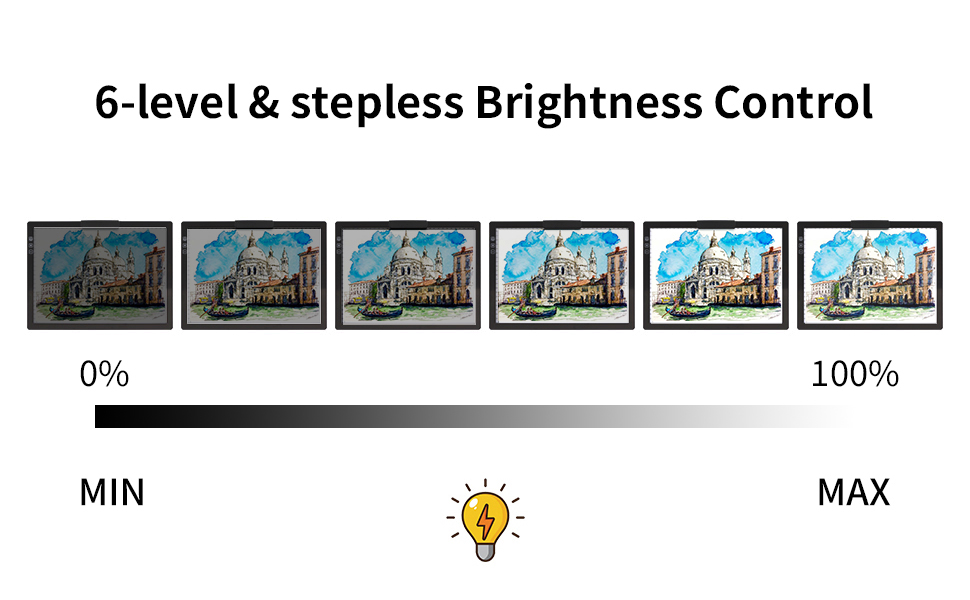
Figure 5.2: Brightness levels ranging from minimum to maximum.
5.3 Programos
The TOHETO A4 Wireless LED Light Pad is versatile and can be used for a variety of creative and professional tasks:
- Drawing & Tracing: Perfect for transferring designs, sketching, and detailed line work.
- Animacija: Facilitates frame-by-frame animation by allowing visibility of multiple layers.
- Diamond Painting: Illuminates the canvas, making symbols clearer and reducing eye strain during intricate work.
- Rentgenas Viewing: Provides a consistent light source for examining X-ray films.
- Kaligrafija ir trafaretas: Aids in precise alignment and consistent strokes.
- Architectural & Fashion Design: Useful for drafting, pattern making, and design overlays.

Figure 5.3: Diverse applications of the TOHETO A4 Wireless LED Light Pad.
6. Priežiūra
6.1 Valymas
To clean the light pad, gently wipe the surface with a soft, dry, or slightly damp cloth. Avoid using abrasive cleaners, solvents, or excessive moisture, as these can damage the surface or internal components.
6.2 Saugykla
When not in use, store the light pad in its protective carry bag to prevent scratches and dust accumulation. Store in a cool, dry place away from direct sunlight and extreme temperatures.
6.3 Akumuliatoriaus priežiūra
To prolong battery life, avoid fully discharging the light pad frequently. If storing for an extended period, charge the battery to about 50% every few months.
7. Problemų sprendimas
If you encounter any issues with your TOHETO A4 Wireless LED Light Pad, please refer to the following common troubleshooting steps:
| Problema | Galima priežastis | Sprendimas |
|---|---|---|
| Light pad does not turn on. | Žema akumuliatoriaus įkrova arba nėra maitinimo jungties. | Charge the light pad using the provided USB-A to Type-C cable. Ensure the power source is active. |
| Light pad is not charging. | Incorrect cable type or faulty cable/adapter. | Ensure you are using a USB-A to Type-C cable. Try a different USB port or power adapter. |
| Ryškumo reguliavimas neveikia. | Buttons not pressed correctly or temporary software glitch. | Ensure you are short-pressing for 6 levels or long-pressing for stepless dimming. Try turning the device off and on again. |
| Light flickers or is uneven. | Low battery or unstable power source. | Charge the light pad fully. Ensure the power source provides stable output if operating wired. |
If the problem persists after trying these solutions, please contact TOHETO customer support for further assistance.
8. Specifikacijos
| Atributas | Specifikacija |
|---|---|
| Modelio pavadinimas | A4 Wireless Lightpad with Case, Innovative Stand and Top Clip (Black) |
| Prekės modelio numeris | 01 |
| Spalva | Juoda |
| Medžiaga | Akrilnitrilo butadieno stirenas (ABS) |
| Gaminio matmenys | 13.47 x 9.85 x 0.43 colio |
| Prekės svoris | 2.57 svaro (1.17 kilogramo) |
| Maitinimo šaltinis | Battery Powered / USB Powered |
| Šviesos šaltinio tipas | Šviesos diodas (LED) |
| Ryškumo valdymas | Stepless (0-100%) and 6 Levels Adjustable |
| Spalvos temperatūra | 3000-6500 tūkst |
| Baterijos tipas | 1 ličio polimero baterija (pridedama) |
| Įkrovimo laikas | Maždaug 1.5 valandos (pilnai įkrautas) |
| Operating Time (Wireless) | Maždaug 5 valandos (esant maksimaliam ryškumui) |
Figure 8.1: Dimensions of the TOHETO A4 Wireless LED Light Pad.
9. Garantija ir palaikymas
TOHETO is committed to providing high-quality products and excellent customer service. Your A4 Wireless LED Light Pad comes with a satisfaction service. If you have any questions, concerns, or encounter any quality issues with your product, please do not hesitate to contact us.
Replacement is available if there is any quality issue with the product.
For support, please refer to the contact information provided on the product packaging or the official TOHETO websvetainę. Kreipdamiesi į palaikymo tarnybą, turėkite paruoštą savo produkto modelio numerį (01) ir pirkimo informaciją.
Ask a question about this manual
Ask about setup, troubleshooting, compatibility, parts, safety, or missing instructions. Manuals+ will review the question and use this page’s manual context to help answer it.