
Įvadas
Thank you for choosing the Ledwood Apollo S True Wireless Stereo (TWS) Earphones. This manual provides essential instructions for setting up, operating, and maintaining your earphones to ensure optimal performance and longevity. The Apollo S earphones feature a sleek design, sensitive touch controls, and a wireless charging case with a digital battery level display.
Pakuotės turinys
- Ledwood Apollo S TWS Earphones (Left and Right)
- Belaidžio įkrovimo dėklas
- USB įkrovimo laidas
- Vartotojo vadovas
Note: Please check all items are present upon unboxing.
Sąranka
1. Ausinių ir dėklo įkrovimas
Before first use, fully charge the earphones and the charging case. The charging case features a digital screen that displays the battery level percentage.
- Dėklo įkrovimas: Connect the provided USB charging cable to the charging port on the case and to a USB power adapter (not included). The digital display will show the charging progress.
- Ausinių įkrovimas: Place the earphones into their respective slots in the charging case. Ensure they are correctly seated. The earphones will automatically begin charging. The case's digital display may indicate the charging status of the earphones.
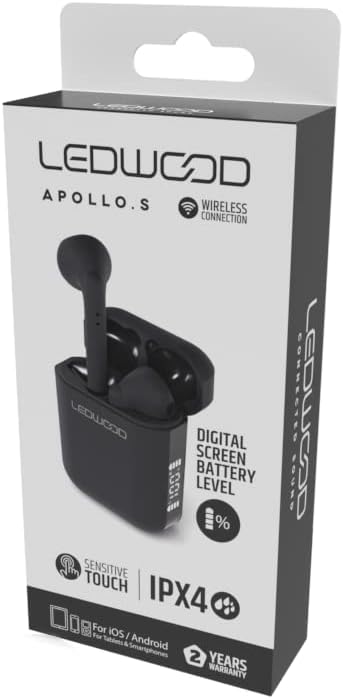
Image: Ledwood Apollo S TWS Earphones shown inside their open charging case. The earphones are black, and the case is also black with a sleek design. This image illustrates the product components.
2. Suporavimas su „Bluetooth“ įrenginiu
- 1 veiksmas: Ensure the earphones are charged. Open the charging case. The earphones will automatically enter pairing mode, indicated by a flashing LED light on one or both earphones.
- 2 veiksmas: Mobiliajame įrenginyje (išmaniajame telefone, planšetiniame kompiuteryje ir kt.) eikite į „Bluetooth“ nustatymus.
- 3 veiksmas: Įjunkite Bluetooth. Ieškokite turimus įrenginius.
- 4 veiksmas: Select "Ledwood Apollo S" from the list of available devices.
- 5 veiksmas: Once connected, the LED indicator on the earphones will stop flashing, and you will hear a confirmation tone.
- Pastaba: išėmus iš dėklo, ausinės automatiškai prisijungs prie paskutinio suporuoto įrenginio, jei įrenginyje įjungtas „Bluetooth“ ryšys.
Naudojimo instrukcijos
Nešioti ausines
Gently insert the earphones into your ears, ensuring a comfortable and secure fit. Adjust them slightly to achieve optimal sound quality and passive noise isolation.
Palieskite valdiklius
The Ledwood Apollo S earphones feature sensitive touch controls on each earbud. The functions may vary slightly depending on your device and operating system.
- Leisti / pristabdyti: Vieną kartą bakstelėkite bet kurią ausinę.
- Kitas takelis: Dukart palieskite dešinįjį ausinės antgalį.
- Ankstesnis takelis: Dukart palieskite kairįjį ausinės antgalį.
- Atsiliepti / Baigti skambutį: Vieną kartą bakstelėkite bet kurią ausinę įeinančio arba aktyvaus skambučio metu.
- Atmesti skambutį: Įeinančio skambučio metu paspauskite ir 2 sekundes palaikykite nuspaudę bet kurią ausinę.
- Suaktyvinti „Voice Assistant“: Tris kartus palieskite bet kurią ausinę (pvz., „Siri“, „Google Assistant“).
- Maitinimo įjungimas/išjungimas: Earphones power on automatically when removed from the case and power off when placed back into the case. Manual power on/off may be available by pressing and holding the touch area for an extended period (refer to specific device behavior).
Priežiūra
- Valymas: Ausinėms ir įkrovimo dėklui valyti naudokite minkštą, sausą, nepūkuotą šluostę. Nenaudokite abrazyvinių valiklių ar tirpiklių.
- Saugykla: Kai nenaudojate, laikykite ausines įkrovimo dėkle, kad jos būtų apsaugotos ir įkrautos.
- Atsparumas vandeniui: The earphones are rated IPX4, meaning they are resistant to splashing water from any direction. They are not waterproof and should not be submerged in water. Avoid exposure to heavy rain or sweat for extended periods.
- Temperatūra: Venkite ausinių laikymo ekstremaliose temperatūrose (karštyje ar šaltyje) arba didelėje drėgmėje.
Trikčių šalinimas
- Ausinės nesusijungia:
- Įsitikinkite, kad abi ausinės yra įkrautos.
- Išjunkite „Bluetooth“ savo įrenginyje ir vėl jį įjunkite.
- Forget "Ledwood Apollo S" from your device's Bluetooth list and try pairing again.
- Place earphones back in the case, close the lid, wait a few seconds, then open again to reset.
- Nėra garso iš vienos ausinės:
- Įsitikinkite, kad abi ausinės yra įkrautos.
- Pabandykite įdėti abi ausines atgal į dėklą ir vėl jas išimti.
- Patikrinkite savo įrenginio garso balanso nustatymus.
- Įkrovimo dėklas neįkraunamas:
- Įsitikinkite, kad įkrovimo laidas yra tvirtai prijungtas tiek prie dėklo, tiek prie maitinimo šaltinio.
- Išbandykite kitą USB kabelį arba maitinimo adapterį.
- Jutikliniai valdikliai nereaguoja:
- Įsitikinkite, kad jūsų pirštai yra švarūs ir sausi.
- Iš naujo paleiskite įrenginį ir bandykite dar kartą.
Specifikacijos
| Prekės ženklas | Ledwood |
| Modelio pavadinimas | APOLLO S (LD-APOLLO-S-BLK) |
| Formos faktorius | Ausyje |
| Ryšio technologija | Belaidis ryšys („Bluetooth“) |
| Kontrolės metodas | Palieskite |
| Atsparumo vandeniui įvertinimas | IPX4 |
| Integruota laikmena | Belaidžio įkrovimo dėklas |
| Papildomos funkcijos | Greitas įkrovimas |
| Medžiaga | Plastikiniai |
| Spalva | Juoda |
| Suderinamumas | For iOS / Android (Tablets & Smartphones) |
Garantija ir palaikymas
The Ledwood Apollo S TWS Earphones come with a 2 metų garantija nuo pirkimo datos. Ši garantija taikoma gamybos defektams. Prašome išsaugoti pirkimo įrodymą garantiniams reikalavimams.
For technical support or warranty inquiries, please contact your retailer or visit the official Ledwood website for customer service information. Ensure you have your model number (LD-APOLLO-S-BLK) and purchase details ready.


