Įvadas
This manual provides comprehensive instructions for the Thomson ROC4301 4-in-1 Web-Programmable Universal Remote Control. This device allows you to control up to four different infrared-controlled electronic devices, such as TVs, DVD players, Blu-ray players, Set-Top Boxes (STB), VCRs, and audio equipment, using a single remote.
The ROC4301 features web-based programming for easy setup and a continuously updated code database to ensure compatibility with a wide range of brands and models.
Pagrindinės savybės
- Controls up to 4 devices via one infrared remote control.
- Fast and easy programming via a web-based database accessible on PC, laptop, or tablet.
- Data transfer to the remote control is facilitated by a 3.5 mm jack cable (30 cm).
- Up to 4 devices can be programmed simultaneously.
- Compatible with TV, DVD, Blu-ray player, STB, VCR, and audio equipment.
- Continuously updated code database available online.
Sąranka ir programavimas
The Thomson ROC4301 remote control is programmed using an online database, ensuring access to the latest device codes. This method requires a computer (PC, laptop, or tablet) with internet access and the included 3.5 mm jack cable.
Žingsniai už Web-Based Programming:
- Paruoškite nuotolinio valdymo pultą: Ensure fresh AAA batteries are installed in the remote control. (See "Maintenance" section for battery installation).
- Access the Programming Websvetainė: Atidarykite a web browser on your PC, laptop, or tablet and navigate to the official Thomson remote control programming website. (Refer to the product packaging or manufacturer's websvetainė, skirta tiksliam URL).
- Prijunkite nuotolinio valdymo pultą: Plug one end of the supplied 3.5 mm jack cable into the designated port on the remote control and the other end into the headphone jack of your computer.
- Select Devices: On the programming website, follow the on-screen instructions to select the types of devices (e.g., TV, DVD, STB) and their respective brands and models you wish to control. The database will provide the necessary codes.
- Transfer Codes: Once you have selected your devices, initiate the data transfer process on the website. The codes will be transmitted through the audio jack to your remote control. Ensure your computer's volume is set to a suitable level as instructed by the websvetainę.
- Išbandykite nuotolinio valdymo pultą: After the transfer is complete, disconnect the remote control from your computer. Test the remote with each programmed device to ensure all functions work correctly. If a device does not respond or functions are incorrect, repeat the programming process, trying alternative codes if available on the websvetainę.
The web database is continuously updated, providing access to codes for new devices. You can program up to four devices simultaneously.
Nuotolinio valdymo pulto valdymas
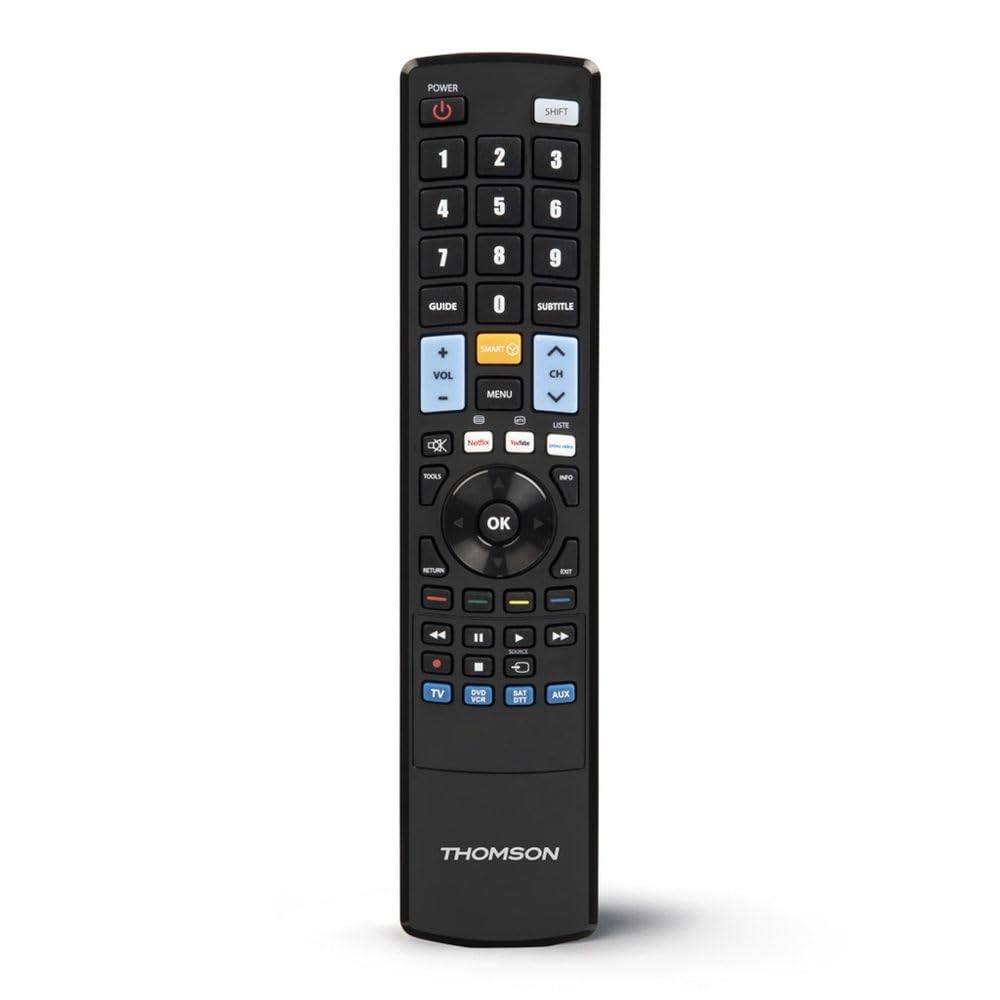
Once programmed, the Thomson ROC4301 functions like a standard remote control for your selected devices. It features 48 buttons designed for intuitive control.
Bendras veikimas:
- Įrenginio pasirinkimas: Use the dedicated device buttons (e.g., TV, DVD, STB, AUDIO) at the top of the remote to switch between controlling different devices. The remote will typically indicate which device is currently selected (e.g., via an LED indicator).
- Maitinimo įjungimas/išjungimas: Paspauskite GALIA mygtuką, kad įjungtumėte arba išjungtumėte pasirinktą įrenginį.
- Channel/Volume: Naudokite KANALAS +/- ir TŪRIS +/- buttons to adjust channels and volume respectively.
- Navigacija: The directional pad (up, down, left, right) and OK button are used for menu navigation on most devices.
- Skaitmeninė klaviatūra: Use the numeric buttons (0-9) to directly enter channel numbers or other numerical inputs.
- Funkciniai mygtukai: Other buttons such as Play, Pause, Stop, Fast Forward, Rewind, Menu, Exit, and colored function buttons will perform their corresponding actions on the selected device.
Ensure there is a clear line of sight between the remote control and the infrared receiver of the device you are operating. The maximum effective range is approximately 10 meters.
Priežiūra
Baterijos montavimas ir keitimas:
The Thomson ROC4301 remote control requires two AAA batteries (included). When the remote's performance degrades or it stops responding, it's time to replace the batteries.
- Nuotolinio valdymo pulto gale raskite baterijų skyriaus dangtelį.
- Norėdami atidaryti skyrių, stumkite dangtelį žemyn arba paspauskite skląstį ir pakelkite.
- Remove the old batteries, if any.
- Insert two new AAA batteries, ensuring the positive (+) and negative (-) terminals match the markings inside the compartment.
- Uždėkite baterijų skyriaus dangtelį, kol jis spragtelėdamas tvirtai užsifiksuos.
Svarbu: Always dispose of used batteries responsibly according to local regulations. Do not mix old and new batteries, or different types of batteries.
Valymas:
Nuotolinio valdymo pultą valykite minkšta, sausa šluoste. Jei nešvarumai sunkiai įveikiami, šiek tiek nuvalykite.ampen the cloth with water. Do not use abrasive cleaners, solvents, or alcohol, as these can damage the remote's surface or internal components.
Trikčių šalinimas
If you encounter issues with your Thomson ROC4301 universal remote control, try the following troubleshooting steps:
- Nuotolinio valdymo pultas nereaguoja:
- Check the batteries. Ensure they are correctly inserted and have sufficient charge. Replace them if necessary.
- Ensure there is a clear line of sight between the remote's IR emitter and the device's IR receiver. Obstructions can block the signal.
- Make sure you have selected the correct device mode (e.g., TV, DVD) on the remote.
- Įrenginys nereaguoja po programavimo:
- Re-program the remote for that specific device. The web database often provides multiple codes for a single brand/model. Try the next available code if the first one doesn't work.
- Ensure the 3.5 mm jack cable connection was secure and the computer's volume was adequate during programming.
- Verify that the device you are trying to control is indeed an infrared-controlled device.
- Kai kurios funkcijos neveikia:
- Even with the correct code, some advanced functions might not be fully supported by a universal remote.
- Try alternative codes for your device, as some codes might offer better functionality mapping.
- Programming Issues (e.g., data transfer failure):
- Patikrinkite savo interneto ryšį.
- Įsitikinkite, kad jūsų kompiuterio garso tvarkyklės yra atnaujintos.
- Temporarily disable any sound enhancements or equalizers on your computer that might interfere with the audio signal.
- Try using a different computer or web browser if problems persist.
If these steps do not resolve the issue, please refer to the "Support" section for further assistance.
Specifikacijos
| Prekės ženklas | Tomsonas |
| Modelio pavadinimas | ROC4301 Web-Programmable Universal Remote Control 4-in-1 |
| Prekės modelio numeris | 00132679 |
| Ryšio technologija | Infraraudonųjų spindulių (IR) |
| Maximum Number of Supported Devices | 4 |
| Suderinami įrenginiai | TV, DVD, Blu-ray player, STB, VCR, Audio equipment |
| Valdiklio tipas | Mygtukų valdymas |
| Mygtukų skaičius | 48 |
| Didžiausias diapazonas | 10 metrai |
| Spalva | Juoda |
| Baterijos | 2 AAA baterijos (pridedamos) |
| Gaminio matmenys | 22.9 x 5.2 x 2.5 cm |
| Prekės svoris | 149.32 g |
| Gamintojas | Tomsonas |
| Kilmės šalis | Kinija |
Informacija apie garantiją
The Thomson ROC4301 Universal Remote Control comes with a 2 metų gamintojo garantija. Please retain your proof of purchase for warranty claims. For specific terms and conditions, refer to the warranty documentation included with your product or visit the official Thomson websvetainę.
Palaikymas
For further assistance, updated device codes, or to access the web-based programming tool, please visit the official Thomson support website. You may also find FAQs and additional resources there.
If you require technical support, please contact Thomson customer service through the channels provided on their official websvetainę.
Produktas baigtasview