
Įvadas
This manual provides instructions for the proper setup, operation, and maintenance of your Comix C-2031 Desk Calculator. This calculator is designed for general arithmetic tasks in home, office, or school environments, featuring a large 12-digit LCD display and dual power sources.

Pagrindinės savybės
The Comix C-2031 Desk Calculator is equipped with several features designed for ease of use and reliability:
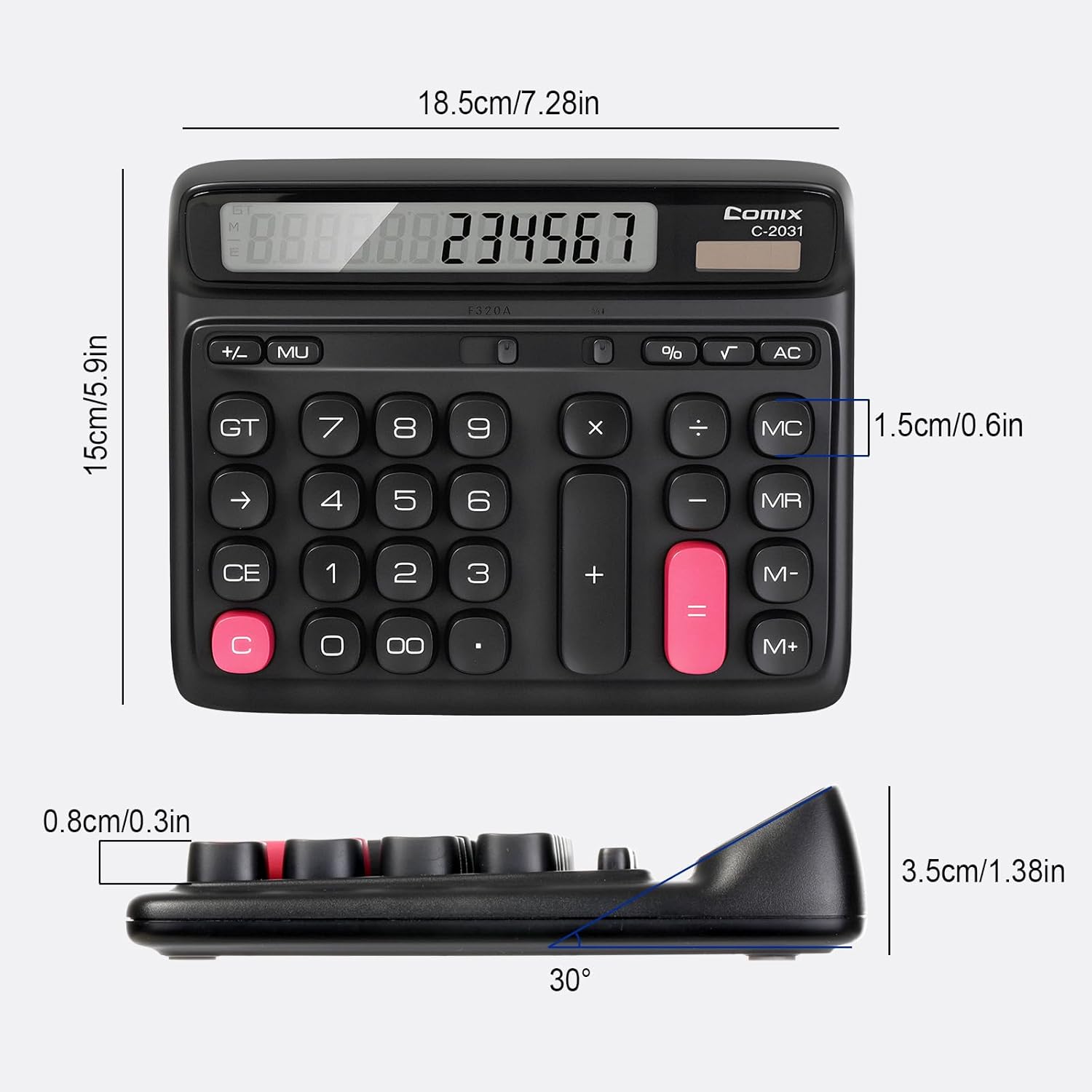
- 12 skaitmenų didelis LCD ekranas: Provides clear and accurate readings with a 30° tilt for comfortable viewing.
- Ergonomic Computer Key Design: Features round keys for comfortable touch and clear feedback, designed for efficient data entry.
- Dvigubas maitinimo šaltinis: Operates on solar energy in well-lit conditions and includes a 1 AA battery for consistent performance, especially in low light.
- Neslidžios pėdos: Equipped with four non-slip feet to ensure stability on your desk during use.
- Kompaktiškas dydis: Measures 7.28 x 5.9 x 1.38 inches, fitting conveniently on any desk.

Sąranka
Maitinimo šaltinis
The Comix C-2031 calculator utilizes a dual power system, operating on both solar energy and a single AA battery. For optimal display clarity and consistent operation, especially in environments with varying light conditions, using the AA battery is recommended.
- Saulės energija: The calculator will automatically use solar power when sufficient light is available. Ensure the solar panel (located above the display) is exposed to light for operation without battery power.
- Akumuliatoriaus montavimas:
- Raskite baterijų skyrių skaičiuotuvo gale.
- Atidarykite akumuliatoriaus skyriaus dangtelį.
- Įdėkite vieną AA bateriją, užtikrindami teisingą poliškumą (+/-).
- Saugiai uždarykite akumuliatoriaus skyriaus dangtelį.

Naudojimo instrukcijos
Familiarize yourself with the calculator's key functions for efficient use.

Pagrindinės operacijos
- Numerio įvedimas: Press the number keys (0-9) to input digits.
- Kablelio: Press the "." key for decimal values.
- Sudėtis (+), atimtis (-), daugyba (×), dalyba (÷): Press the corresponding operator key after entering the first number, then enter the second number, and press "=" for the result.
- Lygu (=): Displays the result of a calculation.
Išvalyti funkcijas
- C (Clear the Screen): Clears the current entry on the display without affecting memory or ongoing calculations.
- CE (aiškus įrašas): Išvalo paskutinį įvestą skaičių arba operaciją.
- AC (Clear All): Clears all entries, operations, and memory content, resetting the calculator to its initial state.
- Backspace (→): Ištrina paskutinį įvestą skaitmenį.
Atminties funkcijos
- M+ (Memory Plus): Prideda rodomą skaičių į atmintį.
- M- (atminties minusas): Atima rodomą skaičių iš atminties.
- MR (atminties priminimas): Recalls the value stored in memory to the display.
- MC (atminties išvalymas): Clears the memory content.
Išplėstinės funkcijos
- % (proctage): Naudojamas procentamstage skaičiavimai. Pavyzdžiui,ample, to calculate 10% of 200, enter 200 × 10 %, which will display 20.
- √ (kvadratinė šaknis): Apskaičiuoja rodomo skaičiaus kvadratinę šaknį.
- GT (bendra suma): Accumulates the results of all calculations. Pressing GT displays the grand total.
- MU (žymėjimas): Naudojamas pelno maržos skaičiavimams.
Produktas baigtasview Vaizdo įrašas
Priežiūra
- Valymas: Wipe the calculator with a soft, dry cloth. Do not use liquid cleaners or abrasive materials.
- Baterijos keitimas: If the display becomes dim or unresponsive, replace the AA battery in the compartment on the back of the unit. Ensure proper polarity.
- Saugykla: Skaičiuoklę laikykite vėsioje, sausoje vietoje, toliau nuo tiesioginių saulės spindulių ir ekstremalių temperatūrų.
Trikčių šalinimas
| Problema | Galima priežastis | Sprendimas |
|---|---|---|
| Ekranas tuščias arba blankus. | Nepakanka šviesos saulės energijai arba išsikrovusi baterija. | Move the calculator to a brighter area or replace the AA battery. |
| Klavišai nereaguoja. | Temporary software glitch or low power. | Press the AC button to reset. If the issue persists, replace the battery. |
| Neteisingi skaičiavimo rezultatai. | Incorrect key sequence or function usage. | Review the operating instructions for the specific function. Press AC to clear all previous entries and start a new calculation. |
Specifikacijos
- Modelis: C-2031
- Ekranas: 12-Digit Large LCD Display
- Maitinimo šaltinis: Solar and 1 x AA Battery (included)
- Gaminio matmenys: 7.28 x 5.9 x 1.38 colio (18.5 x 15 x 3.5 cm)
- Prekės svoris: 10.5 uncijos (297.67 gramų)
- Rakto tipas: Ergonomic Computer Keys
- Savybės: 30° Tilt Display, Non-Slip Feet
Garantija ir palaikymas
Comix products are manufactured with quality and reliability in mind. For any questions, technical support, or warranty inquiries, please refer to the contact information provided with your purchase or visit the official Comix websvetainėje. Prašome išsaugoti pirkimo įrodymą garantiniams reikalavimams.