
Įvadas
Welcome to the user manual for your new VERTU iVERTU-81 5G smartphone. This guide provides essential information to help you set up, operate, maintain, and troubleshoot your device. Please read this manual thoroughly to ensure optimal performance and longevity of your smartphone.
Kas yra dėžutėje
Upon unboxing your VERTU iVERTU-81, please verify that all components are present:
- VERTU iVERTU-81 5G Smartphone
- Maitinimo adapteris
- USB-C Cable (not explicitly listed but implied for charging)
- SIM Ejector Tool (not explicitly listed but implied for SIM tray)
- Quick Start Guide (not explicitly listed but implied)
Jei trūksta kokių nors prekių arba jos pažeistos, susisiekite su klientų aptarnavimo tarnyba.
Sąranka
1. SIM kortelių įdėjimas
The VERTU iVERTU-81 supports dual Nano SIM cards for 5G dual card dual standby functionality.
- Raskite SIM kortelės dėklą telefono šone.
- Įkiškite SIM kortelės išstūmimo įrankį į mažą skylutę šalia dėklo ir švelniai stumkite, kol dėklas iššoks.
- Place your Nano SIM cards into the designated slots on the tray, ensuring the gold contacts face down.
- Atsargiai įstatykite SIM kortelės dėklą į telefoną, kol jis spragtelės ir užsifiksuos.
2. Pradinis įjungimas ir sąranka
- Press and hold the power button until the VERTU logo appears.
- Vykdykite ekrane pateikiamus nurodymus, kad pasirinktumėte kalbą, prisijunkite prie „Wi-Fi“ tinklo ir sukonfigūruotumėte „Google“ paskyrą.
- Konfigūruokite saugos nustatymus, pvz., piršto atspaudą, veido atrakinimą arba PIN kodą / šabloną.
3. Akumuliatoriaus įkrovimas
Before first use, it is recommended to fully charge your device. Use the provided power adapter and USB-C cable.
- Prijunkite USB-C laidą prie telefono apačioje esančio įkrovimo prievado.
- Prijunkite kitą laido galą prie maitinimo adapterio, tada įjunkite adapterį į sieninį lizdą.
- The phone supports 55W fast charging. A full charge can be achieved rapidly.

Image: The VERTU iVERTU-81 smartphone connected to a charger, displaying a '55W Fast Charge' notification on its screen, indicating rapid battery replenishment.
Prietaiso valdymas
Ekranas ir navigacija
The iVERTU-81 features a 6.67-inch OLED FHD+ display with a 120Hz high refresh rate, providing a clear and immersive viewing experience. The display is designed to adapt to blue light, caring for your eyes.
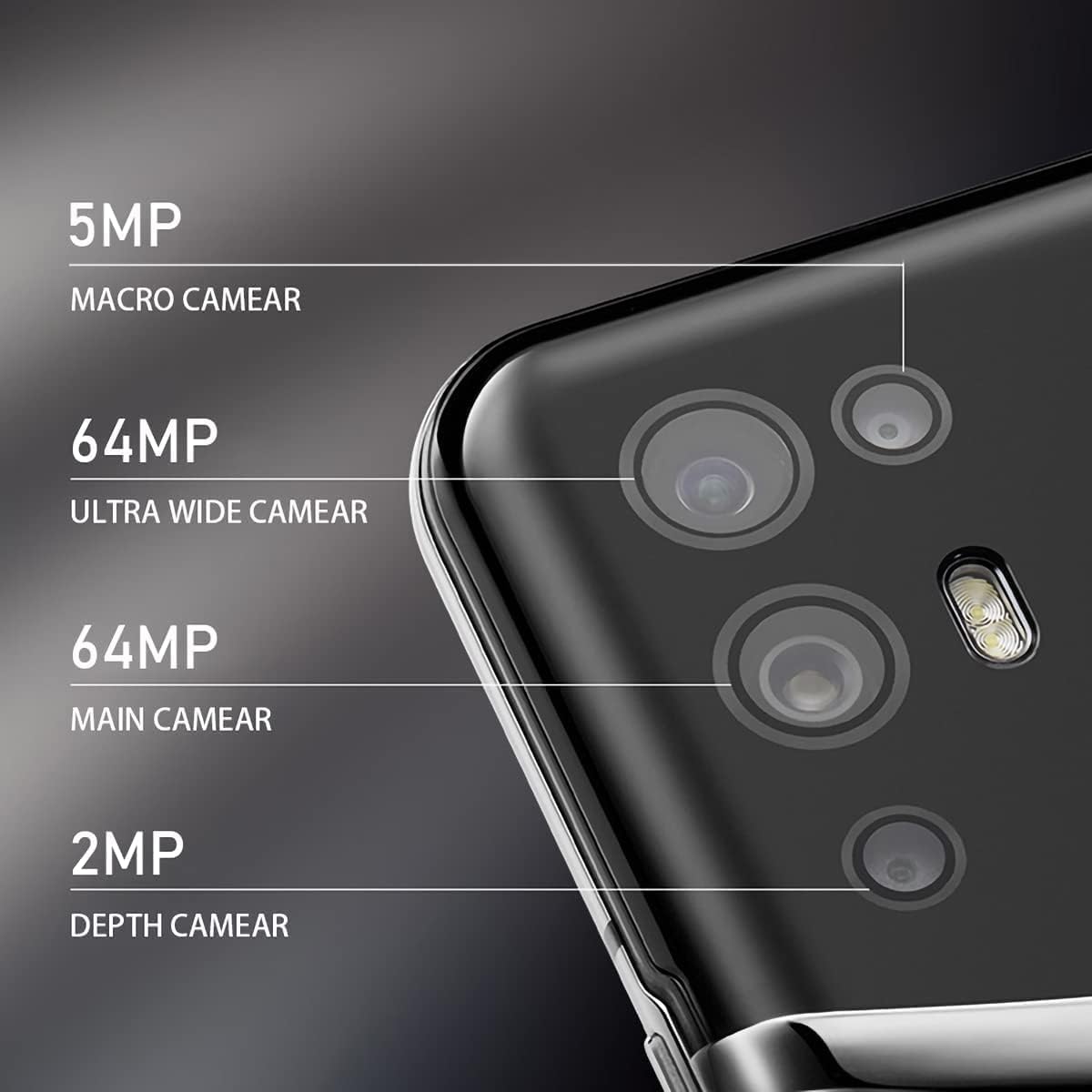
Image: The VERTU iVERTU-81 smartphone showcasing its 6.67-inch OLED display with vibrant colors, featuring a dancer and text highlighting '6.67" OLED Display' and '90hZ' (likely indicating refresh rate).
Spektaklis
Powered by a Snapdragon 888 octa-core chip and 12GB RAM, the iVERTU-81 delivers powerful performance for a smooth gaming and multitasking experience.

Image: Two hands holding the VERTU iVERTU-81 smartphone, which displays a graphically intensive game, illustrating the device's 'Powerful Performance'.
Garso kokybė
Experience master sound quality with 3D audio technology and HiFi sound. The device also features exclusive ringtones compiled by the London Symphony Orchestra.

Image: The VERTU iVERTU-81 smartphone displaying an image of an orchestra, accompanied by text highlighting 'Master Sound Quality', '3D audio technology', 'HiFi sound quality', and 'London Symphony Orchestra compiled exclusive ringtones'.
Kameros ypatybės
The iVERTU-81 is equipped with a professional photography configuration, allowing you to capture high-quality images and videos.
Galinės kameros sistema
- 64MP pagrindinė kamera: Didelės raiškos nuotraukoms.
- 64MP Ultra Wide Angle Camera: For expansive landscape and group shots.
- 5 MP makro kamera: Detalioms stambaus plano nuotraukoms.
- 2 MP gylio kamera: For enhanced portrait mode with bokeh effects.
Priekinė kamera
- 16MP priekinė kamera: Aiškioms asmenukėms ir vaizdo skambučiams.
Vaizdo įrašymas
Support for 4K 60FPS high-definition video shooting with two-way anti-shake technology ensures smooth and stable video capture. Intelligent focus assists in sharp and clear recordings.

Paveikslėlis: detalus view of the VERTU iVERTU-81's rear camera module, labeling its four lenses: 5MP Macro, 64MP Ultra Wide, 64MP Main, and 2MP Depth cameras.

Image: The VERTU iVERTU-81 smartphone displaying its camera interface, capturing a snowboarder in action, with text emphasizing 'Professional Photography' and support for '4K 60FPS HD video shooting, two-way anti-shake, intelligent focus'.
Priežiūra
To ensure the longevity and optimal performance of your VERTU iVERTU-81 smartphone, follow these maintenance guidelines:
- Valymas: Telefono ekraną ir korpusą valykite minkštu, nepūkuotu audiniu. Venkite abrazyvinių medžiagų ar stiprių cheminių medžiagų.
- Programinės įrangos atnaujinimai: Reguliariai tikrinkite, ar yra sistemos naujinimų, ir įdiekite juos, kad jūsų įrenginyje būtų naujausios saugos pataisos ir funkcijos.
- Akumuliatoriaus priežiūra: Avoid extreme temperatures. Do not fully discharge the battery frequently. Use only the provided or certified charging accessories.
- Saugyklos valdymas: Periodiškai valykite nereikalingus files and apps to maintain optimal performance. The phone comes with 512GB ROM.
- Apsauga: Apsvarstykite galimybę naudoti apsauginį dėklą ir ekrano apsaugą, kad apsaugotumėte nuo fizinių pažeidimų.
Trikčių šalinimas
If you encounter issues with your VERTU iVERTU-81, refer to the following common troubleshooting steps:
Įrenginys neįsijungia
- Įsitikinkite, kad akumuliatorius įkrautas. Prijunkite telefoną prie įkroviklio bent 15 minučių, prieš bandydami vėl įjungti.
- Paspauskite ir palaikykite maitinimo mygtuką 10–15 sekundžių, kad priverstumėte įrenginį paleisti iš naujo.
Silpnas tinklo signalas
- Patikrinkite, ar jūsų SIM kortelė tinkamai įdėta.
- Persikelkite į vietovę, kurioje yra geresnis tinklo aprėptis.
- Iš naujo paleiskite telefoną.
- Verify that your mobile data or 5G settings are correctly configured.
Programėlės stringa arba užstringa
- Uždarykite probleminę programėlę ir vėl ją atidarykite.
- Clear the app's cache and data in the phone's settings.
- Įsitikinkite, kad programa atnaujinta į naujausią versiją.
- Iš naujo paleiskite telefoną.
Greitai išsikrauna baterija
- Sumažinkite ekrano ryškumą ir nustatykite trumpesnį ekrano skirtąjį laiką.
- Disable unused features like Wi-Fi, Bluetooth, GPS, or 5G when not needed.
- Nustatykite ir uždarykite fone veikiančias energiją vartojančias programas.
- Check for system updates, as they often include battery optimizations.

Image: The VERTU iVERTU-81 smartphone connected to a charger, displaying '4200mAh Long Battery Life' and '55W fast charge' text, emphasizing its battery capacity and quick charging capability.
Communication Encryption
The device features communication encryption for double protection of your data and privacy.

Image: A visual representation of a safe door, overlaid with various security-related terms such as 'encryption', 'firewalls', 'privacy', and 'information security', illustrating the concept of 'Communication Encryption Double Protection'.
Specifikacijos
| Funkcija | Specifikacija |
|---|---|
| Modelio pavadinimas | iVERTU-81 |
| Operacinė sistema | Android |
| Procesorius | „Snapdragon 888“ (aštuonių branduolių) |
| RAM | 12 GB |
| Atminties talpa | 512 GB |
| Ekrano dydis | 6.67 colių |
| Ekrano tipas | OLED |
| Rezoliucija | 2400 x 1080 |
| Atnaujinimo dažnis | 120 Hz |
| Galinė kamera | 64MP Main + 64MP Ultra Wide + 5MP Macro + 2MP Depth |
| Priekinė kamera | 16 MP |
| Baterijos talpa | 4200 milijonųamp Valandos |
| Įkrovimas | 55W greitas įkrovimas |
| Belaidis nešiklis | Atrakinta |
| Korinio ryšio technologija | 5G |
| Ryšio technologijos | „Wi-Fi“, GPS |
| Spalva | Calf Leather-Brown |
Garantija ir palaikymas
For warranty information and customer support, please refer to the warranty card included with your product or visit the official VERTU websvetainėje. Išsaugokite pirkimo įrodymą garantiniams reikalavimams.
For technical assistance or service inquiries, please contact VERTU customer service through the channels provided on their official websvetainę.