1. Įvadas
Ačiū, kad pirkoteasing the MEIKEE Solar Light, Model AC-TYR032-2700K. This manual provides detailed instructions for the safe and efficient installation, operation, and maintenance of your solar light. Please read this manual thoroughly before use and retain it for future reference.
2. Produktas baigtasview
The MEIKEE Solar Light is a versatile lighting solution designed for both outdoor and indoor use. It features a high-efficiency solar panel, a powerful 5000 mAh battery, 76 super bright LEDs, and multiple operating modes controlled by an intelligent remote. Its adjustable color temperature and motion sensor capabilities make it suitable for various applications.
Pagrindinės funkcijos:
- Dvigubi įkrovimo būdai: Solar panel charging and USB-C charging for continuous power.
- Reguliuojama spalvos temperatūra: Offers Warm White (2500K), Natural White (4000K), and Cool White (6500K) options.
- Multiple Detection Modes: Three distinct motion detection modes for varied lighting needs.
- Light Control & Forced Lighting: Automatic dusk-to-dawn operation and timed lighting options.
- Išmanusis nuotolinio valdymo pultas: Omnidirectional 360-degree remote with a 12m range for easy mode, brightness, and color temperature adjustments.
- Platus spindulio kampas: 270° beam angle with 4 adjustable light sheets for broad illumination.
- Patvarus dizainas: IP54 protection class for outdoor resilience.
- Long Extension Cable: 5m cable for flexible solar panel placement.
Produkto komponentai:
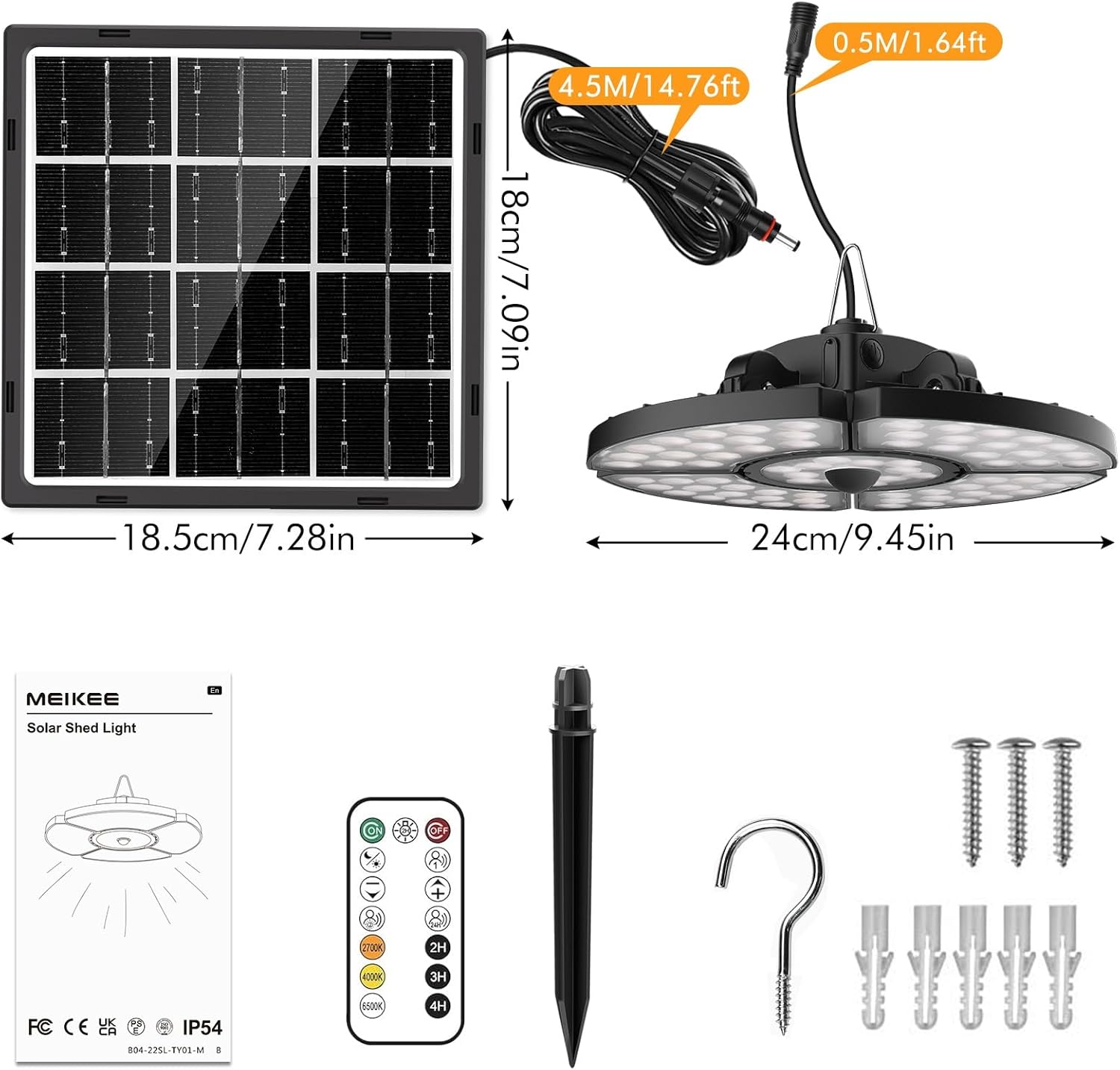
Vaizdas: Baigėsiview of the MEIKEE Solar Light components, including the solar panel, light fixture, remote control, and mounting accessories. Dimensions are also indicated.
- Solar Spotlight (Main Light Fixture)
- Solar Panel with 5m Extension Cable
- Nuotolinio valdymo pultas
- Accessory Pack (Screws, Wall Plugs, Ground Stake, Hook)
- Vartotojo vadovas
3. Techninės specifikacijos
| Modelio numeris | AC-TYR032-2700K |
| Saulės skydas | 6 V / 4 W |
| Baterijos talpa | 5000 mAh |
| Įkrovimo laikas (saulės energija) | 6-8 hours (full sunlight) |
| Discharge Time (Full Energy) | 6-12 valandas |
| šviesos diodai | 76 itin ryškūs šviesos diodai |
| Spindulio kampas | 270° |
| Spalvos temperatūra | 2500 K (šiltai balta), 4000 K (natūrali balta), 6500 K (šaltai balta) |
| Apsaugos klasė | IP54 |
| Prailginimo kabelio ilgis | 5 metrų |
| Darbinė temperatūra | -25°C iki +40°C |
| Product Dimensions (Light) | 24 L x 24 W x 8 A cm |
| Produkto svoris | 1.24 kg |
| Medžiaga | Aluminium, Polycarbonate |
4. Saugos instrukcijos
Kad išvengtumėte sužalojimų ar gaminio sugadinimo, laikykitės šių saugos priemonių:
- Nežiūrėkite tiesiai į šviečiančią LED lemputę, nes tai gali sukelti akių nuovargį ar pažeidimus.
- Ensure the solar panel is installed in a location that receives direct sunlight for most of the day to maximize charging efficiency.
- Keep the product away from open flames or high temperatures to prevent battery damage or explosion.
- Do not attempt to disassemble, repair, or modify the product. Contact qualified personnel for service.
- Laikyti vaikams nepasiekiamoje vietoje.
- Produktą ir jo bateriją utilizuokite atsakingai, laikydamiesi vietinių taisyklių.
- Ensure all connections are secure and waterproof, especially for outdoor installations.
5. Diegimo vadovas
The MEIKEE Solar Light is designed for easy installation. The 5-meter extension cable allows for flexible placement of the solar panel and the light fixture.
Choosing an Installation Location:
- Saulės skydas: Select a location that receives at least 6-8 hours of direct sunlight daily. Avoid shaded areas from trees, buildings, or other obstructions.
- Šviestuvas: The light can be hung in sheds, gazebos, porches, garages, barns, chicken coops, storage rooms, carports, basements, backyards, gardens, or any other desired location. Ensure it is protected from direct heavy rain if installed indoors or in a semi-enclosed space.
Montavimo žingsniai:
- Paruoškite įrankius: You will need a drill, screwdriver, and pencil.
- Sumontuokite saulės kolektorių:
- Position the solar panel in your chosen sunny location.
- Mark the drilling points using the solar panel bracket as a template.
- Drill holes, insert wall plugs (if mounting on masonry), and secure the solar panel bracket with screws.
- Optimaliam įkrovimui sureguliuokite saulės baterijos kampą taip, kad ji būtų nukreipta tiesiai į saulę.
- Šviestuvo montavimas:
- Choose a suitable spot for the light fixture.
- Use the provided hook or screws to hang or mount the light.
- Ensure the light is securely fastened.
- Connect the Solar Panel to the Light:
- Connect the 5-meter extension cable from the solar panel to the input port on the light fixture.
- Ensure the connection is firm and the waterproof interface is properly sealed.

Vaizdas: Illustrates the separate design of the solar panel and light, highlighting solar charging and the USB charging port on the light fixture.
After installation, allow the solar panel to charge the light for at least 6-8 hours in direct sunlight before first use.
6. Operacija
Your MEIKEE Solar Light can be operated and customized using the included remote control.
6.1 Žibintuvėlio įkrovimas
- Saulės įkrovimas: The primary charging method. Ensure the solar panel is exposed to direct sunlight. The light will automatically charge during the day.
- USB-C įkrovimas: In periods of low sunlight or extended indoor use, the light can be charged via a USB-C cable (not included). Connect a standard USB-C charger to the charging port on the light fixture.
6.2 Nuotolinio valdymo pulto funkcijos

Vaizdas: Depicts the omnidirectional remote control and its effective range of up to 12 meters.
The remote control allows you to switch modes, adjust brightness, and change color temperature from a distance of up to 12 meters.
- Maitinimo įjungimas/išjungimas: Paspauskite ĮJUNGTA/IŠJUNGTA mygtuką.
- Režimo pasirinkimas: Use the dedicated mode buttons (Mode 1, Mode 2, Mode 3, Light Control Mode, Forced Lighting 2H Mode) to cycle through lighting behaviors.
- Ryškumo reguliavimas: Naudokite + ir - buttons to increase or decrease light intensity.
- Spalvos temperatūros reguliavimas: Naudokite 2500 tūkst (Warm White), 4000 tūkst (Natural White), and 6500 tūkst (Cool White) buttons to select your desired light color.
- Laikmačio funkcija: Set the light to turn off automatically after 2H, 3H, or 4H using the respective timer buttons.
6.3 apšvietimo režimai

Vaizdas: Visual representation of the five distinct operating modes, showing light behavior during day and night, with and without motion detection.
- Mode 1 (Motion Detection - Full Brightness): At night, the light turns on at 100% brightness for 30 seconds when motion is detected, then turns off when motion ceases.
- Mode 2 (Motion Detection - Dim to Bright): At night, the light stays at 30% brightness. When motion is detected, it brightens to 100% for 30 seconds, then returns to 30% brightness.
- Mode 3 (24-Hour Motion Detection): The light operates similarly to Mode 1 but detects motion and illuminates at 100% brightness for 30 seconds at any time of day or night.
- Šviesos valdymo režimas: Automatically turns on at 50% brightness at dusk and turns off at dawn.
- Forced Lighting 2H Mode: The light stays on at 85% brightness for 2 hours, regardless of day or night.
6.4 Color Temperature Settings
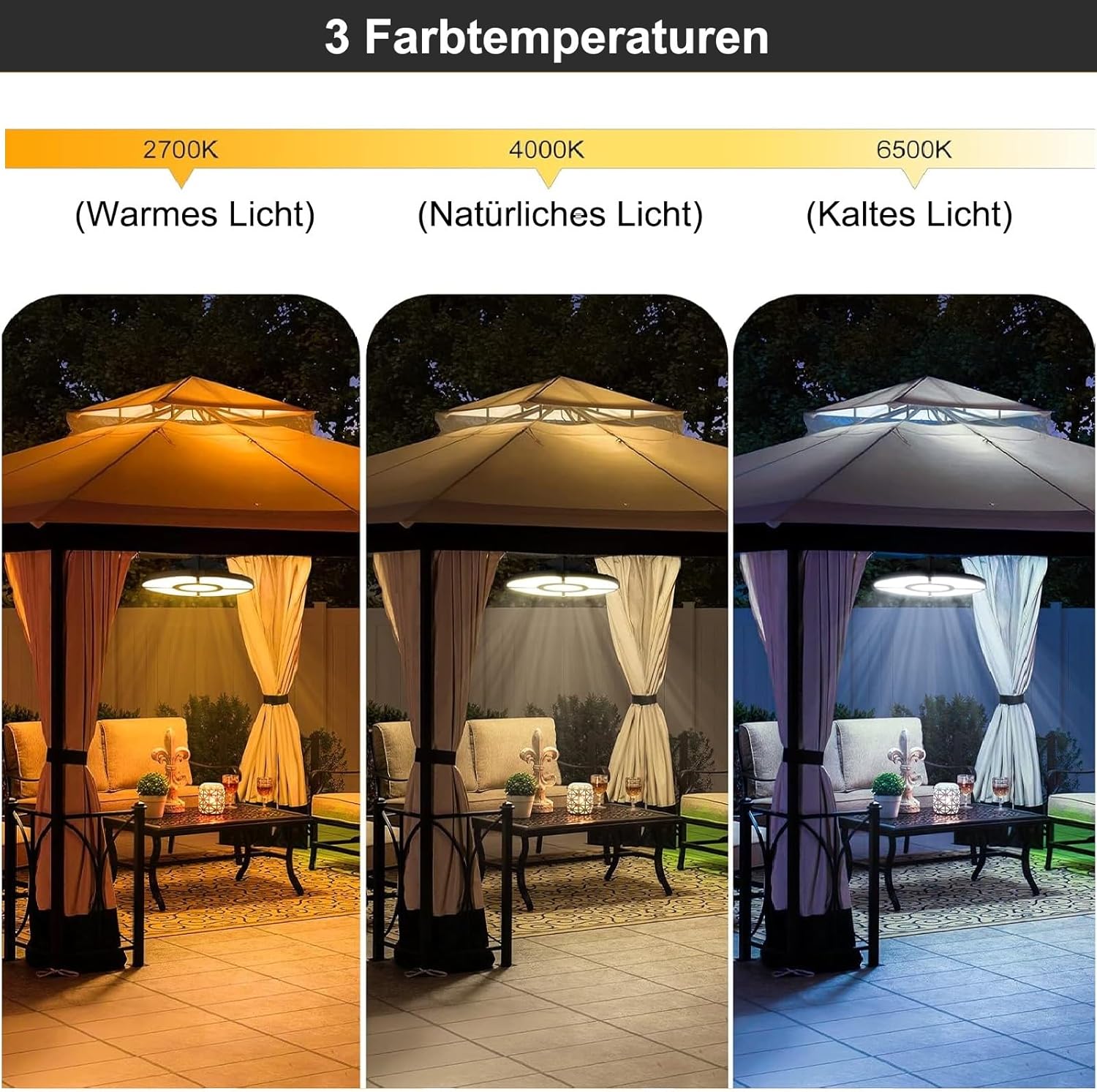
Vaizdas: Demonstrates the three available color temperatures: Warm Light (2700K), Natural Light (4000K), and Cold Light (6500K), as seen in a gazebo setting.
The MEIKEE Solar Light offers three distinct color temperatures to suit different preferences and environments:
- Šiltai balta (2500K): Suteikia jaukią, svetingą atmosferą.
- Natural White (4000K): A balanced, neutral light suitable for general illumination.
- Šalta balta (6500K): Bright, crisp light ideal for task lighting or enhanced visibility.
Select the desired color temperature using the corresponding buttons on the remote control.
7. Priežiūra
Regular maintenance ensures optimal performance and extends the lifespan of your MEIKEE Solar Light.
- Švarus saulės skydelis: Periodiškai nuvalykite saulės bateriją minkšta šluosteamp šluoste dulkėms, nešvarumams, lapams ar sniegui pašalinti. Švarus skydelis užtikrina maksimalų saulės šviesos sugėrimą ir įkrovimo efektyvumą.
- Patikrinkite jungtis: Ensure all cable connections, especially the waterproof interface between the solar panel and the light, remain secure and free from corrosion.
- Patikrinkite, ar nėra pažeidimų: Regularly check the light fixture, solar panel, and cables for any signs of physical damage. If damage is found, discontinue use and contact customer support.
- Akumuliatoriaus priežiūra: While the battery is designed for longevity, extreme temperatures can affect its performance. Avoid prolonged exposure to temperatures outside the recommended operating range (-25°C to +40°C).
8. Problemų sprendimas
If you encounter issues with your MEIKEE Solar Light, refer to the following common problems and solutions:
| Problema | Galima priežastis | Sprendimas |
|---|---|---|
| Šviesa neįsijungia naktį. |
|
|
| Šviesos trukmė trumpesnė nei tikėtasi. |
|
|
| Judesio jutiklis neveikia. |
|
|
| Nuotolinio valdymo pultas nereaguoja. |
|
|
9. Garantija ir klientų aptarnavimas
MEIKEE products are manufactured to high-quality standards. For warranty information, please refer to the warranty card included with your product or contact MEIKEE customer support.
If you have any questions, require technical assistance, or experience issues not covered in this manual, please contact MEIKEE customer support through the retailer where you purchased the product or visit the official MEIKEE websvetainė kontaktinei informacijai.
Please have your model number (AC-TYR032-2700K) and purchase date ready when contacting support.