
„Axis Communications“ 02342-001
User Manual: AXIS P1468-LE Compact Outdoor Camera
Model: 02342-001 | Brand: Axis Communications
Įvadas
The AXIS P1468-LE is a robust, outdoor-ready network camera designed for advanced surveillance scenarios. It delivers excellent image quality and incorporates deep learning-based analytics at the edge, enhancing its capabilities for intelligent monitoring. This camera also features built-in cybersecurity measures to ensure secure operation. This manual provides essential information for the setup, operation, and maintenance of your AXIS P1468-LE camera.
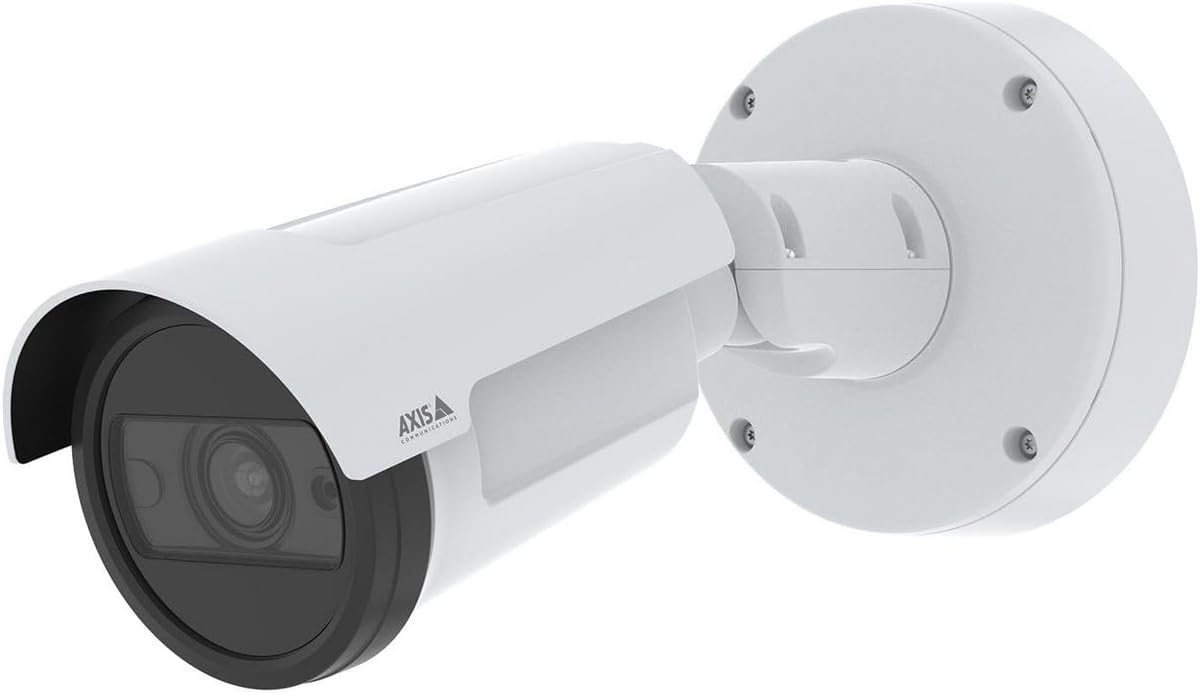
1 paveikslas: The AXIS P1468-LE Compact Outdoor Camera, showcasing its white cylindrical body, integrated sunshield, and wall-mount bracket. The camera features a dark lens housing and the Axis Communications logo on its side.
Sąranka
1. Pakuotės turinys
Prieš pradėdami montavimą, patikrinkite, ar yra visi komponentai:
- AXIS P1468-LE tinklo kamera
- Diegimo vadovas
- Montavimo laikiklis ir aparatūra
- Gręžimo šablonas
- Resistorx® T20 tool
2. Kameros montavimas
The AXIS P1468-LE is designed for wall or ceiling mounting. Ensure the mounting surface is strong enough to support the camera's weight and withstand environmental conditions.
- Pasirinkite vietą: Pasirinkite vietą, kurioje yra norimas laukas view and is within reach of network and power connections.
- Paruoškite paviršių: Use the provided drill template to mark the drilling holes on the mounting surface.
- Įdiegti laikiklį: Secure the mounting bracket using appropriate screws and anchors for your surface type.
- Prijunkite kamerą: Mount the camera body onto the bracket, ensuring it is securely fastened. Adjust the camera's angle for optimal viewing.
3. Tinklo ir maitinimo prijungimas
Connect the camera to your network and power source. The camera supports Power over Ethernet (PoE) for simplified installation.
- Ethernet kabelis: Connect a standard Ethernet cable from your network switch (preferably PoE-enabled) to the camera's Ethernet port.
- Galia (pasirinktinai): If PoE is not used, connect a compatible power adapter (not included) to the camera's power input. Refer to specifications for voltage reikalavimus.
4. Pradinė konfigūracija
After physical installation, access the camera's web sąsaja pradinei sąrankai.
- Atraskite kamerą: Use the AXIS IP Utility or AXIS Device Manager software to discover the camera on your network.
- Prieiga Web Sąsaja: Atidarykite a web naršyklę ir įveskite kameros IP adresą.
- Set Root Password: For security, you will be prompted to set a new root password upon first access.
- Konfigūruoti nustatymus: Follow the on-screen wizard to configure basic settings such as IP address, date/time, and video stream settings.
Fotoaparato valdymas
1. Gyvai View ir Įrašymas
Pasiekite tiesioginį kameros vaizdą view and manage recording settings through its web interface or a compatible Video Management Software (VMS).
- Tiesiogiai View: Navigate to the "Live View" tab to see the real-time video feed.
- Įrašas: Configure recording schedules, motion detection triggers, and storage locations (e.g., SD card, network storage) under the "Recordings" or "Events" section.
2. Išplėstinės funkcijos
The AXIS P1468-LE offers several advanced features for enhanced surveillance:
- Deep Learning Analytics: Utilize built-in analytics for object classification, motion detection, and other intelligent event triggers. Configure these under the "Applications" or "Analytics" menu.
- Cybersecurity Features: The camera includes features like signed firmware and secure boot to prevent unauthorized access and ensure system integrity. Regularly check for firmware updates to maintain security.
- IR apšvietimas: The integrated IR LEDs provide clear video in low-light or complete darkness. This feature is typically automatic but can be adjusted in video settings.
Priežiūra
1. Kameros valymas
Regular cleaning ensures optimal image quality and extends the camera's lifespan.
- Objektyvas: Gently wipe the lens with a soft, lint-free cloth moistened with a mild cleaning solution or lens cleaner. Avoid abrasive materials.
- Būstas: Nuvalykite kameros korpusą reklaminiu valikliuamp audinys. Nenaudokite stiprių ploviklių ar tirpiklių.
2. Firmware atnaujinimai
Keep the camera's firmware updated to benefit from the latest features, performance improvements, and security patches.
- Patikrinkite, ar nėra atnaujinimų: Visit the Axis Communications website or use AXIS Device Manager to check for available firmware updates for your model.
- Montavimas: Follow the instructions provided by Axis for safe firmware installation. Ensure a stable power supply during the update process.
Trikčių šalinimas
| Problema | Galima priežastis | Sprendimas |
|---|---|---|
| Nėra vaizdo kanalo | Maitinimo problemos, atjungtas tinklo kabelis, neteisingas IP adresas. | Check power supply/PoE, ensure Ethernet cable is securely connected, verify camera's IP address and network settings. |
| Prasta vaizdo kokybė | Dirty lens, improper focus, low light conditions, incorrect video settings. | Clean the lens, adjust focus via web interface, ensure IR illumination is active in low light, check resolution and compression settings. |
| Negaliu prieiti web sąsaja | Incorrect IP address, network connectivity issue, firewall blocking access. | Verify IP address, check network connection, temporarily disable firewall to test, reset camera to factory defaults if necessary. |
Specifikacijos
| Funkcija | Detalė |
|---|---|
| Prekės ženklas | „Axis Communications“. |
| Modelio pavadinimas | AXIS P1468-LE - Netzwerk-Überwachungskam |
| Prekės modelio numeris | 02342-001 |
| ASIN | B0BNZ1MW19 |
| Naudojimas viduje / lauke | Lauke |
| Ryšio technologija | Laidinis |
| Ryšio protokolas | „Home Plug“. |
| Valdiklio tipas | Irisas |
| Montavimo tipas | Sieninis laikiklis |
| Spalva | Baltas |
| Prekių skaičius | 1 |
| Įtraukti komponentai | Fotoaparatas/priedai |
| Kanalų skaičius | 4 |
| Belaidžio ryšio technologija | Wi-Fi |
| Medžiaga | Metalas |
| Vattage | 16 vatų |
| Prekės matmenys (IxPxH) | 19.69 x 19.69 x 11.02 colio |
| Reikalingos baterijos? | Nr |
| Prekės svoris | 1.5 kilogramų (3.3 svarai) |
| Priartinimo tipas | Optinis priartinimas |
| Įspėjimo tipas | Tik judėjimas |
| Kambario tipas | Biuras |
| Šviesos šaltinio tipas | Infraraudonųjų spindulių |
| Vaizdo įrašymo formatas | MPEG-4 |
| Vienetų skaičius | 1.0 Skaičius |
| Nuotraukų jutiklių technologija | CMOS |
| Tarptautinis apsaugos įvertinimas | IP66, IP67 |
| Kontrolės metodas | Programėlė |
| Operacinė sistema | iOS |
| Gamintojas | AŠIS - KAMERA |
| Pasiekiama pirmoji data | 31 m. liepos 2022 d |
| Rekomenduojami gaminio naudojimo būdai | Priežiūra |
| Ypatinga funkcija | Mac, Netcam, PC, Wireless connectivit |
Garantija ir palaikymas
1. Gaminio garantija
Axis Communications products typically come with a limited hardware warranty. For specific warranty terms and conditions applicable to your AXIS P1468-LE camera, please refer to the warranty documentation included with your purchase or visit the official Axis Communications websvetainę.
2. Techninė pagalba
For technical assistance, troubleshooting, or further inquiries regarding your AXIS P1468-LE camera, please contact Axis Communications support:
- Palaikymas internetu: Aplankykite Axis Communications Support Portal for FAQs, documentation, and software downloads.
- Kontaktinė informacija: Find regional contact details for phone or email support on the official Axis Communications websvetainę.
When contacting support, please have your camera's model number (02342-001) and serial number ready.
Ask a question about this manual
Ask about setup, troubleshooting, compatibility, parts, safety, or missing instructions. Manuals+ will review the question and use this page’s manual context to help answer it.