
1. Įvadas
This manual provides essential instructions for the safe and efficient operation of your Rigol DHO1074 Digital Oscilloscope. The DHO1074 is a 4-channel, 70 MHz digital oscilloscope featuring a 12-bit resolution and a 2 GSa/s real-time sample rate, designed for precise signal analysis in various applications. Please read this manual thoroughly before using the device to ensure proper functionality and to prevent damage.
2. Saugos informacija
Kad išvengtumėte sužalojimų ir įrenginio sugadinimo, laikykitės šių saugos priemonių:
- Use only the power cord specified for this instrument.
- Įsitikinkite, kad prietaisas yra tinkamai įžemintas, kad išvengtumėte elektros smūgio.
- Nenaudokite prietaiso šlapioje ar sausoje vietojeamp sąlygas.
- Venkite dirbti sprogioje aplinkoje.
- Do not remove the instrument cover. Refer servicing to qualified personnel.
- Use appropriate probes and accessories.
- Prieš valydami atjunkite maitinimą.
3. Pakuotės turinys
Patikrinkite, ar pakuotėje yra visi toliau išvardyti daiktai:
- Rigol DHO1074 Digital Oscilloscope (1 unit)
- Maitinimo laidas (1 vnt.)
- Passive Probes (4 units, one for each channel)
- USB laidas (1 vnt.)
- Trumpas vadovas (1 vnt.)
- Resource CD (1 unit)
4. Sąranka
4.1 Maitinimo prijungimas
- Įsitikinkite, kad osciloskopo maitinimo jungiklis yra IŠJUNGTOJE padėtyje.
- Prijunkite pateiktą maitinimo laidą prie kintamosios srovės maitinimo įvesties, esančios osciloskopo galiniame skydelyje.
- Kitą maitinimo laido galą prijunkite prie įžeminto kintamosios srovės lizdo.
4.2 Zondų prijungimas
- Connect the BNC connector of a passive probe to one of the input channels (CH1, CH2, CH3, or CH4) on the front panel.
- Attach the probe ground clip to a common ground point in your circuit.
- Prijunkite zondo antgalį prie bandymo taško savo grandinėje.
- For accurate measurements, compensate the probe before use. Refer to the "Probe Compensation" section in the full user manual for detailed instructions.
4.3 Pradinis įjungimas
- Press the power switch on the front panel to turn on the oscilloscope.
- The instrument will perform a self-test and display the startup screen.
- Once the main interface appears, the oscilloscope is ready for use.
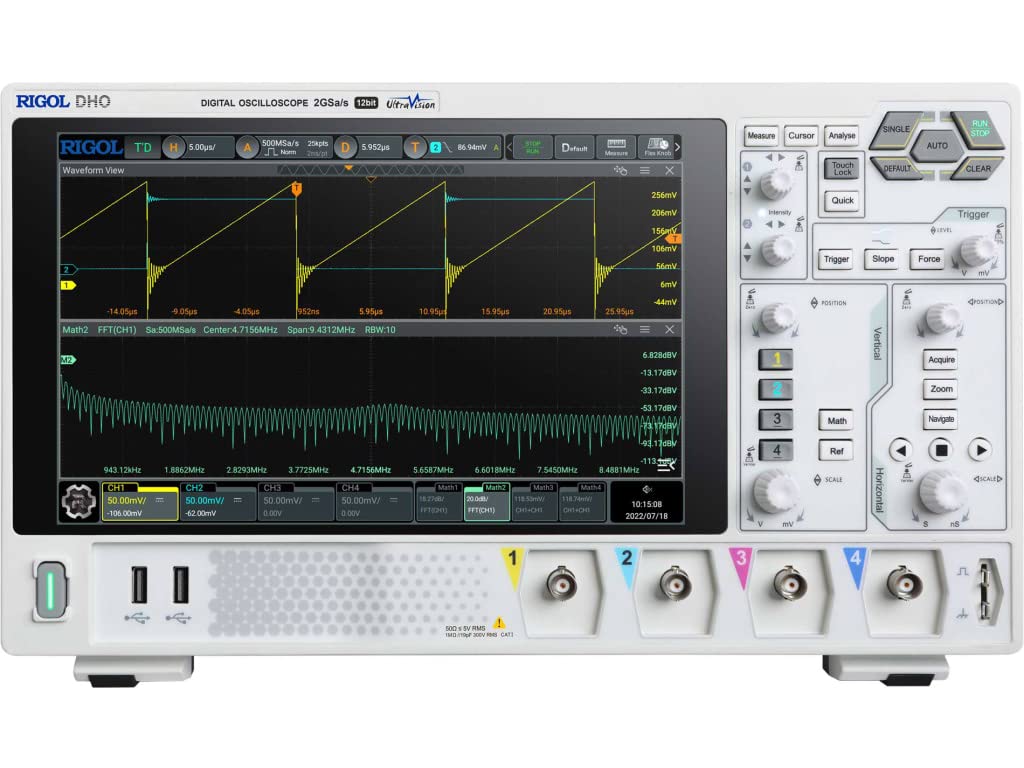
4.1 pav.: priekis view of the Rigol DHO1074 Digital Oscilloscope, showing the display, control panel, and input channels.
5. Osciloskopo valdymas
The Rigol DHO1074 offers a user-friendly interface for capturing and analyzing waveforms. Key features include 4 analog channels, 70 MHz bandwidth, and a 12-bit vertical resolution for enhanced signal fidelity.
5.1 Basic Waveform Acquisition
- Maitinimas: Ensure the oscilloscope is powered on as described in Section 4.3.
- Prijungimo signalas: Connect your signal source to an input channel using a compensated probe.
- Automatinė sąranka: Paspauskite AUTO button on the front panel. The oscilloscope will automatically adjust vertical, horizontal, and trigger settings to display a stable waveform.
- Rankinis reguliavimas:
- Naudokite VERTIKALUS knobs (VOLTS/DIV) to adjust the vertical scale (voltage per division) for each channel.
- Naudokite HORIZONTALUS knob (SEC/DIV) to adjust the horizontal scale (time per division).
- Naudokite TRIGGER controls to set the trigger level and mode for stable waveform capture.
5.2 Išplėstinės funkcijos
- Didelė raiška: Benefit from the 12-bit vertical resolution, providing 16 times more quantization levels than standard 8-bit oscilloscopes, which improves measurement accuracy and reduces quantization noise.
- Deep Memory: The DHO1074 features a 50 Mpts maximum memory depth (expandable to 100 Mpts with option DHO1000-RLU-01), allowing for longer waveform captures at high sample tarifus.
- Serial Decoding: Standard serial decoding capabilities include SPI, I2C, RS232/UART, CAN, and LIN, simplifying the analysis of common serial bus communications.
- Matavimo funkcijos: Access various automatic measurement functions (e.g., Vpp, Vrms, Frequency, Period) via the PAMATUOKITE meniu.
- Matematinės funkcijos: Utilize built-in math functions (e.g., Add, Subtract, Multiply, Divide, FFT) to perform waveform analysis.
6. Priežiūra
6.1 Prietaiso valymas
- Prieš valydami visada atjunkite maitinimo laidą.
- Naudokite minkštą skudurėlį dampened with a mild detergent solution to clean the exterior surfaces.
- Do not use abrasive cleaners or solvents that could damage the plastic parts.
- Venkite purkšti skysčius tiesiai ant instrumento.
6.2 Saugykla
- Store the oscilloscope in a clean, dry environment, away from direct sunlight and extreme temperatures.
- Protect the screen from scratches.
6.3 Kalibravimas
For optimal performance and measurement accuracy, periodic calibration by qualified service personnel is recommended. Refer to Rigol's official support channels for calibration services.
7. Problemų sprendimas
| Problema | Galima priežastis | Sprendimas |
|---|---|---|
| No power when turned on. | Power cord not connected; power outlet faulty; instrument fuse blown. | Check power cord connection; test power outlet; contact service for fuse replacement. |
| Nerodoma bangos forma. | Probe not connected; signal source off; vertical/horizontal scale incorrect; trigger not set correctly. | Verify probe connection; check signal source; adjust VOLTS/DIV and SEC/DIV; adjust trigger level or use AUTO button. |
| Nestabili bangos forma. | Trigger settings incorrect; noisy signal. | Adjust trigger mode, source, and level; ensure proper grounding of the probe. |
| Incorrect measurements. | Probe compensation incorrect; wrong measurement settings. | Compensate probes; verify measurement parameters. |
Jei problema išlieka ir išbandžius šiuos sprendimus, susisiekite su „Rigol“ klientų aptarnavimo tarnyba.
8. Specifikacijos
| Parametras | Vertė |
|---|---|
| Modelis | DHO1074 |
| Pralaidumas | 70 MHz |
| Analoginiai kanalai | 4 |
| Vertikali skiriamoji geba | 12 bitų |
| Maksas Sample Įvertinkite | 2 GSa/s (real-time) |
| Atminties gylis | 50 Mpts (100 Mpts with DHO1000-RLU-01 option) |
| Serijinis dekodavimas | SPI, I2C, RS232/UART, CAN, LIN |
| Gaminio matmenys | 18 x 11 x 12 colio |
| Prekės svoris | 12 svaro |
| Gamintojas | RIGOL TECHNOLOGIES USA INC |
9. Garantija ir palaikymas
Rigol products are designed for reliability and performance. This instrument is covered by a standard manufacturer's warranty. For specific warranty terms and conditions, please refer to the warranty card included with your product or visit the official Rigol websvetainę.
For technical support, service, or inquiries regarding your Rigol DHO1074 Digital Oscilloscope, please contact Rigol Technologies USA Inc. customer service through their official websvetainėje arba kontaktinę informaciją, pateiktą jūsų produkto dokumentuose.
Online resources and additional documentation may be available on the Rigolas websvetainę.