
1. Produktas baigtasview
The YiBiChin AN-MR21GC is a universal magic remote control designed for various 2021 LG Smart TV models. It features magic pointer and intelligent voice control functions, allowing for quick and intuitive navigation and command execution. This remote enhances your TV viewing experience with convenient access to features and content.
1.1 Suderinamumas
This remote control is compatible with the following 2021 LG TV series:
- LG OLED TVs: G1, C1, A1 series
- LG Mini-LED QNED TVs: QNED99, QNED90 series
- LG NanoCell TVs: NANO99, NANO90, NANO85, NANO80, NANO75 series
- LG UHD TVs: UP80, UP75 series
Note: This remote control does not feature NFC functionality.

1 pav.: Priekis, šonas ir galas views of the YiBiChin AN-MR21GC Magic Remote.

Figure 2: The remote control highlighting its universal compatibility with 2021 LG Smart TVs.
2. Sąranka
2.1 Akumuliatoriaus įdėjimas
The remote control requires two AA batteries (not included) for operation. Follow these steps to install them:
- Nuotolinio valdymo pulto gale raskite baterijų skyriaus dangtelį.
- Norėdami atidaryti skyrių, stumkite dangtelį žemyn.
- Įdėkite dvi AA baterijas, užtikrindami, kad teigiamas (+) ir neigiamas (-) poliai teisingai sutaptų su indikatoriais skyriaus viduje.
- Stumkite baterijų skyriaus dangtelį atgal į vietą, kol jis tvirtai spragtelės.

Figure 3: Correct installation of AA batteries into the remote control.
2.2 Susiejimo metodas
To enable the magic pointer and voice functions, the remote control must be paired with your LG Smart TV. Ensure your TV is connected to a WiFi network for these functions to work correctly. If you are replacing an original remote, it is recommended to disconnect it and remove its batteries before pairing the new remote, as only one smart remote can be paired at a TV at a time.
Follow these steps to pair your remote:
- Manually turn on your LG Smart TV using the power button on the TV itself.
- Point the YiBiChin AN-MR21GC remote control directly towards your TV from a close distance.
- Paspauskite ir palaikykite Scroll Wheel (OK button) on the remote control for a few seconds until the pairing process is complete. A confirmation message should appear on your TV screen.
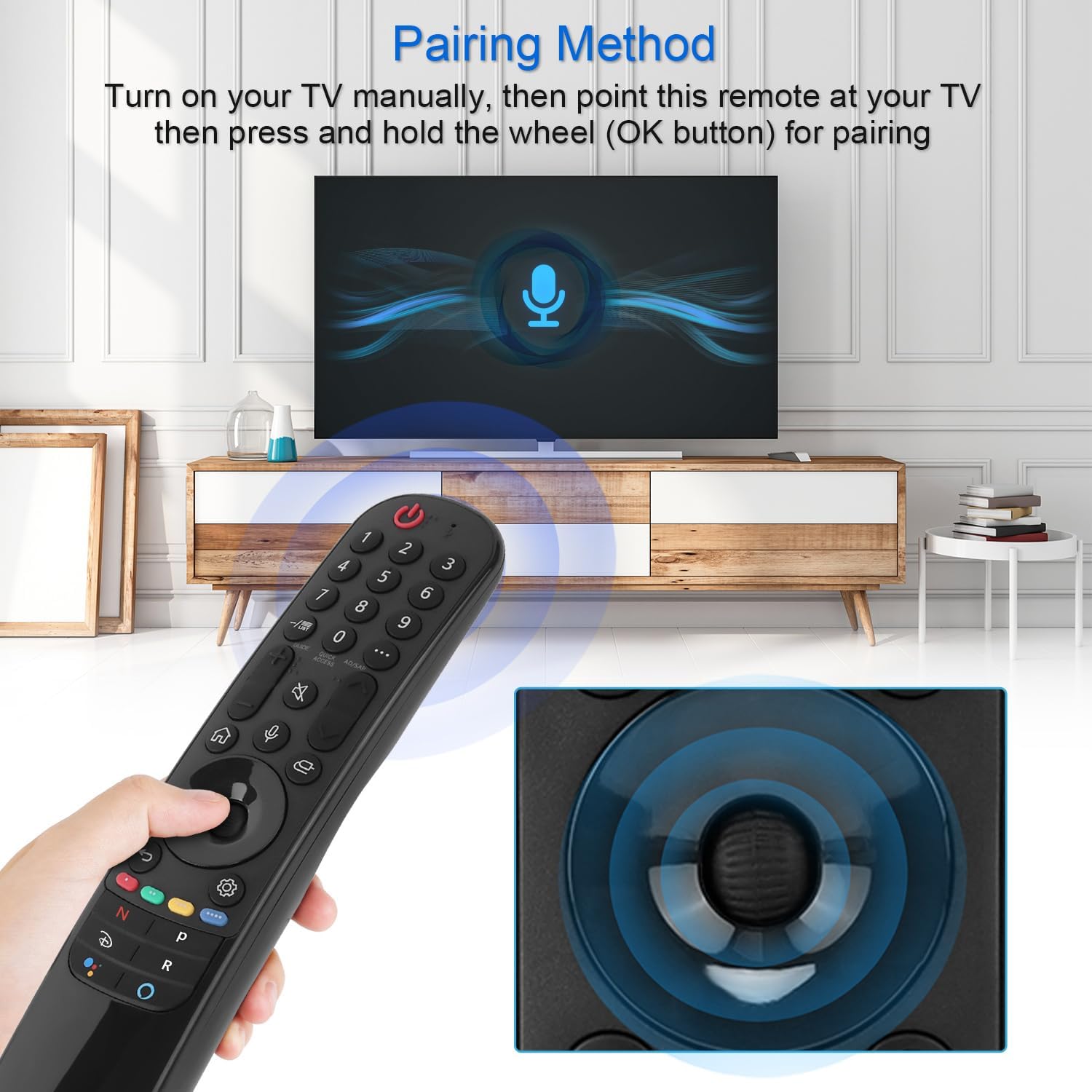
Figure 4: Demonstrating the pairing process by holding the OK button while pointing at the TV.
3. Naudojimo instrukcijos
The YiBiChin AN-MR21GC remote control offers multiple ways to interact with your LG Smart TV, including traditional button presses, a magic pointer, and voice commands.
3.1 Pagrindinės funkcijos
- Maitinimo mygtukas: Įjungia arba išjungia televizorių.
- Skaičių mygtukai (0–9): Tiesiogiai pasirinkite kanalus.
- Garsumo didinimas / sumažinimas: Reguliuoja televizoriaus garsumą.
- Kanalas aukštyn/žemyn: Keičia televizijos kanalus.
- Nutildymo mygtukas: Nutildo arba įjungia televizoriaus garsą.
- Namų mygtukas: Accesses the TV's main smart interface.
- Atgal mygtukas: Grįžta į ankstesnį ekraną arba meniu.
3.2 Magic Pointer Function
Once paired, the remote acts as a pointer, allowing you to move a cursor on the TV screen by simply moving the remote in the air. This provides an intuitive way to select items, scroll through menus, and interact with applications.
3.3 Valdymas balsu
Paspauskite Mikrofono mygtukas to activate voice control. Speak clearly into the remote to issue commands, search for content, or control smart home devices connected to your TV. Voice commands allow for rapid access to desired programs and videos, with a response time of approximately 0.2 seconds.
3.4 Greitosios prieigos mygtukai
The remote includes dedicated shortcut buttons for popular streaming services, providing instant access to your favorite entertainment platforms.
3.5 Tolimųjų distancijų valdymas
The remote utilizes stable infrared and Bluetooth signals, offering a control distance of up to 33 feet (10 meters), ensuring reliable operation from various positions within your room.

Figure 5: The remote's effective operating range and quick response time.
4. Priežiūra
4.1 Akumuliatoriaus keitimas
When the remote control's performance degrades (e.g., unresponsive buttons, weak signal), it is likely time to replace the batteries. Follow the battery installation steps in Section 2.1 to replace the two AA batteries.
4.2 Valymas
Nuotolinio valdymo pultą valykite minkšta, sausa šluoste. Jei nešvarumai sunkiai įveikiami, šiek tiek nuvalykite.ampen the cloth with water or a mild, non-abrasive cleaner. Avoid using harsh chemicals or excessive moisture, as this can damage the remote's electronics.
5. Problemų sprendimas
5.1 Nuotolinio valdymo pultas nereaguoja
- Patikrinkite baterijas: Įsitikinkite, kad baterijos yra tinkamai įdėtos ir neišsikrovusios. Jei reikia, pakeiskite jas.
- Nuotolinio valdymo pulto susiejimas iš naujo: If the remote becomes unresponsive, try re-pairing it with your TV by following the steps in Section 2.2.
- Kliūtys: Įsitikinkite, kad tarp nuotolinio valdymo pulto ir televizoriaus IR imtuvo nėra jokių kliūčių.
5.2 Pointer or Voice Function Not Working
- „WiFi“ ryšys: Verify that your LG Smart TV is connected to a stable WiFi network. The pointer and voice functions rely on this connection.
- Nuotolinio valdymo pulto susiejimas iš naujo: Re-pairing the remote (Section 2.2) can often resolve issues with these advanced functions.
- Original Remote Interference: Ensure no other smart remote is actively paired with the TV, or that the original remote's batteries have been removed.
6. Specifikacijos
| Prekės ženklas | YiBiChin |
| Modelio pavadinimas | AN-MR21GC |
| Suderinami įrenginiai | 2021 LG Smart TVs (OLED, QNED, NanoCell, UHD series) |
| Ryšio technologija | Wi-Fi, Infrared, Bluetooth |
| Valdiklio tipas | Voice Control, Pointer |
| Maitinimo šaltinis | Maitinamas baterijomis |
| Baterijos tipas | 2 x AA (neįtraukta) |
| Didžiausias diapazonas | 10 metrų (33 pėdos) |
| Reagavimo laikas | 0.2 seconds (for voice commands) |
| Matmenys (I x P x A) | 19.2 x 5.7 x 3.1 cm (7.6 x 2.2 x 1.2 colio) |
| Prekės svoris | 110 g (3.88 uncijos) |
| Spalva | Juoda |

6 pav.: Nuotolinio valdymo pulto matmenys.
7. Garantija ir palaikymas
YiBiChin is committed to providing quality replacement remote controls and excellent customer service. While specific warranty details are not provided in this manual, we offer dedicated support for our products.
7.1 Pagalba klientams
If you have any questions, encounter issues, or require assistance with your YiBiChin AN-MR21GC Magic Remote, please do not hesitate to contact our customer support team. We aim to respond to all inquiries within 24 hours.
For support, please refer to the contact information provided with your purchase or visit the official YiBiChin store page on Amazon.
Thank you for choosing YiBiChin.