
Įvadas
Ačiū, kad pirkoteasing the Andoer D2 Handheld RGB LED Video Light Wand. This manual provides detailed instructions for the safe and effective use of your new light wand. Please read this manual thoroughly before operation and retain it for future reference.
Saugos informacija
- Nelaikykite prietaiso vandenyje ar didelėje drėgmėje.
- Venkite tiesioginio akių poveikio šviesos šaltiniui.
- Neardykite ir nemodifikuokite įrenginio. Remontą turėtų atlikti tik įgalioti specialistai.
- Laikyti vaikams nepasiekiamoje vietoje.
- Naudokite tik pridedamą arba sertifikuotą įkrovimo laidą.
- Neeksploatuokite aplinkoje, kurioje yra degių dujų ar skysčių.
Pakuotės turinys
Atidarę pakuotę, patikrinkite jos turinį. Jei trūksta kokių nors daiktų arba jie pažeisti, susisiekite su pardavėju.
- Andoer D2 Handheld RGB LED Video Light Wand
- C tipo USB įkrovimo laidas
- Vartotojo vadovas (šis dokumentas)
Produktas baigtasview
Familiarize yourself with the components and controls of the Andoer D2 light wand.
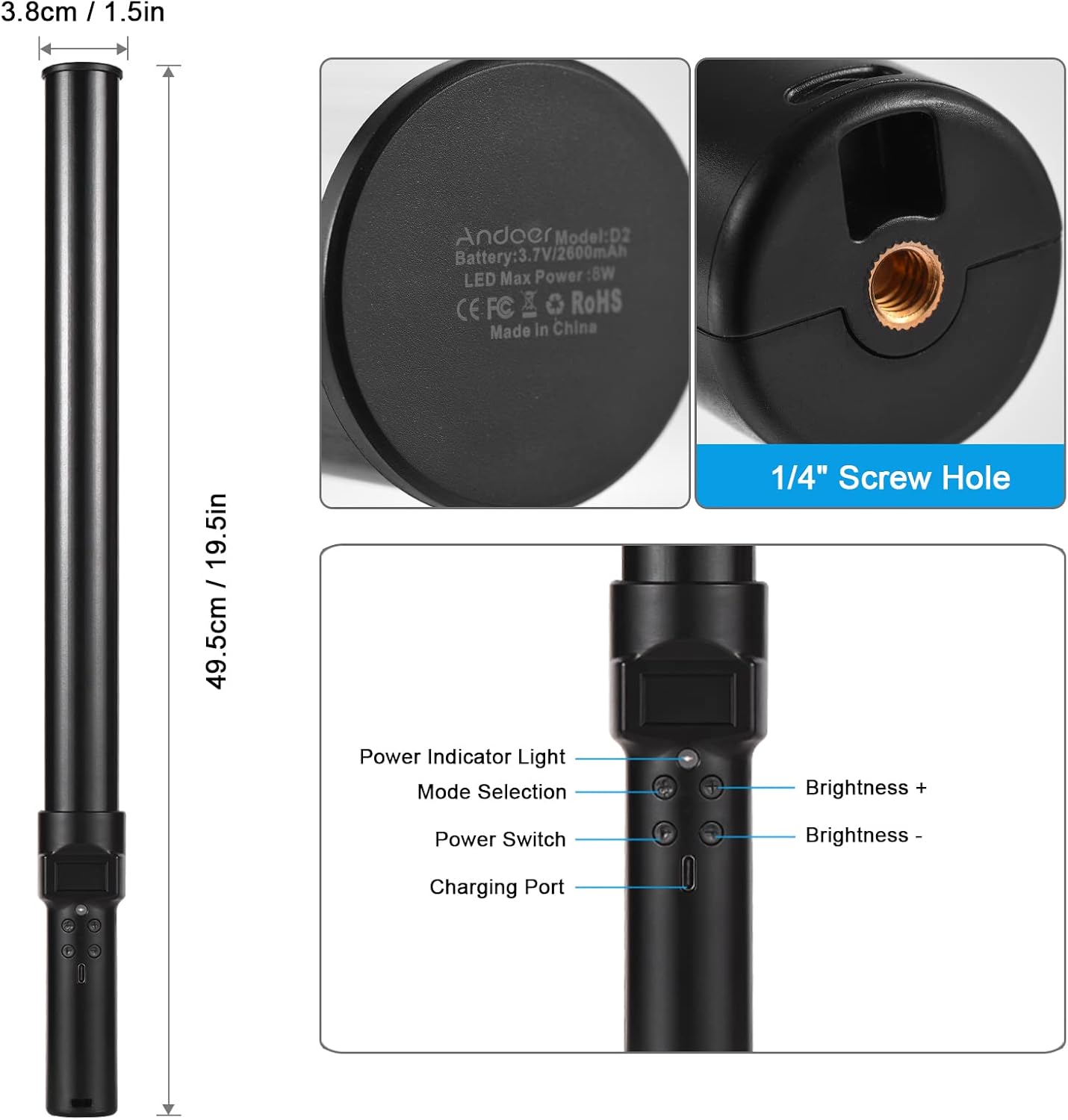
Vaizdas: Baigėsiview of the Andoer D2 light wand, showing its dimensions (approximately 49.5cm / 19.5in long and 3.8cm / 1.5in diameter) and control panel. The control panel includes a Power Indicator Light, Mode Selection button, Power Switch, Brightness + button, Brightness - button, and a Charging Port.
Valdymo skydelio funkcijos:
- Maitinimo jungiklis: Turns the light wand on or off.
- Režimo pasirinkimas: Cycles through different lighting modes (e.g., CCT mode, RGB color effects).
- Ryškumas +: Increases the light brightness.
- Ryškumas -: Decreases the light brightness.
- Maitinimo indikatoriaus lemputė: Shows the power status and charging status.
- Įkrovimo prievadas (C tipo): Naudojamas vidinei baterijai įkrauti.
Sąranka
Pradinis mokestis:
Before first use, fully charge the light wand. Connect the provided USB Type-C cable to the charging port on the device and the other end to a USB power adapter (not included) or a computer USB port. The power indicator light will show charging status.

Vaizdas: Iš arti view of the Type-C charging port, indicating where to connect the charging cable.

Vaizdas: The Andoer D2 light wand shown alongside its USB Type-C charging cable, illustrating the charging setup.
Montavimo parinktys:
The Andoer D2 light wand can be used handheld for flexible lighting or mounted for stable positioning. It features a standard 1/4-inch screw hole at the bottom.

Vaizdas: Išsamią view of the 1/4-inch screw hole located at the base of the light wand, demonstrating how it can be attached to a light stand or tripod for stable use. Note that the light stand/tripod is sold separately.
- Rankinis naudojimas: Simply hold the light wand to direct light as needed.
- Tripod/Light Stand Mounting: Screw the 1/4-inch thread at the bottom of the light wand onto a compatible tripod or light stand. Ensure it is securely fastened before use.
Naudojimo instrukcijos
Maitinimo įjungimas/išjungimas:
Paspauskite ir palaikykite Maitinimo jungiklis mygtuką, kad įjungtumėte arba išjungtumėte šviesos lazdelę.
Ryškumo reguliavimas:
The light wand offers 12 levels of adjustable brightness. Use the Ryškumas + mygtuką, kad padidintumėte ryškumą, ir Ryškumas - mygtuką, kad jį sumažintumėte.

Vaizdas: Illustration of the 12 levels of adjustable brightness, demonstrating the range from dim to bright light output.
Spalvos temperatūros reguliavimas (CCT režimas):
In CCT mode, you can adjust the color temperature between 2500K (warm light), 5500K (neutral/daylight), and 8500K (cold light). Press the Režimo pasirinkimas button to cycle to CCT mode, then use the Ryškumas + ir Ryškumas - buttons to adjust the color temperature.

Vaizdas: Visual representation of the adjustable color temperatures, ranging from warm (2500K) to neutral (5500K) to cool (8500K) light.
Activating Colorful Light Effects (RGB Mode):
The light wand features 7 colorful light effects: red, green, blue, orange, purple, light blue, and red & blue flash. Press the Režimo pasirinkimas button to cycle through these RGB effects. Brightness can still be adjusted in these modes using the Ryškumas + ir Ryškumas - mygtukai.
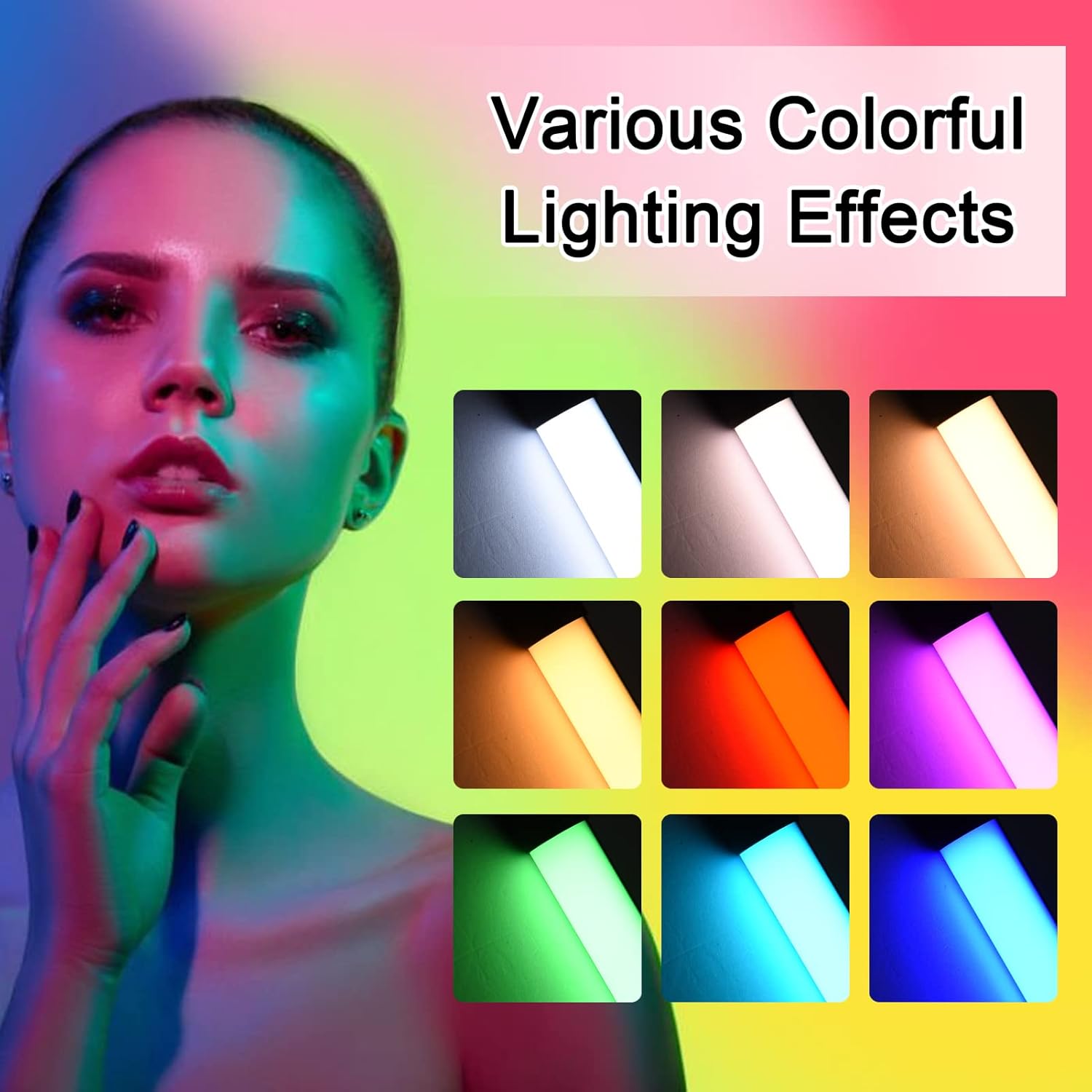
Vaizdas: A visual guide to the 7 colorful light effects available, showcasing the vibrant range of colors the light wand can produce.
Įkrovimas
The Andoer D2 light wand has a built-in 2600mAh rechargeable lithium battery. When the battery is low, the power indicator light will signal. To charge:
- Connect the small end of the USB Type-C charging cable to the charging port on the light wand.
- Connect the standard USB end of the cable to a USB power source (e.g., wall adapter, power bank, computer USB port).
- The power indicator light will illuminate or change color to indicate charging. It will change again or turn off when fully charged.
A full charge provides approximately 2.5 hours of continuous use at maximum brightness.
Priežiūra
- Šviesos lazdelę valykite minkštu, sausu skudurėliu. Nenaudokite abrazyvinių valiklių ar tirpiklių.
- Laikykite prietaisą vėsioje, sausoje vietoje, apsaugotoje nuo tiesioginių saulės spindulių ir ekstremalių temperatūrų.
- If not used for extended periods, charge the battery every 3 months to maintain battery health.
Trikčių šalinimas
| Problema | Galima priežastis | Sprendimas |
|---|---|---|
| Šviesa neįsijungia. | Baterija išsikrovusi. | Įkraukite šviesos lazdelę naudodami pridedamą USB C tipo laidą. |
| Šviesa blanki arba mirga. | Senka baterija. | Įkraukite įrenginį. |
| Cannot change color or mode. | Neteisingas mygtuko paspaudimas arba laikinas programinės įrangos triktis. | Ensure you are pressing the Mode Selection button. Try turning the device off and on again. |
| Įrenginys neįkraunamas. | Faulty cable, power adapter, or charging port. | Try a different USB Type-C cable or power adapter. Ensure the cable is fully inserted. |
Specifikacijos
| Funkcija | Detalė |
|---|---|
| Modelis | D2 (SJI3033515989406YA) |
| Prekės ženklas | Andoer |
| Spalvos temperatūra | 2500K / 5500K / 8500K (reguliuojama) |
| Ryškumo lygiai | 12 lygiai |
| Spalvingi šviesos efektai | 7 effects (Red, Green, Blue, Orange, Purple, Light Blue, Red & Blue Flash) |
| Baterijos talpa | 2600 mAh ličio baterija |
| Įkrovimo prievadas | C tipo USB |
| Battery Life (Max Brightness) | apytiksliai 2.5 valandas |
| Montavimas | 1/4 colio varžto skylė |
| Matmenys | Approx. 49.5cm (19.5in) length, 3.8cm (1.5in) diameter |
Garantija ir palaikymas
Andoer products are designed and manufactured to the highest quality standards. For warranty information or technical support, please refer to the warranty card included with your purchase or visit the official Andoer websvetainėje. Prašome išsaugoti pirkimo įrodymą garantiniams reikalavimams.
Andoer Official Websvetainė: Andoer Store on Amazon


