
1. Įvadas
Thank you for choosing the typecase Touch iPad Keyboard Case. This manual provides detailed instructions for setting up, operating, and maintaining your keyboard case to ensure optimal performance and longevity. Please read this manual thoroughly before use.
2. Suderinamumas
This keyboard case is designed for specific iPad models. Please verify your iPad model number to ensure compatibility.
- iPad 10th Generation (10.9-inch, 2022): Modeliai A2696, A2757, A2777
- iPad A16 (11th Generation, 2025): Modeliai A3354, A3355, A3356
To verify your iPad model:
- 1 būdas: Check the back of your iPad for the model number (e.g., A2696).
- 2 būdas: Go to iPad Settings > General > About > Model Number. Tap the model number to display the A-number.
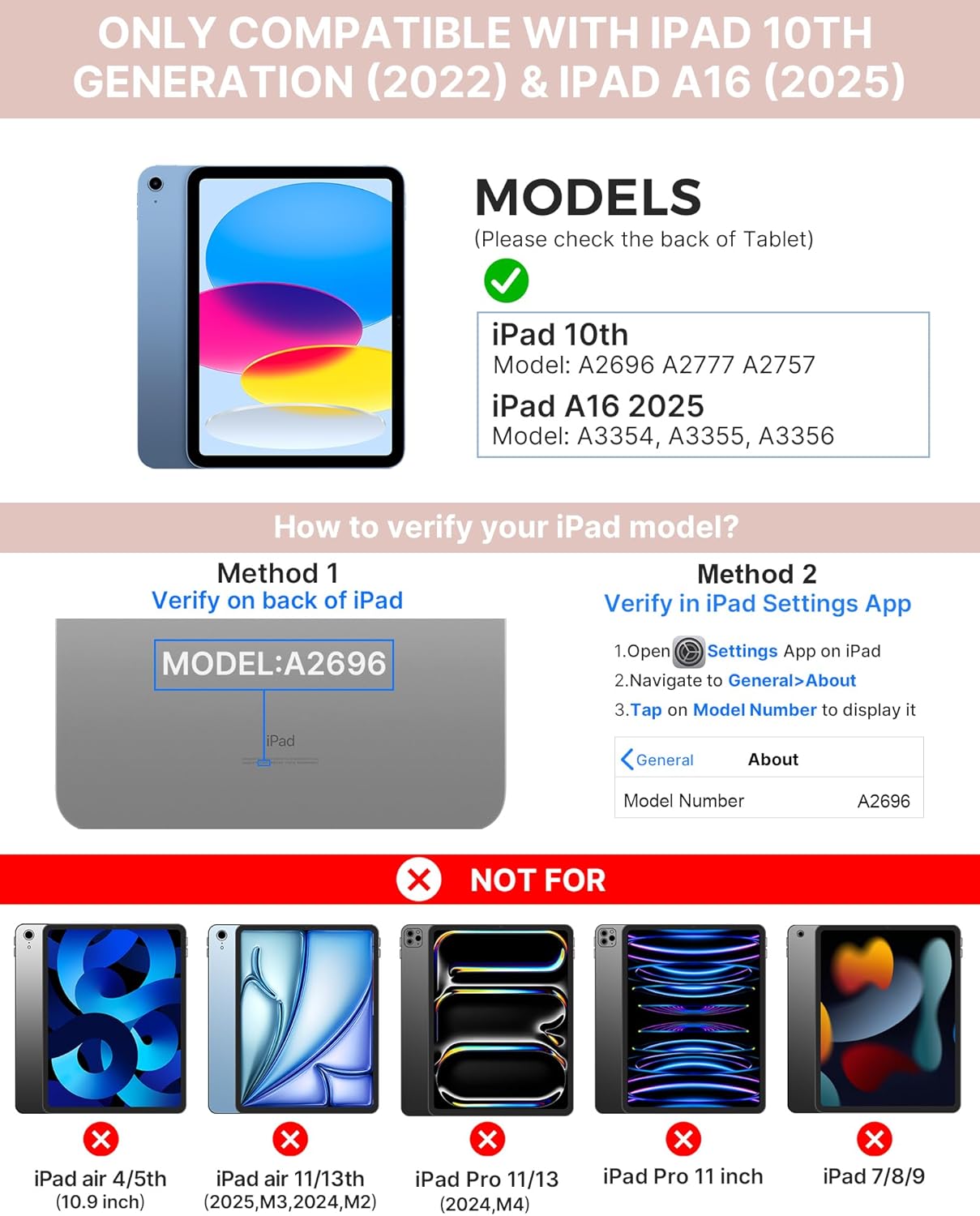
Image: Visual guide for identifying compatible iPad models and verifying the model number on the device or through settings.
3. Pakuotės turinys
Į paketą įeina:
- 1 x typecase Touch iPad Keyboard Case
- 1 x USB-C įkrovimo laidas
- 1 x Vartotojo vadovas
4. Sąrankos instrukcijos
4.1 Klaviatūros įkrovimas
Before initial use, fully charge the keyboard. Connect the provided USB-C charging cable to the keyboard's charging port and a power source. The charging indicator light will show the charging status.
- Budėjimo režimas: Iki 1 metų
- Daytime use (2 hours/day with backlight off): Iki 3 mėnesių
- Nighttime use (2 hours/day with backlight on): Iki 2 savaičių

Image: Close-up of the keyboard's USB-C charging port and battery life specifications.
4.2 Susiejimas su „iPad“
- Įsitikinkite, kad klaviatūra įkrauta.
- Turn on the keyboard by pressing the power button. The Bluetooth indicator light will flash.
- Savo „iPad“ įrenginyje eikite į Nustatymai > Bluetooth.
- Įjunkite „Bluetooth“. Jūsų „iPad“ ieškos galimų įrenginių.
- Select "typecase Keyboard" from the list of devices.
- Follow any on-screen prompts to complete the pairing process. The Bluetooth indicator light on the keyboard will turn solid when successfully paired.
5. Naudojimo instrukcijos
5.1 „iPad“ diegimas
Gently insert your iPad into the case, ensuring all edges are securely seated. The case provides full protection for your device.
5.2 Klaviatūros funkcijos
The keyboard features a standard 78-key layout with a dedicated row of iPadOS shortcut keys for enhanced productivity.

Vaizdas: Viršutinės išlaidos view of the keyboard layout, highlighting the 78-key design and iPadOS shortcuts.
Foninio apšvietimo klavišai
The keyboard features 11-color RGB LED backlighting with adjustable brightness levels. This allows for comfortable typing in various lighting conditions.
- Paspauskite light bulb key , kad būtų galima perjungti foninio apšvietimo spalvas.
- Paspauskite Fn + light bulb key reguliuoti apšvietimo ryškumą.
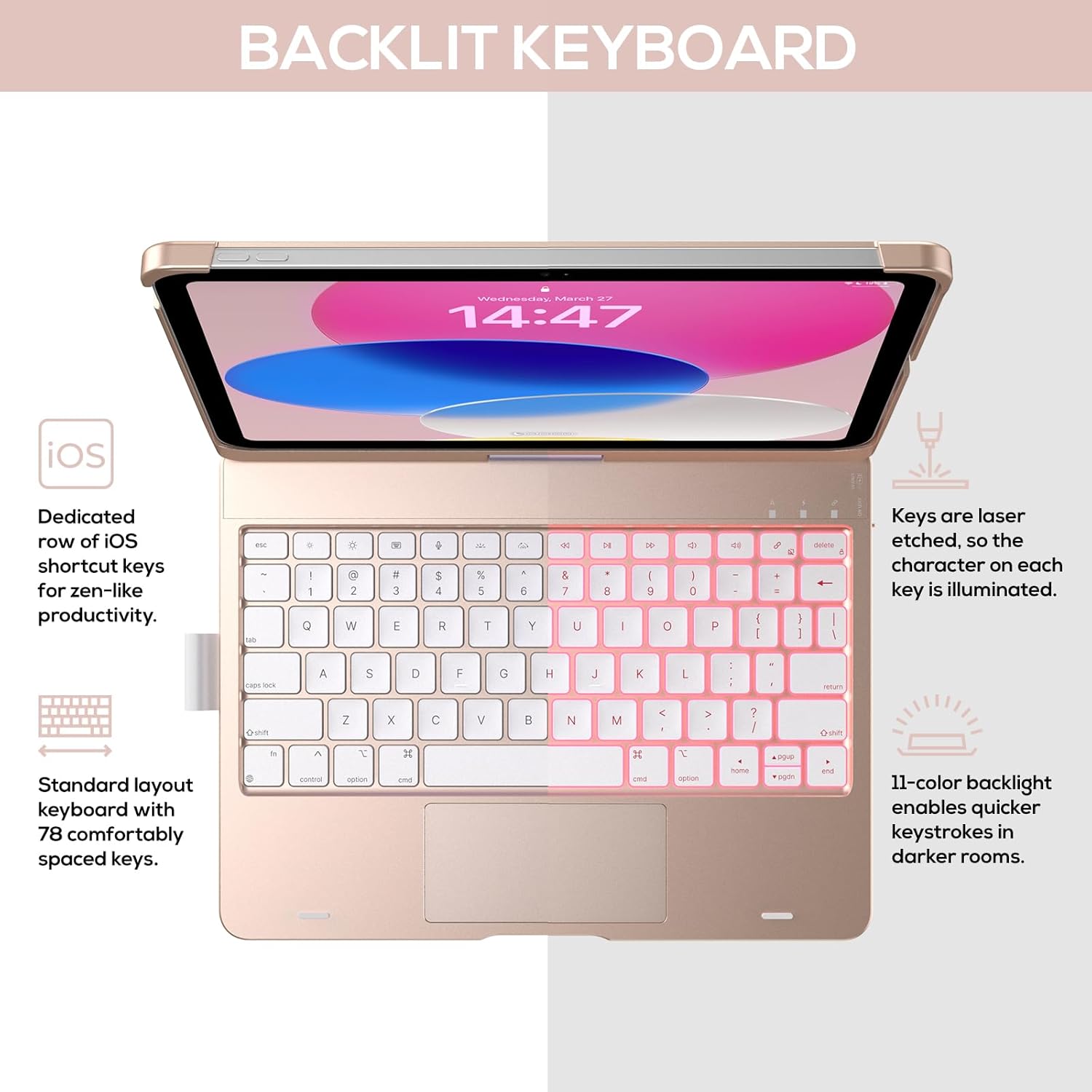
Image: The keyboard with illuminated keys, demonstrating the 11-color backlight and dedicated iOS shortcut keys.
5.3 Daugiafunkcis jutiklinis skydelis
The integrated precision trackpad supports multi-gesture controls, enhancing productivity for tasks like document editing, web browsing, and presentation building.
- Bakstelėjimas vienu pirštu: Spustelėkite / pasirinkite
- Slinkimas dviem pirštais: Slinkite aukštyn / žemyn arba kairėn / dešinėn
- Suspauskite, kad padidintumėte: Priartinti / sumažinti
- Trimis pirštais braukimas aukštyn: Atidaryti programų perjungiklį
- Three-finger swipe down: Grįžkite į pagrindinį ekraną

Image: Diagram showing common multi-touch gestures for the trackpad, including managing files, web browsing, and app switching.
5.4 360° Rotatable Hinge and Use Modes
The patented 360° hinge allows for versatile use of your iPad in 7 unique modes, adapting to various tasks from typing to viewing.
- Nešiojamojo kompiuterio režimas: Traditional laptop setup for typing.
- Stovėjimo režimas: Idealiai tinka viewturinio.
- Palapinės režimas: Stable for touch interaction or presentations.
- Planšetinio kompiuterio režimas: Fold the keyboard behind the iPad for tablet use. Keys are protected in this mode.
- Corner Mode: Angled for comfortable drawing or writing.
- Bendrinimo režimas: Rotate the screen to share content with others.
- Protect Mode: Close the case to fully protect the iPad.
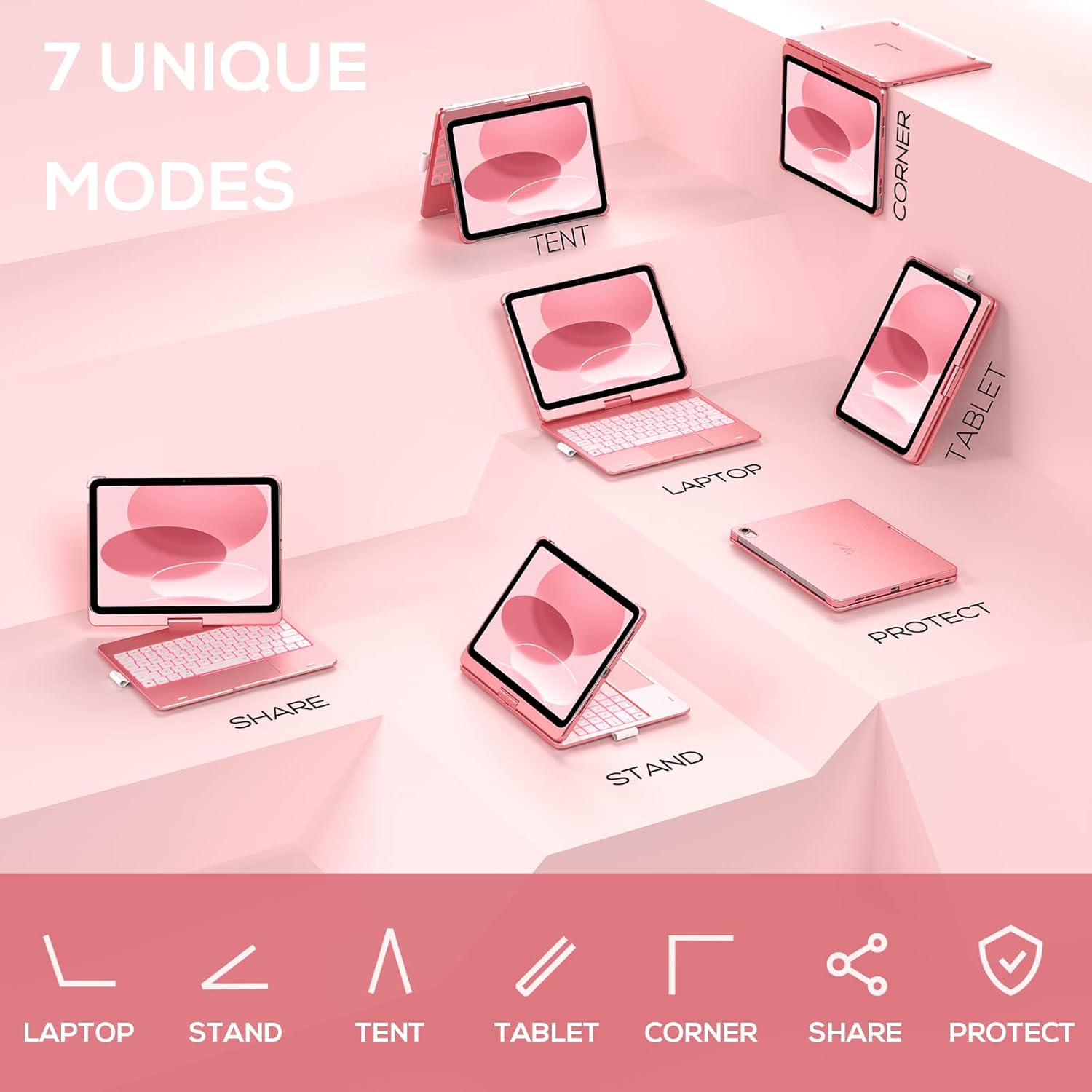
Image: A visual representation of the seven different configurations the keyboard case can be used in, including laptop, stand, and tablet modes.
5.5 Automatinio miego / pabudimo funkcija
The case features an auto sleep/wake function. Opening the case will wake your iPad, and closing it will put your iPad to sleep, helping to conserve battery life for both the iPad and the keyboard.

Image: A user's hand on the trackpad, illustrating the built-in trackpad and the auto sleep/wake feature that activates when the case is opened or closed.
5.6 „Apple“ pieštuko laikiklis
An integrated holder is provided for your Apple Pencil, ensuring it is securely stored and easily accessible.
6. Priežiūra
6.1 Valymas
To clean the keyboard case, use a soft, damp cloth. Avoid using harsh chemicals or abrasive materials, as these may damage the surface. Ensure the charging port is dry before charging.
6.2 Saugykla
When not in use for extended periods, store the keyboard case in a cool, dry place. It is recommended to fully charge the keyboard before long-term storage to maintain battery health.
7. Problemų sprendimas
7.1 Klaviatūra neprisijungia
- Įsitikinkite, kad klaviatūra įjungta ir įkrauta.
- Patikrinkite, ar jūsų „iPad“ įrenginyje įjungtas „Bluetooth“ ryšys.
- Pamirškite įrenginį „iPad“ „Bluetooth“ nustatymuose ir bandykite iš naujo susieti.
- Iš naujo paleiskite ir „iPad“, ir klaviatūrą.
7.2 Klavišai nereaguoja
- Įsitikinkite, kad klaviatūra tinkamai prijungta per „Bluetooth“.
- Patikrinkite klaviatūros akumuliatoriaus lygį.
- Nuvalykite visas šiukšles aplink klavišus.
7.3 Jutiklinė planšetė neveikia
- Įsitikinkite, kad klaviatūra prijungta.
- Check iPad settings for trackpad functionality (Settings > General > Trackpad).
- Iš naujo paleiskite klaviatūrą ir „iPad“.
7.4 Neveikia foninis apšvietimas
- Įsitikinkite, kad klaviatūra įjungta.
- Press the backlight control keys (light bulb key, Fn + light bulb key) to activate or adjust.
- Check battery level; low battery may disable backlighting.
8. Specifikacijos
| Modelio numeris | KB201T-100 |
| Gaminio matmenys | 11 x 8.6 x 1.5 colio (11 colio ilgio x 8.6 colio pločio x 1.5 colio aukščio) |
| Prekės svoris | 1.43 svaro |
| Ryšio technologija | Bluetooth |
| Klaviatūros aprašymas | Flexible, 78-key layout with iPadOS shortcuts |
| Ypatingos savybės | 360° Rotatable, 11-Color Backlit, Ergonomic, Lightweight, Multi-Touch Trackpad, Auto Sleep/Wake, Apple Pencil Holder |
| Klaviatūros apšvietimas | RGB (11 spalvų) |
| Baterijos tipas | 1 ličio polimero baterija (pridedama) |
9. Garantija ir palaikymas
typecase is committed to product quality and customer satisfaction. This product comes with the following support:
- Pakeitimo paslauga: Within 1 year of purchase.
- Pinigų grąžinimo politika: Per 30 dienų nuo įsigijimo datos.
For any issues or inquiries, please contact typecase customer support for quick feedback and assistance.

Image: Information on typecase's after-sales service, including replacement, refund, and customer support.