
1. Įvadas
This manual provides essential information for the installation, operation, and maintenance of your Montech Titan Gold 850W ATX 3.0 Power Supply. This high-end power supply is designed for gaming systems, featuring 80 Plus Gold and Cybenetics Gold certifications, fully modular cabling, and readiness for PCIe 5.0 with a new 12VHPWR connector. Please read this manual thoroughly before installation and use to ensure proper functionality and safety.

Figure 1: Montech Titan Gold 850W Power Supply and its retail packaging.
2. Saugos informacija
Always observe the following safety precautions to prevent injury or damage to your power supply and system components:
- Prieš montuodami ar tvarkydami įsitikinkite, kad maitinimo šaltinis yra atjungtas nuo kintamosios srovės maitinimo lizdo.
- Neatidarykite maitinimo šaltinio c.asing. Didelis tūristagViduje yra dalių, kurias galėtų aptarnauti vartotojas.
- Maitinimo šaltinį montuokite gerai vėdinamoje vietoje, atokiau nuo šilumos šaltinių, tiesioginių saulės spindulių ir drėgmės.
- Naudokite tik su šiuo maitinimo šaltiniu pateiktus modulinius kabelius. Nesuderinamų kabelių naudojimas gali sukelti gedimų.
- Ensure all connectors are securely seated before powering on the system.
3. Pakuotės turinys
Patikrinkite, ar pakuotėje yra visi reikalingi daiktai:
- Montech Titan Gold 850W Power Supply Unit
- Modulinis kabelių rinkinys (įskaitant 12VHPWR kabelį)
- Kintamosios srovės maitinimo laidas
- Tvirtinimo varžtai
- Kabelių raiščiai / lipnios juostelės
- Vartotojo vadovas (šis dokumentas)

Figure 2: Included modular cables and accessories for the power supply.
4. Sąranka ir diegimas
Norėdami įdiegti maitinimo šaltinį, atlikite šiuos veiksmus:
- Paruoškite kompiuterio korpusą: Ensure your PC case is compatible with ATX power supplies.
- Maitinimo bloko montavimas: Secure the power supply into the designated PSU bay in your PC case using the provided mounting screws. Ensure the fan is oriented correctly for optimal airflow (typically facing downwards if your case has a bottom vent).
- Prijunkite modulinius kabelius: Identify the necessary cables for your motherboard, CPU, graphics card(s), and storage devices. Connect these cables to the corresponding ports on the power supply. The fully modular design allows you to connect only the cables you need, reducing clutter.
- Prijunkite prie komponentų: Route the connected cables through your case's cable management channels and connect them to your motherboard (24-pin ATX, 8-pin EPS/CPU), graphics card(s) (PCIe, including the 12VHPWR for compatible GPUs), and storage drives (SATA, Molex).
- Saugūs ryšiai: Double-check all connections to ensure they are firm and properly seated.

3 pav. Baigtaview of the modular cable connection ports on the power supply.
5. Naudojimo instrukcijos
After installation, follow these steps to operate your power supply:
- Prijunkite kintamosios srovės maitinimą: Plug the AC power cord into the power supply's AC inlet and then into a wall outlet or surge protector.
- Maitinimo jungiklis: Locate the main power switch on the rear of the power supply and flip it to the 'ON' (I) position.
- Sistemos įjungimas: Press the power button on your PC case to start your computer.
- Smart Zero Fan Feature: This power supply includes a 'Smart Zero Fan' switch. When enabled (ON), the fan will remain off under low load conditions for silent operation. The fan will automatically activate when the load increases to maintain optimal temperatures. If disabled (OFF), the fan will operate continuously.

Figure 4: Rear panel with main power switch and Smart Zero Fan control.
6. Priežiūra
Norint užtikrinti maitinimo šaltinio ilgaamžiškumą ir optimalų veikimą, rekomenduojama periodiškai atlikti techninę priežiūrą:
- Dulkių valymas: Regularly clean dust from the power supply's fan intake and exhaust vents using compressed air. Ensure the power supply is turned off and unplugged before cleaning.
- Kabelio apžiūra: Periodically check all modular cable connections for looseness or damage. Re-seat any loose cables.
- Aplinkos sąlygos: Maintain a clean, dry, and cool environment for your PC to prevent excessive heat and dust buildup.

5 paveikslas: viršuje view of the power supply, highlighting the fan grill for cleaning.
7. Problemų sprendimas
Jei kyla problemų dėl maitinimo šaltinio, žr. šias dažniausiai pasitaikančias problemas ir sprendimus:
- Nėra galios:
- Įsitikinkite, kad kintamosios srovės maitinimo laidas yra tvirtai prijungtas tiek prie maitinimo šaltinio, tiek prie sieninio lizdo.
- Verify the main power switch on the PSU is in the 'ON' (I) position.
- Check all modular cable connections, especially the 24-pin ATX and 8-pin EPS/CPU cables, for secure seating.
- Patikrinkite sieninį lizdą su kitu įrenginiu, kad įsitikintumėte, jog jame yra maitinimas.
- Sistema netikėtai išsijungia:
- This could indicate an overload or overheating. Ensure your system's power consumption does not exceed the PSU's 850W capacity.
- Check for proper ventilation around the PSU and inside the PC case. Clean any dust buildup.
- Ensure the 'Smart Zero Fan' is functioning correctly or try disabling it to force continuous fan operation.
- Fan Not Spinning (under low load):
- If the 'Smart Zero Fan' feature is enabled, the fan will not spin under low loads. This is normal operation. The fan will activate when the system load increases.
- If the fan never spins even under high load with 'Smart Zero Fan' disabled, contact customer support.
8. Specifikacijos
Detailed technical specifications for the Montech Titan Gold 850W Power Supply:
| Funkcija | Specifikacija |
|---|---|
| Prekės ženklas | Montech |
| Modelio pavadinimas | Titan Gold 850W (TIS0124) |
| Vattage | 850 vatų |
| Išėjimo vattage | 750 Watts (Note: Product title states 850W, specifications list 750W. Please verify with manufacturer if discrepancy is critical.) |
| Efektyvumo sertifikavimas | 80+ auksas, kibenetikos auksas |
| Formos faktorius | ATX |
| Maitinimo bloko dizainas | Pilnas modulinis |
| Jungties tipas | ATX, PCIe 5.0 (12VHPWR) |
| Aušinimo būdas | Air (1 Fan) |
| Prekės svoris | 7.52 svaro |
| Pasiekiama pirmoji data | 13 m. gruodžio 2022 d |
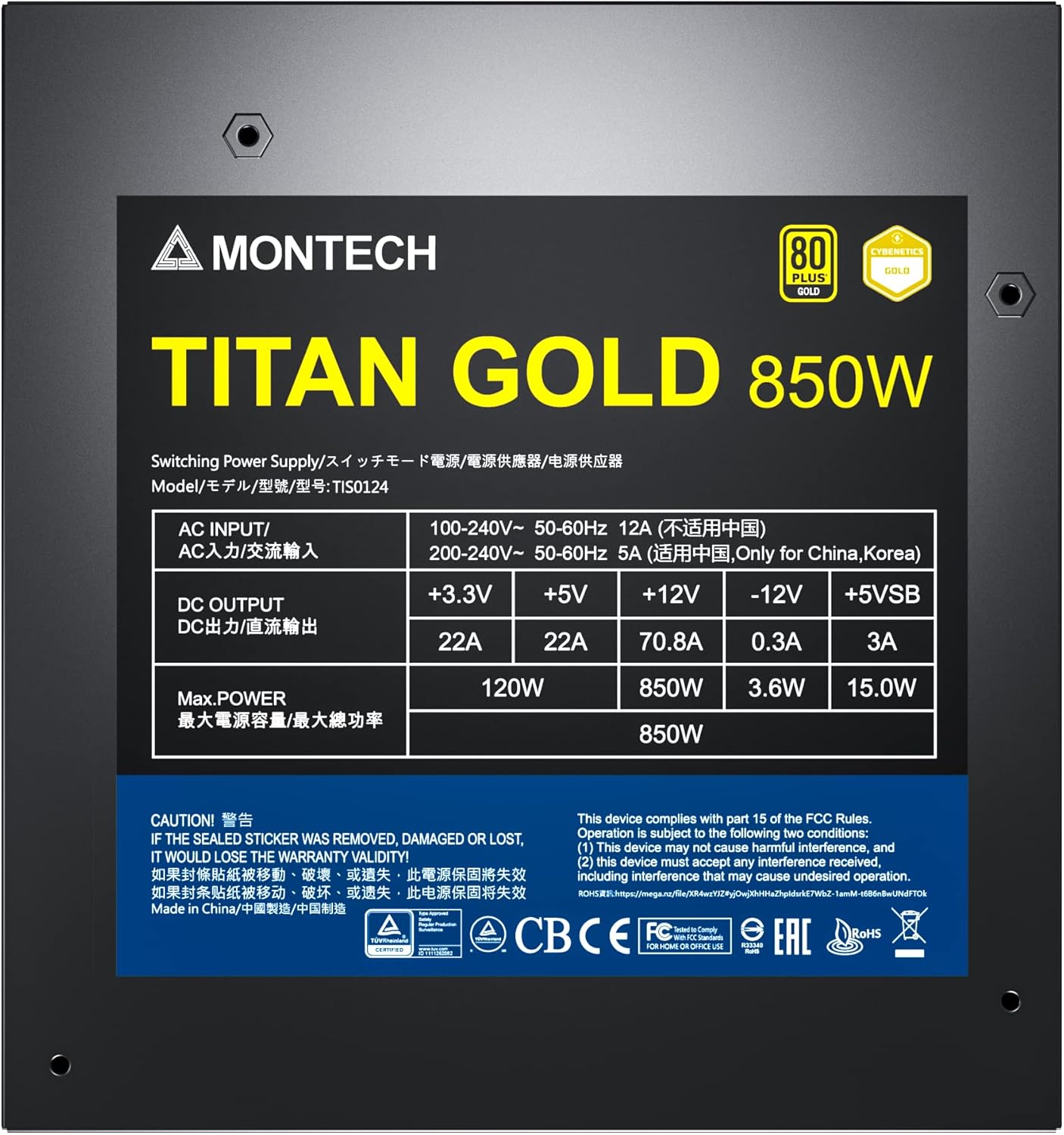
Figure 6: Product label displaying electrical specifications and certifications.
9. Garantija ir palaikymas
The Montech Titan Gold 850W Power Supply comes with a 10 metų garantija, ensuring long-term reliability and peace of mind. For technical support, warranty claims, or further assistance, please visit the official Montech websvetainėje arba susisiekite su klientų aptarnavimo skyriumi.
Prašome išsaugoti pirkimo įrodymą garantijos galiojimui.