
1. Įvadas
Thank you for choosing the Cecotec Bolero Hexa AF316000 Multifunction Built-in Oven. This manual provides essential information for the safe and efficient operation, installation, and maintenance of your new appliance. Please read this manual thoroughly before using the oven and keep it for future reference.

1.1 pav.: priekis view of the Cecotec Bolero Hexa AF316000 oven.
2. Saugos informacija
Visada laikykitės toliau nurodytų saugos priemonių, kad išvengtumėte sužalojimų ar prietaiso sugadinimo.
- Ensure the oven is properly installed by a qualified technician before use.
- Nelieskite karštų paviršių. Visada naudokite orkaitės pirštines arba puodkėles.
- Orkaitei veikiant, laikykite vaikus ir naminius gyvūnus atokiau nuo jos.
- Never use abrasive cleaners or sharp objects to clean the oven interior.
- Prieš atlikdami bet kokius priežiūros ar valymo darbus, atjunkite maitinimą.
- Nelaikykite degių medžiagų orkaitėje ar šalia jos.
3. Produkto ypatybės
The Cecotec Bolero Hexa AF316000 oven is designed with advanced features for versatile cooking.
3.1. Pagrindinės savybės
- Didelė talpa: 81 Liters with 5 shelf positions, offering up to 25% more interior space.
- 11 gaminimo funkcijų: Convection, Maxi Grill, Fast Cooking, Steam Assist Cooking, Steam EasyClean, Fan Grill, Multicooking, Airfry Master, Pizza Master, 3D Cooking, and Defrost.
- Energijos vartojimo efektyvumo klasė A: Designed for reduced energy consumption.
- Centrinis valdymas: Intuitive electronic control for easy operation.
- X3 Display: Three-zone display for clear viewing and selection of temperature, time, and cooking mode.
- Teleskopiniai kreiptuvai: For easy access and control of food during cooking.

Figure 3.1: Visual representation of the oven's spacious 81-liter capacity.

Figure 3.2: The oven's Energy Efficiency Class A rating.

Figure 3.3: Close-up of the intuitive control panel with various function icons.
4. Sąranka ir diegimas
Tinkamas montavimas yra labai svarbus saugiam ir efektyviam orkaitės veikimui. Rekomenduojama, kad montavimą atliktų kvalifikuotas specialistas.
4.1. Matmenys ir prošvaisa
Ensure adequate space and ventilation around the oven. Refer to the diagrams below for precise measurements.

4.1 pav.: šonas view of the oven with overall dimensions (59.4 cm width, 59.5 cm height, 63.5 cm depth).

Figure 4.2: Diagram illustrating the required cutout dimensions for built-in installation.

Figure 4.3: Diagram illustrating the required cutout dimensions for installation in a tall cabinet.
4.2. Elektrinis sujungimas
The oven requires a 230 Volts electrical supply with a power rating of 3400 Watts. Ensure the electrical circuit can support this load and is properly grounded. Consult a qualified electrician for connection.
4.3. Pradinis valymas
Prieš pirmą kartą naudodami orkaitės vidų ir priedus išvalykite specialiu valikliu.amp cloth and mild detergent. Run the oven empty at a high temperature (e.g., 200°C) for about 30 minutes to burn off any manufacturing residues. Ensure the kitchen is well-ventilated during this process.
5. Naudojimo instrukcijos
This section details how to use the various functions of your Cecotec oven.
5.1. Pagrindinė operacija
- Maitinimas: Turn the central control knob or press the power button to activate the oven.
- Pasirinkite funkciją: Use the function selection buttons or knob to choose your desired cooking mode (e.g., Convection, Grill).
- Nustatyti temperatūrą: Adjust the temperature using the dedicated control. The X3 display will show the selected temperature.
- Nustatyti laiką: Norėdami nustatyti kepimo trukmę, naudokite laikmačio valdiklius.
- Pradėti virti: Norėdami pradėti gaminimo procesą, paspauskite pradžios mygtuką.

Figure 5.1: A hand interacting with the oven's control panel to select settings.
5.2. Specialiosios funkcijos
- Airfryer Master: This function uses forced hot air convection for healthier frying with minimal oil. Place food in the included SS Airfry Basket for best results.
- Pizza Master: Achieve authentic stone-baked pizzas. Use the included Pizza Stone XXL (35 cm diameter) for professional results.
- Steam Assist Cooking: Add water to the designated area to create steam, ensuring dishes are crispy on the outside and juicy on the inside.
- 3D Cooking: Ensures homogeneous heat distribution throughout the oven cavity for perfect cooking results on multiple levels.

5.2 pav. Pvzamples of dishes prepared using Airfryer, Pizza Master, and Steam Assist functions.

Figure 5.3: The Pizza Master function in action, utilizing the special pizza stone.

Figure 5.4: Illustrating the Steam Assist function, where water is added to generate steam for cooking.
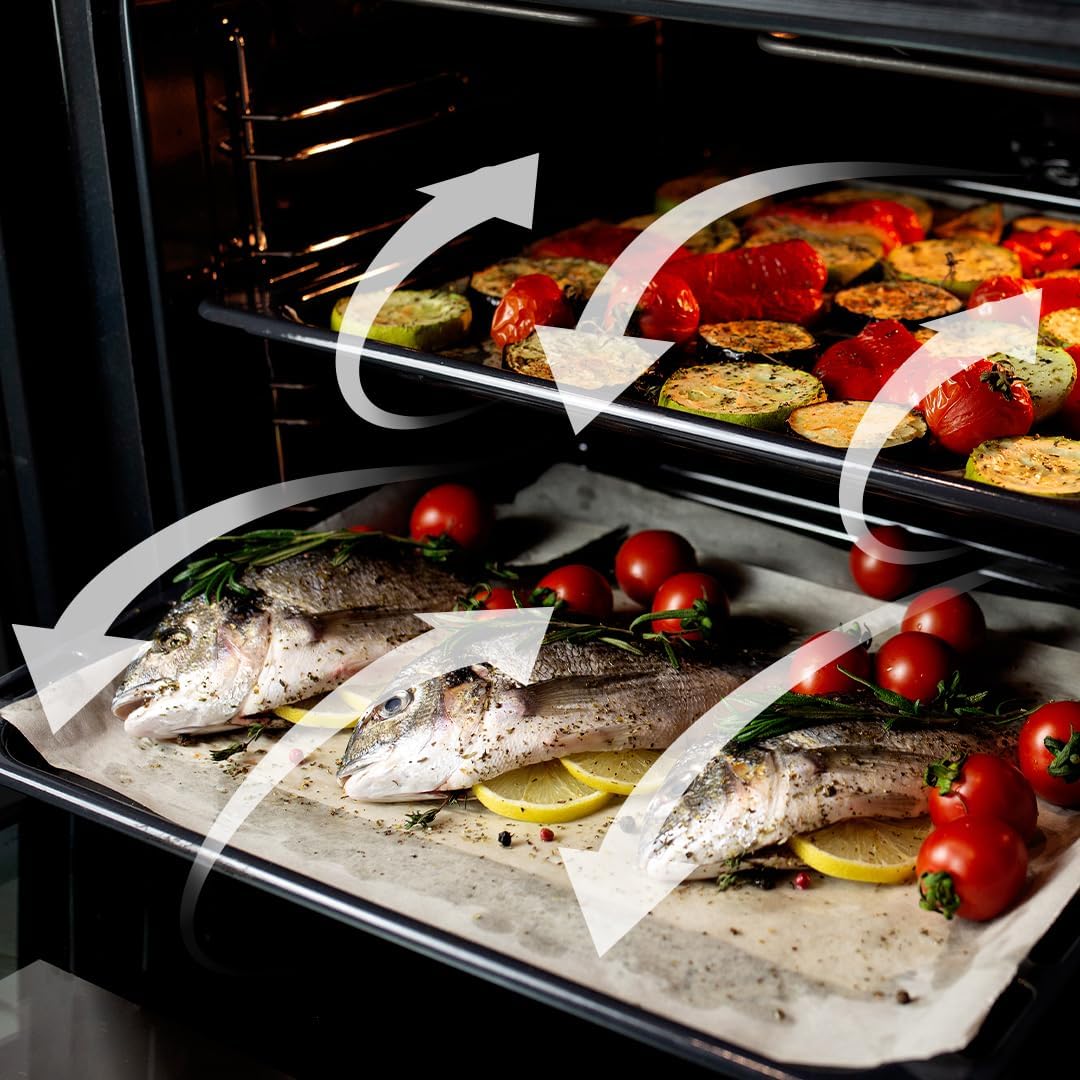
Figure 5.5: Visual representation of the 3D Cooking function's homogeneous airflow.
6. Valymas ir priežiūra
Reguliarus valymas ir priežiūra prailgins jūsų orkaitės tarnavimo laiką ir užtikrins optimalų veikimą.
6.1. Steam EasyClean Function
This function uses steam to loosen dirt and food residues, making cleaning easier. Add water to the designated area and activate the Steam EasyClean function. After the cycle, wipe the interior with a soft cloth.

Figure 6.1: Comparison showing the effectiveness of the Steam EasyClean function.
6.2. Bendras valymas
- Išvalykite išorę su skelbimuamp skudurėliu ir švelniu plovikliu. Venkite abrazyvinių valiklių.
- Remove and clean oven racks and accessories separately using warm soapy water.
- Prieš valydami, įsitikinkite, kad orkaitė atvėsusi.
7. Problemų sprendimas
Jei kyla problemų dėl orkaitės, dažniausiai pasitaikančias problemas ir sprendimus rasite toliau pateiktoje lentelėje.
| Problema | Galima priežastis | Sprendimas |
|---|---|---|
| Orkaitė neįsijungia | Nėra maitinimo | Patikrinkite maitinimo laidą, grandinės pertraukiklį ir sieninį lizdą. |
| Orkaitė nekaitinama | Incorrect function/temperature setting | Verify selected function and temperature. |
| Netolygus virimas | Improper rack position or overloaded oven | Use recommended rack positions; avoid overcrowding. Utilize 3D Cooking function. |
| Smoke/odor during first use | Gamybos atliekų deginimas | Tai normalu. Užtikrinkite gerą vėdinimą. Po pirmojo naudojimo jis išsisklaidys. |
Jei problema išlieka ir išbandžius šiuos sprendimus, susisiekite su „Cecotec“ klientų aptarnavimo tarnyba.
8. Specifikacijos
Detailed technical specifications for the Cecotec Bolero Hexa AF316000 oven.
| Specifikacija | Vertė |
|---|---|
| Prekės ženklas | Cecotec |
| Modelio numeris | AF316000 (02814) |
| Talpa | 81 litrai |
| Matmenys (I x P x A) | 59.4 x 63.5 x 59.5 cm |
| Svoris | 32.3 kilogramo |
| Galia | 3400 vatų |
| ttage | 230 voltų |
| Energijos efektyvumas | A klasė |
| Diegimo tipas | Wall Mount (Built-in) |
| Virimo režimai | 11 Functions (Convection, Maxi Grill, Fast Cooking, Steam Assist, Steam EasyClean, Fan Grill, Multicooking, Airfry Master, Pizza Master, 3D Cooking, Defrost) |
| Įtraukti komponentai | 1 Integrated Air Fryer Oven, 1 Airfryer Basket, 1 User Manual, 1 Pizza Stone XXL |
| Atsarginių dalių prieinamumas | 10 metai |
9. Garantija ir palaikymas
Cecotec products are manufactured to high-quality standards. This product comes with a standard manufacturer's warranty. For specific warranty terms and conditions, please refer to the warranty card included with your product or visit the official Cecotec websvetainę.
For technical support, spare parts, or service inquiries, please contact Cecotec customer service through their official channels. When contacting support, please have your model number (AF316000 or 02814) and purchase date available.
Daugiau informacijos ir pagalbos galite rasti oficialioje „Cecotec“ svetainėje websvetainė: www.cecotec.com