
1. Svarbios saugos instrukcijos
Prieš pradėdami montuoti, perskaitykite ir supraskite visas instrukcijas. Nesilaikant šių instrukcijų, gali kilti elektros smūgis, gaisras arba gali kilti kūno sužalojimas.
- Prieš montuodami ar atlikdami techninę priežiūrą, įsitikinkite, kad maitinimas yra išjungtas grandinės pertraukikliu.
- All electrical connections must be in accordance with local codes and ordinances.
- Jei abejojate dėl laidų prijungimo ar montavimo, pasitarkite su kvalifikuotu elektriku.
- Mount the fan directly to a structural ceiling joist or an outlet box marked 'Acceptable for Fan Support of 35 lbs (15.9 kg)'.
- Nekiškite jokių daiktų į ventiliatoriaus mentes, kai ventiliatorius veikia.
- Ventiliatoriui veikiant, laikykite vaikus atokiau nuo jo.
2. Pakuotės turinys
Prieš tęsdami montavimą, patikrinkite, ar yra visi komponentai.
- Motor Housing with Blades
- Downrod (various lengths available)
- Mounting Bracket
- Nuotolinio valdymo pultas
- LED šviesos rinkinys
- Aparatūros paketas (varžtai, poveržlės, vielinės veržlės)
- Vartotojo vadovas
3. Gaminio specifikacijos
| Funkcija | Specifikacija |
|---|---|
| Prekės ženklas | Ohniyou |
| Modelio pavadinimas | GLX047B |
| Elektrinio ventiliatoriaus dizainas | Lubinis ventiliatorius |
| Maitinimo šaltinis | DC |
| Stilius | Modernus |
| Gaminio matmenys | 7.6 "D x 17.23" P x 9.79" A |
| Ašmenų ilgis | 38 colių |
| Ašmenų skaičius | 4 |
| Kambario tipas | Study Room (suitable for various rooms) |
| Triukšmo lygis | 35 decibelų |
| Vattage | 35 vatų |
| Apdailos tipas | Dažytos |
| Jungiklio tipas | Nuotolinis |
| Įtraukti komponentai | Nuotolinis |
| Naudojimas viduje / lauke | Lauke |
| Kontrolės metodas | Nuotolinis |
| Galios lygių skaičius | 6 |
| Medžiaga | Metalas, Plastikas |
| Montavimo tipas | Montavimas ant lubų |
Išsamesnės informacijos apie energiją rasite oficialioje EPREL duomenų bazėje: EPREL QR Code Link
4. Diegimo vadovas
Follow these steps carefully to install your Ohniyou GLX047 ceiling fan. It is recommended to have two people for installation.
4.1 Išankstinis montavimas
- Išjunkite maitinimą: Ensure the power supply to the installation location is disconnected at the circuit breaker.
- Prepare mounting: Securely attach the mounting bracket to the ceiling joist or fan-rated outlet box.
4.2 Ventiliatoriaus surinkimas
- Attach the fan blades to the motor housing using the provided screws. Ensure they are securely fastened.
- Connect the LED light kit to the motor housing. Secure the light kit with the provided screws.
- Insert the downrod through the canopy and connect the wires. Secure the downrod to the motor housing with the pin and screws.
Vaizdo įrašas: Assembly Video for Ohniyou Ceiling Fan - 38 inch. This video demonstrates the step-by-step assembly process of the ceiling fan, including attaching blades, installing the light kit, and securing the downrod.
4.3 Montavimas ir laidai
- Hang the assembled fan onto the ceiling mounting bracket.
- Make electrical connections: connect the fan wires to the household wiring according to the wiring diagram in the full manual. Ensure all connections are secure with wire nuts.
- Tuck wires into the outlet box and slide the canopy up to cover the mounting bracket. Secure the canopy.
Vaizdas: Pilnas view of the Ohniyou 38-inch ceiling fan with integrated lights, showcasing its modern design and four blades.

Vaizdas: Detailed dimensions of the Ohniyou 38-inch ceiling fan, including blade length, downrod options (4-inch and 8-inch), and overall height and width.
5. Naudojimo instrukcijos
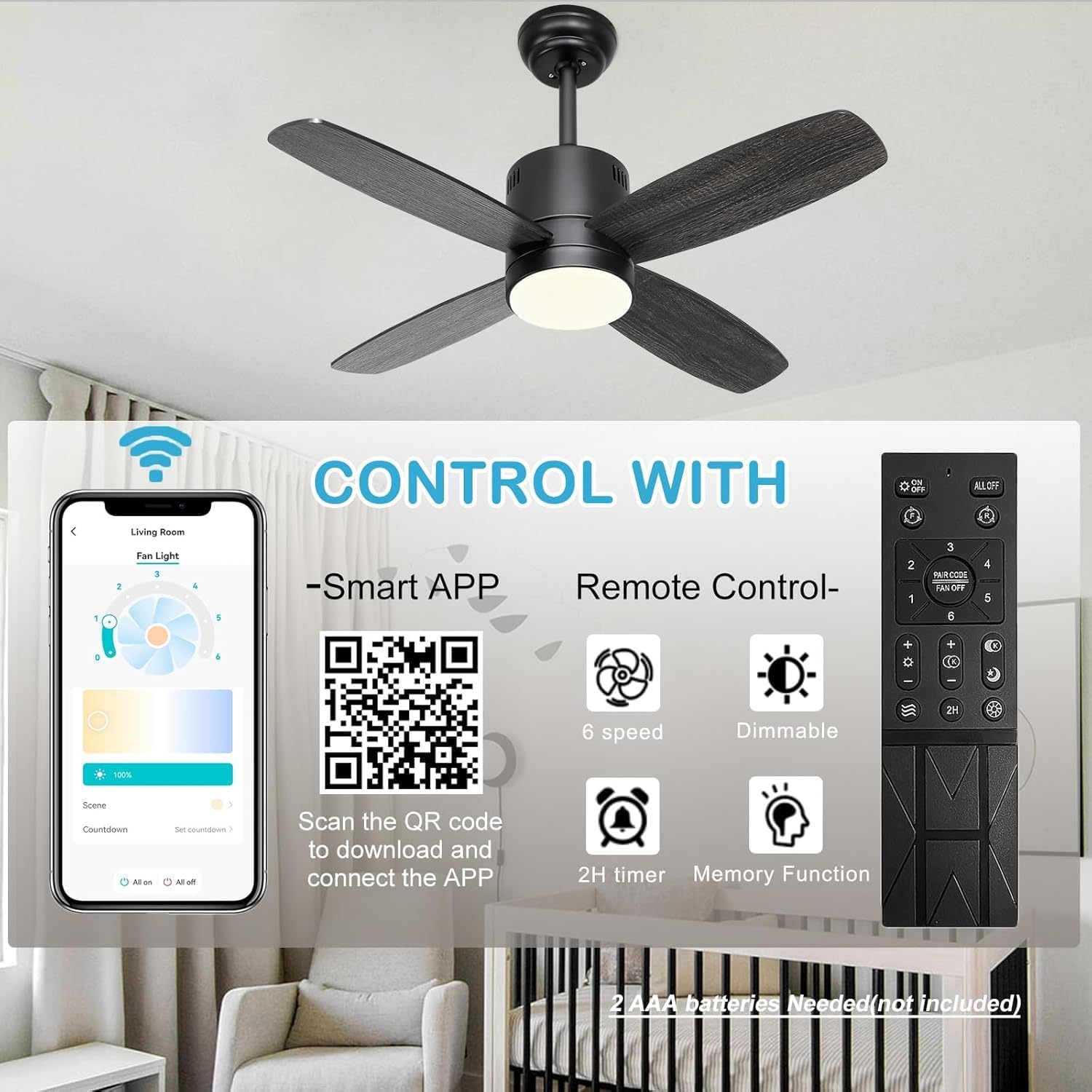
Your Ohniyou GLX047 ceiling fan can be controlled via the included remote control or a smartphone application.
5.1 Nuotolinio valdymo pulto funkcijos
- Ventiliatoriaus ĮJUNGIMAS/IŠJUNGIMAS: Paspauskite ventiliatoriaus mygtuką, kad įjungtumėte arba išjungtumėte ventiliatorių.
- Ventiliatoriaus greitis: Use the '1' to '6' buttons to select desired fan speed (6 speeds available).
- Šviesos įjungimas/išjungimas: Norėdami įjungti arba išjungti šviesą, paspauskite šviesos mygtuką.
- Šviesos pritemdymas: Use the '+' and '-' buttons to adjust light brightness.
- Spalvos temperatūra: Cycle through 3 color temperatures (warm, neutral, cool) by pressing the color temperature button.
- Laikmatis: Set a 2-hour timer for automatic fan shutdown.
- Natūralaus vėjelio režimas: Activates a varying fan speed to simulate natural wind.
- Atminties funkcija: The fan remembers the last light and fan settings.
5.2 Programų valdymas
Scan the QR code provided in the product packaging or on the product image to download the companion smartphone application. The app offers full control over fan speed, light dimming, color temperature, and timer functions.

Vaizdas: This image illustrates the dual control options for the Ohniyou ceiling fan: a remote control with dedicated buttons for fan speed, light, timer, and dimming, and a smartphone app interface for comprehensive control. A QR code for app download is also visible.

Vaizdas: Demonstrates the 3-color temperature options (3000K, 4000K, 6000K) and dimmable brightness (1% to 100%) of the integrated LED light, controllable via remote or app.
5.3 Grįžtamasis nuolatinės srovės variklis
The fan features a reversible DC motor for year-round comfort.
- Žemyn nukreipto oro režimas (vasara): Peiliai sukasi prieš laikrodžio rodyklę, kad sukurtų vėsinantį vėjelį.
- Aukštesnės traukos režimas (žiema): Blades rotate clockwise to circulate warm air trapped near the ceiling.

Vaizdas: Illustrates the reversible DC motor function, showing airflow patterns for both downdraft (cooling in summer) and updraft (circulating warm air in winter) modes.
5.4 Energiją taupančios funkcijos

Vaizdas: Highlights key energy-saving features including a quiet and efficient DC motor, a 2-hour timer function, and a night light mode for soft illumination during sleep.
6. Priežiūra
Reguliarus valymas užtikrina optimalų jūsų lubų ventiliatoriaus veikimą ir ilgaamžiškumą.
- Valymas: Naudokite minkštą, damp Ventiliatoriaus mentes ir variklio korpusą valykite šluoste. Nenaudokite abrazyvinių valiklių ar tirpiklių.
- Ašmenų balansas: If the fan wobbles, check that all blade screws are tight. Refer to the full manual for detailed balancing instructions if needed.
- Šviesos šaltinis: The integrated LED light is designed for long life and is not user-replaceable.
7. Problemų sprendimas
Jei kyla problemų dėl ventiliatoriaus, žr. toliau pateiktas dažniausiai pasitaikančias problemas ir sprendimus.
| Problema | Galima priežastis | Sprendimas |
|---|---|---|
| Ventiliatorius neįsijungia | Nėra maitinimo, atsilaisvinę laidai, problema su nuotolinio valdymo pultu | Check circuit breaker. Verify all wire connections. Replace remote batteries. |
| Šviesa neveikia | Loose wiring, LED driver issue | Check light kit wiring connections. If problem persists, contact customer support. |
| Ventiliatoriaus virpėjimas | Loose blades, unbalanced blades, improper mounting | Ensure all blade screws are tight. Use a balancing kit (not included) if necessary. Recheck mounting bracket. |
| Nuotolinio valdymo pultas neveikia | Dead batteries, remote not paired | Replace batteries (2 AAA batteries, not included). Refer to the full manual for remote pairing instructions. |
8. Garantija ir palaikymas
Ohniyou products are manufactured to high-quality standards. For warranty information, technical support, or replacement parts, please contact Ohniyou customer service through the retailer where the product was purchased or visit the official Ohniyou websvetainę.
Internetiniai ištekliai:
- Ohniyou Store: Visit the Ohniyou Store on Amazon