
kinstone KST102SA_ROW
Kinstone 10.1" 4G LTE Android Tablet User Manual
Model: KST102SA_ROW
1. Įvadas
Welcome to the Kinstone 10.1" 4G LTE Android Tablet user manual. This guide provides comprehensive instructions for setting up, operating, and maintaining your new tablet. Designed for both work and play, this tablet features an octa-core processor, 8GB RAM, 128GB internal storage (expandable up to 1TB), an 8000mAh battery, and dual SIM slots for enhanced connectivity.

1.1 pav.: Priekinė ir galinė dalys view of the Kinstone 10.1" Android Tablet, showcasindėl savo elegantiško dizaino ir kameros modulio.
2. Produktas baigtasview
2.1 Komponentai ir funkcijos
Your Kinstone tablet is equipped with advanced features for a superior user experience. Key components include:
- Ekranas: 10.1-inch Full HD IPS screen with 1920x1200 resolution, 178° wide viewing angle, and low blue light technology for eye comfort.
- Procesorius: High-performance octa-core processor (hexa-core @2.0 GHz Cortex-A55 and dual-core @1.8 GHz Cortex-A75) with 2025 AI Chip.
- Atmintis ir saugojimas: 8GB RAM and 128GB internal storage, expandable up to 1TB via microSD card.
- Kameros: 13 MP galinė kamera ir 5 MP priekinė kamera.
- Baterija: 8000 mAh baterija ilgam naudojimui.
- Ryšys: 4G VoLTE dual SIM support, Bluetooth 5.0, 2.4/5G dual-band Wi-Fi.
- Garsas: Dual speakers for stereo effect.
- Prievadai: Type-C charging port, 3.5mm earphone jack.

2.1 pav. Baigtaview of the Android 12 OS features, highlighting efficiency, safety, entertainment, and display enhancements.

Figure 2.2: Visual summary of the Kinstone Android tablet's core features and specifications.
3. Sąranka
3.1 Pradinis įkrovimas
Before first use, fully charge your tablet. Connect the provided Type-C charging cable to the tablet's charging port and the other end to the charger. Plug the charger into a power outlet. The charging indicator will show the charging status. A full charge typically takes approximately 2 hours.

Figure 3.1: Illustration of the tablet's long-lasting 8000mAh battery life, supporting various activities.
3.2 Įjungimas / išjungimas
- Norėdami įjungti: Press and hold the Power button until the Kinstone logo appears on the screen.
- Norėdami išjungti: Paspauskite ir palaikykite maitinimo mygtuką, kol pasirodys maitinimo parinkčių meniu. Pasirinkite „Išjungti“ ir patvirtinkite.
- Norėdami paleisti iš naujo: Maitinimo parinkčių meniu pasirinkite „Paleisti iš naujo“.
3.3 Pradinio nustatymo vedlys
Pirmą kartą įjungus planšetinį kompiuterį, bus pateiktas pradinio nustatymo vedlys. Vykdykite ekrane pateikiamus nurodymus, kad atliktumėte toliau nurodytus veiksmus.
- Pasirinkite savo kalbą.
- Prisijunkite prie „Wi-Fi“ tinklo.
- Sign in with your Google account (or create one).
- Nustatykite ekrano užraktą (PIN kodą, šabloną, slaptažodį arba „Face ID“).
- Review ir sutikite su sąlygomis ir nuostatomis.
4. Naudojimo instrukcijos
4.1 „Android“ sąsajos naršymas
Jūsų planšetinis kompiuteris veikia su „Android 12“ operacine sistema ir turi intuityvią vartotojo sąsają. Įprasti gestai:
- Bakstelėkite: Norėdami pasirinkti elementą arba atidaryti programėlę.
- Perbraukimas: Norėdami slinkti per ekranus arba sąrašus.
- Žnybtelėjimas, norint priartinti: Norėdami priartinti arba atitolinti vaizdus ir web puslapių.
- Ilgai paspauskite: Norėdami pasiekti kontekstinius meniu arba perkelti programų piktogramas.
4.2 Programų diegimas
Applications can be downloaded and installed from the Google Play Store. Ensure you are connected to the internet before downloading.
- Atidarykite Play parduotuvė programėlė.
- Ieškokite norimą programą.
- Bakstelėkite Įdiegti ir vykdykite ekrane pateikiamas instrukcijas.
4.3 Veido ID naudojimas
The tablet supports Face Recognition for unlocking. To set up Face ID:
- Eikite į Nustatymai > Saugumas ir privatumas > Atrakinimas pagal veidą.
- Vykdykite nurodymus, kad užregistruotumėte savo veidą.

Figure 4.1: Display features, including Face Recognition for secure and fast unlocking.
5. Ryšys
5.1 „Wi-Fi“ ryšys
Connect to Wi-Fi for internet access:
- Eikite į Nustatymai > Tinklas ir internetas > Internetas.
- Įjunkite „Wi-Fi“.
- Pasirinkite norimą tinklą ir, jei reikia, įveskite slaptažodį.

Figure 5.1: Connectivity options, including dual-band Wi-Fi for fast and stable connections.
5.2 Bluetooth poravimas
Pair your tablet with Bluetooth devices like headphones or speakers:
- Eikite į Nustatymai > Prijungti įrenginiai > Ryšio nuostatos > Bluetooth.
- Įjunkite Bluetooth.
- Select the device you wish to pair from the list of available devices.
5.3 4G LTE and Dual SIM
The tablet supports 4G VoLTE with dual SIM slots, allowing for simultaneous calls and browsing. You can use two SIM cards or one SIM card and one microSD card.
- Planšetinio kompiuterio šone raskite SIM kortelės dėklą.
- Norėdami atidaryti dėklą, naudokite pateiktą SIM kortelės išstūmimo įrankį.
- Insert your Nano-SIM cards and/or microSD card into the designated slots.
- Gently push the tray back into the tablet.

Figure 5.2: Dual card slot functionality for SIM cards and expandable storage.
6. Kameros naudojimas
Your tablet is equipped with a 13MP rear camera and a 5MP front camera for capturing photos and videos, and for video calls.
- Atidarykite Fotoaparatas app from the home screen or app drawer.
- Perjunkite priekinę ir galinę kameras naudodami kameros piktogramą.
- Palieskite užrakto mygtuką, kad nufotografuotumėte, arba įrašymo mygtuką, kad pradėtumėte / sustabdytumėte vaizdo įrašymą.
- Access various camera modes and settings within the app.
7. Baterijos valdymas
8000 mAh baterija suteikia ampmažai energijos kasdieniam naudojimui. Norėdami optimizuoti akumuliatoriaus veikimo laiką:
- Sumažinkite ekrano ryškumą.
- Turn off Wi-Fi, Bluetooth, and 4G when not in use.
- Uždarykite fonines programas.
- Įjunkite akumuliatoriaus taupymo režimą Nustatymai > Baterija.
The tablet supports fast charging via its Type-C port.
8. Sandėliavimo valdymas
Your tablet comes with 128GB of internal storage, which can be expanded up to 1TB using a microSD card.
- To check storage usage: Go to Nustatymai > Sandėliavimas.
- Norėdami atlaisvinti vietos: ištrinkite nereikalingus filepašalinkite nenaudojamas programas arba perkelkite didelius failus files į „microSD“ kortelę.

Figure 8.1: Visual representation of the tablet's generous storage capabilities.
9. Priežiūra
To ensure the longevity and optimal performance of your Kinstone tablet:
- Keep the tablet clean using a soft, lint-free cloth. Avoid harsh chemicals.
- Protect the screen with a screen protector (one is included).
- Avoid exposing the tablet to extreme temperatures, direct sunlight, or moisture.
- Regularly update the operating system and applications to the latest versions.
- Perform periodic backups of important data.
10. Problemų sprendimas
Jei kyla problemų dėl planšetinio kompiuterio, žr. šiuos dažniausiai pasitaikančius sprendimus:
| Problema | Galimas sprendimas |
|---|---|
| Planšetinis kompiuteris neįsijungia | Įsitikinkite, kad akumuliatorius įkrautas. Paspauskite ir palaikykite maitinimo mygtuką bent 10–15 sekundžių, kad priverstumėte įrenginį paleisti iš naujo. |
| Wi-Fi ryšio problemos | Restart your Wi-Fi router. Go to Settings > Network & internet > Internet, forget the network, and reconnect. Ensure the tablet is within range. |
| Programėlės užstringa arba stringa | Close the app and reopen it. Clear the app's cache (Settings > Apps > [App Name] > Storage & cache > Clear cache). Ensure the app is updated. |
| Lėtas veikimas | Uždarykite nenaudojamas programas. Išvalykite talpyklą ir laikinuosius files. Check storage space and free up if necessary. Restart the tablet. |
| Baterija greitai išsikrauna | Reduce screen brightness. Disable unnecessary features like GPS, Bluetooth, or Wi-Fi when not in use. Check battery usage in settings to identify power-hungry apps. |
If problems persist, contact Kinstone customer support for further assistance.
11. Specifikacijos
Detailed technical specifications for your Kinstone tablet:
| Funkcija | Specifikacija |
|---|---|
| Modelio numeris | KST102SA_ROW |
| Operacinė sistema | Android 12 |
| Ekrano dydis | 10.1 colių |
| Ekrano raiška | 1920 x 1200 pikselių |
| Procesorius | 2 GHz Octa-Core (Unisoc) |
| RAM | 8 GB DDR4 SDRAM |
| Vidinė saugykla | 128 GB (flash atmintis) |
| Išplečiama saugykla | Iki 1 TB per „MicroSD“ |
| Grafikos koprocesorius | Mali-G57 MP1 |
| Belaidis tipas | 802.11a, 802.11ac (2.4G/5G Dual-band Wi-Fi) |
| Bluetooth | 5.0 |
| Galinė kamera | 13 MP |
| Priekinė kamera | 5 MP |
| Baterijos talpa | 8000 mAh (ličio polimeras) |
| Vidutinis baterijos veikimo laikas | 8 valandų |
| Prekės svoris | 2 svaro |
| Gaminio matmenys | 15.8 x 24.1 x 0.8 colio |
| Spalva | Pilka |
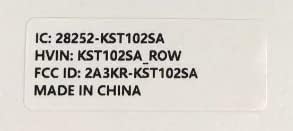
Figure 11.1: Product label with model number and regulatory information.
12. Garantija ir palaikymas
12.1 Garantinis aptarnavimas
Kinstone provides a warranty service for your tablet. Within three months from the date of purchase, Kinstone offers replacement services for eligible issues, not repair. Please retain your proof of purchase.
12.2 Pagalba klientams
For any questions, technical assistance, or warranty claims, please contact Kinstone customer support. You may also be eligible to receive a compatible leather case by contacting the seller after receiving your tablet.
Visit the official Kinstone store for more information and support: Kinstone Store on Amazon
Ask a question about this manual
Ask about setup, troubleshooting, compatibility, parts, safety, or missing instructions. Manuals+ will review the question and use this page’s manual context to help answer it.