
1. Įvadas
Ačiū, kad pirkoteasing the Klipsch Reference Premiere RP-1400SW 14-inch High Excursion Subwoofer. This subwoofer is designed to deliver powerful and accurate low-frequency sound, enhancing your home theater or music listening experience. This manual provides essential information for proper setup, operation, and care of your new subwoofer.

Figure 1.1: Klipsch Reference Premiere RP-1400SW Subwoofer (Grille Removed)
2. Svarbi saugos informacija
Please read all safety instructions before operating this product. Keep these instructions for future reference.
- Maitinimo šaltinis: Connect the subwoofer only to a power supply of the type described in the operating instructions or as marked on the appliance.
- Vėdinimas: Užtikrinkite tinkamą vėdinimą. Neužblokuokite jokių ventiliacijos angų. Įrenkite pagal gamintojo instrukcijas.
- Šiluma: Nemontuokite šalia jokių šilumos šaltinių, pvz., radiatorių, šilumokaičių, viryklių ar kitų įrenginių (įskaitant ampkeltuvai), kurie gamina šilumą.
- Vanduo ir drėgmė: Nenaudokite šio prietaiso šalia vandens ar drėgmės.
- Valymas: Valykite tik sausa šluoste.
- Aptarnavimas: Visus techninės priežiūros darbus patikėkite kvalifikuotam techninės priežiūros personalui. Techninė priežiūra reikalinga, kai aparatas buvo kaip nors pažeistas, pvz., pažeistas maitinimo laidas arba kištukas, į aparatą išsiliejo skystis ar įkrito daiktai, aparatas buvo paveiktas lietaus ar drėgmės, neveikia normaliai. , arba buvo numestas.
- Sunkus objektas: This subwoofer is heavy (85 lbs). Exercise caution when moving to prevent injury.
3. Kas yra dėžutėje
Patikrinkite, ar yra visi komponentai:
- Klipsch Reference Premiere RP-1400SW Subwoofer
- Maitinimo laidas
- Instrukcijų vadovas (šis dokumentas)
4. Sąranka
4.1 Žemųjų dažnių garsiakalbio išdėstymas
The Klipsch RP-1400SW features a front-firing driver and Aerofoil front slot port, allowing for flexible placement within your room. Experiment with different locations to find the optimal bass response for your listening environment. Generally, corner placement can enhance bass output, while placement along a wall can provide a more balanced sound. The shock-absorbing rubber feet help isolate the subwoofer from the floor.

Figure 4.1: Front-Firing Driver and Aerofoil Front Slot Port

Figure 4.2: Subwoofer Design Features (Rounded Corners, Shock-Absorbing Feet)
4.2 Jungtys
Your RP-1400SW subwoofer offers both wired and wireless connectivity options.

Figure 4.3: Subwoofer Rear Panel Connections and Controls
- Wired Connection (RCA/LFE):
Connect an RCA cable from the LFE output of your AV receiver to the LFE input on the subwoofer's rear panel. If your receiver does not have an LFE output, use a standard RCA stereo cable to connect the receiver's pre-out (subwoofer output) to both the left and right RCA inputs on the subwoofer.
- Wireless Connection (Optional WA-2 Kit):
For wireless operation, you can connect your subwoofer with a Klipsch WA-2 Wireless Subwoofer Kit (sold separately). This allows for flexible placement without the need for long RCA cables. Refer to the WA-2 kit's instructions for pairing and setup.

Figure 4.4: Wireless Connectivity with Optional WA-2 Kit
- Maitinimo jungtis:
Once audio connections are made, plug the supplied power cord into the subwoofer's power inlet and then into a suitable wall outlet.
5. Žemųjų dažnių garsiakalbio valdymas
5.1 Valdymas baigtasview
The rear panel of your subwoofer features several controls to fine-tune its performance:

Figure 5.1: Easy-to-Use Controls on Rear Panel
- PAGERINIMAS (garsumas): Reguliuoja žemųjų dažnių garsiakalbio išvesties lygį. Pradėkite nuo žemo nustatymo ir palaipsniui didinkite, kol bosas sklandžiai susilies su pagrindiniais garsiakalbiais.
- ŽEMŲJŲ DAŽNIŲ PRALAIDE (filtrų kryžminimas): This control sets the upper frequency limit for the subwoofer. If using an AV receiver with LFE output, set this to LFE (or bypass if available on your receiver). If connecting via stereo RCA, adjust this to blend with your main speakers' low-frequency cutoff.
- FAZĖ (0°/180°): Reguliuoja žemųjų dažnių garsiakalbio išvesties fazę pagrindinių garsiakalbių atžvilgiu. Eksperimentuokite su abiem nustatymais, kad rastumėte tą, kuris užtikrina galingiausius ir darniausius žemuosius dažnius.
- POWER (ON/AUTO/OFF):
- ĮJUNGTA: Subwoofer remains continuously on.
- AUTOMATINIS: Subwoofer automatically turns on when an audio signal is detected and enters a low-power standby mode after a period of inactivity.
- IŠJUNGTA: Žemųjų dažnių garsiakalbis išjungtas.
The 1/2-watt standby mode in AUTO setting ensures exceptional efficiency and reduces energy costs.
5.2 Initial Power On and Adjustment
- Įsitikinkite, kad visos jungtys yra saugios.
- Set the GAIN control to its minimum position.
- Set the LOW-PASS control to LFE if using an AV receiver, or to a suitable frequency (e.g., 80Hz) if connecting via stereo RCA.
- Set the PHASE switch to 0°.
- Set the POWER switch to AUTO.
- Play some audio with significant bass content. Gradually increase the GAIN control until the subwoofer output blends with your main speakers.
- Experiment with the PHASE switch (0° vs. 180°) to determine which setting provides the most impactful and seamless bass response in your listening position.
For optimal performance, consider using your AV receiver's automatic room correction system (if available) after initial setup.
5.3 Product Video: Reference Premiere Subwoofers
Video 5.1: An official Klipsch video showcasing the features and design of the Reference Premiere Subwoofers, including the RP-1400SW. This video highlights advanced acoustics, balanced performance, front-firing Cerametallic woofers, high-efficiency Class D amplifier, front-firing slot port, detailed design, and easy-to-use controls.
6. Priežiūra
To ensure the longevity and optimal performance of your Klipsch RP-1400SW subwoofer, follow these simple maintenance guidelines:
- Valymas: Dust the cabinet regularly with a dry, soft cloth. Avoid using abrasive cleaners, solvents, or strong detergents, as these can damage the ebony vinyl finish.
- Vieta: Avoid placing the subwoofer in direct sunlight or near heat sources, which can cause discoloration or damage to the cabinet.
- Vėdinimas: Įsitikinkite, kad galinis amplifier panel has adequate airflow. Do not block the heat sink.
- Grotelės: The durable woven cloth grille can be gently cleaned with a soft brush or vacuum cleaner attachment to remove dust.
7. Problemų sprendimas
If you experience issues with your subwoofer, consult the following table for common problems and solutions:
| Problema | Galima priežastis | Sprendimas |
|---|---|---|
| Nėra garso iš žemųjų dažnių garsiakalbio |
|
|
| Silpni arba iškraipyti bosai |
|
|
| Žemųjų dažnių garsiakalbis ūžia arba zvimbia |
|
|
If the problem persists after trying these solutions, please contact Klipsch customer support.
8. Specifikacijos
Key technical specifications for the Klipsch Reference Premiere RP-1400SW Subwoofer:
| Funkcija | Detalė |
|---|---|
| Modelio numeris | RP-1400SW |
| Prekės ženklas | Klipsch |
| Garsiakalbio tipas | Žemųjų dažnių garsiakalbis |
| Žemų dažnių garsiakalbio skersmuo | 14 colių |
| Garso tvarkyklės tipas | Dynamic Driver (Cerametallic) |
| Didžiausia garsiakalbio išėjimo galia | 600 vatų |
| RMS galia | 500 vatų |
| Dažnio atsakas | 20Hz - 1kHz (approximate, based on A+ content) |
| Ryšio technologija | Wired RCA, LFE, and WA-2 Wireless Port |
| Garso išvesties režimas | Stereo, erdvinis garsas |
| Montavimo tipas | Grindų stovėjimas |
| Korpuso medžiaga | Mediena |
| Spalva | Juodmedis |
| Maitinimo šaltinis | Su laidu elektra |
| Elemento matmenys (D x P x A) | 25.67 "D x 20" P x 21.34" A |
| Prekės svoris | 85 svaro |
| UPC | 743878047424 |
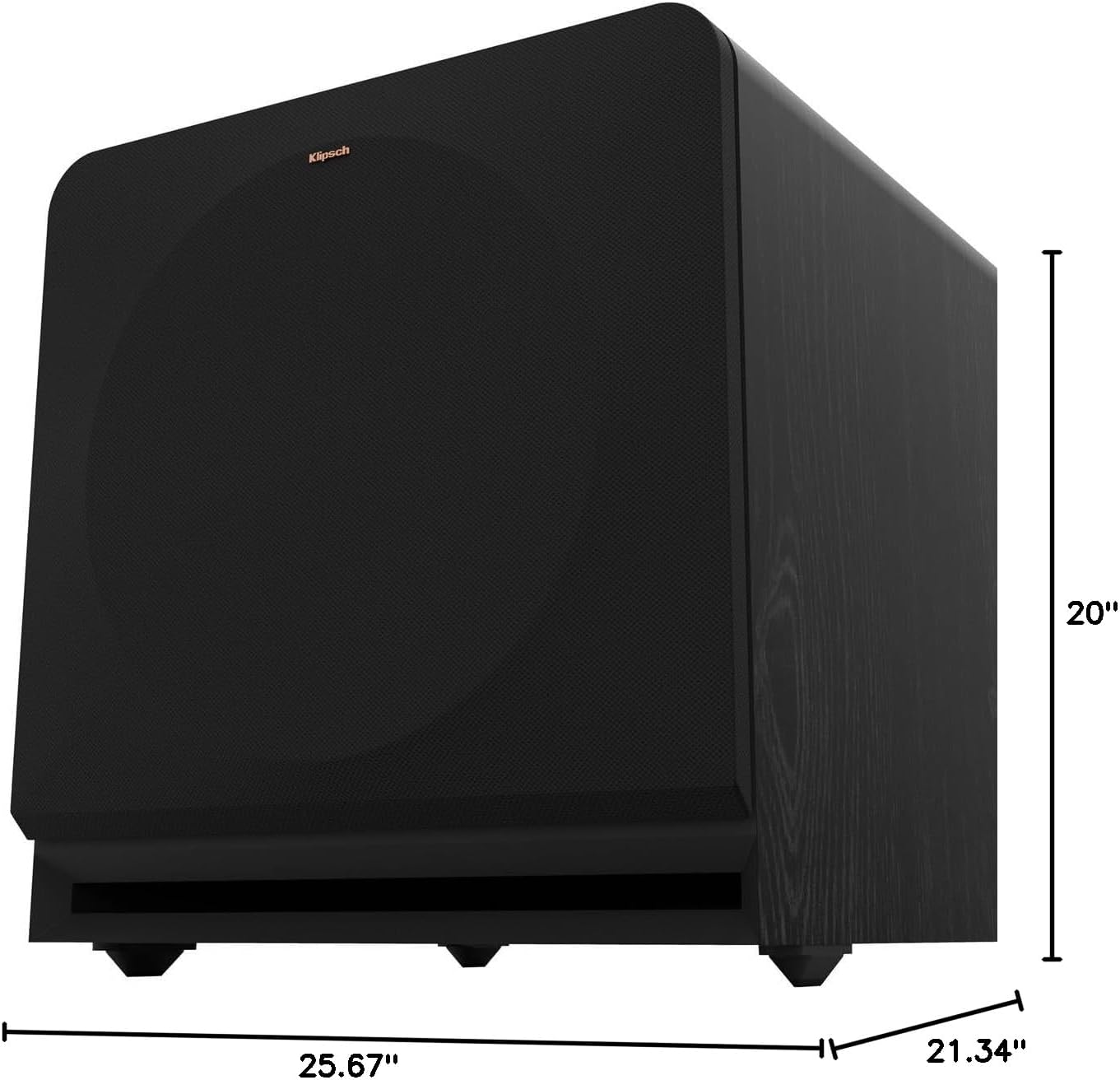
Figure 8.1: Subwoofer Dimensions
9. Garantija ir palaikymas
9.1 Informacija apie garantiją
The Klipsch Reference Premiere RP-1400SW Subwoofer comes with a limited warranty:
- Elektronika: Dveji (2) metai
- Woofer, Cabinet, and Non-Electrical Mechanics: Penkeri (5) metai
Please retain your proof of purchase for warranty claims. For full warranty terms and conditions, refer to the official Klipsch websvetainėje arba susisiekite su klientų aptarnavimo tarnyba.
9.2 Pagalba klientams
For further assistance, technical support, or warranty inquiries, please visit the official Klipsch website or contact their customer service department. Contact details can typically be found on the Klipsch websvetainėje, skiltyje „Pagalba“ arba „Susisiekite su mumis“.