1. Įvadas
This manual provides detailed instructions for the installation, operation, and maintenance of the Supermicro X13SEI-F Server Motherboard. This motherboard is designed for high-performance server applications, supporting Intel Xeon processors with an LGA4677 socket and DDR5 memory.
Please read this manual thoroughly before attempting to install or operate the motherboard to ensure proper setup and to prevent damage to the components.
2. Saugos informacija
Kad išvengtumėte sužalojimų ir įrangos sugadinimo, laikykitės šių saugos priemonių:
- Always disconnect the power cord from the power supply before installing or removing any components.
- Wear an anti-static wrist strap when handling the motherboard and other components to prevent electrostatic discharge (ESD).
- Ensure the installation environment is dry and free from static electricity.
- Saugokite pagrindinę plokštę nuo drėgmės ar ekstremalių temperatūrų.
- Pagrindinę plokštę imkite už kraštų, kad neliestumėte jautrių komponentų.
- Refer to the power supply unit's manual for specific safety guidelines related to power connections.
3. Pakuotės turinys
Verify that all items are present and in good condition. If any items are damaged or missing, contact your vendor.
- Supermicro X13SEI-F Server Motherboard
- I / O skydas
- SATA kabeliai (kiekis gali skirtis)
- Quick Reference Guide / User Manual (this document)
- Driver CD/DVD or USB drive (or download instructions)
4. Produktas baigtasview
The Supermicro X13SEI-F is a high-performance server motherboard featuring the LGA4677 socket, designed to support Intel Xeon Scalable processors. It offers robust memory capabilities with 8 DDR5 DIMM slots, supporting up to 4800MHz memory speed. The board also includes multiple PCIe slots for expansion.
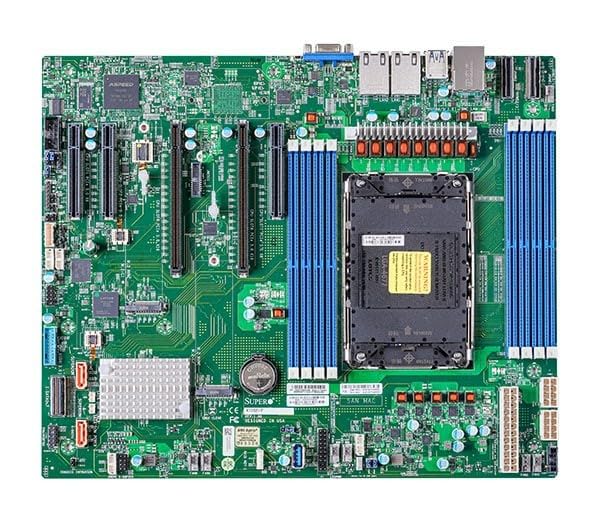
Figure 1: Supermicro X13SEI-F Server Motherboard. This image displays the overall layout of the motherboard, including the CPU socket, DIMM slots, and various connectors.
4.1 Pagrindinės savybės
- Procesoriaus lizdas: LGA4677 for Intel Xeon Scalable Processors
- Lustų rinkinys: Intel C621
- Atmintis: 8x DDR5 DIMM slots, up to 4800MHz
- Išplėtimo lizdai: Multiple PCIe slots (specific configuration depends on model variant)
- Saugykla: Support for various storage interfaces (SATA, NVMe - specific details in specifications)
- Tinklas: Integrated LAN controllers
5. Sąranka ir diegimas
Before beginning installation, ensure your system case is compatible with the motherboard's form factor and that you have all necessary components.
5.1 CPU diegimas (LGA4677)
- Raskite LGA4677 lizdą pagrindinėje plokštėje.
- Carefully open the CPU socket retention mechanism according to the instructions provided with your CPU or motherboard.
- Align the CPU with the socket, ensuring the triangular mark on the CPU matches the mark on the socket. Do not force the CPU into the socket.
- Gently lower the CPU into the socket.
- Close the CPU socket retention mechanism until it locks securely.
- Įdiekite procesoriaus aušintuvą pagal gamintojo instrukcijas.
5.2 RAM atminties diegimas (DDR5)
- Locate the 8 DDR5 DIMM slots on the motherboard.
- Atidarykite tvirtinimo spaustukus abiejuose DIMM lizdo galuose.
- Suderinkite DDR5 atminties modulio įpjovą su DIMM lizdo rakteliu.
- Insert the memory module firmly into the slot until the retention clips snap into place. Ensure both clips are closed.
- For optimal performance, refer to the motherboard's manual for recommended memory population order.
5.3 PCIe plokštės diegimas
- Identify the appropriate PCIe slot for your expansion card (e.g., GPU, RAID card).
- Remove the corresponding expansion slot cover from your chassis.
- Align the PCIe card with the slot and press down firmly until it is fully seated.
- Secure the card with a screw or retention clip to the chassis.
5.4 Saugojimo įrenginio įrengimas
- SATA diskai: Connect SATA data cables from the motherboard's SATA ports to your SATA hard drives or SSDs. Connect power cables from the PSU to the drives.
- NVMe M.2 Drives: Locate the M.2 slots. Insert the M.2 drive at an angle, then push it down and secure it with the provided screw or retention mechanism.
5.5 Maitinimo jungtys
- Prijunkite 24 kontaktų ATX maitinimo jungtį iš maitinimo šaltinio į pagrindinį maitinimo lizdą pagrindinėje plokštėje.
- Connect the 8-pin (or 4+4 pin) EPS 12V CPU power connector(s) to the corresponding sockets near the CPU.
- Įsitikinkite, kad visos maitinimo jungtys yra tvirtos.
5.6 Priekinio skydelio jungtys
Connect the front panel cables (Power LED, HDD LED, Power Switch, Reset Switch, USB, Audio) from your chassis to the corresponding headers on the motherboard. Refer to the motherboard's silkscreen labels or the detailed manual for exact pin configurations.
6. Naudojimo instrukcijos
6.1 Pirmasis paleidimas
- After completing all hardware installations, connect the monitor, keyboard, and mouse.
- Connect the power cord to the power supply and turn on the power switch on the PSU.
- Press the power button on your chassis.
- The system should power on, and you should see the BIOS/UEFI POST screen.
6.2 BIOS / UEFI sąranka
Norėdami patekti į BIOS / UEFI sąrankos programą, paspauskite DEL or F2 key repeatedly during the POST process. Within the BIOS/UEFI, you can configure:
- Įkrovos tvarka
- Sistemos laikas ir data
- CPU and memory settings
- Storage configurations (RAID, AHCI)
- Ventiliatoriaus greičio valdymas
- Apsaugos nustatymai
Save changes before exiting the BIOS/UEFI.
6.3 Operacinės sistemos diegimas
Insert your operating system installation media (USB drive or DVD) and set it as the primary boot device in the BIOS/UEFI. Follow the on-screen instructions to install your preferred operating system. After installation, install all necessary drivers from the Supermicro website or the provided driver media.
7. Priežiūra
7.1 Valymas
- Regularly clean dust from the motherboard and system components using compressed air.
- Prieš valydami, įsitikinkite, kad sistema išjungta ir atjungta nuo elektros tinklo.
- Venkite naudoti skystus valiklius tiesiai ant komponentų.
7.2 Firmware atnaujinimai
Periodically check the Supermicro website for updated BIOS/UEFI firmware. Firmware updates can improve system stability, performance, and compatibility. Follow the specific instructions provided by Supermicro for updating the firmware to avoid system damage.
8. Problemų sprendimas
Šiame skyriuje pateikiami dažniausiai pasitaikančių problemų, su kuriomis galite susidurti, sprendimai.
8.1 No Power / No POST (Power-On Self-Test)
- Patikrinkite maitinimo jungtis: Ensure the 24-pin ATX and 8-pin EPS 12V power connectors are securely seated.
- Patikrinkite maitinimo šaltinį: Test the power supply unit (PSU) with another system or a PSU tester.
- Iš naujo įstatykite komponentus: Reseat the CPU, RAM modules, and any expansion cards.
- Išvalyti CMOS: Refer to the motherboard manual for instructions on how to clear the CMOS (Complementary Metal-Oxide-Semiconductor) settings, which can resolve boot issues.
- Minimali konfigūracija: Try booting with only the CPU, one RAM stick, and the necessary power connections.
8.2 Nėra ekrano išvesties
- Monitoriaus jungtis: Ensure the monitor is properly connected to the graphics output (either integrated or discrete GPU) and is powered on.
- Vaizdo plokštė: If using a discrete graphics card, ensure it is fully seated in its PCIe slot and has all necessary power connectors from the PSU.
- Integruota grafika: If your CPU supports integrated graphics, try connecting the monitor to the motherboard's video output to rule out a discrete GPU issue.
8.3 Operacinė sistema nepaleidžiama
- Įkrovos tvarka: Check the BIOS/UEFI settings to ensure the correct boot device (e.g., SSD, HDD) is selected as the primary boot option.
- Drive Connections: Verify that your storage drives are properly connected (data and power).
- OS diegimas: If the OS is newly installed, ensure the installation process completed successfully and all drivers are installed.
9. Specifikacijos
| Funkcija | Detalė |
|---|---|
| Prekės ženklas | Supermikro |
| Modelio pavadinimas | MBD-X13SEI-F-B |
| CPU lizdas | LGA 4677 |
| Suderinami procesoriai | Intel Xeon Scalable |
| Lustų rinkinio tipas | Intel C621 |
| RAM atminties technologija | DDR5 |
| Atminties greitis | 4800 MHz |
| RAM Slots | 8x DDR5 DIMM slots |
| Gaminio matmenys (IxPxH) | 16 x 12 x 5 colio |
| Prekės svoris | 3.19 svaro |
| Pirmoji laisva data | 20 m. sausio 2023 d |
Note: Specifications are subject to change without notice. For the most current information, please refer to the official Supermicro product page.
10. Garantija ir techninė pagalba
10.1 Informacija apie garantiją
Supermicro products are covered by a limited warranty. For detailed warranty terms and conditions, including duration and coverage, please visit the official Supermicro website or consult the warranty card included with your product. Keep your proof of purchase for warranty claims.
10.2 Techninė pagalba
For technical assistance, driver downloads, BIOS updates, and further product information, please visit the official Supermicro support websvetainė:
https://www.supermicro.com/support
Before contacting support, please have your motherboard model number (MBD-X13SEI-F-B) and serial number ready.