
Viper 37-0116
„Viper ProScore“ elektroninės rezultatų suvestinės naudotojo vadovas
Modelis: 37-0116
Įvadas
Thank you for choosing the Viper ProScore Electronic Scoreboard. This device is designed to enhance your dart game experience by providing automatic scoring for up to 8 players across 40 different games and 655 game options. This manual will guide you through the installation, operation, and maintenance of your new scoreboard.
Produkto savybės
- Compatible with steel-tip dartboards, bringing electronic dart game features to traditional play.
- Large, backlit LCD screen for clear visibility from the throw line.
- Supports up to 8 players with 40 distinct games and 655 game variations, including customizable handicaps.
- Features an automatic shut-off and sleep mode to conserve battery power.
- Soft-touch keypad for intuitive and easy operation.
- Compact dimensions: 12.7 cm (L) x 3.8 cm (W) x 26 cm (H).
- Battery operated: Requires 3 AA batteries (not included).
Pakuotės turinys
Prieš tęsdami montavimą, įsitikinkite, kad yra visi reikalingi elementai:
- Viper ProScore Electronic Scoreboard
- Mounting hardware (screws and wall anchors or wood screws)
Sąrankos instrukcijos
1. Akumuliatoriaus įdėjimas
- Locate the battery compartment on the back of the scoreboard.
- Atidarykite akumuliatoriaus skyriaus dangtelį.
- Įdėkite 3 AA tipo baterijas (nepridedamos), užtikrindami teisingą poliškumą (+/-).
- Saugiai uždarykite akumuliatoriaus skyriaus dangtelį.
2. Mounting the Scoreboard
The Viper ProScore Electronic Scoreboard can be mounted on a wall next to your dartboard for optimal viewing.

Vaizdas: Stambus planas view of the black mounting bracket with three screw holes, designed to secure the scoreboard to a wall.
- Pasirinkite tinkamą vietą ant sienos, paprastai šalia dartų lentos, patogioje vietoje. viewaukštis.
- Use the provided mounting hardware (screws and anchors or wood screws) to securely attach the scoreboard to the wall. Ensure the scoreboard is level.

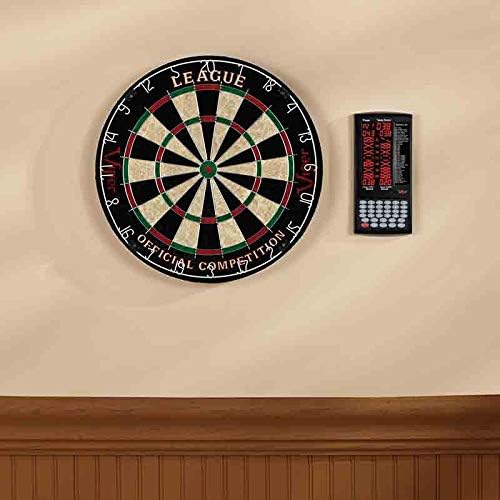
Image: The Viper ProScore Electronic Scoreboard is shown mounted on a wall to the right of a traditional dartboard, illustrating a typical installation setup.
Naudojimo instrukcijos

Image: The Viper ProScore Electronic Scoreboard displaying scores for two players and a list of available games. The keypad with number buttons and function keys is visible at the bottom.
1. Maitinimo įjungimas/išjungimas
- To turn on the scoreboard, press the Įjungta/Išjungta mygtuką.
- To turn off the scoreboard, press and hold the Įjungta/Išjungta mygtuką, kol ekranas išsijungs.
- The scoreboard features an automatic shut-off and sleep mode to conserve battery life when not in use.
2. Žaidimo pasirinkimas
- Įjungę maitinimą, naudokite Up ir Žemyn buttons to scroll through the list of 40 available games displayed on the screen.
- Once your desired game is highlighted, press the Įeikite mygtuką, kad jį pasirinktumėte.
3. Player Setup
- The scoreboard supports up to 8 players. Follow the on-screen prompts to select the number of players for your game.
- Some games allow for custom handicaps. Refer to the specific game rules for details.
4. Taškų skaičiavimas
After each player's turn, manually enter the score using the numeric keypad (buttons 1-20, 25, 50). Special buttons are available for common dart scores:
- X2: Multiplies the last entered score by 2 (Double).
- X3: Multiplies the last entered score by 3 (Triple).
- 25: For scoring a single bullseye.
- 50: For scoring a double bullseye.
- Ponia: To register a missed throw.
- Next Player: Advances to the next player's turn after scores are entered.
5. Correcting Scores
- Jei įvedamas neteisingas rezultatas, paspauskite Teisingai button to adjust the last entry.
6. Garsumo valdymas
- Naudokite Apimtis button to adjust the sound level of the scoreboard's voice announcements and effects.
Žaidimų sąrašas
The Viper ProScore Electronic Scoreboard includes the following 40 games:
Paveikslėlis: detalus view of the game list section on the scoreboard's display, showing game codes and names.
- G01 Kriketas
- G02 No Score Cricket
- G03 Gerklės svirplis
- G04 Killer Cricket
- G05 Low Ball Cricket
- G06 Low Pitch Cricket
- G07 English Cricket
- G08 Doubles Only Cricket
- G09 Double only Cricket
- G10 Single only Cricket
- G11 futbolas
- G12 Boulingas
- G13 golfas
- G14 Rally
- G15 301
- G16 401
- G17 501
- G18 601
- G19 701
- G20 301 lyga
- G21 401 lyga
- G22 501 lyga
- G23 601 lyga
- G24 801 lyga
- G25 Round the Clock
- G26 suskaičiuoti
- G27 Shoot-Out
- G28 Šanchajus
- G29 Half-It
- G30 žudikas
- G31 Shoot-Out
- G32 9 Lives
- G33 Baigta
- G34 Unders
- G35 High Score
- G36 Big-6
- G37 Forty-One
- G38 „Bingo“
- G39 dvigubai žemyn
- G40 21 Points
Priežiūra
- Valymas: Wipe the scoreboard surface with a soft, dry cloth. Do not use abrasive cleaners or solvents.
- Baterijos keitimas: Replace batteries when the display dims or the scoreboard functions erratically. Always replace all batteries at the same time with new ones of the same type.
- Saugykla: Jei ilgesnį laiką sandėliuosite, išimkite baterijas, kad išvengtumėte jų ištekėjimo.
Trikčių šalinimas
- Scoreboard does not turn on:
- Patikrinkite, ar baterijos įdėtos teisingai, laikantis poliškumo.
- Pakeiskite senas baterijas naujomis.
- Ekranas blyškus arba mirga:
- Baterijos gali būti išsikrovusios. Pakeiskite jas.
- Incorrect scores are registered:
- Ensure you are pressing the correct numeric buttons for the score.
- Naudokite Teisingai button to rectify recent entries.
- Mygtukai nereaguoja:
- Try turning the scoreboard off and on again.
- Ensure the buttons are clean and free from debris.
Specifikacijos
- Modelio numeris: 37-0116
- Matmenys (P x P x A): 12.07 x 12.07 x 25.4 cm (4.75 x 4.75 x 10 colio)
- Svoris: 318 gramai (0.7 svaro)
- Maitinimo šaltinis: 3 AA baterijos (į komplektą neįeina)
- Medžiaga: Sisal (Note: This specification seems to refer to a dartboard material, not the scoreboard itself. The scoreboard is typically plastic/electronic components.)
- Spalva: Juoda
- Žaidėjo talpa: Iki 8 žaidėjų
- Žaidimai: 40 games, 655 options
Garantija ir palaikymas
For specific warranty information and customer support, please refer to the documentation included with your product or visit the official Viper websvetainę. Išsaugokite pirkimo čekį garantiniams reikalavimams.
Susiję dokumentai37-0116


Ask a question about this manual
Ask about setup, troubleshooting, compatibility, parts, safety, or missing instructions. Manuals+ will review the question and use this page’s manual context to help answer it.