
Produktas baigtasview
The Clarion JM-Carry On is a portable speaker designed for versatile audio playback. It features a wired microphone input, multi-color light effects, and an in-built battery for on-the-go use. Its compact and portable design allows for easy transport and setup in various environments.

Image: Clarion JM-Carry On Portable Bluetooth Speaker shown with its wired microphone.
Vaizdo įrašas: Viršijimasview of the Clarion Portable Bluetooth Speaker, highlighting its features and audio performance.
Pakuotės turinys
Pažymėkite langelį prie šių elementų:
- Clarion JM-Carry On Portable Bluetooth Speaker
- Laidinis mikrofonas
- Įkrovimo kabelis
Pradinė sąranka
- Garsiakalbio įkrovimas: Connect the provided charging cable to the speaker's charging port and a suitable power source. The LED indicator will show charging status. Ensure the speaker is fully charged before first use for optimal battery life.
- Maitinimo įjungimas/išjungimas: Locate the power switch on the speaker. Slide it to the 'ON' position to power on the device. Slide it to 'OFF' to power off.
- „Bluetooth“ susiejimas:
- Įjunkite garsiakalbį. Jis automatiškai įsijungs „Bluetooth“ susiejimo režimu, ką parodys mirksintis LED indikatorius.
- Išmaniajame telefone arba planšetiniame kompiuteryje įjunkite Bluetooth ir ieškokite galimų įrenginių.
- Select "Clarion JM-Carry On" from the list. A confirmation tone will sound upon successful pairing.
- Connecting Wired Microphone: Insert the wired microphone's plug into the designated microphone input jack on the speaker.
Naudojimo vadovas
- Režimo pasirinkimas: Use the 'Mode' button to switch between Bluetooth (BT), FM Radio, USB, and AUX input modes.
- „Bluetooth“ režimas: Once paired, audio from your connected device will play through the speaker. Use your device or the speaker's controls for volume and track navigation.
- FM radijo režimas: In FM mode, press and hold the 'Play/Pause' button to auto-scan and save available radio stations. Use the 'Next/Previous' buttons to navigate through saved stations.
- USB/AUX Mode: Insert a USB drive into the USB port for MP3 playback or connect an external audio device via the AUX input using a 3.5mm audio cable.
- TWS (True Wireless Stereo) Functionality: To connect two JM-Carry On speakers for stereo sound, ensure both speakers are in Bluetooth mode and not connected to any device. Press and hold the TWS button on one speaker until you hear a pairing tone. The two speakers will connect, and then you can pair your device to the primary speaker.
- Garso valdymas: Adjust the master volume using the main rotary knob. Separate controls may be available for microphone volume and echo effects.
- LED šviesos efektai: The speaker features multi-color LED light effects. Use the dedicated 'Light' button to cycle through different light modes or turn them off.
Priežiūra ir priežiūra
- Valymas: Garsiakalbio išorę valykite minkšta, sausa šluoste. Nenaudokite abrazyvinių valiklių ar tirpiklių.
- Saugykla: Garsiakalbį laikykite vėsioje, sausoje vietoje, toliau nuo tiesioginių saulės spindulių ir ekstremalių temperatūrų.
- Akumuliatoriaus priežiūra: Norėdami pailginti baterijos veikimo laiką, venkite dažnai visiškai ją iškrauti. Reguliariai įkraukite garsiakalbį, net jei ilgą laiką jo nenaudojate.
- Atsparumas vandeniui: Šis garsiakalbis nėra atsparus vandeniui. Venkite sąlyčio su vandeniu ar didele drėgme.
Trikčių šalinimo vadovas
| Problema | Sprendimas |
|---|---|
| Garsiakalbis neįsijungia. | Ensure the battery is charged. Connect the charging cable and try again. Check the power switch position. |
| Nėra garso iš garsiakalbio. | Check the volume level on both the speaker and the connected device. Ensure the correct input mode (BT, AUX, USB) is selected. |
| „Bluetooth“ susiejimas nepavyksta. | Ensure the speaker is in pairing mode. Turn off and on Bluetooth on your device. Move the device closer to the speaker. Disconnect from other Bluetooth devices. |
| Mikrofonas neveikia. | Ensure the microphone is securely plugged into the correct jack. Check the microphone volume control on the speaker. |
| Prastas FM radijo priėmimas. | Adjust the speaker's position. Extend any external antenna if available. |
Techninės specifikacijos
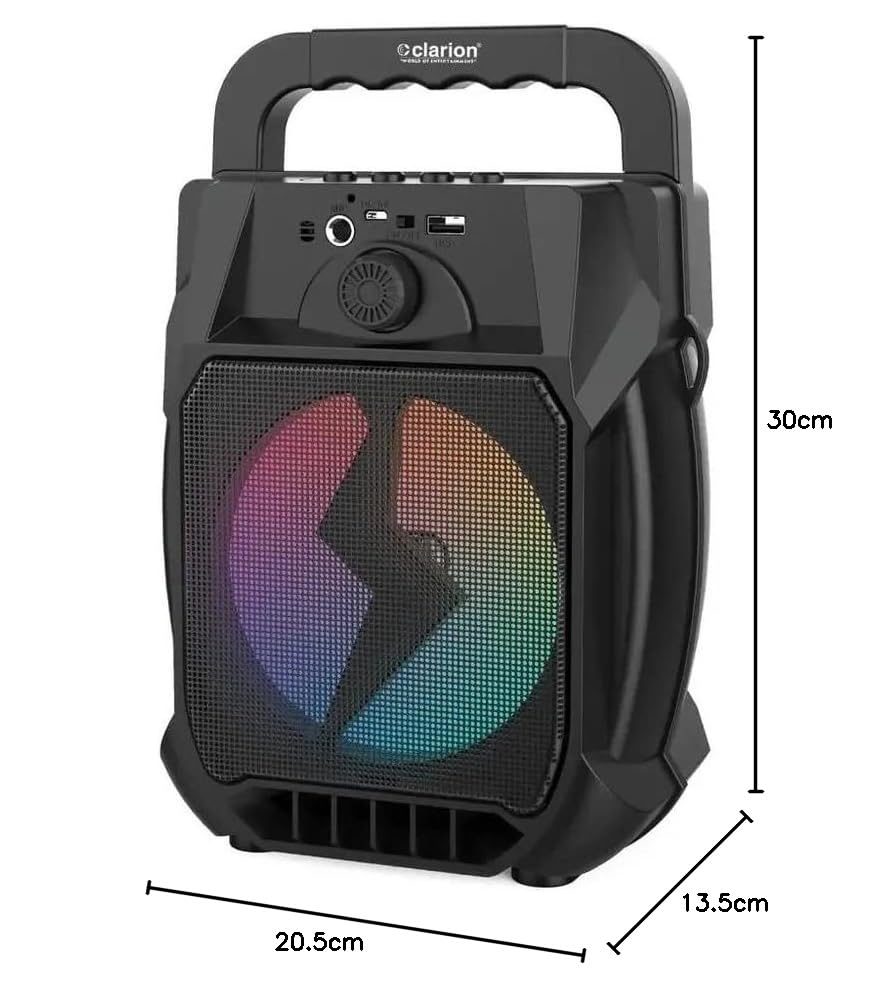
Image: Clarion JM-Carry On Portable Bluetooth Speaker with its dimensions indicated.
- Prekinis ženklas: Clarion (Generic)
- Modelio pavadinimas: JM-Carry On
- Didžiausia garsiakalbio išėjimo galia: 20 vatų efektinė vertė
- Ryšio technologija: Pagalbinis, „Bluetooth“, USB
- Garso išvesties režimas: Stereo
- Montavimo tipas: Grindų stovėjimas
- Garsiakalbio tipas: Palydovas
- Produkto savybės: Built-In Microphone, Radio, Subwoofer, Multi-color Light Effect, Sound Controller
- Kontrolės metodas: Palieskite
- Woofer Driver Diameter: 6.5 colių
- Vidutinis akumuliatoriaus veikimo laikas: 3-4 valandos
- Baterijos talpa: 1.2 Amp Valandos (3.7 V)
- Prekės matmenys (D x P x A): 13.5x20.5x30 cm
- Suderinami įrenginiai: Išmanusis telefonas, planšetinis kompiuteris
- Maitinimo šaltinis: Maitinamas baterijomis
Garantija ir klientų aptarnavimas
This Clarion JM-Carry On Portable Bluetooth Speaker comes with a 1 metų garantija on the speaker unit from the date of purchase. Please retain your purchase receipt as proof of warranty.
For any technical assistance, troubleshooting, or warranty claims, please contact Clarion Computers customer support. Refer to your purchase documentation for specific contact details or visit the official Clarion Computers websvetainę, kurioje pateikiama informacija apie palaikymą.
Note: The warranty typically covers manufacturing defects and does not cover damage caused by misuse, accidents, unauthorized modifications, or normal wear and tear.