
1. Įvadas
The HiBy FD1 is a portable USB Digital-to-Analog Converter (DAC) and headphone amplifier designed to enhance audio quality from various devices. It features dual ES9118 audio chips for high-resolution sound and supports both single-ended and balanced headphone outputs.
This device is compatible with a wide range of operating systems and devices, including Android, iOS, Windows, macOS, smartphones, computers, tablets, and digital audio players.

Image 1: The HiBy FD1 USB Headphone Ampgelbėtojas, šouasindėl savo kompaktiško dizaino.
Pagrindinės funkcijos:
- Dual ES9118 Audio Chips: Provides high-resolution audio and enhanced decoding capabilities.
- Dual Crystal Oscillators: Lowers jitter and improves digital audio accuracy for 44.1x and 48x clocked audio signals.
- Universalūs išėjimai: Includes 3.5mm single-ended (SE) and 2.5mm balanced headphone outputs.
- Platus suderinamumas: Supports multiple system platforms including Android, iOS, Windows, and macOS.
- Lossless Audio Support: Compatible with most lossless music formats, including native DSD128 decoding.
- Hardware USB Mode Switch: Allows switching between USB Audio 1.0 and 2.0 standards.
- Driverless Plug-and-Play: No charging required; automatically powers on when connected via USB and shuts down when unplugged.
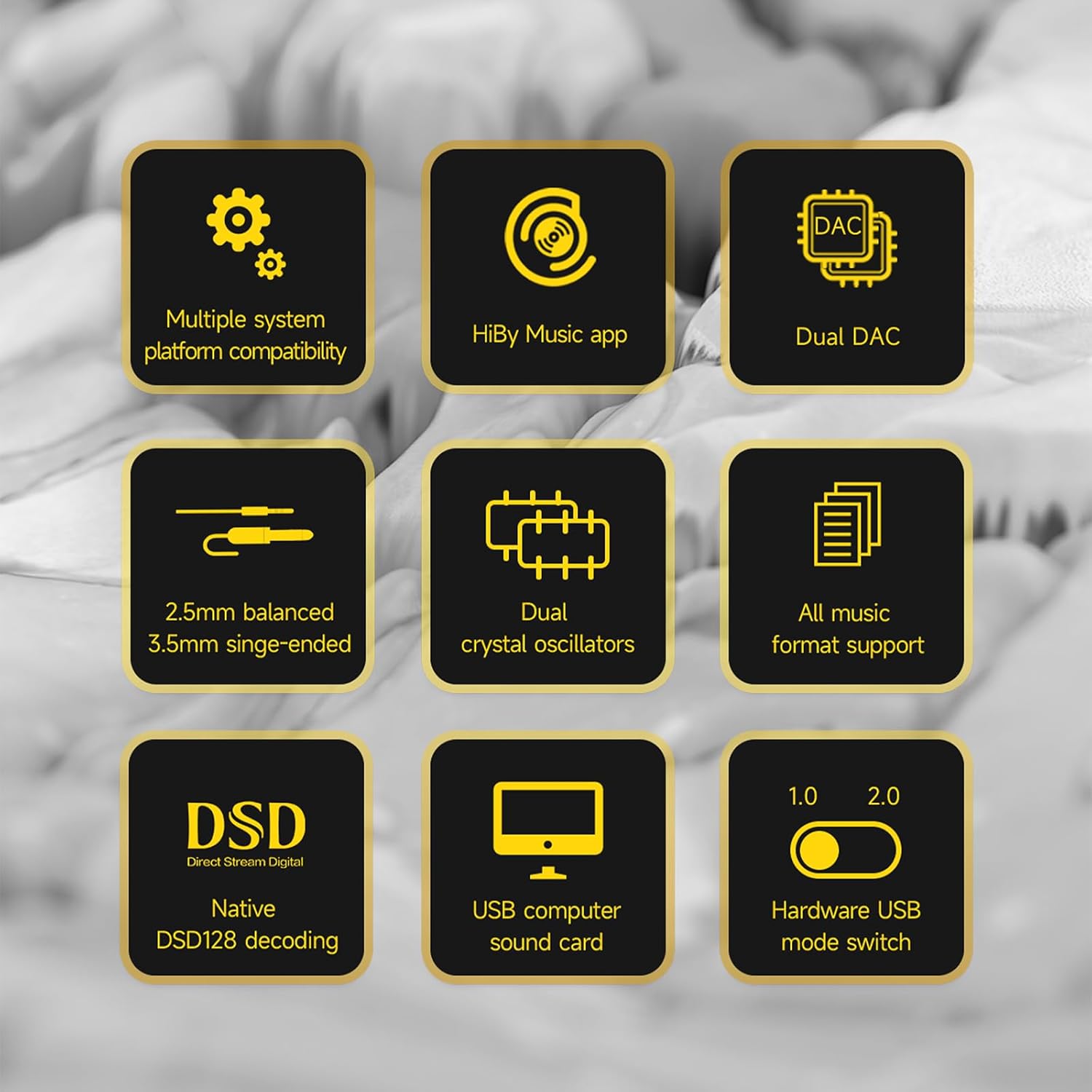
Image 2: A visual representation of the HiBy FD1's key features, including dual DAC, DSD support, and multiple system compatibility.
2. Sąranka
2.1 Prisijungimas prie įrenginių
The HiBy FD1 connects to your source device (computer, smartphone, tablet) via its USB Type-C port. It is designed for driverless plug-and-play operation.
- For Android/Windows/macOS: Connect the FD1 using a compatible USB Type-C cable.
- „iOS“ įrenginiams („iPhone“ / „iPad“): A Camera Connection Kit (CCK) cable is required for proper functionality.

Image 3: The HiBy FD1 connected to various devices, illustrating its broad compatibility with smartphones, tablets, and computers.
2.2 USB Mode Switch
The FD1 features a hardware switch to select between USB Audio 1.0 and USB Audio 2.0 standards. This switch is located on the side of the device.
- USB Audio 1.0: Provides driverless plug-and-play functionality on Windows 7/8/10. DSD audio is not supported in this mode.
- USB Audio 2.0: Offers driverless plug-and-play on Windows 10 (build 1703 and later). For DSD support on Windows, an additional driver installation may be required.

Image 4: Close-up of the HiBy FD1's hardware USB mode switch, allowing selection between 1.0 and 2.0 standards.
2.3 Įjungimas / išjungimas
The HiBy FD1 automatically powers on when connected to a USB source and automatically shuts down when disconnected. No external power button or charging is required as it draws power directly from the connected device.

Image 5: The HiBy FD1 connected to a smartphone and a laptop, demonstrating its plug-and-play functionality without external charging.
3. Naudojimo instrukcijos
3.1 Ausinių prijungimas
The HiBy FD1 offers two headphone output options:
- 3.5mm Single-Ended (SE) Output: Standartinėms ausinėms.
- 2.5 mm subalansuota išvestis: For headphones with a balanced connection, offering improved audio performance.
Connect your headphones to the appropriate port on the FD1.
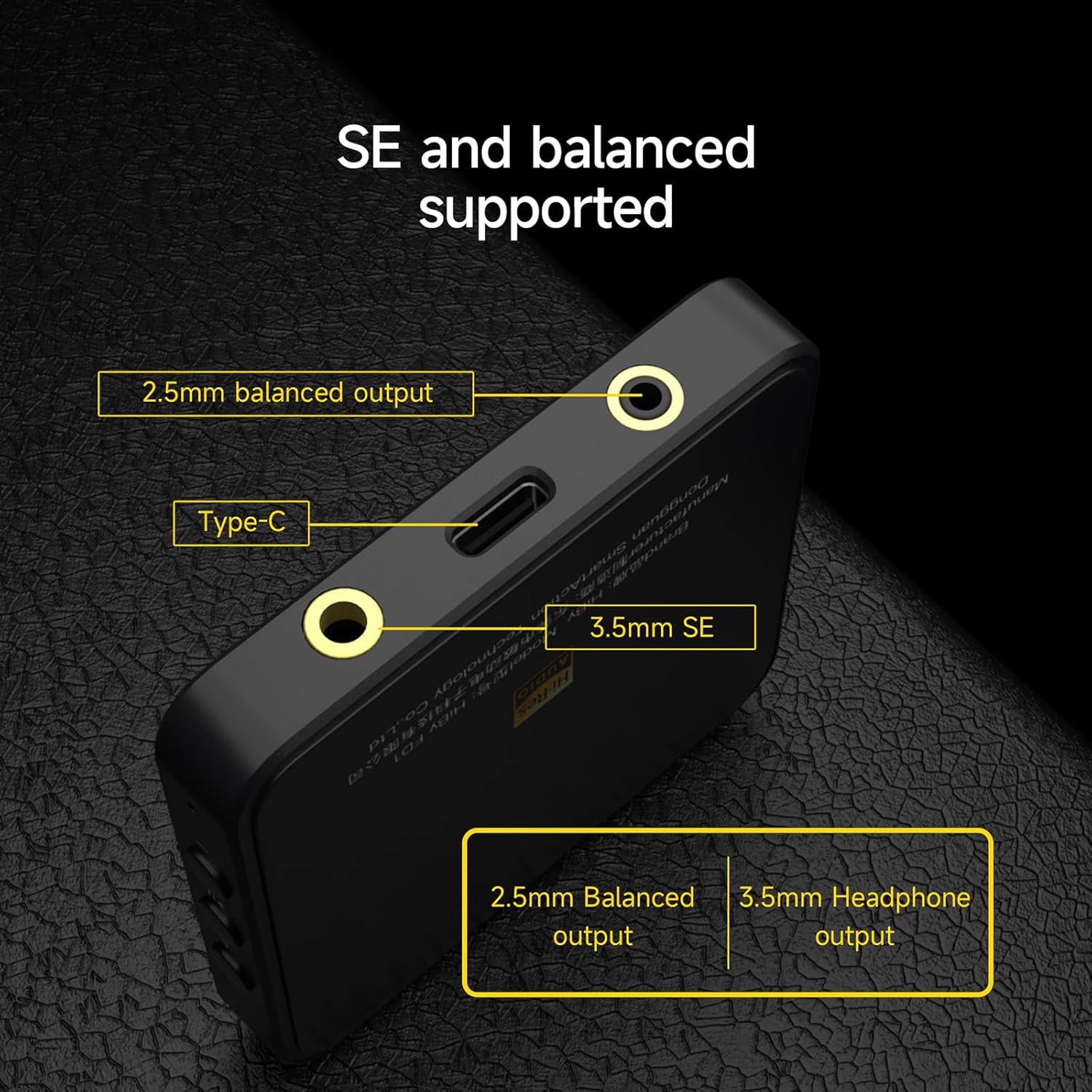
6 paveikslėlis: Išsamus view of the HiBy FD1's ports, highlighting the 2.5mm balanced output, Type-C input, and 3.5mm single-ended output.
3.2 Playback and Controls
Once connected, the FD1 acts as an external sound card for your device. Play audio through your preferred music application. The FD1 features hardware buttons for basic playback control:
- Tomas +: Tap to increase volume.
- Leisti / pristabdyti: Palieskite, kad paleistumėte arba pristabdytumėte garsą.
- Tūris -: Tap to decrease volume.
3.3 Indikatoriaus lemputės būsena
The FD1 includes an indicator light that changes color to reflect the current audio status and sample norma:

Image 7: The HiBy FD1's hardware buttons (Volume+, Play/Pause, Volume-) and a table explaining the indicator light colors for different audio statuses.
| Būsena | Raudona | Žalia | Mėlyna | Baltas |
|---|---|---|---|---|
| Connected, not playing | ||||
| Playing at PCM 32k-48kHz | Taip | |||
| Playing at PCM 88.2k-192kHz | Taip | |||
| Playing at DSD | Taip |
Note: The table indicates which color is active for each status.
3.4 HiBy Music App
For optimal compatibility and advanced features, it is recommended to use the HiBy Music app, which offers an exclusive HQ USB Audio Access mode.
4. Priežiūra
To ensure the longevity and optimal performance of your HiBy FD1, follow these general maintenance guidelines:
- Įrenginį valykite minkštu, sausu skudurėliu. Venkite naudoti stiprias chemines medžiagas ar abrazyvines medžiagas.
- Laikykite prietaisą vėsioje, sausoje vietoje, toliau nuo tiesioginių saulės spindulių, ekstremalių temperatūrų ir didelės drėgmės.
- Saugokitės, kad prietaisas nenukristų ir nepatirtų stipraus smūgio.
- Nebandykite patys ardyti ar taisyti įrenginio, nes tai gali panaikinti garantiją.
5. Problemų sprendimas
If you encounter issues with your HiBy FD1, consider the following basic troubleshooting steps:
- Nėra garso:
- Ensure the FD1 is securely connected to your source device and headphones.
- Check the volume levels on both your source device and the FD1.
- Verify that the correct audio output device (HiBy FD1) is selected in your operating system's sound settings.
- Test with different headphones or a different source device to isolate the problem.
- Įrenginys neatpažintas:
- Išbandykite kitą USB prievadą arba kabelį.
- Ensure the USB mode switch on the FD1 is set correctly (1.0 or 2.0) for your operating system.
- Iš naujo paleiskite šaltinio įrenginį.
- For Windows 10 (build 1703 and later) with USB Audio 2.0 and DSD, ensure any necessary drivers are installed.
- Iškraipytas garsas:
- Reduce the volume on your source device or the FD1.
- Užtikrinkite garsą file nėra sugadintas.
- Patikrinkite, ar netrukdo kiti elektroniniai prietaisai.
Jei šie veiksmai neišsprendžia problemos, daugiau pagalbos ieškokite pagalbos skyriuje.
6. Specifikacijos
| Funkcija | Specifikacija |
|---|---|
| Modelio numeris | HiBy FD1 |
| Prekės ženklas | Sveiki |
| Techninės įrangos sąsaja | C tipo USB |
| Suderinami įrenginiai | Desktop, Laptop, Smartphones, Tablets (Android, iOS, Windows, macOS) |
| Duomenų nuorodos protokolas | USB |
| Duomenų perdavimo sparta | 441 Megabits Per Second (Max) |
| DAC lustai | Dual ES9118 |
| Ausinių išėjimai | 3.5mm Single-Ended, 2.5mm Balanced |
| DSD palaikymas | Native DSD128 decoding |
| USB garso režimai | USB Audio 1.0, USB Audio 2.0 (switchable) |
7. Informacija apie garantiją
HiBy products come with a 1 metų garantija from the date of purchase. This warranty covers manufacturing defects. If damage is not caused by human factors, parts will be replaced free of charge.
Išsaugokite pirkimo įrodymą, kad galėtumėte kreiptis dėl garantijos.
8. Parama
For technical support, warranty claims, or further inquiries regarding your HiBy FD1, please contact HiBy customer service through their official websvetainėje arba mažmenininke, iš kurio įsigijote produktą.
You can visit the official HiBy store on Amazon for more information: HiBy Amazon Store