
Zetta ZIR32
ZIR32 Wide Angle Night Vision HD Digital Security Camcorder
Vartotojo vadovas
Model: ZIR32 | Brand: Zetta
Produktas baigtasview
The Zetta ZIR32 is a compact, high-definition digital security camcorder designed for discreet surveillance. It features wide-angle night vision, 24-hour continuous recording capability, and up to 7 days of circular recording. Its versatile modes, including continuous, motion-triggered, and custom settings, make it suitable for various indoor security needs.
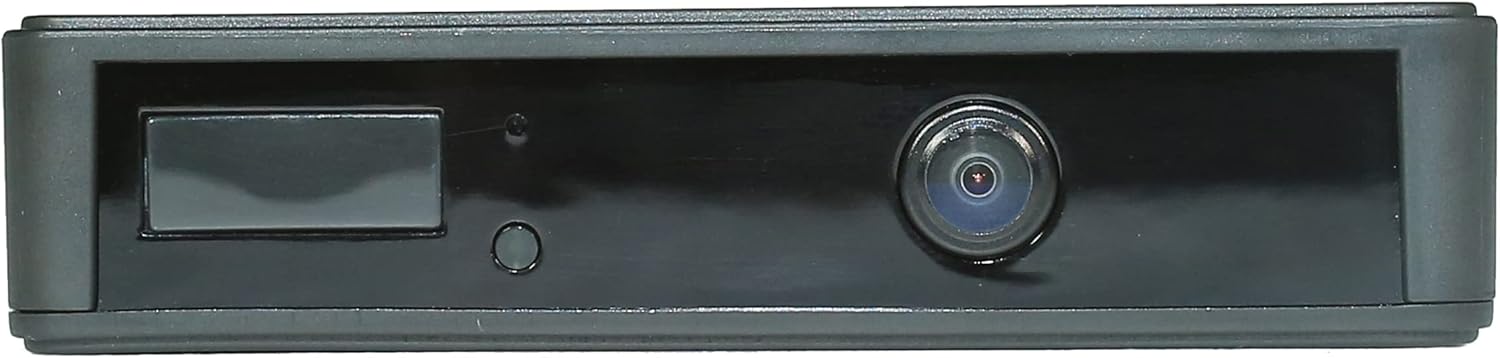
Priekyje view of the ZIR32 camcorder, showing the lens and indicator lights.

The ZIR32 camcorder held in a hand, illustrating its compact and portable size.
Pakuotės turinys
Įsitikinkite, kad jūsų siuntinyje yra visi toliau išvardyti daiktai:
- Zetta ZIR32 Infrared HD Security Camcorder
- 5V DC adapteris
- USB 2.0 laidas
- Greitos pradžios vadovas

The ZIR32 camcorder, its retail packaging, and included accessories: 5V DC adapter and USB cable.
Įrenginio išdėstymas
Familiarize yourself with the various ports, buttons, and indicators on your ZIR32 camcorder.

An annotated diagram highlighting the key features of the ZIR32: Trigger in/out, Micro USB port, PIR sensor, light sensor, camera, card slot, on/off switch, LED indicator, and mode switches (continuous, triggering, custom).
- Kameros objektyvas: Užfiksuoja vaizdo įrašą footage.
- PIR jutiklis: Passive Infrared sensor for motion detection in Triggering mode.
- Šviesos jutiklis: Detects ambient light levels to automatically activate night vision.
- LED indikatorius: Pateikia būsenos atsiliepimus (pvz., įrašymas, įkrovimas).
- „Micro USB“ prievadas: Skirta įkrovimui ir prijungimui prie kompiuterio.
- Kortelės lizdas: For inserting a FAT32 formatted SD card.
- Įjungimo / išjungimo jungiklis: Įjungia arba išjungia įrenginį.
- Recording Mode Switch: Selects between Continuous, Triggering, and Custom modes.
Sąranka
- Įkraukite įrenginį: Before first use, fully charge the ZIR32 using the provided 5V DC adapter and USB 2.0 cable. Connect the USB cable to the camcorder's Micro USB port and the adapter to a power outlet. The LED indicator will show charging status.
- Įdėkite SD kortelę: Obtain a FAT32 formatted SD card. Carefully insert the SD card into the card slot until it clicks into place. Ensure the card is inserted in the correct orientation.
Note: The device requires a FAT32 formatted SD card for proper operation.

Šoninė view of the ZIR32 camcorder, highlighting the SD card slot and the Micro USB port.
- Maitinimas: Press and hold the On/Off switch for approximately 2 seconds. The green LED light will flash, indicating the camera has entered working condition.
- Pasirinkite įrašymo režimą: Use the recording mode switch on the device to select your desired operation mode: Continuous, Triggering, or Custom. Refer to the "Operating Instructions" section for details on each mode.
Naudojimo instrukcijos
The ZIR32 offers three primary recording modes:
1. Nepertraukiamas režimas
In this mode, the camcorder records continuously for up to 24 hours on a full charge, utilizing its built-in 2400 mAh rechargeable battery. The recorded video resolution in this mode is 640x360 pixels.
- To activate: Slide the mode switch to the "Continuous" position.
- Ideal for situations requiring constant monitoring.
2. Triggering Mode (PIR Sensor)
This mode uses the PIR (Passive Infrared) sensor to detect motion, initiating recording only when movement is detected. This conserves battery life, allowing for up to 180 days of standby time. The recorded video resolution in this mode is 1280x720 pixels.
- To activate: Slide the mode switch to the "Triggering" position.
- Ensures you capture only relevant events, minimizing unnecessary footage.
3. Custom Mode (Zetta Widget)
The Custom mode allows for advanced configuration of the camcorder's features using the "Zetta Widget" software on your computer. This mode provides flexibility to tailor settings to specific needs.
- To activate: Slide the mode switch to the "Custom" position.
- Download "Zetta Widget" from the official Zetta websvetainę.
- Connect the ZIR32 to your computer via the USB cable.
- Through the software, you can configure:
- Ciklo įrašymas
- Laikuamp perdanga
- Suplanuotas įrašymas
- Motion trigger recording sensitivity
- Infraraudonųjų spindulių naktinio matymo nustatymai
- External trigger input/output
- Car on/off mode
- Voice trigger recording
- Video quality and resolution (e.g., 1280x720 or 640x360)
- Frame rate (High/Low)
- Day/Night mode (Day mode, Night mode, Auto switching)
- Orientation (Normal, Up-side-down)

Screenshot of the Zetta Widget software interface, showing various customizable settings for the ZIR32 camcorder.
Night Vision Operation
The ZIR32 is equipped with 12 non-illuminated infrared night vision lights. When the ambient light becomes weak, the camera automatically enters night vision mode. This allows for clear and high-quality video recording up to 15 feet in low-light or pitch-dark conditions.

Illustration depicting the ZIR32 camcorder's night vision capability in a dark environment.
Priežiūra
- Valymas: Use a soft, dry cloth to clean the exterior of the camcorder. For the lens, use a specialized lens cleaning cloth and solution to avoid scratches. Do not use abrasive cleaners or solvents.
- Saugykla: When not in use for extended periods, store the ZIR32 in a cool, dry place away from direct sunlight and extreme temperatures. Ensure the battery is partially charged (around 50%) before storage to prolong its lifespan.
- Akumuliatoriaus priežiūra: Avoid fully discharging the battery frequently. Recharge the device regularly, even if not in active use, to maintain battery health.
- SD kortelės tvarkymas: Reguliariai kurkite svarbių duomenų atsargines kopijastage from your SD card to a computer or external storage. Format the SD card periodically (e.g., once a month) using the FAT32 file system to maintain optimal performance and prevent data corruption.
Trikčių šalinimas
| Problema | Galima priežastis | Sprendimas |
|---|---|---|
| Įrenginys neįsijungia. | Baterija išsikrovusi. | Connect the device to the power adapter and charge it fully. |
| Įrašymas neprasideda. | Neįdėta SD kortelė arba ji pilna / sugadinta. | Ensure a FAT32 formatted SD card is inserted. Check available space. Format or replace the SD card if necessary. |
| Prasta vaizdo kokybė. | Lens is dirty; incorrect settings in Custom Mode. | Clean the camera lens. Use Zetta Widget to verify video quality and resolution settings (e.g., 1280x720). |
| Naktinis matymas neveikia. | Insufficient darkness; night vision disabled in Custom Mode. | Ensure the environment is dark enough for automatic activation. Check "Day/Night Mode" settings in Zetta Widget. |
| Įrenginys neatpažįstamas kompiuterio. | Faulty USB cable; driver issue; incorrect connection. | Try a different USB cable and USB port. Ensure the device is powered on when connected. |
Specifikacijos
| Funkcija | Detalė |
|---|---|
| Modelis | ZIR 32 |
| Prekės ženklas | Zetta |
| Vaizdo įrašymo raiška | 720p (1280x720) for Triggering Mode; 640x360 for Continuous Mode |
| Vaizdo įrašymo formatas | MPEG-4 |
| Maitinimo šaltinis | Battery Powered (Built-in 2400 mAh rechargeable battery) |
| Battery Life (Continuous) | Iki 24 valandų |
| Standby Time (Triggering) | Iki 180 dienų |
| Naktinis matymas | 12 non-illuminated infrared lights, up to 15 feet range |
| Sandėliavimas | FAT32 SD card (not included) |
| Matmenys (I x P x A) | 4.3 x 2.3 x 0.8 colio |
| Svoris | 4 uncijos (0.25 svaro) |
| Ryšio technologija | Wired (USB 2.0) |
| Naudojimas viduje / lauke | Vidinis |
| Įtraukti komponentai | Camcorder, 5V DC Adapter, USB 2.0 cable, Quick Start Guide |
| Suderinami įrenginiai | Stalinis kompiuteris |
| Ryšio protokolas | Nėra |
| Valdiklio tipas | Mygtukas |
| Montavimo tipas | Stalviršis |
| Spalva | Juoda |
| Įspėjimo tipas | Tik judėjimas |
| Kambario tipas | Biuras |
| Šviesos šaltinio tipas | Infraraudonųjų spindulių |
Ask a question about this manual
Ask about setup, troubleshooting, compatibility, parts, safety, or missing instructions. Manuals+ will review the question and use this page’s manual context to help answer it.